3.3.4 YOLOv5 Model Example Introduction
Example Overview
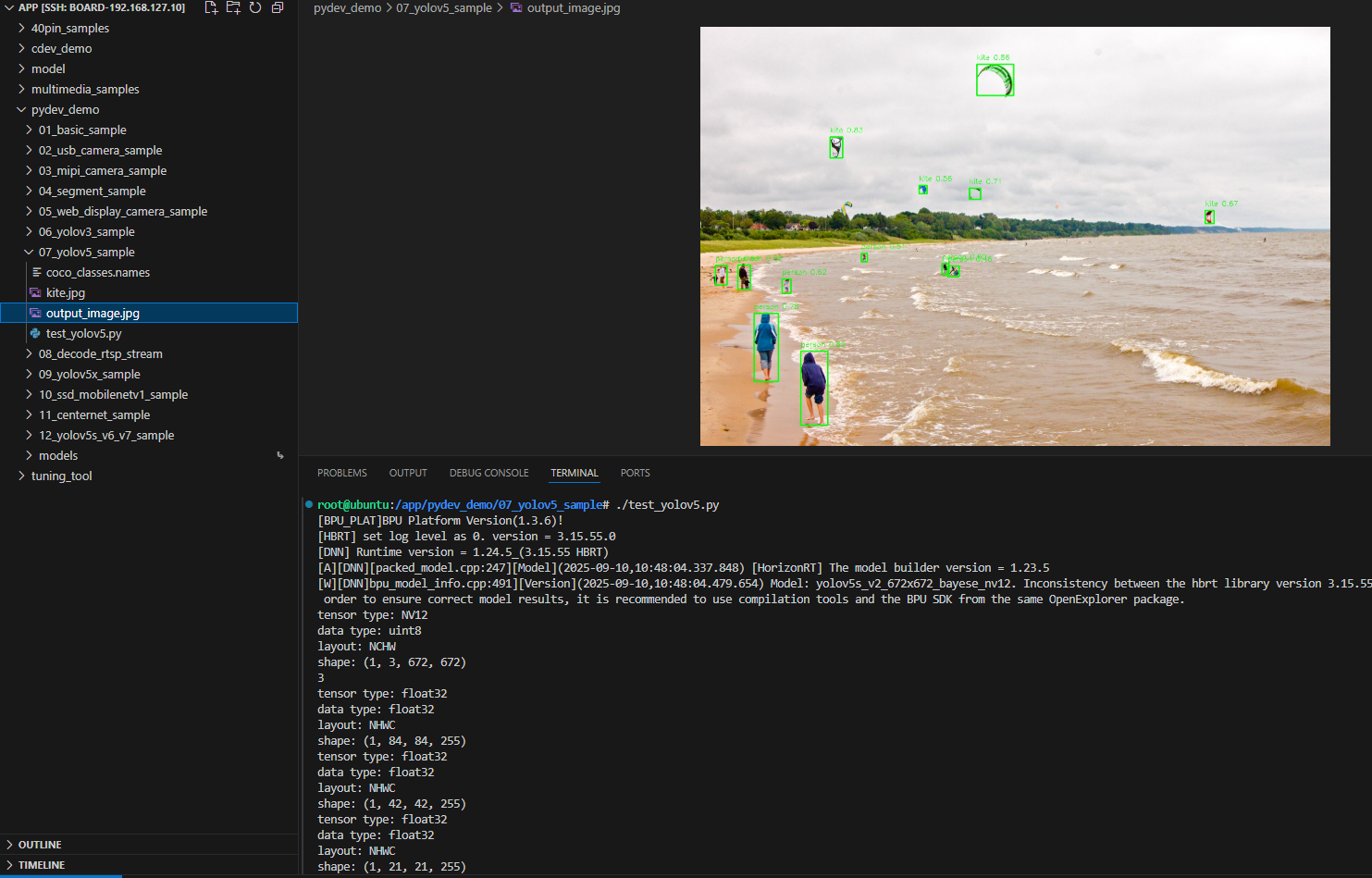
The YOLOv5 object detection example is a Python interface development code example located in /app/pydev_demo/07_yolov5_sample/, demonstrating how to use the YOLOv5 model for object detection tasks. YOLOv5 is the latest version in the YOLO series, offering higher detection accuracy and faster inference speed compared to YOLOv3. This example shows how to perform object detection on static images, identify multiple objects in the image, and draw detection boxes with confidence information on the image.
Effect Demonstration
Hardware Preparation
Hardware Connection
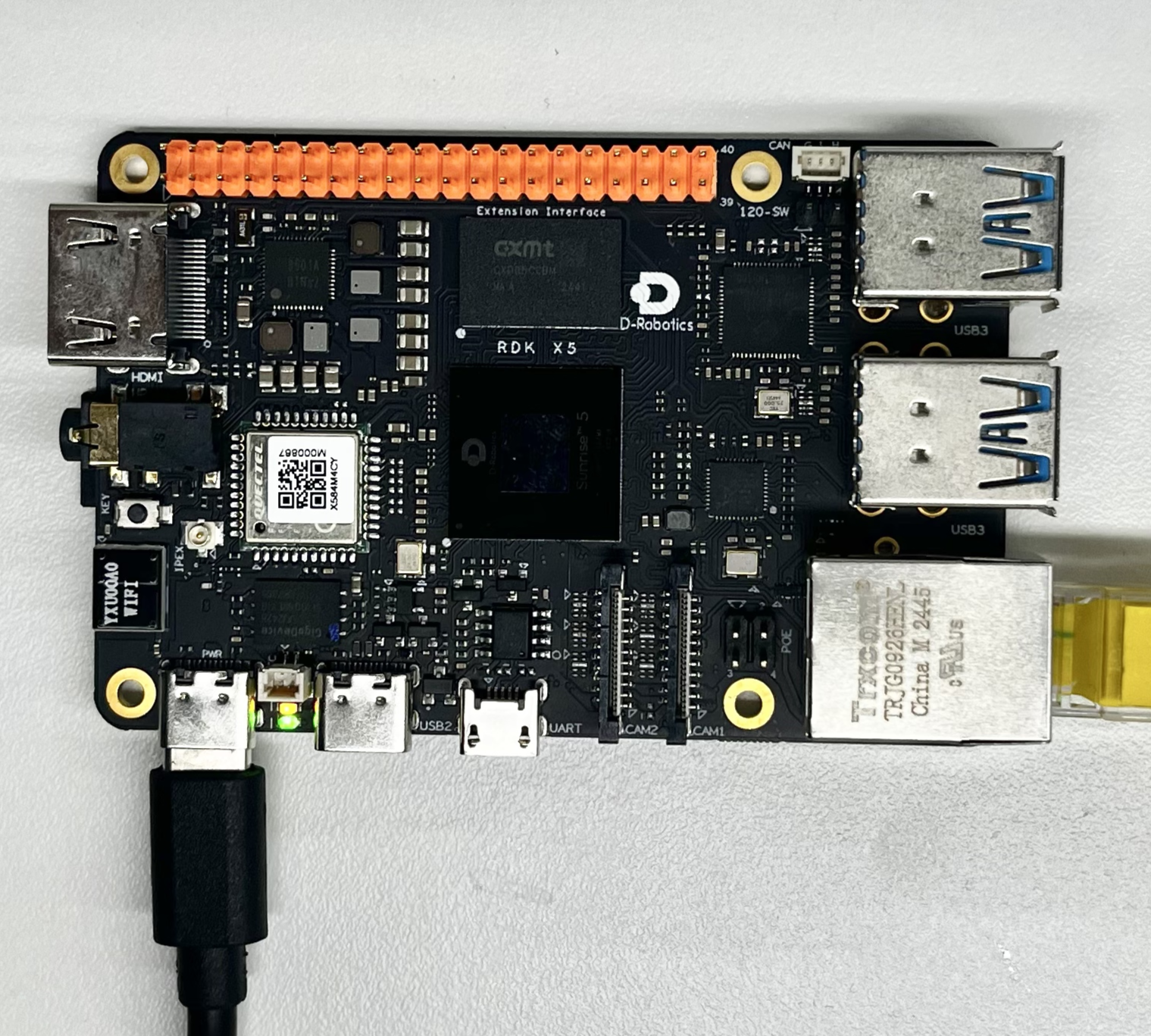
This example only requires the RDK development board itself, without additional peripheral connections. Ensure the development board is properly powered and the system is booted.
Quick Start
Code and Board Location
Navigate to /app/pydev_demo/07_yolov5_sample/ location, where you can see the YOLOv5 example contains the following files:
root@ubuntu:/app/pydev_demo/07_yolov5_sample# tree
.
├── coco_classes.names
├── kite.jpg
└── test_yolov5.py
Compilation and Execution
The Python example does not require compilation and can be run directly:
python3 test_yolov5.py
Execution Effect
After running, the program will load the pre-trained YOLOv5 model, perform object detection on the kite.jpg image, and generate the result image output_image.jpg with detection boxes.
root@ubuntu:/app/pydev_demo/07_yolov5_sample# ./test_yolov5.py
[BPU_PLAT]BPU Platform Version(1.3.6)!
[HBRT] set log level as 0. version = 3.15.55.0
[DNN] Runtime version = 1.24.5_(3.15.55 HBRT)
[A][DNN][packed_model.cpp:247][Model](2025-09-10,10:48:04.337.848) [HorizonRT] The model builder version = 1.23.5
[W][DNN]bpu_model_info.cpp:491][Version](2025-09-10,10:48:04.479.654) Model: yolov5s_v2_672x672_bayese_nv12. Inconsistency between the hbrt library version 3.15.55.0 and the model build version 3.15.47.0 detected, in order to ensure correct model results, it is recommended to use compilation tools and the BPU SDK from the same OpenExplorer package.
tensor type: NV12
data type: uint8
layout: NCHW
shape: (1, 3, 672, 672)
3
tensor type: float32
data type: float32
layout: NHWC
shape: (1, 84, 84, 255)
tensor type: float32
data type: float32
layout: NHWC
shape: (1, 42, 42, 255)
tensor type: float32
data type: float32
layout: NHWC
shape: (1, 21, 21, 255)
bbox: [593.949768, 80.819038, 672.215027, 147.131607], score: 0.856997, id: 33, name: kite
bbox: [215.716019, 696.537476, 273.653442, 855.298706], score: 0.852251, id: 0, name: person
bbox: [278.934448, 236.631256, 305.838867, 281.294922], score: 0.834647, id: 33, name: kite
bbox: [115.184196, 615.987, 167.202667, 761.042542], score: 0.781627, id: 0, name: person
bbox: [577.261719, 346.008453, 601.795349, 370.308624], score: 0.705358, id: 33, name: kite
bbox: [1083.22998, 394.714569, 1102.146729, 422.34787], score: 0.673642, id: 33, name: kite
bbox: [80.515938, 511.157104, 107.181572, 564.28363], score: 0.662, id: 0, name: person
bbox: [175.470078, 541.949219, 194.192871, 572.981812], score: 0.623189, id: 0, name: person
bbox: [518.504333, 508.224396, 533.452759, 531.92926], score: 0.597822, id: 0, name: person
bbox: [469.970398, 340.634796, 486.181305, 358.508972], score: 0.5593, id: 33, name: kite
bbox: [32.987705, 512.65033, 57.665741, 554.898804], score: 0.508812, id: 0, name: person
bbox: [345.142609, 486.988464, 358.24762, 504.551331], score: 0.50672, id: 0, name: person
bbox: [530.825439, 513.695679, 555.200256, 536.498352], score: 0.459818, id: 0, name: person
draw result time is : 0.03627920150756836
Detailed Introduction
Example Program Parameter Options Description
The YOLOv5 object detection example does not require command line parameters and can be run directly. The program will automatically load the kite.jpg image in the same directory for detection processing.
Software Architecture Description
The software architecture of the YOLOv5 object detection example includes the following core components:
-
Model Loading: Using the pyeasy_dnn module to load the pre-trained YOLOv5 model
-
Image Preprocessing: Converting the input image to the NV12 format and specified dimensions (672x672) required by the model
-
Model Inference: Calling the model for forward computation to generate feature maps
-
Post-processing: Using the libpostprocess library to parse model outputs and generate detection results
-
Result Visualization: Drawing detection boxes and category information on the original image
-
Result Saving: Saving the visualized results as an image file

API Process Description
-
Model Loading: models = dnn.load('../models/yolov5s_672x672_nv12.bin')
-
Image Preprocessing: Adjusting image dimensions and converting to NV12 format
-
Model Inference: outputs = models[0].forward(nv12_data)
-
Post-processing Configuration: Setting post-processing parameters (dimensions, thresholds, etc.)
-
Result Parsing: Calling the post-processing library to parse output tensors
-
Result Visualization: Drawing detection boxes and label information on the original image
-
Result Saving: Saving the results as an image file

FAQ
Q: What's the difference between YOLOv5 and YOLOv3?
A: YOLOv5 has improvements in network architecture, training strategies, and post-processing algorithms, typically offering higher detection accuracy and faster inference speed.
Q: What should I do if I encounter "No module named 'hobot_dnn'" error when running the example?
A: Please ensure the RDK Python environment is correctly installed, including the hobot_dnn module and other official dedicated inference libraries.
Q: How to change the test image?
A: Place the new image file in the example directory and modify img_file = cv2.imread('your_image_path') in the code.
Q: What should I do if the detection results are inaccurate?
A: The YOLOv5 model is trained on the COCO dataset and may require fine-tuning for specific scenarios or using more suitable models.
Q: How to adjust the detection threshold?
A: Modify the value of yolov5_postprocess_info.score_threshold in the code. For example, changing it to 0.5 can increase detection sensitivity.
Q: Can real-time video stream processing be achieved?
A: The current example is designed for single images, but the code can be modified to achieve real-time object detection on video streams.
Q: How to obtain YOLOv5 models of other sizes?
A: You can refer to the model_zoo repository or Toolchain's basic model repository
Q: How to further improve detection speed?
A: You can try using lighter YOLOv5 variants like YOLOv5n or YOLOv5s, or reduce the input image resolution.