Opening Examples in Node-RED
- Windows
- macOS
-
Click
Examplesto enter the example list interface. Click the dropdown list at the bottom of an example application. All connected RDK devices will be displayed here. Select the RDK device on which you want to install the example application.
-
Check if the example is available. An available example shows a green indicator dot in the upper left corner, while an unavailable one shows red.
 Note
Note-
Some examples are already installed. For uninstalled examples, click
Install Exampleto install them. This section uses theGesture Recognitionexample for explanation. -
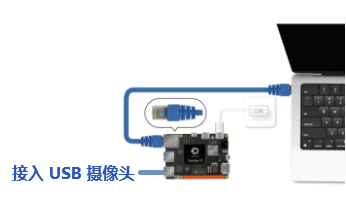
The Gesture Recognition example requires tracking gestures, so please connect a camera in advance.Supports connecting both USB and MIPI cameras. This section uses a USB camera as an example. The connection method for a USB camera is as follows:
-
If Node-RED is not installed, a prompt will appear. You need to install Node-RED in "Device Management - Application Space". Refer to Using Node-RED.
-
-
Click Node-RED under the
Gesture Recognitionexample. After reading the guide information, clickCloseto close the guide pop-up window.
-
Enter the example application workflow interface.

For those using macOS, please wait a moment as the documentation is being rapidly prepared.