YOLO-World
Feature Introduction
YOLO-World is an advanced open-vocabulary object detection method capable of efficiently detecting various novel object categories in a zero-shot manner by adapting to input text changes.
Code Repository: (https://github.com/D-Robotics/hobot_yolo_world)
Application Scenarios: YOLO-World’s powerful zero-shot detection capability grants it strong generalization ability, making it suitable for applications such as autonomous driving, smart homes, geological surveying, and more.
Supported Platforms
| Platform | Runtime Mode | Example Functionality |
|---|---|---|
| RDK X5, RDK X5 Module | Ubuntu 22.04 (Humble) | Launch MIPI/USB camera or local image replay, and display inference results via a web browser |
Algorithm Details
| Model | Platform | Input Size | Inference FPS |
|---|---|---|---|
| yoloworldv2 | X5 | 1×640×640×3 | 7.0 |
Prerequisites
RDK Platform
-
The RDK has been flashed with the Ubuntu 22.04 system image.
-
TogetheROS.Bot has been successfully installed on the RDK.
-
An MIPI or USB camera has been installed on the RDK.
-
Ensure your PC can access the RDK over the network.
Usage Guide
The YOLO-World (hobot_yolo_world) package subscribes to images published by the sensor package. Additionally, YOLO-World supports dynamically changing detection categories based on input text. Text features are sourced from a local feature library—input text queries corresponding features, which are then fed into the model for inference. After inference, algorithm messages are published and rendered in a web browser on the PC via the websocket package, displaying both the original sensor images and corresponding algorithm results.
RDK Platform
Publish Images Using an MIPI Camera
- Humble
# Configure the tros.b environment
source /opt/tros/humble/setup.bash
# Copy required configuration files for the example from the tros.b installation path.
cp -r /opt/tros/${TROS_DISTRO}/lib/hobot_yolo_world/config/ .

# Configure MIPI camera
export CAM_TYPE=mipi

# Launch the launch file
ros2 launch hobot_yolo_world yolo_world.launch.py yolo_world_texts:="red bottle,trash bin"
Publish Images Using a USB Camera
- Humble
# Configure the tros.b environment
source /opt/tros/humble/setup.bash
# Copy required configuration files for the example from the tros.b installation path.
cp -r /opt/tros/${TROS_DISTRO}/lib/hobot_yolo_world/config/ .

# Configure USB camera
export CAM_TYPE=usb

# Launch the launch file
ros2 launch hobot_yolo_world yolo_world.launch.py yolo_world_texts:="red bottle,trash bin"
Use Local Image Replay
- Humble
# Configure the tros.b environment
source /opt/tros/humble/setup.bash
# Copy required configuration files for the example from the tros.b installation path.
cp -r /opt/tros/${TROS_DISTRO}/lib/hobot_yolo_world/config/ .

# Configure local image replay
export CAM_TYPE=fb

# Launch the launch file
ros2 launch hobot_yolo_world yolo_world.launch.py yolo_world_texts:="red bottle,trash bin"
Result Analysis
The following output appears in the terminal:
[hobot_yolo_world-3] [WARN] [0000003710.693524477] [hobot_yolo_world]: This is hobot yolo world!
[hobot_yolo_world-3] [WARN] [0000003710.792557185] [hobot_yolo_world]: Parameter:
[hobot_yolo_world-3]  feed_type(0:local, 1:sub): 1
[hobot_yolo_world-3]  image: config/yolo_world_test.jpg
[hobot_yolo_world-3]  dump_render_img: 0
[hobot_yolo_world-3]  is_shared_mem_sub: 1
[hobot_yolo_world-3]  score_threshold: 0.05
[hobot_yolo_world-3]  iou_threshold: 0.45
[hobot_yolo_world-3]  nms_top_k: 50
[hobot_yolo_world-3]  texts: red bottle,trash bin
[hobot_yolo_world-3]  ai_msg_pub_topic_name: /hobot_yolo_world
[hobot_yolo_world-3]  ros_img_sub_topic_name: /image
[hobot_yolo_world-3]  ros_string_sub_topic_name: /target_words
[hobot_yolo_world-3] [WARN] [0000003710.848418019] [hobot_yolo_world]: Parameter:
[hobot_yolo_world-3]  model_file_name: config/yolo_world.bin
[hobot_yolo_world-3]  model_name:
[hobot_yolo_world-3] [WARN] [0000003710.848540935] [hobot_yolo_world]: model_file_name_: config/yolo_world.bin, task_num: 4
[hobot_yolo_world-3] [BPU_PLAT]BPU Platform Version(1.3.6)!
[hobot_yolo_world-3] [HBRT] set log level as 0. version = 3.15.49.0
[hobot_yolo_world-3] [DNN] Runtime version = 1.23.8_(3.15.49 HBRT)
[hobot_yolo_world-3] [A][DNN][packed_model.cpp:247][Model](1970-01-01,01:01:51.482.877) [HorizonRT] The model builder version = 1.23.5
[hobot_yolo_world-3] [WARN] [0000003711.739402019] [hobot_yolo_world]: Get model name: yolo_world_pad_pretrain_norm_new from load model.
[hobot_yolo_world-3] [WARN] [0000003711.739551686] [hobot_yolo_world]: Create ai msg publisher with topic_name: /hobot_yolo_world
[hobot_yolo_world-3] [WARN] [0000003711.794810269] [hobot_yolo_world]: Create string subscription with topic_name: /target_words
[hobot_yolo_world-3] [WARN] [0000003711.808682144] [hobot_yolo_world]: Create img hbmem_subscription with topic_name: /hbmem_img
[hobot_yolo_world-3] [WARN] [0000003712.541236020] [yolo_world]: Loaned messages are only safe with const ref subscription callbacks. If you are using any other kind of subscriptions, set the ROS_DISABLE_LOANED_MESSAGES environment variable to 1 (the default).
[hobot_yolo_world-3] [W][DNN]bpu_model_info.cpp:491][Version](1970-01-01,01:01:51.727.259) Model: yolo_world_pad_pretrain_norm_new. Inconsistency between the hbrt library version 3.15.49.0 and the model build version 3.15.47.0 detected, in order to ensure correct model results, it is recommended to use compilation tools and the BPU SDK from the same OpenExplorer package.
[hobot_yolo_world-3] [WARN] [0000003714.698775687] [hobot_yolo_world]: Sub img fps: 1.00, Smart fps: 1.51, pre process time ms: 30, infer time ms: 121, post process time ms: 5
[hobot_yolo_world-3] [WARN] [0000003716.714586355] [hobot_yolo_world]: Sub img fps: 1.00, Smart fps: 0.99, pre process time ms: 40, infer time ms: 127, post process time ms: 6
[hobot_yolo_world-3] [WARN] [0000003718.707619939] [hobot_yolo_world]: Sub img fps: 1.00, Smart fps: 1.00, pre process time ms: 39, infer time ms: 121, post process time ms: 6
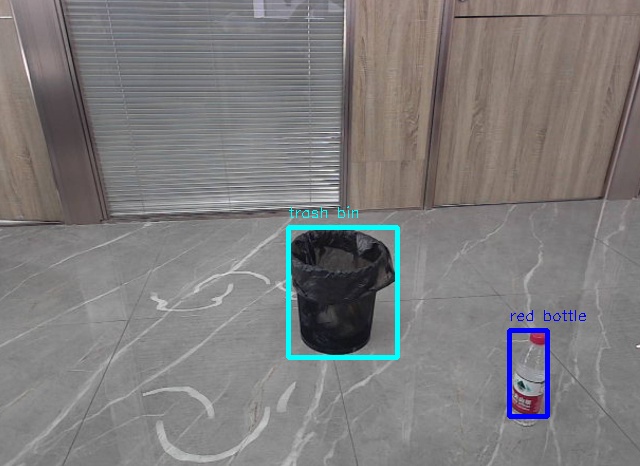
Open a browser on your PC and navigate to http://IP:8000 to view the rendered images and algorithm results (replace IP with the RDK's IP address):
Advanced Usage
If you wish to modify the local text features, you can generate them locally using the provided tools. Usage Instructions.
# Copy the required tool files for the example from the tros.b installation path.
cp -r /opt/tros/${TROS_DISTRO}/lib/hobot_yolo_world/tool/ .

# Download and extract the model
wget http://archive.d-robotics.cc/models/yoloworld_encode_text/huggingclip_text_encode.tar.gz
sudo tar -xf huggingclip_text_encode.tar.gz -C tool

cd tool/

# Install dependencies
pip install -r requirements.txt
# Modify the vocabulary in class.list

# Generate local vocabulary embeddings
python main.py

# Copy the new vocabulary feature file
mv offline_vocabulary_embeddings.json ../config/