Human Detection and Tracking
Feature Overview
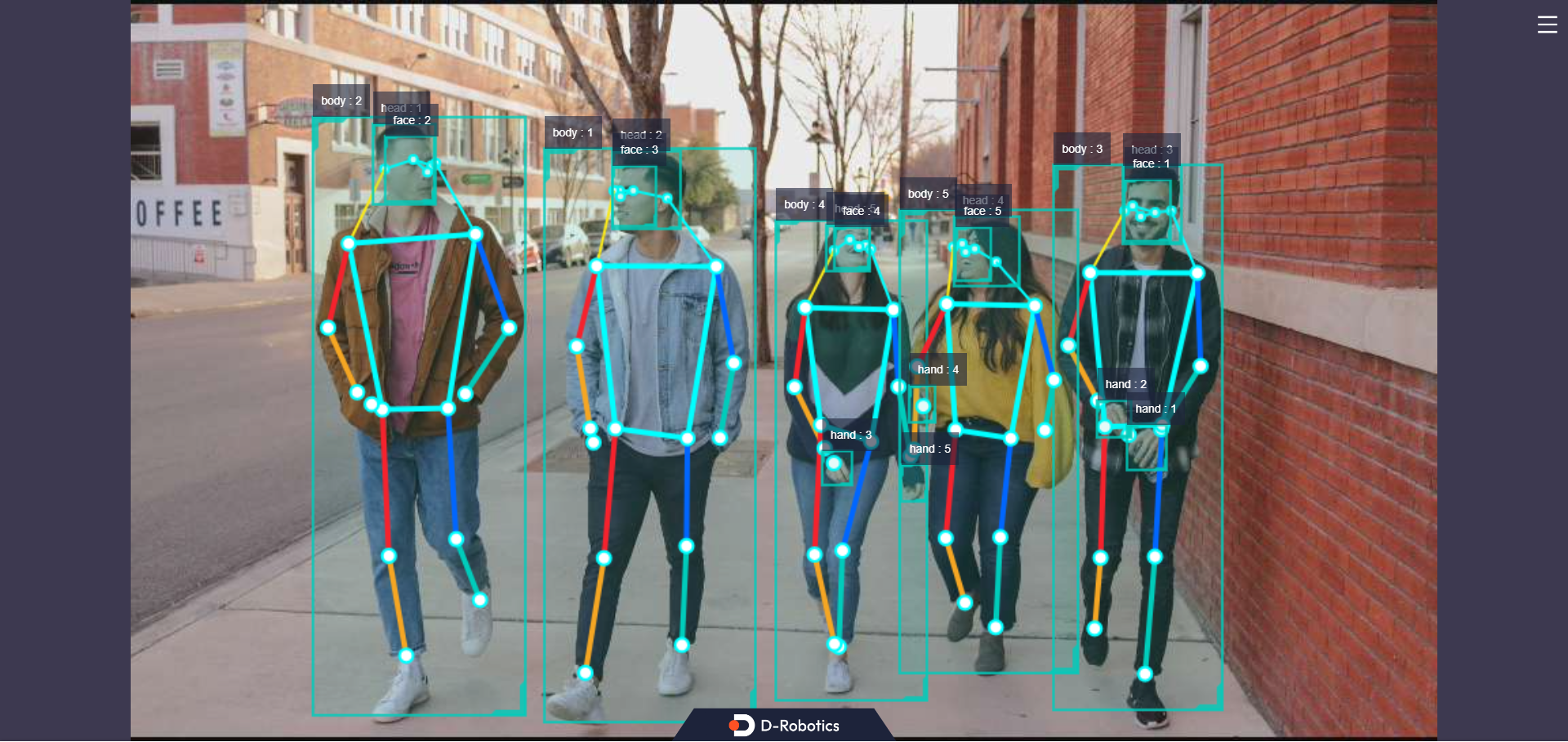
The human detection and tracking algorithm subscribes to image topics, performs inference using the BPU, publishes messages containing detection results for human bodies, heads, faces, hands (bounding boxes), and human body keypoints, and implements bounding box tracking via Multi-Object Tracking (MOT). The x86 version currently does not support MOT or web-based visualization.
The detection categories supported by the algorithm and their corresponding data types in the algorithm message are as follows:
| Category | Description | Data Type |
|---|---|---|
| body | Human body bounding box | Roi |
| head | Head bounding box | Roi |
| face | Face bounding box | Roi |
| hand | Hand bounding box | Roi |
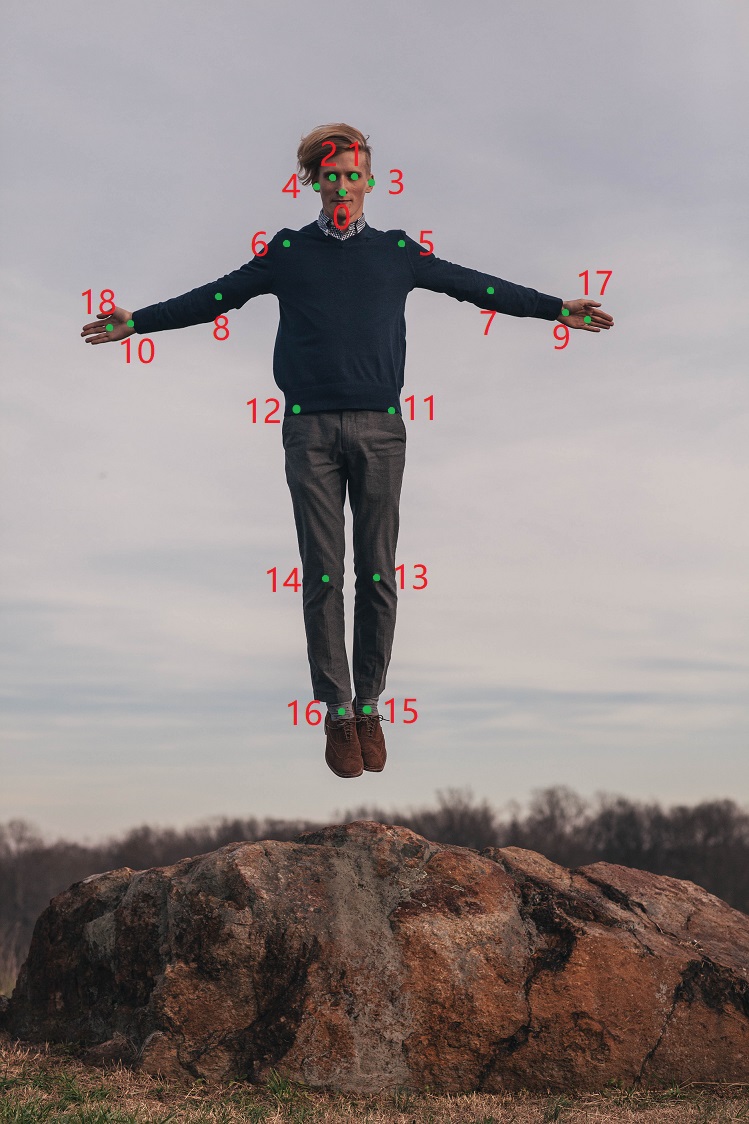
| body_kps | Human body keypoints | Point |
The keypoint indices for the human pose estimation algorithm are shown in the following figure:
Code repository: (https://github.com/D-Robotics/mono2d_body_detection)
Application scenarios: Human detection and tracking is a crucial component of human motion visual analysis, enabling functionalities such as human pose estimation and people counting. It is primarily applied in human-computer interaction, gaming, and entertainment domains.
Pose detection example: 5.4.3 Pose Detection
Robot human-following example: 5.4.4 Robot Human Following
Game character control based on human pose and gesture recognition: Play with X3 Pi—Fitness and Gaming Combined
Supported Platforms
| Platform | Execution Environment | Example Features |
|---|---|---|
| RDK X3, RDK X3 Module | Ubuntu 20.04 (Foxy), Ubuntu 22.04 (Humble) | Launch MIPI/USB camera and display inference results via Web |
| RDK X5, RDK X5 Module | Ubuntu 22.04 (Humble) | Launch MIPI/USB camera and display inference results via Web |
| RDK Ultra | Ubuntu 20.04 (Foxy) | Launch MIPI/USB camera or local image replay, display via Web |
| x86 | Ubuntu 20.04 (Foxy) | Launch local image replay and display inference results via Web |
Algorithm Details
| Model | Platform | Input Size | Inference FPS |
|---|---|---|---|
| fastrcnn | X3 | 1x3x544x960 | 74.96 |
| fastrcnn | X5 | 1x3x544x960 | 125.21 |
Prerequisites
RDK Platform
- RDK has been flashed with Ubuntu 20.04 or Ubuntu 22.04 system image.
- TogetheROS.Bot has been successfully installed on RDK.
- An MIPI or USB camera has been installed on RDK.
- Ensure your PC can access the RDK over the network.
x86 Platform
- The x86 environment has been set up with Ubuntu 20.04 system image.
- tros.b has been successfully installed in the x86 environment.
Usage Guide
The human detection and tracking package (mono2d_body_detection) subscribes to images published by the sensor package, performs inference, publishes algorithm messages, and renders both the original images and corresponding algorithm results in a web browser on the PC via the websocket package.
RDK Platform
Publish images using an MIPI camera
- Foxy
- Humble
# Configure tros.b environment
source /opt/tros/setup.bash
# Configure tros.b environment
source /opt/tros/humble/setup.bash
# Copy required configuration files for the example from the tros.b installation path.
cp -r /opt/tros/${TROS_DISTRO}/lib/mono2d_body_detection/config/ .

# Configure MIPI camera
export CAM_TYPE=mipi

# Launch the launch file
ros2 launch mono2d_body_detection mono2d_body_detection.launch.py
Publish images using a USB camera
- Foxy
- Humble
# Configure tros.b environment
source /opt/tros/setup.bash
# Configure tros.b environment
source /opt/tros/humble/setup.bash
# Copy required configuration files for the example from the tros.b installation path.
cp -r /opt/tros/${TROS_DISTRO}/lib/mono2d_body_detection/config/ .

# Configure USB camera
export CAM_TYPE=usb

# Launch the launch file
ros2 launch mono2d_body_detection mono2d_body_detection.launch.py
Use local image replay
- Foxy
- Humble
# Configure tros.b environment
source /opt/tros/setup.bash
# Configure tros.b environment
source /opt/tros/humble/setup.bash
# Copy required configuration files for the example from the tros.b installation path.
cp -r /opt/tros/${TROS_DISTRO}/lib/mono2d_body_detection/config/ .
cp -r /opt/tros/${TROS_DISTRO}/lib/dnn_node_example/config/ .

# Configure local image replay
export CAM_TYPE=fb

# Launch the launch file
ros2 launch mono2d_body_detection mono2d_body_detection.launch.py publish_image_source:=config/person_body.jpg publish_image_format:=jpg publish_output_image_w:=960 publish_output_image_h:=544

# For RDK Ultra platform, specify the replay image explicitly, e.g.:
# ros2 launch mono2d_body_detection mono2d_body_detection.launch.py picture:=./config/target.jpg
x86 Platform
Use local image replay
# Configure tros.b environment
source /opt/tros/setup.bash

# Copy required configuration files for the example from the tros.b installation path.
cp -r /opt/tros/${TROS_DISTRO}/lib/mono2d_body_detection/config/ .
cp -r /opt/tros/${TROS_DISTRO}/lib/dnn_node_example/config/ .

# Configure local image replay
export CAM_TYPE=fb

# Launch the launch file
ros2 launch mono2d_body_detection mono2d_body_detection.launch.py
Result Analysis
The following messages are displayed in the terminal upon execution:
[mono2d_body_detection-3] [WARN] [1660219823.214730286] [example]: This is mono2d body det example!
[mono2d_body_detection-3] [WARN] [1660219823.417856952] [mono2d_body_det]: Parameter:
[mono2d_body_detection-3]  is_sync_mode_: 0
[mono2d_body_detection-3]  model_file_name_: config/multitask_body_head_face_hand_kps_960x544.hbm
[mono2d_body_detection-3]  is_shared_mem_sub: 1
[mono2d_body_detection-3]  ai_msg_pub_topic_name: /hobot_mono2d_body_detection
[mono2d_body_detection-3] [C][31082][08-11][20:10:23:425][configuration.cpp:49][EasyDNN]EasyDNN version: 0.4.11
[mono2d_body_detection-3] [BPU_PLAT]BPU Platform Version(1.3.1)!
[mono2d_body_detection-3] [HBRT] set log level as 0. version = 3.14.5
[mono2d_body_detection-3] [DNN] Runtime version = 1.9.7_(3.14.5 HBRT)
[mono2d_body_detection-3] [WARN] [1660219823.545293244] [mono2d_body_det]: Create hbmem_subscription with topic_name: /hbmem_img
[mono2d_body_detection-3] (MOTMethod.cpp:39): MOTMethod::Init config/iou2_euclid_method_param.json
[mono2d_body_detection-3]
[mono2d_body_detection-3] (IOU2.cpp:34): IOU2 Mot::Init config/iou2_euclid_method_param.json
[mono2d_body_detection-3]
[mono2d_body_detection-3] (MOTMethod.cpp:39): MOTMethod::Init config/iou2_method_param.json
[mono2d_body_detection-3]
[mono2d_body_detection-3] (IOU2.cpp:34): IOU2 Mot::Init config/iou2_method_param.json
[mono2d_body_detection-3]
[mono2d_body_detection-3] (MOTMethod.cpp:39): MOTMethod::Init config/iou2_method_param.json
[mono2d_body_detection-3]
[mono2d_body_detection-3] (IOU2.cpp:34): IOU2 Mot::Init config/iou2_method_param.json
[mono2d_body_detection-3]
[mono2d_body_detection-3] (MOTMethod.cpp:39): MOTMethod::Init config/iou2_method_param.json
[mono2d_body_detection-3]
[mono2d_body_detection-3] (IOU2.cpp:34): IOU2 Mot::Init config/iou2_method_param.json
[mono2d_body_detection-3]
[mono2d_body_detection-3] [WARN] [1660219824.895102286] [mono2d_body_det]: input fps: 31.34, out fps: 31.22
[mono2d_body_detection-3] [WARN] [1660219825.921873870] [mono2d_body_det]: input fps: 30.16, out fps: 30.21
[mono2d_body_detection-3] [WARN] [1660219826.922075496] [mono2d_body_det]: input fps: 30.16, out fps: 30.00
[mono2d_body_detection-3] [WARN] [1660219827.955463330] [mono2d_body_det]: input fps: 30.01, out fps: 30.01
[mono2d_body_detection-3] [WARN] [1660219828.955764872] [mono2d_body_det]: input fps: 30.01, out fps: 30.00
The output logs indicate that the program runs successfully, with both input and output frame rates of the algorithm reaching approximately 30 fps during inference. The FPS statistics are refreshed once per second.
Open a web browser on your PC and navigate to http://IP:8000 to view the rendered results, including detection bounding boxes for human bodies, heads, faces, and hands, along with their respective detection types, tracking IDs, and human body keypoints (replace "IP" with the actual IP address of your RDK/X86 device):