BEV Perception Algorithm
Feature Introduction
The BEV perception algorithm is a multi-task BEV model trained on the nuscenes dataset using OpenExplorer.
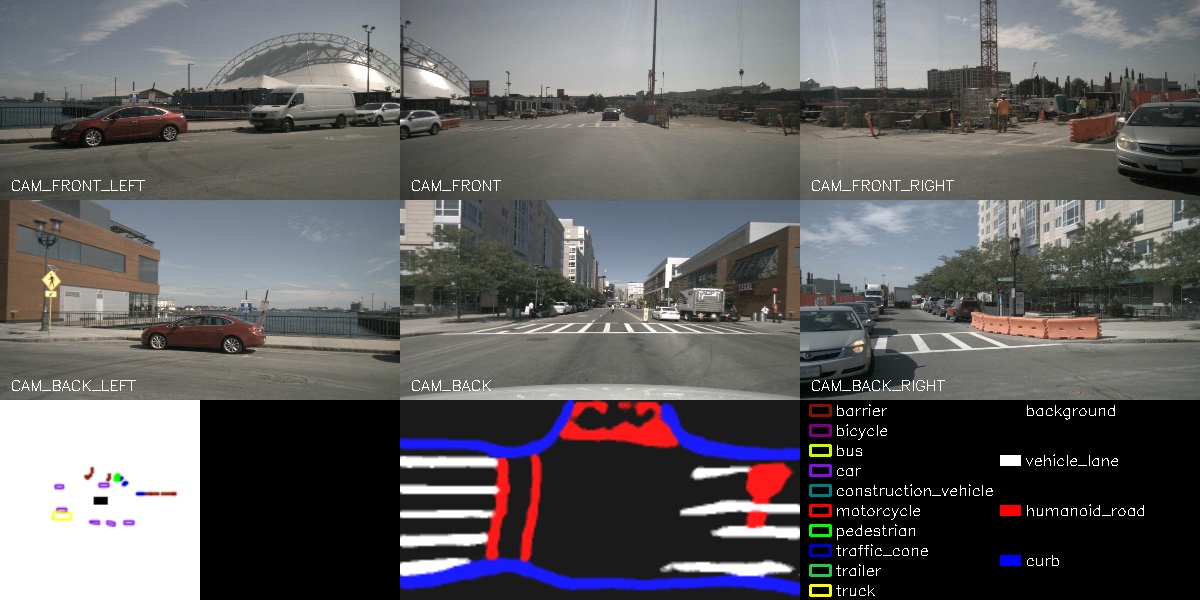
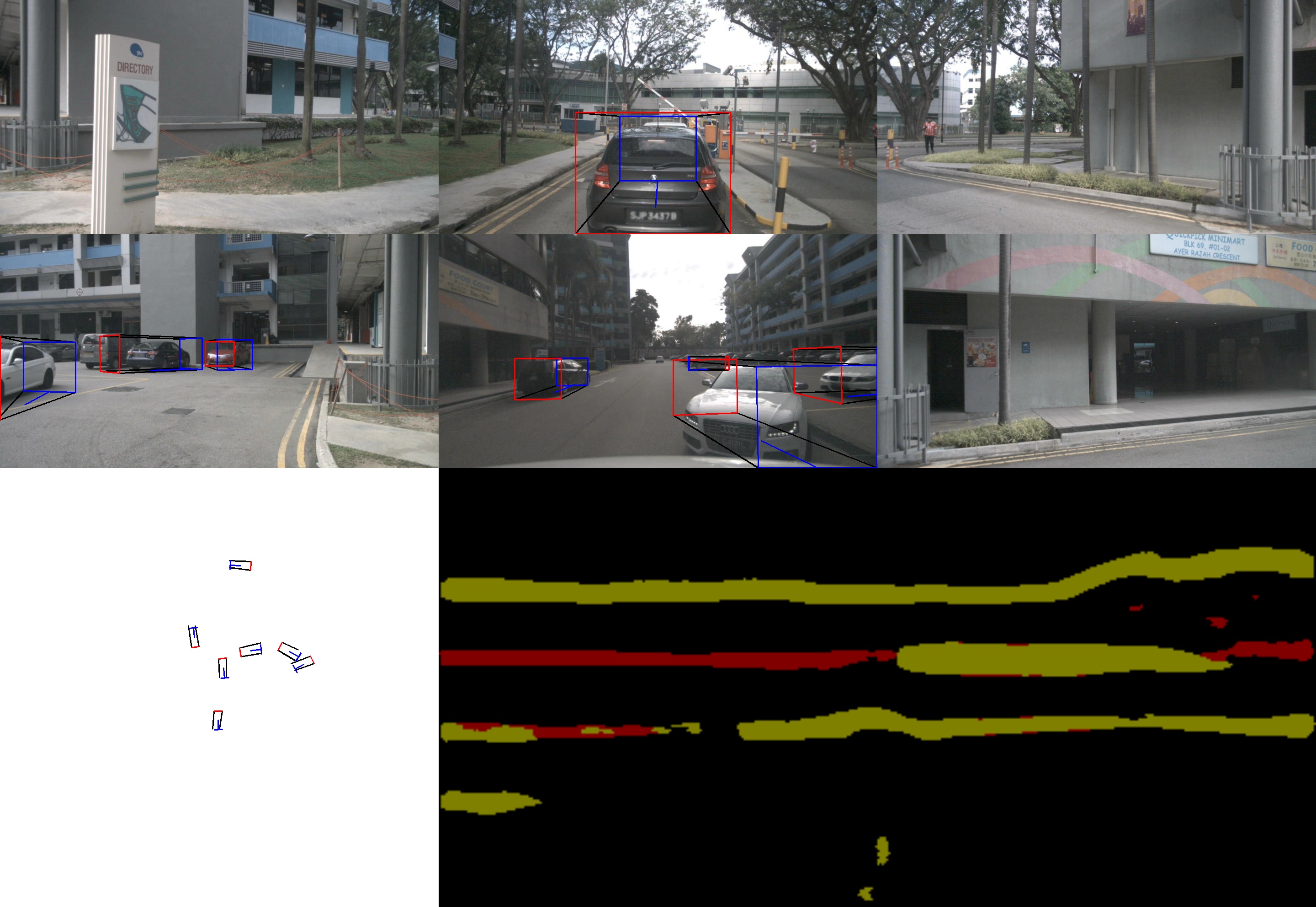
The algorithm takes six groups of image data as input: front, front-left, front-right, rear, rear-left, and rear-right views. The model outputs detection results for ten object categories along with their corresponding 3D bounding boxes—including obstacles, various vehicle types, traffic signs, etc.—as well as semantic segmentation results for lane markings, sidewalks, and road edges.
This example uses local image data as input, performs inference on the BPU, publishes rendered images containing perception results, and displays these results in a web browser on a PC.
Code repository: (https://github.com/D-Robotics/hobot_bev.git)
Supported Platforms
| Platform | Runtime Environment | Example Functionality |
|---|---|---|
| RDK S100, RDK S100P | Ubuntu 22.04 (Humble) | Uses local data replay and displays inference results via web |
Prerequisites
- The RDK has been flashed with an Ubuntu 20.04 or Ubuntu 22.04 system image.
- TogetheROS.Bot has been successfully installed on the RDK.
- Ensure your PC can access the RDK over the network.
Usage Instructions
Using Local Dataset Replay
Local dataset replay is used to feed images into the algorithm. After inference, the algorithm publishes rendered image messages containing perception results. These are displayed in a web browser on the PC via the websocket package.
Preparing the Replay Dataset
- Foxy
- Humble
# Download dataset on the board
wget http://archive.d-robotics.cc/TogetheROS/data/hobot_bev_data.tar.gz

# Extract the archive
mkdir -p hobot_bev_data
tar -zxvf hobot_bev_data.tar.gz -C hobot_bev_data

# After extraction, the dataset resides under hobot_bev_data/data
# Download dataset on the board
cd ~
wget http://archive.d-robotics.cc/TogetheROS/data/nuscenes_bev_val/nuscenes_bev_val.tar.gz

# Extract the archive
mkdir -p ~/hobot_bev_data
tar -zxvf ~/nuscenes_bev_val.tar.gz -C ~/hobot_bev_data
Replaying the Dataset
- Foxy
- Humble
# Set up the tros.b environment
source /opt/tros/setup.bash

# Launch the websocket service
ros2 launch websocket websocket_service.launch.py

# Launch the execution script and specify the dataset path
ros2 launch hobot_bev hobot_bev.launch.py image_pre_path:=hobot_bev_data/data
# Set up the tros.b humble environment
source /opt/tros/humble/setup.bash

if [ -L qat ]; then rm qat; fi
ln -s `ros2 pkg prefix hobot_bev`/lib/hobot_bev/qat/ qat
ln -s ~/hobot_bev_data/nuscenes_bev_val nuscenes_bev_val

# Launch the execution script
ros2 launch hobot_bev hobot_bev.launch.py
Result Analysis
The following output appears in the terminal during execution:
- Foxy
- Humble
[INFO] [launch]: All log files can be found below /root/.ros/log/2023-07-05-17-47-07-232907-hobot-2627970
[INFO] [launch]: Default logging verbosity is set to INFO
[INFO] [hobot_bev-1]: process started with pid [2627972]
[INFO] [websocket-2]: process started with pid [2627974]
[hobot_bev-1] [WARN] [1688579227.907268364] [bev_node]:
[hobot_bev-1]  image_pre_path: hobot_bev_data/data
[hobot_bev-1] [BPU_PLAT]BPU Platform Version(1.3.3)!
[hobot_bev-1] [HBRT] set log level as 0. version = 3.14.25.0
[hobot_bev-1] [DNN] Runtime version = 1.12.3_(3.14.25 HBRT)
[hobot_bev-1] [WARN] [1688579228.714778531] [dnn]: Run default SetOutputParser.
[hobot_bev-1] [WARN] [1688579228.714925489] [dnn]: Set output parser with default dnn node parser, you will get all output tensors and should parse output_tensors in PostProcess.
[hobot_bev-1] [WARN] [1688579228.886846489] [bev_node]: loop 0/1002
[hobot_bev-1] [WARN] [1688579229.474568573] [bev_node]: loop 1/1002
[hobot_bev-1] [WARN] [1688579230.058551781] [bev_node]: loop 2/1002
[hobot_bev-1] [WARN] [1688579230.691667198] [bev_node]: loop 3/1002
[hobot_bev-1] [WARN] [1688579231.324658782] [bev_node]: loop 4/1002
[hobot_bev-1] [WARN] [1688579231.365145532] [bev_node]: input fps: 2.47, out fps: 2.52, infer time ms: 12, post process time ms: 659
[hobot_bev-1] [WARN] [1688579231.915645741] [bev_node]: loop 5/1002
[hobot_bev-1] [WARN] [1688579231.996993824] [bev_node]: input fps: 2.47, out fps: 2.52, infer time ms: 12, post process time ms: 658
[INFO] [launch]: All log files can be found below /root/.ros/log/2025-05-08-09-44-40-838952-ubuntu-20037
[INFO] [launch]: Default logging verbosity is set to INFO
[INFO] [hobot_bev-1]: process started with pid [20040]
[INFO] [websocket-2]: process started with pid [20042]
[hobot_bev-1] [UCP]: log level = 3
[hobot_bev-1] [UCP]: UCP version = 3.3.3
[hobot_bev-1] [VP]: log level = 3
[hobot_bev-1] [DNN]: log level = 3
[hobot_bev-1] [HPL]: log level = 3
[websocket-2] [WARN] [1746668681.078783258] [websocket]:
[websocket-2] Parameter:
[websocket-2]  image_topic: /image_jpeg
[websocket-2]  image_type: mjpeg
[websocket-2]  only_show_image: 1
[websocket-2]  output_fps: 0
[websocket-2] [INFO] [1746668681.079077507] [websocket]: Websocket using image mjpeg
[hobot_bev-1] [UCPT]: log level = 6
[hobot_bev-1] [DSP]: log level = 3
[hobot_bev-1] [INFO] [1746668681.182092730] [bev_node]: BevNode init
[hobot_bev-1] [WARN] [1746668681.182327429] [bev_node]:
[hobot_bev-1]  topic_name: image_jpeg
[hobot_bev-1]  save_image: false
[hobot_bev-1]  glog_level: 1
[hobot_bev-1] [WARN] [1746668681.186660916] [ai_wrapper]:
[hobot_bev-1]  Set glog level in cmd line with '--glog_level=$num'
[hobot_bev-1]    EXAMPLE_SYSTEM = 0,  EXAMPLE_REPORT = 1,  EXAMPLE_DETAIL = 2,  EXAMPLE_DEBUG = 3
[hobot_bev-1] [BPU][[BPU_MONITOR]][281473498852256][INFO]BPULib verison(2, 1, 2)[0d3f195]!
[hobot_bev-1] [DNN] HBTL_EXT_DNN log level:6
[hobot_bev-1] [DNN]: 3.3.3_(4.1.17 HBRT)
[hobot_bev-1] [INFO] [1746668681.944706857] [bev_node]: Get render imgs size: 8, frame_id: 0, duration ms infer: 12.52, postp: 3.37, prep: 0.00
[hobot_bev-1] [INFO] [1746668681.997575564] [bev_node]: Publish ros compressed image msg, format: jpeg, topic: image_jpeg
Enter http://IP:8000 in your PC's web browser to view the rendered images and algorithm results (replace IP with the RDK's IP address):
- Foxy
- Humble