5.4.7 Voice Tracking to Control Car Movement
Feature Overview
The voice tracking car control feature uses Direction-of-Arrival (DOA) angle information from sound source localization to steer the robot toward the sound source and move it forward. This feature must be used together with the intelligent voice module of the D-Robotics RDK Robot Operating System. After the user utters the wake-up word configured in the intelligent voice recognition module to activate the device, the voice tracking car control function becomes active. Subsequently, whenever the user speaks the wake-up word or a configured command word, the intelligent voice recognition module outputs the DOA angle of the sound source. Upon receiving this DOA angle information, the module controls the robot to turn toward the sound source direction and then move forward by a certain distance.
The workflow is illustrated below:
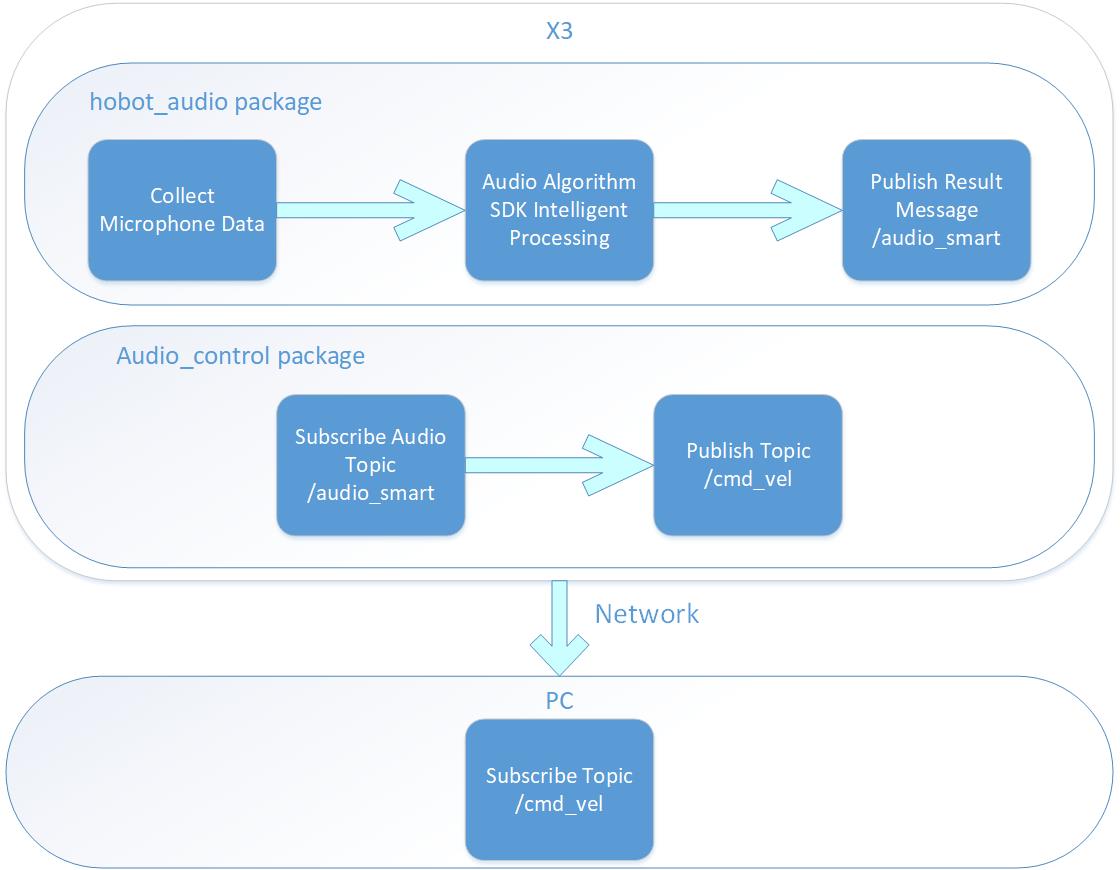
This application example uses a simulated robot car in the Gazebo simulation environment on a PC. The published control commands can also be directly applied to control a physical robot car.
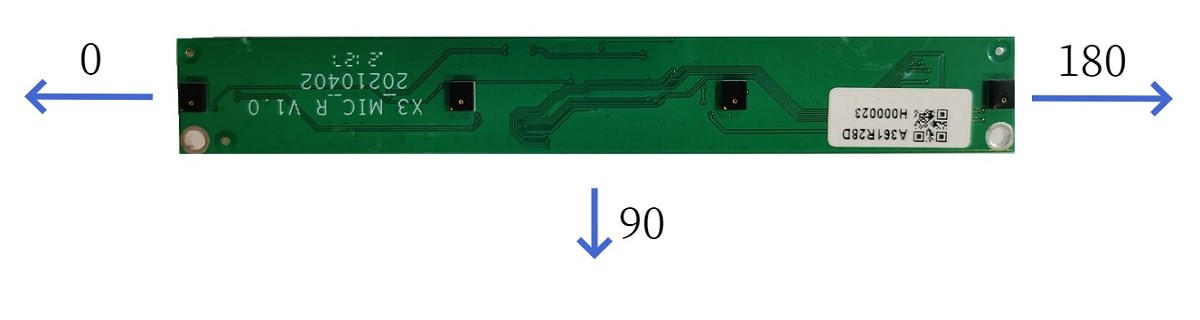
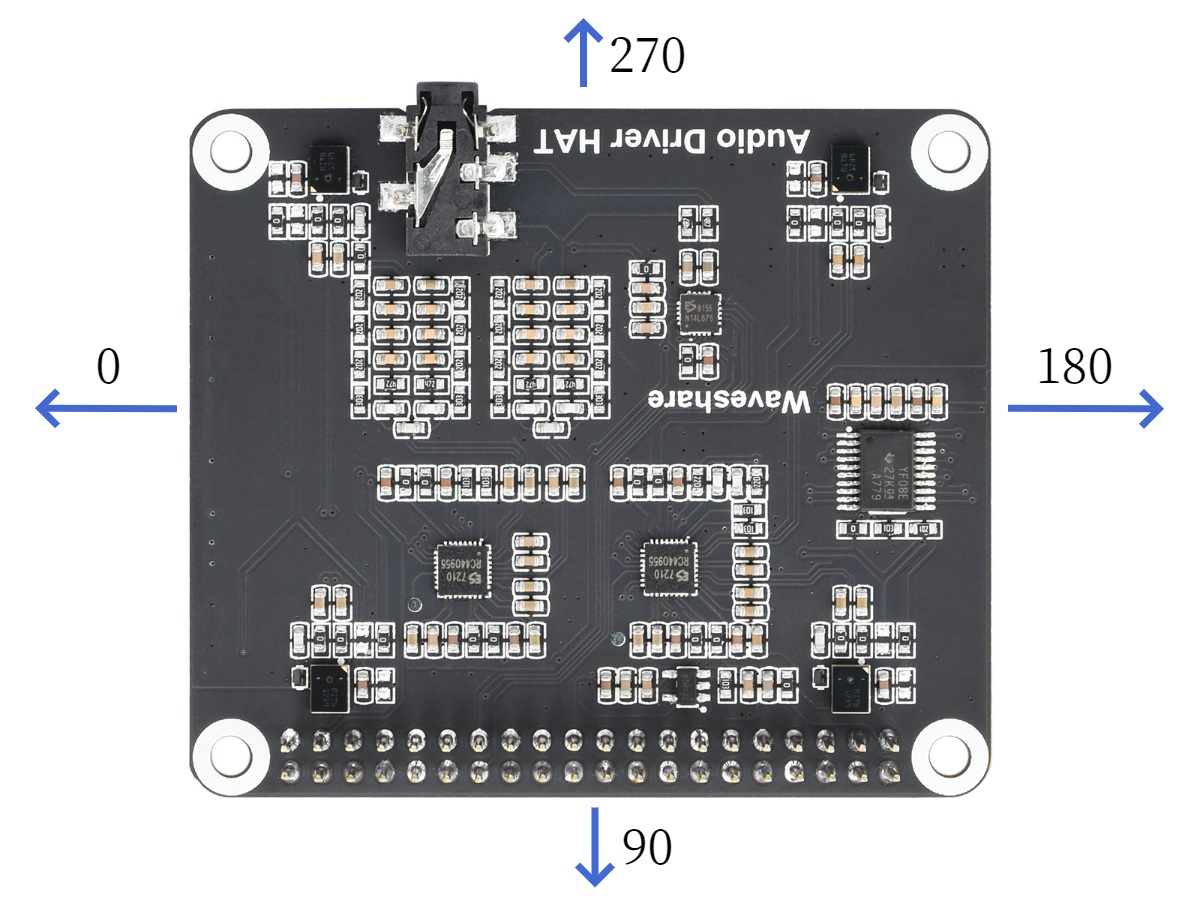
The DOA angle information output by the intelligent voice module is measured in degrees and supports both linear and circular microphone arrays. For linear microphone arrays, the angle range is 0° to 180°, while for circular microphone arrays, the range is 0° to 360°. The angular reference frame is highly dependent on the physical installation position of the microphone array. The actual angle diagrams are shown below:
Linear Microphone Array:
Circular Microphone Array:
Code Repository: (https://github.com/D-Robotics/audio_tracking.git)
Supported Platforms
| Platform | Runtime Environment | Example Functionality |
|---|---|---|
| RDK X3 | Ubuntu 20.04 (Foxy), Ubuntu 22.04 (Humble) | Launch the intelligent voice module to parse speech and perform voice tracking, visualized via Gazebo |
| RDK X5, RDK X5 Module | Ubuntu 22.04 (Humble) | Launch the intelligent voice module to parse speech and perform voice tracking, visualized via Gazebo |
Note: Only RDK X3 is supported; RDK X3 Module is not currently supported.
Prerequisites
RDK Platform
-
The RDK has been flashed with an Ubuntu 20.04 or Ubuntu 22.04 system image.
-
TogetheROS.Bot has been successfully installed on the RDK.
-
The intelligent voice algorithm package has been successfully installed on the RDK. Installation commands:
- Foxy
- Humble
sudo apt update
sudo apt install tros-hobot-audio
sudo apt update
sudo apt install tros-humble-hobot-audio
If the sudo apt update command fails or returns an error, please refer to the FAQ section Common Issues, specifically Q10: How to resolve failures or errors when running apt update?
-
A compatible audio board has been properly connected to the RDK (refer to the Intelligent Voice chapter).
-
A PC on the same network segment as the RDK (either via wired connection or the same Wi-Fi network; the first three segments of the IP address must match). The following software must be installed on the PC:
- Foxy
- Humble
- Ubuntu 20.04 system and ROS2 Foxy Desktop
- Gazebo and Turtlebot3-related packages. Installation commands:
sudo apt-get install ros-foxy-gazebo-*
sudo apt install ros-foxy-turtlebot3
sudo apt install ros-foxy-turtlebot3-simulations
- Ubuntu 22.04 system and ROS2 Humble Desktop
- Gazebo and Turtlebot3-related packages. Installation commands:
sudo apt-get install ros-humble-gazebo-*
sudo apt install ros-humble-turtlebot3
sudo apt install ros-humble-turtlebot3-simulations
Usage Instructions
RDK Platform
After launching the voice tracking feature, the voice tracking control module receives intelligent voice messages published by the intelligent voice module, parses them, and issues commands to rotate the car toward the specified direction based on wake-up events and DOA angle information in the message. Once the car has turned to the target angle, it moves forward by a fixed distance (by default, 0.2 meters).
Start the simulation environment on the PC:
- Foxy
- Humble
source /opt/ros/foxy/setup.bash
source /opt/ros/humble/setup.bash
export TURTLEBOT3_MODEL=burger
ros2 launch turtlebot3_gazebo empty_world.launch.py
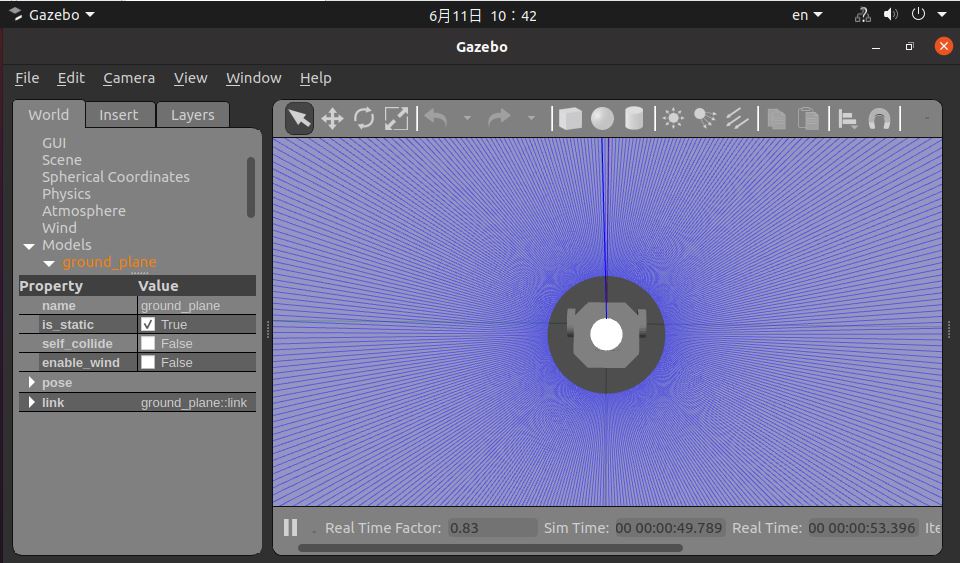
After successful launch, the simulated robot car appears as follows:
Launch the program on the RDK platform:
- Copy audio configuration files and load the audio driver
- Foxy
- Humble
# Set up the tros.b environment
source /opt/tros/setup.bash
# Set up the tros.b environment
source /opt/tros/humble/setup.bash
# Copy required configuration files for the example from the tros.b installation path.
cp -r /opt/tros/${TROS_DISTRO}/lib/hobot_audio/config/ .
-
Verify the microphone device
The microphone device ID is set via the
micphone_namefield in the configuration file config/audio_config.json. The default value is "hw:0,0", which refers to Card 0, Device 0. You can check available devices using the commandls /dev/snd, e.g., "pcmC0D1c"; the trailing 'c' indicates a capture device, C0 means Card 0, and D1 means Device 1. In this case, you would set the parameter to "hw:0,1". -
Launch the program
- Foxy
- Humble
# Set up the tros.b environment
source /opt/tros/setup.bash
# Set up the tros.b environment
source /opt/tros/humble/setup.bash# Launch the launch file and specify the DOA angle corresponding to the front direction of the car (e.g., 90 degrees)
ros2 launch audio_tracking audio_tracking.launch.py car_front_audio_angle:=90
Result Analysis
The following information is the output of the RDK running on the terminal:
        This is audio tracking package.

============================================
        audio tracking usage

Wake up device is "D-Robotics Hello".
Audio control command word definitions are:
        "Go forward"
        "Go backward"
        "Turn right"
        "Turn left"
When you say the wake word, the car turns toward you
Let's start the experience
============================================

[INFO] [1663149803.248119421] [audio_tracking]: AudioTrackingEngine construct
[INFO] [1663149803.313949108] [rclcpp]: ParametersClass node construct
[WARN] [1663149803.337782049] [AudioTrackingNode]: Parameter:
 ai_msg_sub_topic_name: /audio_smart
 twist_pub_topic_name: /cmd_vel
[WARN] [1663149804.316577383] [audio_control_parameter_node]: Robot Move param are
move_step: 0.3
rotate_step: 0.348

[INFO] [1663149814.967019845] [audio_tracking]: process audio frame type:2
[INFO] [1663149814.967377380] [audio_tracking]: process audio event type:1
[INFO] [1663149815.012831677] [audio_tracking]: process audio frame type:5
[WARN] [1663149815.013112088] [audio_tracking]: process audio doa theta:80.000000
[INFO] [1663149815.168426039] [audio_tracking]: process audio doa move to front distance:0.200000, speed:0.300000, duration:0.666667, ticks:6
[WARN] [1663149815.769833806] [audio_tracking]: cancel move
[INFO] [1663149822.128098383] [audio_tracking]: process audio frame type:2
[INFO] [1663149822.128389794] [audio_tracking]: process audio event type:1
[INFO] [1663149822.145186562] [audio_tracking]: process audio frame type:5
[WARN] [1663149822.145491473] [audio_tracking]: process audio doa theta:55.000000
[INFO] [1663149822.174037772] [audio_tracking]: process audio doa move theta:35.000000, angle:0.610865, direction:1, ticks:6
[WARN] [1663149822.775398926] [audio_tracking]: cancel move
[INFO] [1663149822.775698796] [audio_tracking]: process audio doa move to front distance:0.200000, speed:0.300000, duration:0.666667, ticks:6
[WARN] [1663149823.377099758] [audio_tracking]: cancel move
The above logs capture a segment of the output after the audio control package is launched. The log shows that the wake-up word configured for the intelligent voice recognition module is "D-Robotics Hello". After receiving the wake-up event, the audio tracking control module receives DOA angle information. As shown in the log above, the DOA is 80 degrees. At this time, the audio tracking control module publishes a command to make the car turn left by 20 degrees. After the rotation, the car moves forward, and later the car stops moving.
On the PC, you can use the ros2 topic list command in the terminal to query the topic information of the RDK.
ros2 topic list
/audio_smart
/cmd_vel
The topic "/audio_smart" is the algorithm perception message published, which contains intelligent voice results. The topic "/cmd_vel" is the motion control command published by RDK.
On the PC, the command "ros2 topic echo /cmd_vel" can be used in the terminal to view the motion control command published by RDK:
linear:
  x: 0.0
  y: 0.30000001192092896
  z: 0.0
angular:
  x: 0.0
  y: 0.0
  z: 1.1136000156402588
---
linear:
  x: 0.0
  y: 0.30000001192092896
  z: 0.0
angular:
  x: 0.0
  y: 0.0
  z: 1.1136000156402588
---
linear:
  x: 0.0
  y: 0.30000001192092896
  z: 0.0
angular:
  x: 0.0
  y: 0.0
  z: 1.1136000156402588
---
linear:
  x: 0.0
  y: 0.30000001192092896
  z: 0.0
angular:
  x: 0.0
  y: 0.0
  z: 1.1136000156402588
---
linear:
  x: 0.0
  y: 0.30000001192092896
  z: 0.0
angular:
  x: 0.0
  y: 0.0
  z: 1.1136000156402588
---
In the PC-side simulation environment, the car’s movement controlled by audio tracking performs as follows:
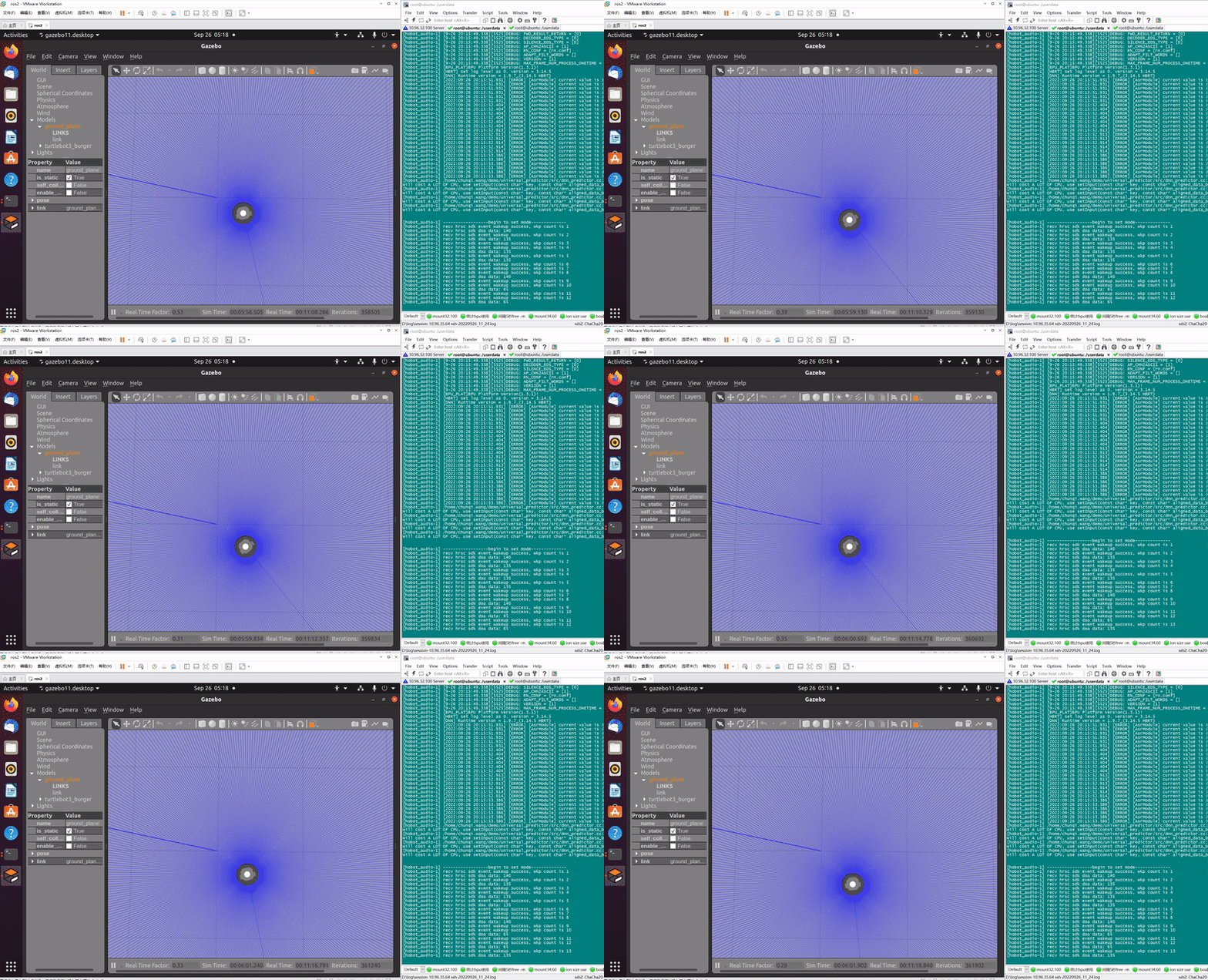
In the image above, the left side shows the simulated car rotating according to the sound source localization angle, while the right side displays the program’s output log, which includes DOA angle information.