Vision Language Models
Feature Overview
This section introduces how to experience on-device Vision Language Models (VLMs) on the RDK platform. Thanks to the outstanding achievements of InternVL and SmolVLM, we have implemented quantization and deployment on the RDK platform. Additionally, this example leverages the powerful KV Cache management capabilities from llama.cpp combined with the computational advantages of the RDK platform's BPU module to enable local VLM deployment.
Code repository: (https://github.com/D-Robotics/hobot_llamacpp.git)
Supported Platforms
| Platform | Runtime Environment | Example Feature |
|---|---|---|
| RDK X5, RDK X5 Module | Ubuntu 22.04 (Humble) | On-device Vision Language Model demo |
| RDK S100, RDK S100P | Ubuntu 22.04 (Humble) | On-device Vision Language Model demo |
Supported Models
| Model Type | Parameters | Platform | Image Encoder Model | Text Decoder Model |
|---|---|---|---|---|
| InternVL2_5 | 1B | X5 | vit_model_int16_v2.bin | Qwen2.5-0.5B-Instruct-Q4_0.gguf |
| InternVL2_5 | 1B | S100 | vit_model_int16.hbm | Qwen2.5-0.5B-Instruct-Q4_0.gguf |
| InternVL3 | 1B | X5 | vit_model_int16_VL3_1B_Instruct_X5.bin | qwen2_5_q8_0_InternVL3_1B_Instruct.gguf |
| InternVL3 | 1B | S100 | vit_model_int16_VL3_1B_Instruct.hbm | qwen2_5_q8_0_InternVL3_1B_Instruct.gguf |
| InternVL3 | 2B | X5 | vit_model_int16_VL3_2B_Instruct.bin | qwen2_5_1.5b_q8_0_InternVL3_2B_Instruct.gguf |
| InternVL3 | 2B | S100 | vit_model_int16_VL3_2B_Instruct.hbm | qwen2_5_1.5b_q8_0_InternVL3_2B_Instruct.gguf |
| SmolVLM2 | 256M | X5 | SigLip_int16_SmolVLM2_256M_Instruct_MLP_C1_UP_X5.bin | SmolVLM2-256M-Video-Instruct-Q8_0.gguf |
| SmolVLM2 | 256M | S100 | SigLip_int16_SmolVLM2_256M_Instruct_S100.hbm | SmolVLM2-256M-Video-Instruct-Q8_0.gguf |
| SmolVLM2 | 500M | X5 | SigLip_int16_SmolVLM2_500M_Instruct_MLP_C1_UP_X5.bin | SmolVLM2-500M-Video-Instruct-Q8_0.gguf |
| SmolVLM2 | 500M | S100 | SigLip_int16_SmolVLM2_500M_Instruct_S100.hbm | SmolVLM2-500M-Video-Instruct-Q8_0.gguf |
Algorithm Performance Metrics
| Model | Parameters | Quantization | Platform | Input Size | Image Encoder Time (ms) | Prefill Eval Time (ms/token) | Eval Time (ms/token) |
|---|---|---|---|---|---|---|---|
| InternVL2_5 | 1B | Q4_0 | X5 | 1x3x448x448 | 2456.00 | 7.7 | 51.6 |
| InternVL3 | 1B | Q8_0 | S100 | 1x3x448x448 | 100.00 | 9.19 | 41.65 |
| SmolVLM2 | 256M | Q8_0 | X5 | 1x3x512x512 | 1053 | 9.3 | 27.8 |
| SmolVLM2 | 500M | Q8_0 | X5 | 1x3x512x512 | 1053 | 27.3 | 65.7 |
Prerequisites
RDK Platform
- The RDK has been flashed with an Ubuntu 22.04 system image.
- TogetheROS.Bot has been successfully installed on the RDK.
- Install the required package:
sudo apt update
sudo apt install tros-humble-hobot-llamacpp
If the sudo apt update command fails or returns errors, refer to the FAQ section Common Issues, specifically question Q10: How to resolve apt update command failures or errors? for solutions.
- System Configuration
Use the command srpi-config to set ION memory size to 1.6GB and configure the CPU to run at its maximum frequency after reboot.
-
ION Setting:
2.2 srpi-config Configuration Tool User Guide -
CPU Setting:
2.4 Thermal Control and CPU Frequency Management
Usage Instructions
Two interaction modes are currently provided: one allows direct input of images and text via terminal; the other subscribes to image and text messages and publishes results as text output.
InternVL
Before running the program, download the model files to your working directory using the following commands:
- RDK X5
- RDK S100
wget https://huggingface.co/D-Robotics/InternVL2_5-1B-GGUF-BPU/resolve/main/Qwen2.5-0.5B-Instruct-Q4_0.gguf
wget https://huggingface.co/D-Robotics/InternVL2_5-1B-GGUF-BPU/resolve/main/rdkx5/vit_model_int16_v2.bin
wget https://huggingface.co/D-Robotics/InternVL2_5-1B-GGUF-BPU/resolve/main/Qwen2.5-0.5B-Instruct-Q4_0.gguf
wget https://huggingface.co/D-Robotics/InternVL2_5-1B-GGUF-BPU/resolve/main/rdks100/vit_model_int16.hbm
- RDK X5
- RDK S100
source /opt/tros/humble/setup.bash
cp -r /opt/tros/${TROS_DISTRO}/lib/hobot_llamacpp/config/ .
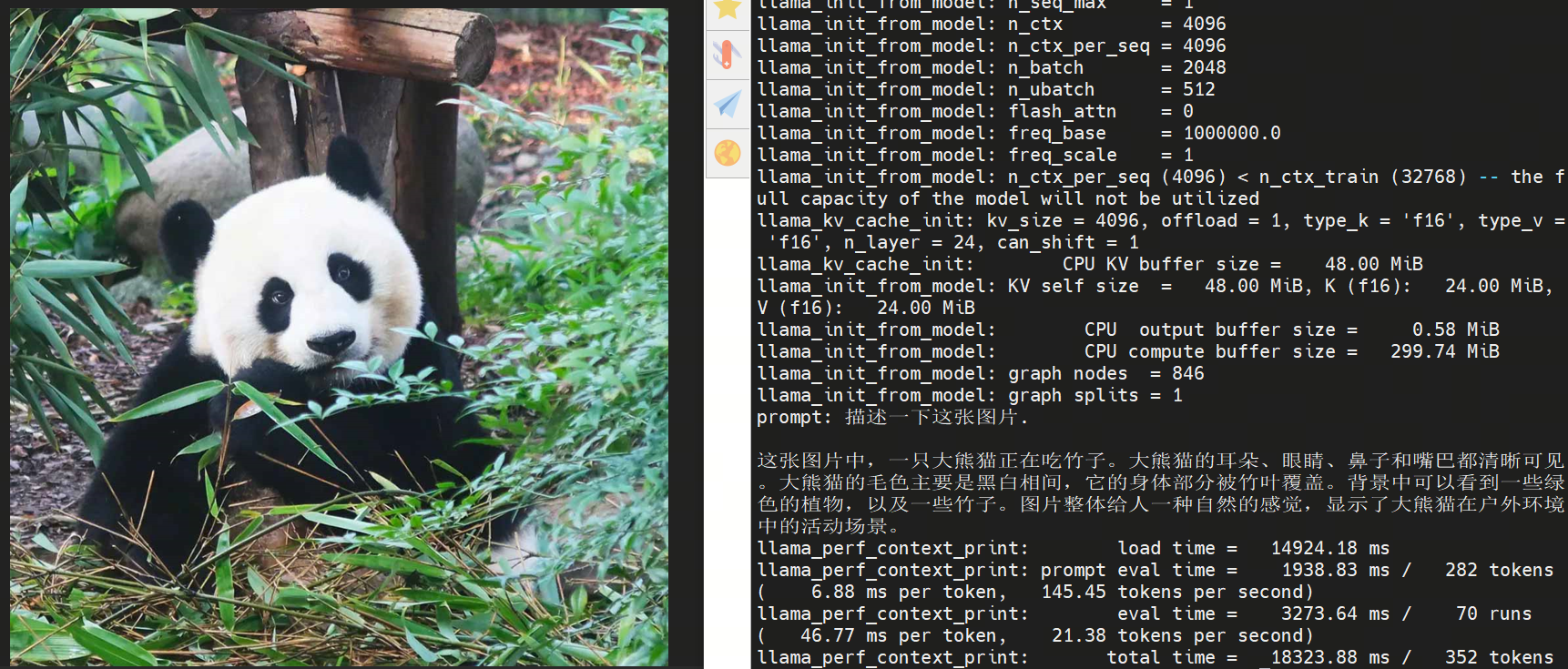
ros2 run hobot_llamacpp hobot_llamacpp --ros-args -p feed_type:=0 -p image:=config/image2.jpg -p image_type:=0 -p user_prompt:="Describe this image." -p model_file_name:=vit_model_int16_v2.bin -p llm_model_name:=Qwen2.5-0.5B-Instruct-Q4_0.gguf
source /opt/tros/humble/setup.bash
cp -r /opt/tros/${TROS_DISTRO}/lib/hobot_llamacpp/config/ .
ros2 run hobot_llamacpp hobot_llamacpp --ros-args -p feed_type:=0 -p image:=config/image2.jpg -p image_type:=0 -p user_prompt:="Describe this image." -p model_file_name:=vit_model_int16.hbm -p llm_model_name:=Qwen2.5-0.5B-Instruct-Q4_0.gguf
After launching the program, you can use local images and custom prompts to generate outputs.
SmolVLM
Before running the program, download the model files to your working directory using the following commands:
- RDK X5
- RDK S100
wget https://huggingface.co/D-Robotics/SmolVLM2-256M-Video-Instruct-GGUF-BPU/resolve/main/rdkx5/SigLip_int16_SmolVLM2_256M_Instruct_MLP_C1_UP_X5.bin
wget https://huggingface.co/D-Robotics/SmolVLM2-256M-Video-Instruct-GGUF-BPU/resolve/main/SmolVLM2-256M-Video-Instruct-Q8_0.gguf
wget https://huggingface.co/D-Robotics/SmolVLM2-256M-Video-Instruct-GGUF-BPU/resolve/main/rdks100/SigLip_int16_SmolVLM2_256M_Instruct_S100.hbm
wget https://huggingface.co/D-Robotics/SmolVLM2-256M-Video-Instruct-GGUF-BPU/resolve/main/SmolVLM2-256M-Video-Instruct-Q8_0.gguf
- RDK X5
- RDK S100
source /opt/tros/humble/setup.bash
cp -r /opt/tros/${TROS_DISTRO}/lib/hobot_llamacpp/config/ .
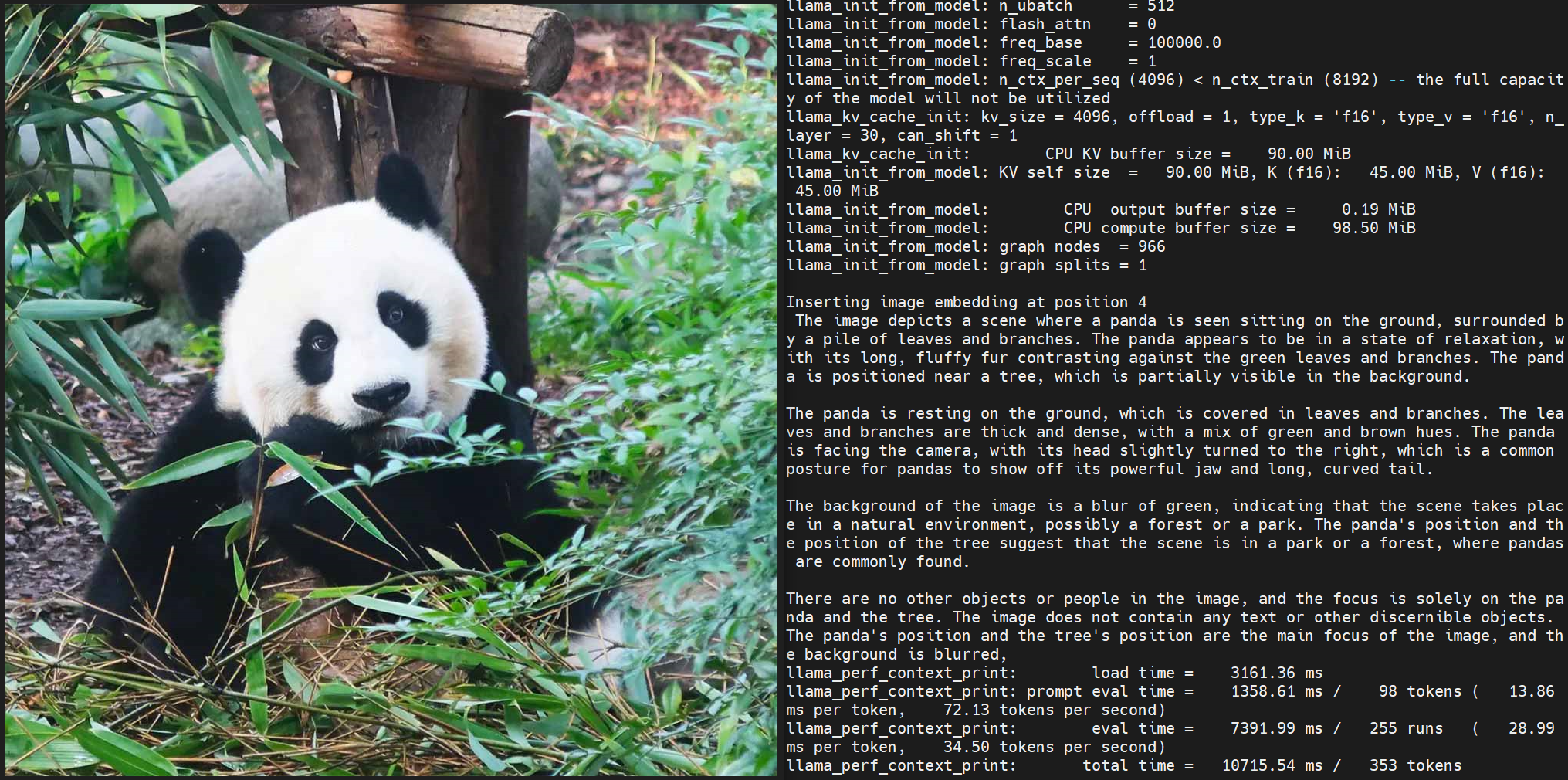
ros2 run hobot_llamacpp hobot_llamacpp --ros-args -p feed_type:=0 -p model_type:=1 -p image:=config/image2.jpg -p image_type:=0 -p user_prompt:="Describe the image." -p model_file_name:=SigLip_int16_SmolVLM2_256M_Instruct_MLP_C1_UP_X5.bin -p llm_model_name:=SmolVLM2-256M-Video-Instruct-Q8_0.gguf
source /opt/tros/humble/setup.bash
cp -r /opt/tros/${TROS_DISTRO}/lib/hobot_llamacpp/config/ .
ros2 run hobot_llamacpp hobot_llamacpp --ros-args -p feed_type:=0 -p model_type:=1 -p image:=config/image2.jpg -p image_type:=0 -p user_prompt:="Describe the image." -p model_file_name:=SigLip_int16_SmolVLM2_256M_Instruct_S100.hbm -p llm_model_name:=SmolVLM2-256M-Video-Instruct-Q8_0.gguf
After launching the program, you can use local images and custom prompts to generate outputs.
Notes
On the X5 platform, set the ION memory size to 1.6GB. On the S100 platform, set the ION memory size to more than 1.6GB; otherwise, model loading will fail.