Stereo IMU Camera
1. Feature Overview
The Digua Stereo IMU Camera comes with complete pre-calibrated parameters, including stereo calibration parameters, IMU intrinsic parameters, and extrinsic parameters between the stereo cameras and IMU. Users can use it directly without additional calibration.
With these parameters, high-precision depth maps can be computed via stereo matching algorithms to achieve real-time 3D environmental perception.
Additionally, the camera data can be used with open-source Visual-Inertial Odometry (VIO) algorithms such as OpenVINS to estimate camera pose and trajectory information.
This makes it suitable for applications like robot navigation and obstacle avoidance, providing developers with plug-and-play depth perception and visual-inertial fusion capabilities.
MIPI camera code repository: https://github.com/D-Robotics/hobot_mipi_cam
2. Supported Platforms
| Platform | OS Support | Example Functionality |
|---|---|---|
| RDK X5, RDK X5 Module | Ubuntu 22.04 (Humble) | Launch stereo camera and output stereo images and IMU data |
3. Preparation
3.1. RDK Platform
- RDK has been flashed with the RDK OS.
- TogetheROS.Bot has been successfully installed on the RDK.
- Ensure your PC can access the RDK over the network.
3.2. System and Package Versions
| Version | Verification Command | |
|---|---|---|
| RDK X5 System Image Version | ≥ 3.4.1 | cat /etc/version |
| tros-humble-hobot-stereonet Package | ≥ 2.5.0 | apt list | grep tros-humble-hobot-stereonet/ |
| tros-humble-mipi-cam Package | ≥ 2.5.0 | apt list | grep tros-humble-mipi-cam/ |
- If your system image version does not meet the requirement, please refer to the corresponding section in the documentation to re-flash the image.
- If your package versions are outdated, run the following commands to upgrade:
sudo apt update
sudo apt install --only-upgrade tros-humble-hobot-stereonet
sudo apt install --only-upgrade tros-humble-mipi-cam
If the sudo apt update command fails or returns an error, please refer to the FAQ section Common Issues, specifically Q10: How to resolve apt update command failure or errors?
4. Launching the Stereo Camera
4.1. Stereo IMU Camera
- Note: The camera is available in two versions—black metal housing and acrylic housing—but both offer identical functionality.
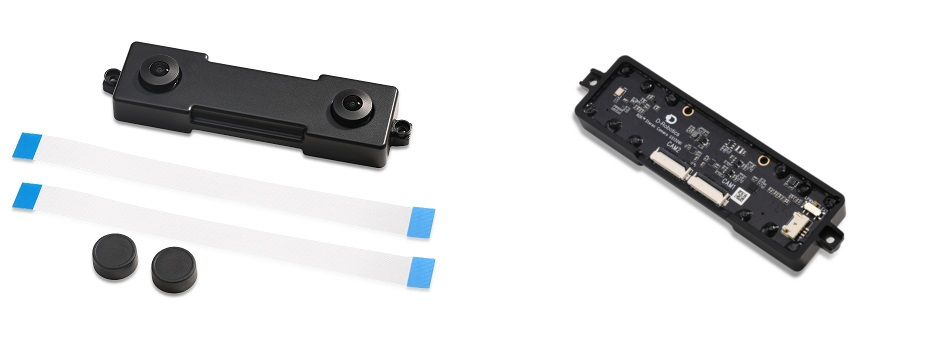
4.2. Hardware Connection
- Set the switch on the back of the module to
EXTmode, notLPWMmode. - Connect the black Dupont wire from the camera to pin
37on the RDK X5. This external trigger is required for time synchronization between the camera and IMU. For pin definitions, refer to 3.1.1 Pin Definitions and Applications.
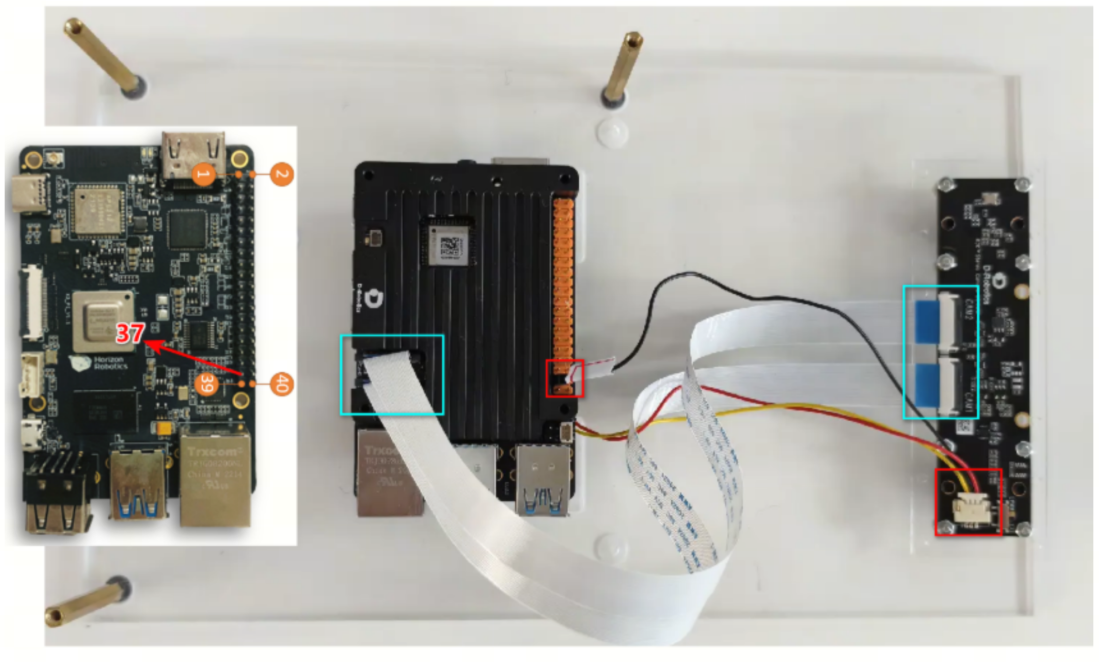

4.3. RDK X5 Configuration
- Specific settings are required on the RDK X5 to read IMU data. First, verify that your system version meets the requirement (≥ 3.4.1):
cat /etc/version
- Run the following command on the RDK X5 to configure the system:
srpi-config
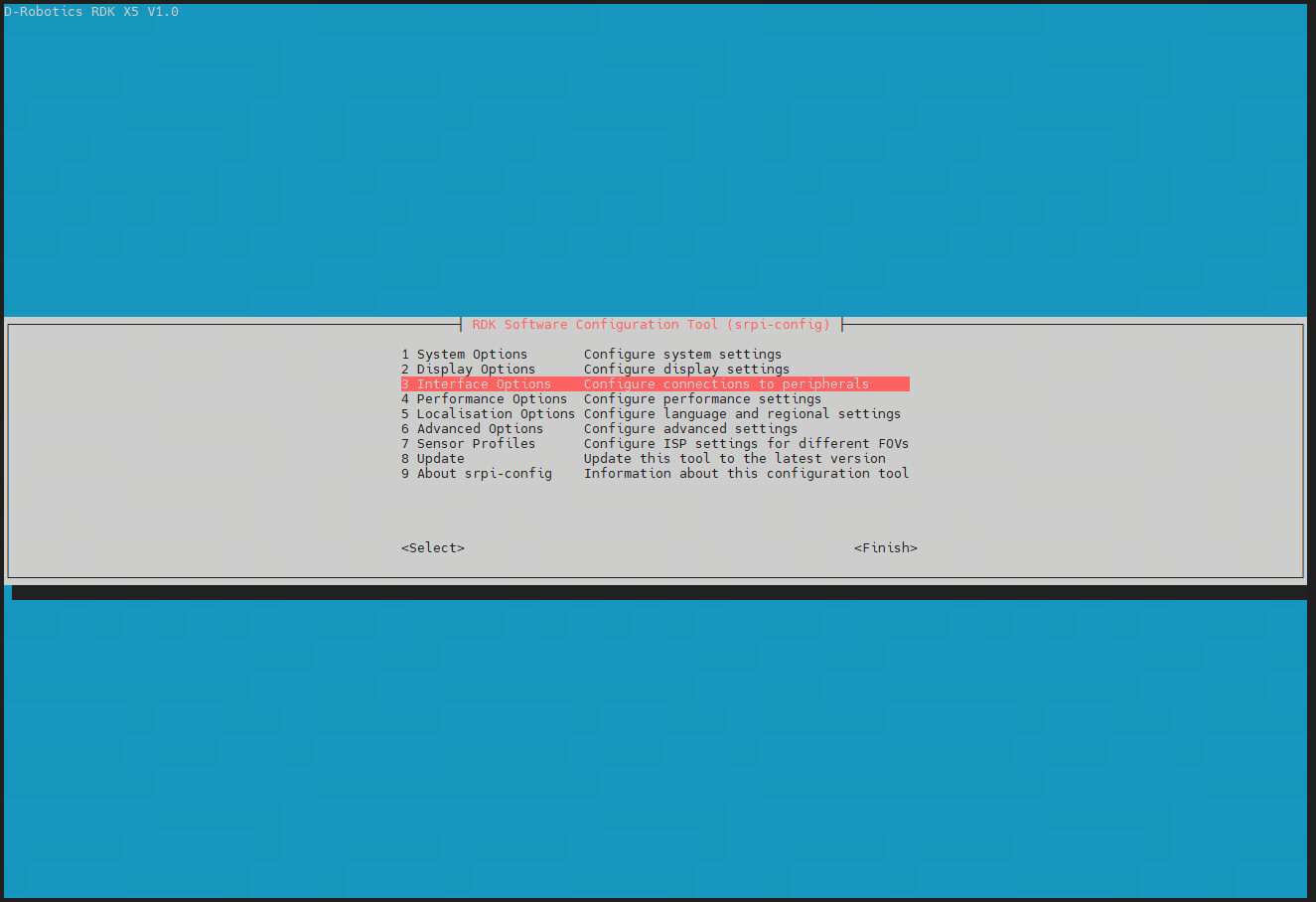
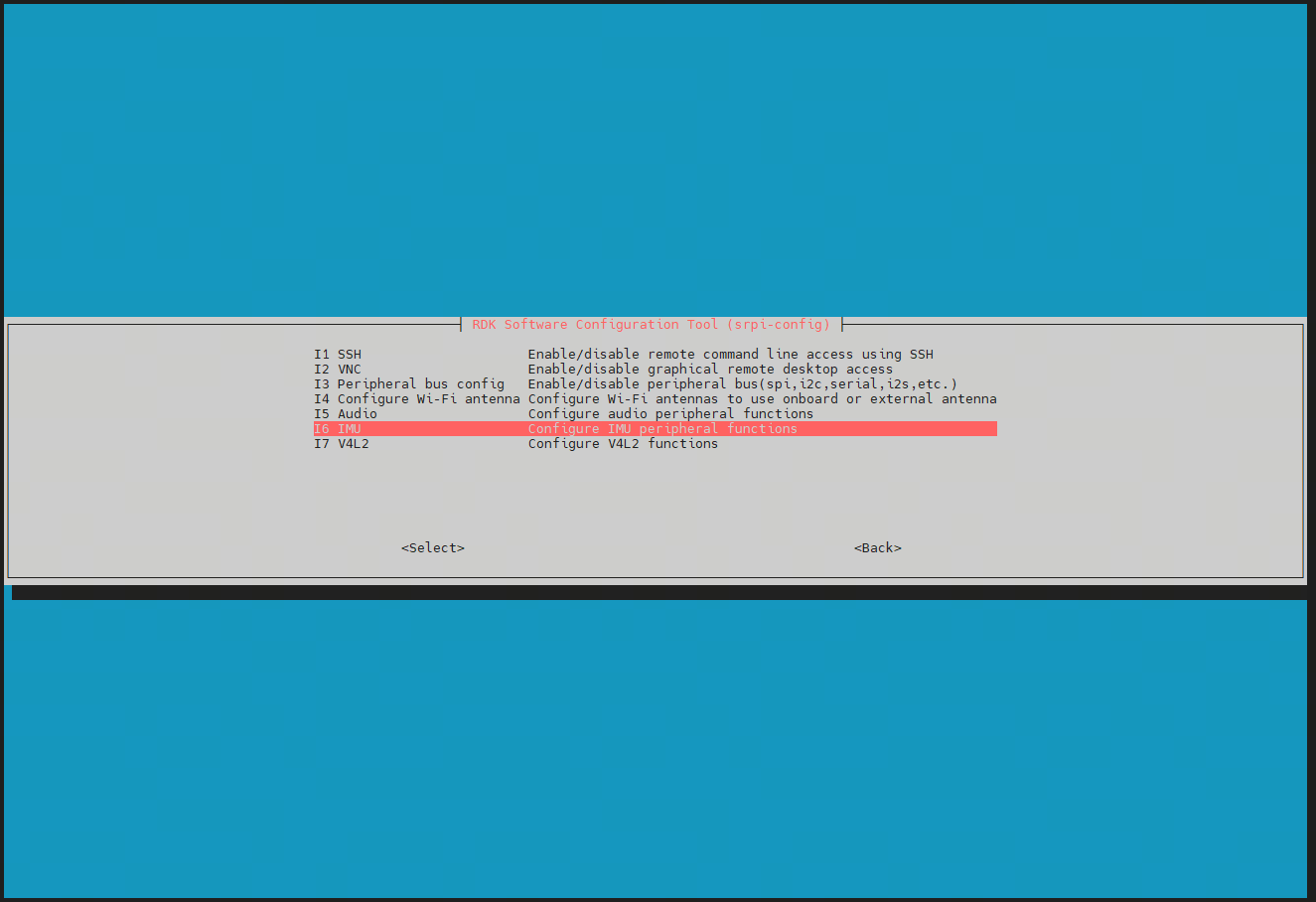
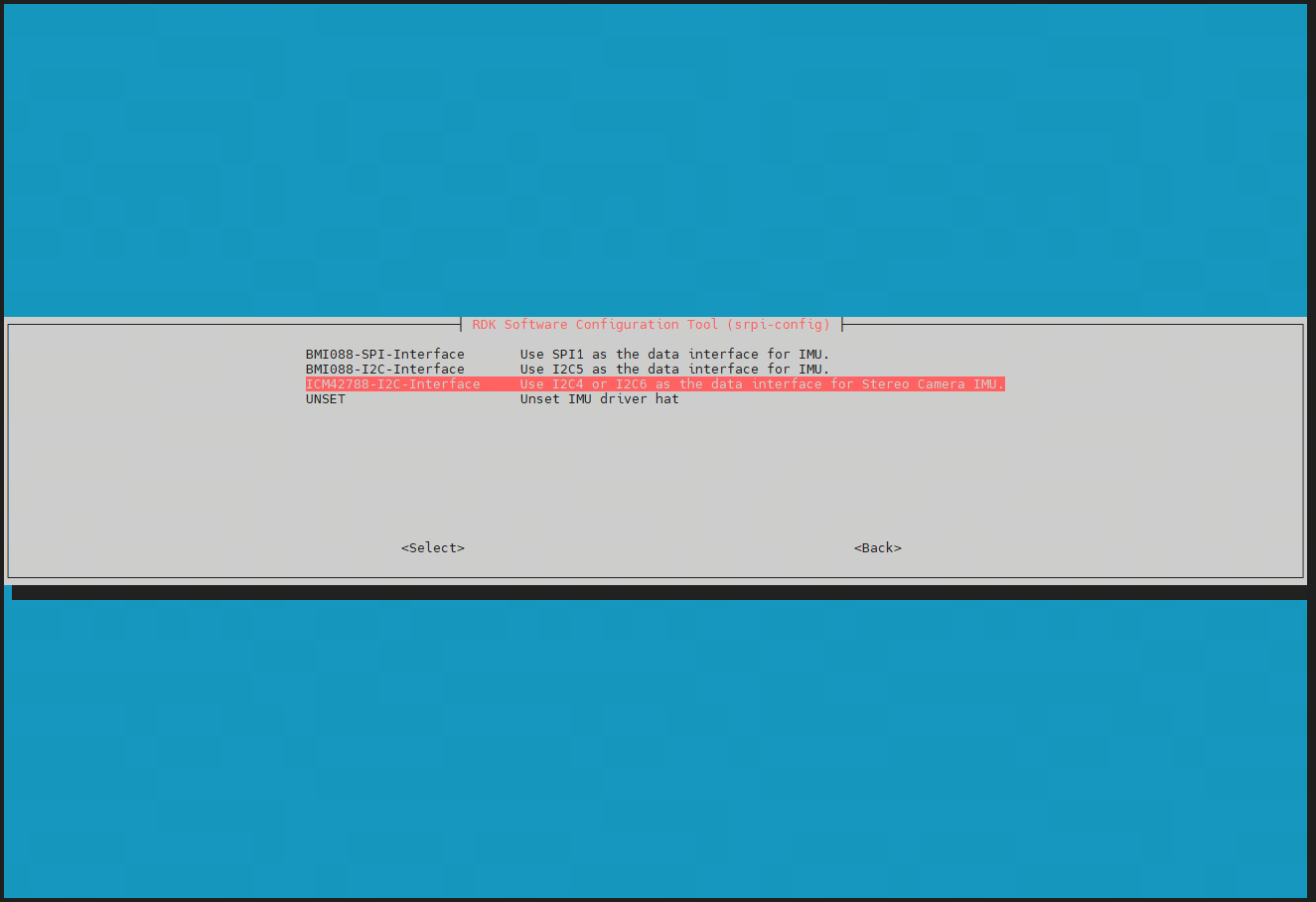
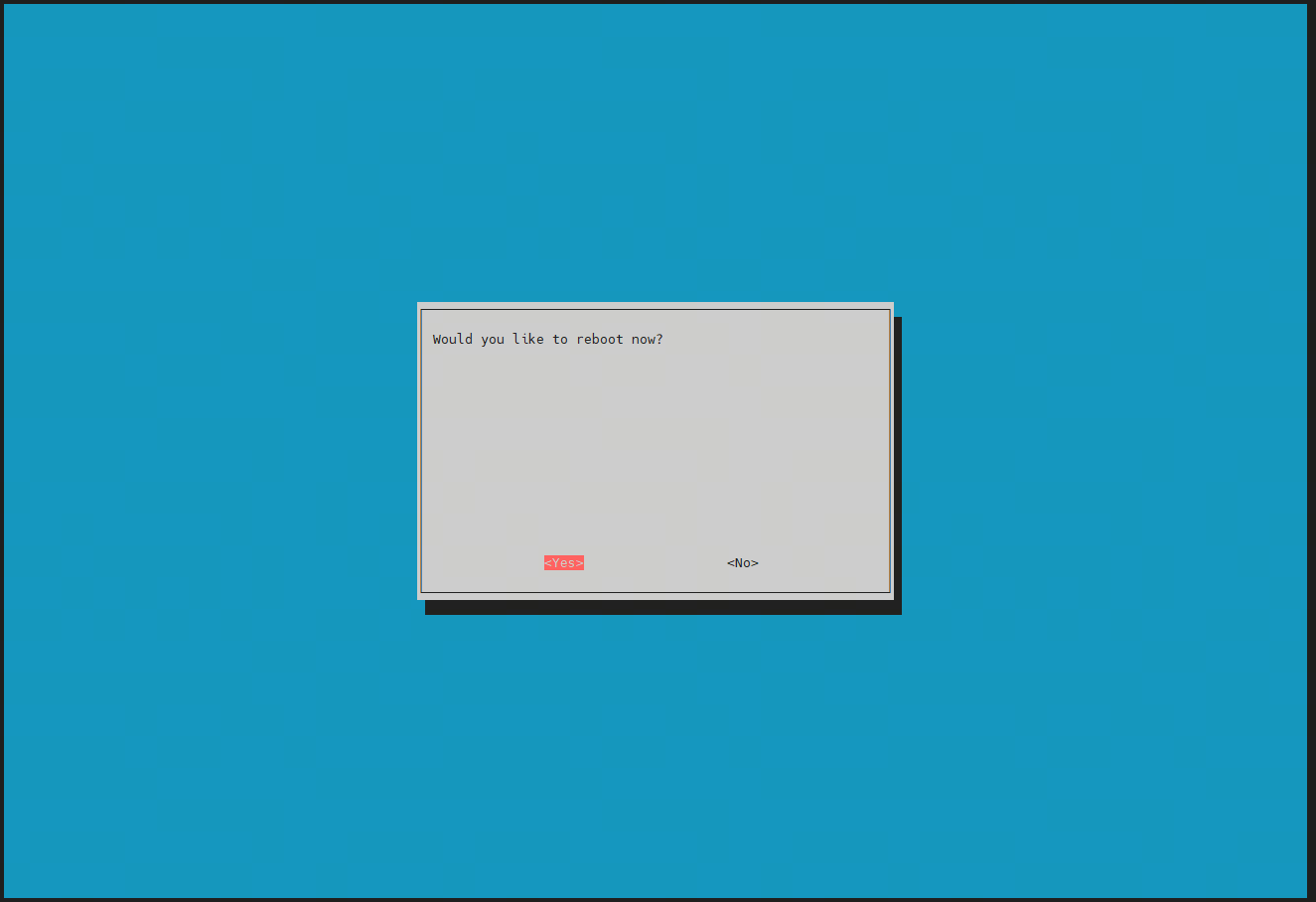
- After rebooting, confirm successful configuration by checking if the directories
iio:device1andiio:device2exist under/sys/bus/iio/devices/:
ll /sys/bus/iio/devices/

4.4. Camera Launch Command
- Execute the following command to launch the camera:
source /opt/tros/humble/setup.bash

ros2 launch mipi_cam mipi_cam_dual_channel.launch.py \
mipi_channel:=2 mipi_channel2:=0 \
mipi_lpwm_enable:=True mipi_frame_ts_type:=realtime \
mipi_image_width:=816 mipi_image_height:=960 \
mipi_image_framerate:=10.0 mipi_gdc_enable:=True \
mipi_out_format:=nv12 \
log_level:=info
Parameter explanations:
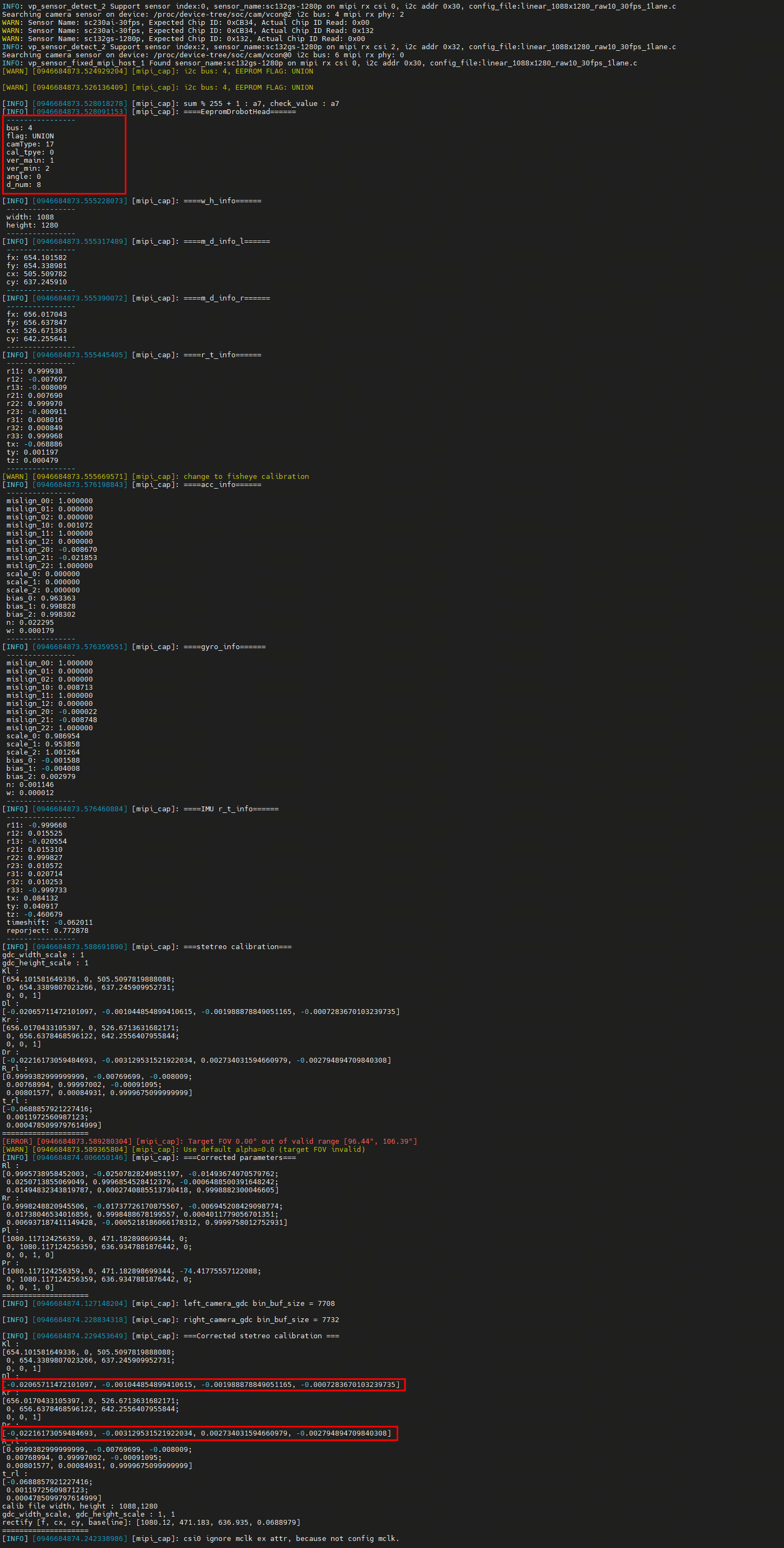
mipi_channel:=2 mipi_channel2:=0: Controls the left-right image stitching order.mipi_lpwm_enable:=True: Enables LPWM hardware synchronization.mipi_frame_ts_type:=realtime: Uses system time for timestamps.mipi_image_width:=816 mipi_image_height:=960: Sets image resolution (maximum supported: 1088×1280).mipi_image_framerate:=10.0: Sets camera frame rate (maximum: 30.0 fps).mipi_gdc_enable:=True: Enables GDC correction to publish rectified stereo images; otherwise, distorted images are published.mipi_out_format:=nv12: Sets output image format (supportsnv12/bgr8).log_level:=info: Sets logging level. Atinfolevel, calibration parameters are printed. Usewarnto suppress excessive logs.
- If the program runs successfully, it will print the following log containing all the camera calibration parameters. Currently, the fisheye mode is used for stereo calibration. For details, refer to OpenCV fisheye.
- Published topics:
ros2 topic list -v
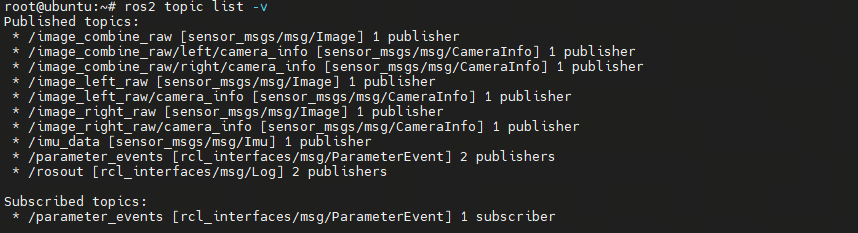
/image_combine_raw: Vertically stacked stereo image. Stitching order controlled bymipi_channelandmipi_channel2./image_left_raw//image_right_raw: Left and right camera image topics. Order controlled bymipi_channelandmipi_channel2./imu_data: IMU data topic publishing gyroscope and accelerometer readings.
In the IMU data topic, angular_velocity is in rad/s, and linear_acceleration is in m/s². The gravitational acceleration value is 9.81.
5. Launching Stereo Depth Algorithm
5.1. Launch Command
- Refer to the Stereo Depth Algorithm documentation for algorithm details and launch instructions.
- Launch command for this camera:
bash run_stereo.sh --mipi_rotation 0.0

# Refer to the corresponding documentation for detailed parameter settings.
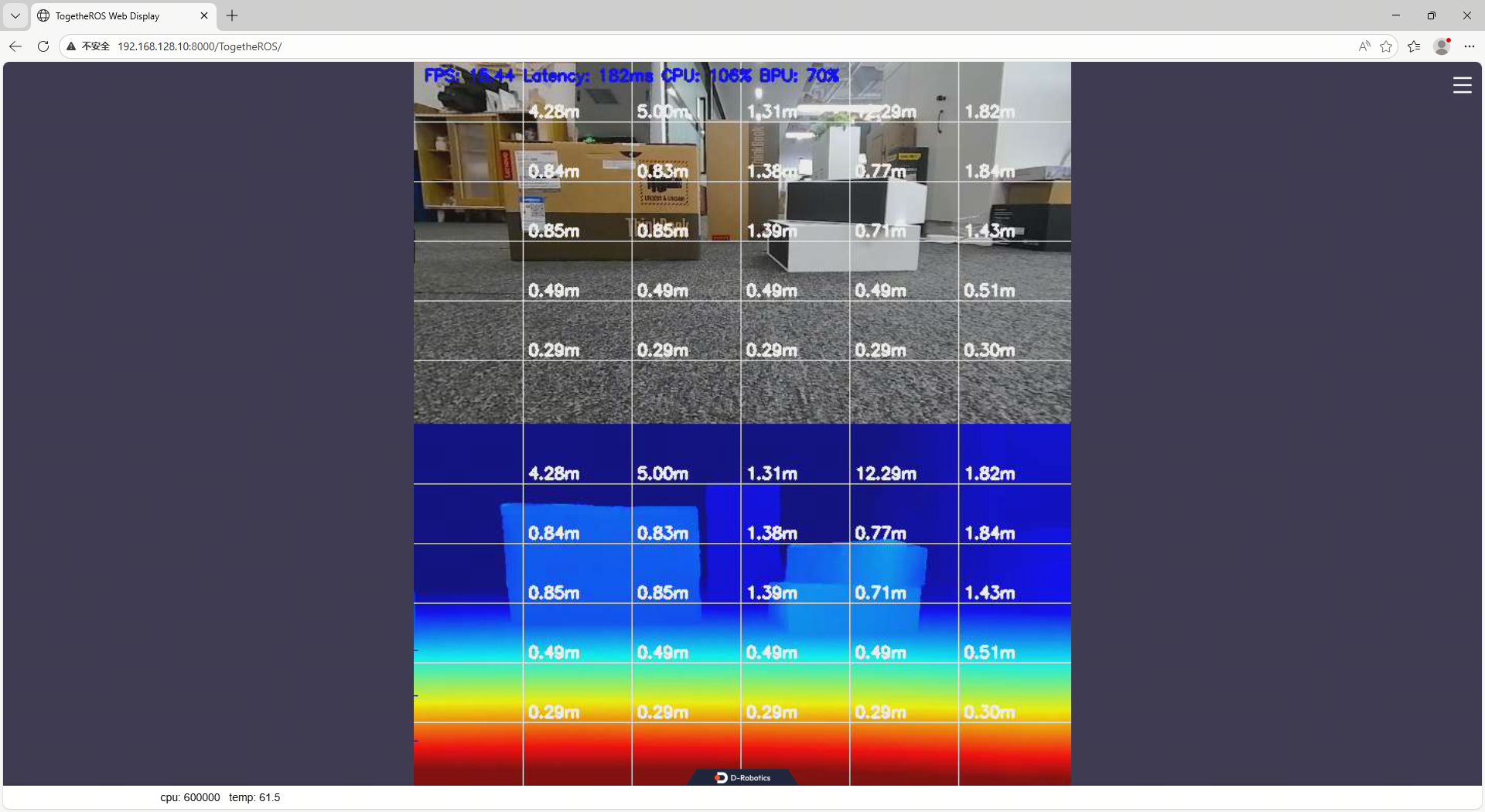
5.2. Results Visualization
- After launching, view RGB and depth images via a web browser by navigating to
http://ip:8000(e.g., RDK IP: 192.168.128.10):
6. Stereo VIO Algorithm (Using OpenVINS as an Example)
6.1. Recording rosbag
Currently, online VIO execution is not supported. You need to record a rosbag and process it on a PC.
- Launch command:
source /opt/tros/humble/setup.bash

ros2 pkg prefix mipi_cam

ros2 launch mipi_cam mipi_cam_dual_channel.launch.py \
mipi_channel:=2 mipi_channel2:=0 \
mipi_lpwm_enable:=True mipi_frame_ts_type:=realtime \
mipi_image_width:=816 mipi_image_height:=960 \
mipi_image_framerate:=10.0 mipi_gdc_enable:=False \
mipi_out_format:=nv12 \
log_level:=warn
- Record the IMU and stereo image topics. Due to limited write performance on the RDK X5, avoid recording for extended durations:
ros2 bag record /imu_data /image_combine_raw --max-cache-size 1073741824
- Convert the ROS 2 bag to ROS 1 format (implementation requires custom code).
6.2. Preparing VIO Parameters
Configure OpenVINS parameters. In the OpenVINS config directory, create a new folder named drobotics_stereo_imu_cam, and add the following three files. Note: Camera calibration files must be extracted from the logs generated by the command in Section 4.4.
- estimator_config.yaml
%YAML:1.0 # need to specify the file type at the top!

verbosity: "INFO" # ALL, DEBUG, INFO, WARNING, ERROR, SILENT

use_fej: true # if first-estimate Jacobians should be used (enable for good consistency)
integration: "rk4" # discrete, rk4, analytical (if rk4 or analytical used then analytical covariance propagation is used)
use_stereo: true # if we have more than 1 camera, if we should try to track stereo constraints between pairs
max_cameras: 2 # how many cameras we have 1 = mono, 2 = stereo, >2 = binocular (all mono tracking)

calib_cam_extrinsics: true # if the transform between camera and IMU should be optimized R_ItoC, p_CinI
calib_cam_intrinsics: true # if camera intrinsics should be optimized (focal, center, distortion)
calib_cam_timeoffset: true # if timeoffset between camera and IMU should be optimized
calib_imu_intrinsics: false # if imu intrinsics should be calibrated (rotation and skew-scale matrix)
calib_imu_g_sensitivity: false # if gyroscope gravity sensitivity (Tg) should be calibrated

max_clones: 11 # how many clones in the sliding window
max_slam: 50 # number of features in our state vector
max_slam_in_update: 25 # update can be split into sequential updates of batches, how many in a batch
max_msckf_in_update: 40 # how many MSCKF features to use in the update
dt_slam_delay: 1 # delay before initializing (helps with stability from bad initialization...)

gravity_mag: 9.7887 # magnitude of gravity in this location

feat_rep_msckf: "GLOBAL_3D"
feat_rep_slam: "ANCHORED_MSCKF_INVERSE_DEPTH"
feat_rep_aruco: "ANCHORED_MSCKF_INVERSE_DEPTH"

# zero velocity update parameters we can use
# we support either IMU-based or disparity detection.
try_zupt: false
zupt_chi2_multipler: 0 # set to 0 for only disp-based
zupt_max_velocity: 0.1
zupt_noise_multiplier: 10
zupt_max_disparity: 0.5 # set to 0 for only imu-based
zupt_only_at_beginning: false

# ==================================================================
# ==================================================================

init_window_time: 2.0 # how many seconds to collect initialization information
init_imu_thresh: 1.5 # threshold for variance of the accelerometer to detect a "jerk" in motion
init_max_disparity: 10.0 # max disparity to consider the platform stationary (dependent on resolution)
init_max_features: 50 # how many features to track during initialization (saves on computation)

init_dyn_use: false # if dynamic initialization should be used
init_dyn_mle_opt_calib: false # if we should optimize calibration during intialization (not recommended)
init_dyn_mle_max_iter: 50 # how many iterations the MLE refinement should use (zero to skip the MLE)
init_dyn_mle_max_time: 0.05 # how many seconds the MLE should be completed in
init_dyn_mle_max_threads: 6 # how many threads the MLE should use
init_dyn_num_pose: 6 # number of poses to use within our window time (evenly spaced)
init_dyn_min_deg: 10.0 # orientation change needed to try to init

init_dyn_inflation_ori: 10 # what to inflate the recovered q_GtoI covariance by
init_dyn_inflation_vel: 100 # what to inflate the recovered v_IinG covariance by
init_dyn_inflation_bg: 10 # what to inflate the recovered bias_g covariance by
init_dyn_inflation_ba: 100 # what to inflate the recovered bias_a covariance by
init_dyn_min_rec_cond: 1e-12 # reciprocal condition number thresh for info inversion

init_dyn_bias_g: [ 0.0, 0.0, 0.0 ] # initial gyroscope bias guess
init_dyn_bias_a: [ 0.0, 0.0, 0.0 ] # initial accelerometer bias guess

# ==================================================================
# ==================================================================

record_timing_information: false # if we want to record timing information of the method
record_timing_filepath: "/tmp/traj_timing.txt" # https://docs.openvins.com/eval-timing.html#eval-ov-timing-flame

# if we want to save the simulation state and its diagonal covariance
# use this with rosrun ov_eval error_simulation
save_total_state: false
filepath_est: "/tmp/ov_estimate.txt"
filepath_std: "/tmp/ov_estimate_std.txt"
filepath_gt: "/tmp/ov_groundtruth.txt"

# ==================================================================
# ==================================================================

# our front-end feature tracking parameters
# we have a KLT and descriptor based (KLT is better implemented...)
use_klt: true # if true we will use KLT, otherwise use a ORB descriptor + robust matching
num_pts: 200 # number of points (per camera) we will extract and try to track
fast_threshold: 20 # threshold for fast extraction (warning: lower threshs can be expensive)
grid_x: 5 # extraction sub-grid count for horizontal direction (uniform tracking)
grid_y: 5 # extraction sub-grid count for vertical direction (uniform tracking)
min_px_dist: 10 # distance between features (features near each other provide less information)
knn_ratio: 0.70 # descriptor knn threshold for the top two descriptor matches
track_frequency: 21.0 # frequency we will perform feature tracking at (in frames per second / hertz)
downsample_cameras: false # will downsample image in half if true
num_opencv_threads: 4 # -1: auto, 0-1: serial, >1: number of threads
histogram_method: "HISTOGRAM" # NONE, HISTOGRAM, CLAHE

# aruco tag tracker for the system
# DICT_6X6_1000 from https://chev.me/arucogen/
use_aruco: false
num_aruco: 1024
downsize_aruco: true

# ==================================================================
# ==================================================================

# camera noises and chi-squared threshold multipliers
up_msckf_sigma_px: 1
up_msckf_chi2_multipler: 1
up_slam_sigma_px: 1
up_slam_chi2_multipler: 1
up_aruco_sigma_px: 1
up_aruco_chi2_multipler: 1

# masks for our images
use_mask: false

# imu and camera spacial-temporal
# imu config should also have the correct noise values
relative_config_imu: "kalibr_imu_chain.yaml"
relative_config_imucam: "kalibr_imucam_chain.yaml"
- kalibr_imu_chain.yaml
%YAML:1.0

imu0:
  T_i_b:
    - [1.0, 0.0, 0.0, 0.0]
    - [0.0, 1.0, 0.0, 0.0]
    - [0.0, 0.0, 1.0, 0.0]
    - [0.0, 0.0, 0.0, 1.0]
  accelerometer_noise_density: 0.02229489595390929  # [ m / s^2 / sqrt(Hz) ]   ( accel "white noise" )
  accelerometer_random_walk: 0.0001785433950802699  # [ m / s^3 / sqrt(Hz) ].  ( accel bias diffusion )
  gyroscope_noise_density: 0.001145986736669183     # [ rad / s / sqrt(Hz) ]   ( gyro "white noise" )
  gyroscope_random_walk: 1.2431490829218913e-05     # [ rad / s^2 / sqrt(Hz) ] ( gyro bias diffusion )
  rostopic: /imu/data
  time_offset: 0.0
  update_rate: 344.0
  # three different modes supported:
  # "calibrated" (same as "kalibr"), "kalibr", "rpng"
  model: "kalibr"
  # how to get from Kalibr imu.yaml result file:
  #   - Tw is imu0:gyroscopes:M:
  #   - R_IMUtoGYRO: is imu0:gyroscopes:C_gyro_i:
  #   - Ta is imu0:accelerometers:M:
  #   - R_IMUtoACC not used by Kalibr
  #   - Tg is imu0:gyroscopes:A:
  Tw:
    - [ 1.0, 0.0, 0.0 ]
    - [ 0.0, 1.0, 0.0 ]
    - [ 0.0, 0.0, 1.0 ]
  R_IMUtoGYRO:
    - [ 1.0, 0.0, 0.0 ]
    - [ 0.0, 1.0, 0.0 ]
    - [ 0.0, 0.0, 1.0 ]
  Ta:
    - [ 1.0, 0.0, 0.0 ]
    - [ 0.0, 1.0, 0.0 ]
    - [ 0.0, 0.0, 1.0 ]
  R_IMUtoACC:
    - [ 1.0, 0.0, 0.0 ]
    - [ 0.0, 1.0, 0.0 ]
    - [ 0.0, 0.0, 1.0 ]
  Tg:
    - [ 0.0, 0.0, 0.0 ]
    - [ 0.0, 0.0, 0.0 ]
    - [ 0.0, 0.0, 0.0 ]
- kalibr_imucam_chain.yaml
%YAML:1.0
cam0:
  T_cam_imu:
    - [-0.9999730211612913, 0.0011654864078604154, 0.007252488606936615, 0.05855576022314668]
    - [0.0011859186262073965, 0.9999953385940187, 0.002813607514727948, 0.002858928245212033]
    - [-0.00724917557882737, 0.0028221324681899397, -0.9999697420531085, -0.005490310834812385]
    - [0.0, 0.0, 0.0, 1.0]
  cam_overlaps: [1]
  camera_model: pinhole
  distortion_coeffs: [-0.029225109913193572, 0.02082403492287568, -0.03194158971070967, 0.0165934134408496]
  distortion_model: equidistant
  intrinsics: [497.81111262347383, 497.8055103598601, 396.48820025924294, 463.4451903675188]
  resolution: [816, 960]
  rostopic: /left_camera/image_raw
  timeshift_cam_imu: 0.005901386399303203
cam1:
  T_cam_imu:
    - [-0.9999845146989352, 0.004550487081340542, 0.003203658792316898, -0.010601870574768642]
    - [0.0045684145407885015, 0.9999738226044781, 0.005611033271290525, 0.002251517696825047]
    - [-0.0031780419944595945, 0.00562558202416158, -0.9999791262201281, -0.005008993420470941]
    - [0.0, 0.0, 0.0, 1.0]
  T_cn_cnm1:
    - [0.9999860743077356, 0.0033735794462250975, 0.004058343544320085, -0.06914417862245166]
    - [-0.003362141436934531, 0.9999903663337931, -0.0028219221399547337, -0.00042600348830910853]
    - [-0.0040678244261232255, 0.0028082381177397444, 0.9999877832269312, 0.0007114163409117424]
    - [0.0, 0.0, 0.0, 1.0]
  cam_overlaps: [0]
  camera_model: pinhole
  distortion_coeffs: [-0.028463396839828604, 0.012205852066252196, -0.01306188175421103, 0.001536051968099967]
  distortion_model: equidistant
  intrinsics: [494.7591785888601, 494.9156071869387, 384.67971500453064, 488.34269230328925]
  resolution: [816, 960]
  rostopic: /right_camera/image_raw
  timeshift_cam_imu: 0.00591541095880247
6.3. Launch OpenVINS
- Open three terminals and run the following commands respectively:
# Launch OpenVINS
roslaunch ov_msckf subscribe.launch config:=drobotics_stereo_imu_cam verbosity:=DEBUG \
dosave:=true path_est:=~/openvins_traj.txt
# Launch RViz
rosrun rviz rviz -d <OpenVINS directory>/open_vins/ov_msckf/launch/display.rviz
# Play the recorded rosbag data
rosbag play xxx_ros1.bag