Text-to-Image Feature Retrieval
Feature Introduction
CLIP is a multimodal machine learning model proposed by OpenAI. By performing contrastive learning on large-scale image-text pairs, this model can simultaneously process images and text, mapping them into a shared vector space. This example demonstrates using CLIP on the RDK platform for image management and text-based image retrieval.
Code repository: (https://github.com/D-Robotics/hobot_clip.git)
Application scenarios: Leveraging CLIP's image feature extractor for image management, enabling cross-modal search (text-to-image), as well as image-to-image retrieval.
Project Structure
The project consists of several nodes:
- clip_encode_image: Edge-side image encoder inference node, supporting two modes:
- Local mode: Supports loopback input and outputs encoded image features.
- Service mode: Based on ROS Action Server, allows client nodes to send inference requests and returns computed image encoding features.
- clip_encode_text: Edge-side text encoder inference node, supporting two modes:
- Local mode: Supports loopback input and outputs encoded text features.
- Service mode: Based on ROS Action Server, allows client nodes to send inference requests and returns computed text encoding features.
- clip_manage: CLIP relay node responsible for sending/receiving data, supporting two modes:
- Indexing mode: Sends encoding requests to the image encoder node
clip_encode_image, retrieves image features from a target folder, and stores these features in a local SQLite database. - Retrieval mode: Sends encoding requests to the text encoder node
clip_encode_textto obtain text features, then matches these against stored image features in the database to produce retrieval results.
- Indexing mode: Sends encoding requests to the image encoder node
- clip_msgs: Topic messages and Action Server control messages used within the CLIP system.
Supported Platforms
| Platform | Runtime Environment | Example Features |
|---|---|---|
| RDK X5, RDK X5 Module | Ubuntu 22.04 (Humble) | · Launch CLIP indexing/retrieval; indexing results saved locally / retrieval results displayed via Web |
| RDK S100, RDK S100P | Ubuntu 22.04 (Humble) | · Launch CLIP indexing/retrieval; indexing results saved locally / retrieval results displayed via Web |
Algorithm Details
| Model | Platform | Input Size | Inference FPS |
|---|---|---|---|
| clip image encoder | X5 | 1x3x224x224 | 4.6 |
| clip image encoder | S100 | 1x3x224x224 | 166.92 |
Prerequisites
RDK Platform
- The RDK device has been flashed with the Ubuntu 22.04 system image.
- TogetheROS.Bot has been successfully installed on the RDK.
Dependency Installation
pip3 install onnxruntime
pip3 install ftfy
pip3 install wcwidth
pip3 install regex
Model Download
# Download required model files for the example from the web.
wget http://archive.d-robotics.cc/models/clip_encode_text/text_encoder.tar.gz
sudo tar -xf text_encoder.tar.gz -C config
Usage Guide
RDK Platform
Mode 1: Indexing
Set clip_mode to "0" to index all images under the /root/config directory into the clip.db database.
(Users may customize the image folder path clip_storage_folder and database filename clip_db_file as needed; absolute paths are recommended.)
- RDK X5
- RDK S100
# Configure ROS2 environment
source /opt/tros/humble/setup.bash

# Copy required configuration files from the tros.b installation path.
cp -r /opt/tros/${TROS_DISTRO}/lib/clip_encode_image/config/ .

# Launch the launch file
ros2 launch clip_manage hobot_clip_manage.launch.py clip_mode:=0 clip_db_file:=clip.db clip_storage_folder:=/root/config
# Configure ROS2 environment
source /opt/tros/humble/setup.bash

# Copy required configuration files from the tros.b installation path.
cp -r /opt/tros/${TROS_DISTRO}/lib/clip_encode_image/config/ .

# Launch the launch file
ros2 launch clip_manage hobot_clip_manage.launch.py clip_mode:=0 clip_image_model_file_name:=config/full_model_11.hbm clip_db_file:=clip.db clip_storage_folder:=/root/config
Mode 2: Retrieval
Set clip_mode to "1" to perform text-based retrieval on the image database clip.db using the query text "a diagram". Retrieval results will be saved under the result directory.
(Users may customize the database filename clip_db_file, query text clip_text, and result output path clip_result_folder as needed.)
- RDK X5
- RDK S100
# Configure ROS2 environment
source /opt/tros/humble/setup.bash

# Launch the launch file
ros2 launch clip_manage hobot_clip_manage.launch.py clip_mode:=1 clip_db_file:=clip.db clip_result_folder:=result clip_text:="a diagram"
# Configure ROS2 environment
source /opt/tros/humble/setup.bash

# Launch the launch file
ros2 launch clip_manage hobot_clip_manage.launch.py clip_mode:=1 clip_image_model_file_name:=config/full_model_11.hbm clip_db_file:=clip.db clip_result_folder:=result clip_text:="a diagram"
Visualizing Retrieval Results
Open another terminal: Start a web server to view retrieval results. Ensure that index.html and the result folder are located in the same directory.
cp -r /opt/tros/${TROS_DISTRO}/lib/clip_manage/config/index.html .
python -m http.server 8080
Result Analysis
Mode 1: Indexing
Successful indexing terminal log:
[clip_manage-3] [WARN] [0000434374.492834334] [image_action_client]: Action client recved goal
[clip_manage-3] [WARN] [0000434374.493161250] [image_action_client]: Action client got lock
[clip_manage-3] [WARN] [0000434374.493402834] [image_action_client]: Sending goal, type: 1, urls size: 0
[clip_encode_image-1] [WARN] [0000434374.494557250] [encode_image_server]: Received goal request with type: 1
[clip_encode_image-1] [WARN] [0000434374.495408375] [encode_image_server]: Executing goal
[clip_encode_image-1] [WARN] [0000434379.674204836] [ClipImageNode]: Sub img fps: 1.58, Smart fps: 1.58, preprocess time ms: 1422, infer time ms: 218, post process time ms: 0
[clip_encode_image-1] [WARN] [0000434380.881684628] [ClipImageNode]: Sub img fps: 3.31, Smart fps: 3.31, preprocess time ms: 44, infer time ms: 216, post process time ms: 0
[clip_encode_image-1] [WARN] [0000434380.882277045] [encode_image_server]: Goal complete, task_result: 1
[clip_manage-3] [WARN] [0000434381.704573129] [image_action_client]: Get Result errorcode: 0
[clip_manage-3] [WARN] [0000434381.704934504] [ClipNode]: Storage finish, current num of database: 7.
Mode 2: Retrieval
Successful retrieval terminal log:
[clip_manage-3] [WARN] [0000435148.509009119] [ClipNode]: Query start, num of database: 7.
[clip_manage-3] [WARN] [0000435148.509820786] [ClipNode]: Query finished! Cost 1 ms.
[clip_encode_text_node-2] [WARN] [0000435148.514026703] [clip_encode_text_node]: Clip Encode Text Node work success.
[clip_manage-3] [WARN] [0000435148.532558536] [ClipNode]: Query Result config/CLIP.png, similarity: 0.289350
[clip_manage-3] [WARN] [0000435148.540040328] [ClipNode]: Query Result config/dog.jpg, similarity: 0.228837
[clip_manage-3] [WARN] [0000435148.547667078] [ClipNode]: Query Result config/target_class.jpg, similarity: 0.224744
[clip_manage-3] [WARN] [0000435148.555092286] [ClipNode]: Query Result config/target.jpg, similarity: 0.207572
[clip_manage-3] [WARN] [0000435148.562450494] [ClipNode]: Query Result config/raw_unet.jpg, similarity: 0.198459
[clip_manage-3] [WARN] [0000435148.569500536] [ClipNode]: Query Result config/people.jpg, similarity: 0.174074
[clip_manage-3] [WARN] [0000435148.576885453] [ClipNode]: Query Result config/test.jpg, similarity: 0.174074
[clip_manage-3] [WARN] [0000435148.584450703] [text_action_client]: Get Result errorcode: 0
Visualizing Retrieval Results
Enter http://IP:8080 in a browser on your PC to view image retrieval results (replace IP with the device’s IP address).
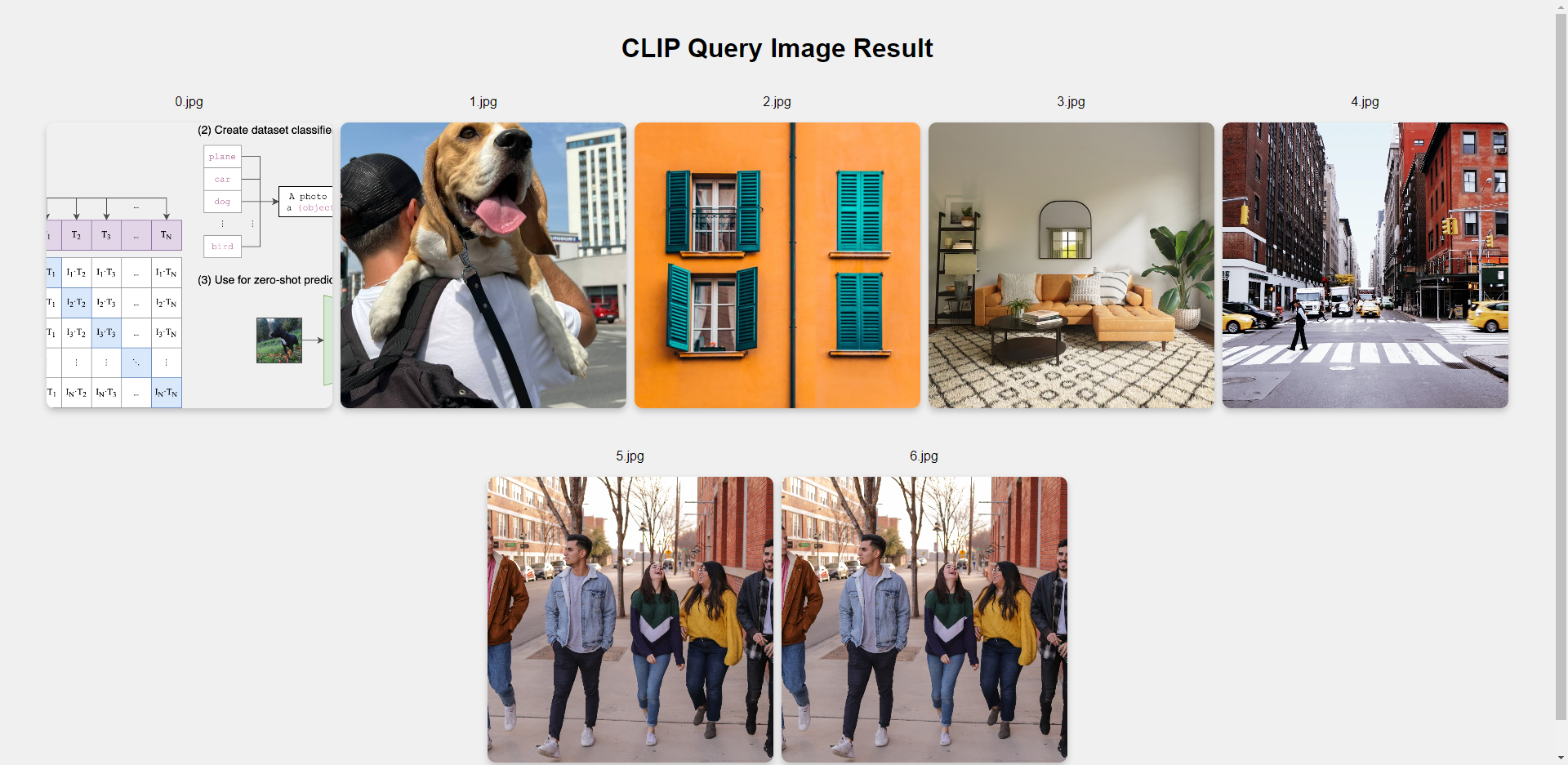
Result analysis: The retrieved images are ranked in descending order of similarity to the query text. Only CLIP.png is provided by this example; all other images come from the user’s actual config directory. Therefore, only the first image in the visualization is expected to match the example exactly.