EdgeSAM Segment Anything
Feature Introduction
The mono_edgesam package provides a usage example of quantized deployment based on EdgeSAM. Image data is sourced either from local image replay or subscribed image messages. SAM performs segmentation based on bounding box inputs, segmenting objects within the provided boxes without requiring explicit category information—only the bounding box coordinates are needed. The algorithm outputs its results via ROS topics and renders visualizations on a web page.
In this example, we provide two deployment modes:
- Fixed-box segmentation: Uses a fixed detection box (centered in the image) for segmentation.
- Subscribed-box segmentation: Subscribes to bounding box outputs from an upstream detection network and segments objects within those boxes.
Code repository: (https://github.com/D-Robotics/mono_edgesam.git)
Application scenarios: Obstacle segmentation or water stain area segmentation when combined with detection bounding boxes.
Supported Platforms
| Platform | Runtime Environment | Example Features |
|---|---|---|
| RDK X5, RDK X5 Module | Ubuntu 22.04 (Humble) | · Launch MIPI/USB camera or local image replay; inference results rendered on Web or saved locally |
| RDK S100, RDK S100P | Ubuntu 22.04 (Humble) | · Launch MIPI/USB camera or local image replay; inference results rendered on Web or saved locally |
Algorithm Details
| Model | Platform | Input Size | Inference FPS |
|---|---|---|---|
| edgesam | X5 | 1×3×512×512 | 9.09 |
| edgesam | S100 | 1×3×512×512 | 77.0 |
Prerequisites
RDK Platform
- The RDK device has been flashed with the Ubuntu 22.04 system image.
- TogetheROS.Bot has been successfully installed on the RDK.
Usage Guide
The package publishes algorithm messages containing both semantic segmentation and object detection information. Users can subscribe to the topic /perception/segmentation/edgesam for application development.
RDK Platform
Publish images using an MIPI camera
- Humble
# Configure ROS2 environment
source /opt/tros/humble/setup.bash

# Set MIPI camera type
export CAM_TYPE=mipi

# Launch the launch file
ros2 launch mono_edgesam sam.launch.py
Publish images using a USB camera
- Humble
# Configure ROS2 environment
source /opt/tros/humble/setup.bash

# Set USB camera type
export CAM_TYPE=usb

# Launch the launch file
ros2 launch mono_edgesam sam.launch.py
Use a single replay image
- Humble
# Configure ROS2 environment
source /opt/tros/humble/setup.bash

# Set replay image mode
export CAM_TYPE=fb

# Launch the launch file
ros2 launch mono_edgesam sam.launch.py
Result Analysis
Publish images using the replay tool
After package initialization, the following output appears in the terminal:
[INFO] [launch]: All log files can be found below /root/.ros/log/2025-07-28-19-51-28-488985-ubuntu-107175
[INFO] [launch]: Default logging verbosity is set to INFO
mono_edgesam basic_path is  /root/install/lib/mono_edgesam/config
camera_type is  fb
using feedback
Hobot shm pkg enables zero-copy with fastrtps profiles file: /opt/tros/humble/lib/hobot_shm/config/shm_fastdds.xml
Hobot shm pkg sets RMW_FASTRTPS_USE_QOS_FROM_XML: 1
env of RMW_FASTRTPS_USE_QOS_FROM_XML is  1 , ignore env setting
env of RMW_FASTRTPS_USE_QOS_FROM_XML is  1 , ignore env setting
webserver has launch
env of RMW_FASTRTPS_USE_QOS_FROM_XML is  1 , ignore env setting
env of RMW_FASTRTPS_USE_QOS_FROM_XML is  1 , ignore env setting
env of RMW_FASTRTPS_USE_QOS_FROM_XML is  1 , ignore env setting
env of RMW_FASTRTPS_USE_QOS_FROM_XML is  1 , ignore env setting
env of RMW_FASTRTPS_USE_QOS_FROM_XML is  1 , ignore env setting
webserver has launch
[INFO] [hobot_image_pub-1]: process started with pid [107191]
[INFO] [hobot_codec_republish-2]: process started with pid [107193]
[INFO] [mono_edgesam-3]: process started with pid [107195]
[INFO] [websocket-4]: process started with pid [107197]
[hobot_codec_republish-2] [WARN] [1753703489.112526140] [hobot_codec_encoder]: Parameters:
[hobot_codec_republish-2] sub_topic: /hbmem_img
[hobot_codec_republish-2] pub_topic: /image
[hobot_codec_republish-2] channel: 1
[hobot_codec_republish-2] in_mode: shared_mem
[hobot_codec_republish-2] out_mode: ros
[hobot_codec_republish-2] in_format: nv12
[hobot_codec_republish-2] out_format: jpeg
[hobot_codec_republish-2] enc_qp: 10
[hobot_codec_republish-2] jpg_quality: 60
[hobot_codec_republish-2] input_framerate: 30
[hobot_codec_republish-2] output_framerate: -1
[hobot_codec_republish-2] dump_output: 0
[hobot_codec_republish-2] [WARN] [1753703489.118608825] [HobotCodecImpl]: platform x5
[hobot_codec_republish-2] [WARN] [1753703489.118873534] [hobot_codec_encoder]: Enabling zero-copy
[websocket-4] [WARN] [1753703489.499688698] [websocket]:
[websocket-4] Parameter:
[websocket-4]  image_topic: /image
[websocket-4]  image_type: mjpeg
[websocket-4]  only_show_image: 0
[websocket-4]  smart_topic: perception/segmentation/edgesam
[websocket-4]  output_fps: 0
[hobot_image_pub-1] [WARN] [1753703489.864104228] [image_pub_node]: parameter:
[hobot_image_pub-1] image_source: /root/install/lib/mono_edgesam/config/4.jpg
[hobot_image_pub-1] source_image_w: 960
[hobot_image_pub-1] source_image_h: 544
[hobot_image_pub-1] output_image_w: 1920
[hobot_image_pub-1] output_image_h: 1080
[hobot_image_pub-1] fps: 10
[hobot_image_pub-1] is_shared_mem: 1
[hobot_image_pub-1] is_loop: 1
[hobot_image_pub-1] is_compressed_img_pub: 0
[hobot_image_pub-1] image_format: jpg
[hobot_image_pub-1] pub_encoding: nv12pub_name_mode: 0
[hobot_image_pub-1] msg_pub_topic_name: /hbmem_img
[hobot_image_pub-1] [WARN] [1753703489.864484396] [hobot_image_pub]: Enabling zero-copy
[mono_edgesam-3] [WARN] [1753703489.948943404] [mono_edgesam]: Parameter:
[mono_edgesam-3]  cache_len_limit: 8
[mono_edgesam-3]  dump_render_img: 0
[mono_edgesam-3]  feed_type(0:local, 1:sub): 1
[mono_edgesam-3]  image: ./config/4.jpg
[mono_edgesam-3]  encoder_model_file_name: /root/install/lib/mono_edgesam/config/edgesam_encoder_1024.bin
[mono_edgesam-3]  decoder_model_file_name: /root/install/lib/mono_edgesam/config/edgesam_decoder_1024.bin
[mono_edgesam-3]  is_regular_box: 1
[mono_edgesam-3]  is_padding_seg: 0
[mono_edgesam-3]  is_shared_mem_sub: 1
[mono_edgesam-3]  is_sync_mode: 0
[mono_edgesam-3]  ai_msg_pub_topic_name: /perception/segmentation/edgesam
[mono_edgesam-3]  ai_msg_sub_topic_name: /hobot_dnn_detection
[mono_edgesam-3]  ros_img_sub_topic_name: /image
[mono_edgesam-3] [BPU_PLAT]BPU Platform Version(1.3.6)!
[mono_edgesam-3] [HBRT] set log level as 0. version = 3.15.55.0
[mono_edgesam-3] [DNN] Runtime version = 1.24.5_(3.15.55 HBRT)
[hobot_codec_republish-2] [WARN] [1753703490.160037466] [hobot_codec_encoder]: Loaned messages are only safe with const ref subscription callbacks. If you are using any other kind of subscriptions, set the ROS_DISABLE_LOANED_MESSAGES environment variable to 1 (the default).
[hobot_codec_republish-2] [WARN] [1753703490.160368467] [HobotVenc]: init_pic_w_: 1920, init_pic_h_: 1080, alined_pic_w_: 1920, alined_pic_h_: 1088, aline_w_: 16, aline_h_: 16
[mono_edgesam-3] [A][DNN][packed_model.cpp:247][Model](2025-07-28,19:51:31.34.979) [HorizonRT] The model builder version = 1.24.3
[hobot_codec_republish-2] [WARN] [1753703491.369838914] [hobot_codec_encoder]: sub nv12 1920x1088, fps: 11.9485, pub jpeg, fps: 11.9485, comm delay [1.7692]ms, codec delay [15.5385]ms
[mono_edgesam-3] [A][DNN][packed_model.cpp:247][Model](2025-07-28,19:51:33.829.850) [HorizonRT] The model builder version = 1.24.3
[mono_edgesam-3] [WARN] [1753703494.035526230] [mono_edgesam]: Create hbmem_subscription with topic_name: /hbmem_img
[mono_edgesam-3] [WARN] [1753703494.057170296] [edgesam_node]: Loaned messages are only safe with const ref subscription callbacks. If you are using any other kind of subscriptions, set the ROS_DISABLE_LOANED_MESSAGES environment variable to 1 (the default).
[mono_edgesam-3] [WARN] [1753703494.213043065] [mono_edgesam]: Smart fps: 9.00, pre process time ms: 14, infer time ms: 92, post process time ms: 48
[mono_edgesam-3] [WARN] [1753703494.342125459] [mono_edgesam]: Smart fps: 11.00, pre process time ms: 12, infer time ms: 81, post process time ms: 41
[hobot_codec_republish-2] [WARN] [1753703494.362260146] [hobot_codec_encoder]: Pub img fps [8.45]
[mono_edgesam-3] [WARN] [1753703494.471613064] [mono_edgesam]: Smart fps: 10.00, pre process time ms: 11, infer time ms: 88, post process time ms: 39
[mono_edgesam-3] [WARN] [1753703494.592498850] [mono_edgesam]: Smart fps: 11.00, pre process time ms: 12, infer time ms: 81, post process time ms: 38
[mono_edgesam-3] [WARN] [1753703494.724020335] [mono_edgesam]: Smart fps: 11.00, pre process time ms: 11, infer time ms: 84, post process time ms: 46
[mono_edgesam-3] [WARN] [1753703494.849518302] [mono_edgesam]: Smart fps: 10.00, pre process time ms: 12, infer time ms: 85, post process time ms: 38
[mono_edgesam-3] [WARN] [1753703494.973585807] [mono_edgesam]: Smart fps: 11.00, pre process time ms: 13, infer time ms: 82, post process time ms: 40
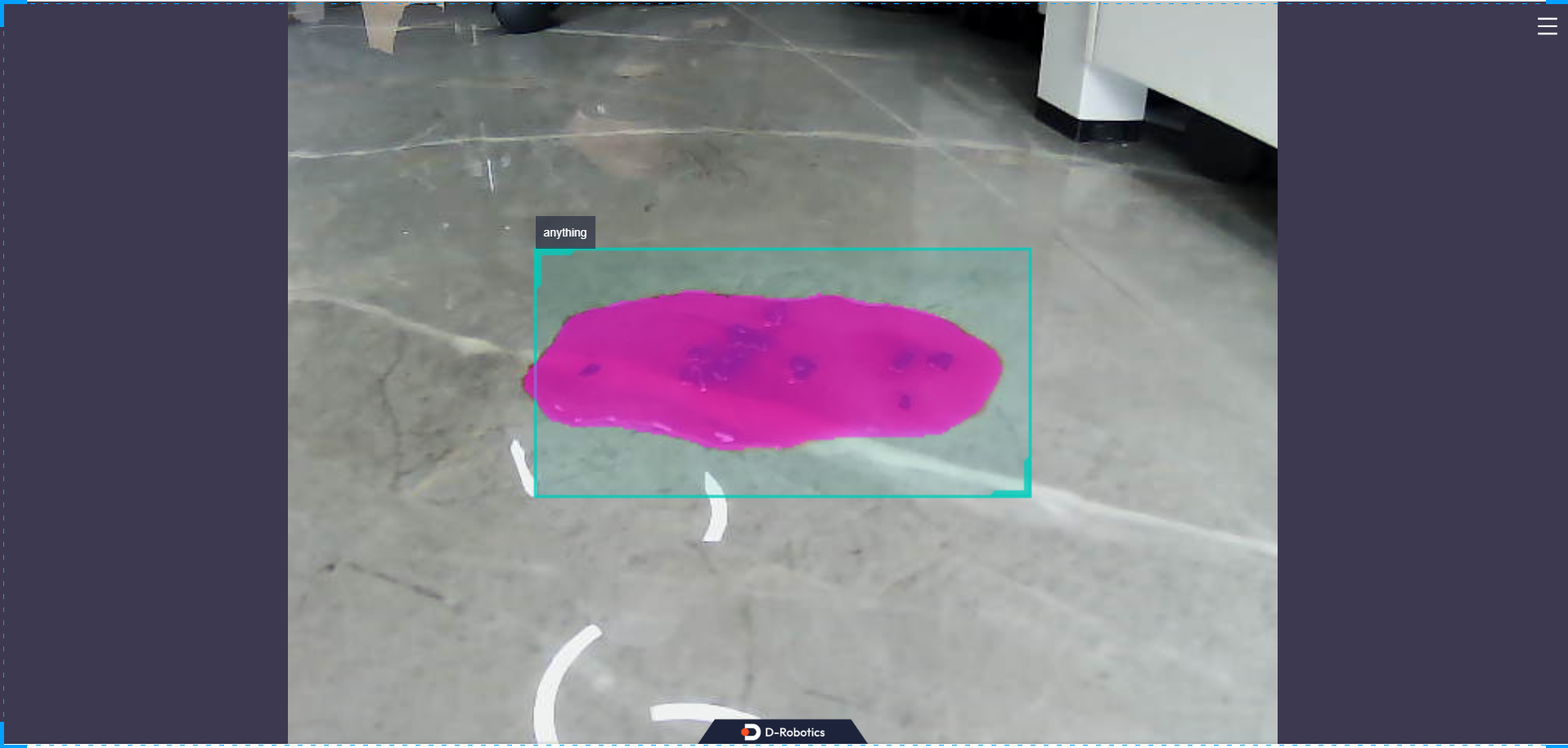
The inference results in the example will be rendered on the web. Enter http://IP:8000 in a browser on your PC to view the image and algorithm rendering results (replace "IP" with the RDK's IP address). Open the settings menu in the upper-right corner of the interface and select the "Full Image Segmentation" option to display the rendering effect.
Advanced Usage
To adjust the size of detection boxes, you can verify using the method below. More importantly, you can use detection results from an upstream detection node as input for SAM.
Run SAM with fixed-box mode disabled (sam_is_regular_box:=0):
ros2 launch mono_edgesam sam.launch.py sam_is_regular_box:=0
In another terminal, publish to the AI topic:
ros2 topic pub /hobot_dnn_detection ai_msgs/msg/PerceptionTargets '{"targets": [{"rois": [{"rect": {"x_offset": 160, "y_offset": 120, "width": 320, "height": 240}, "type": "anything"}]}] }'
Explanation: The published topic name is /hobot_dnn_detection. The bounding box starts at coordinates (160, 120) with a width of 320 and height of 240. Note that the bounding box coordinates must not exceed the dimensions of the input image—please pay attention to this during actual usage.