rtsp2display Example Introduction
Example Overview
rtsp2display is a C language interface development code example located in /app/cdev_demo, demonstrating how to obtain H.264 stream from RTSP video stream, and achieve real-time video playback on embedded device screens through hardware decoding (SP_Decoder), video processing (SP_VPS), and display module (SP_Display). Core functionalities include:
- RTSP streaming protocol parsing
- H.264 hardware decoding
- Video scaling and format conversion
- Multi-module collaborative rendering to display
Effect Demonstration
Hardware Preparation
Prepare an RDK development board, log in to the desktop via HDMI or VNC
Hardware Connection
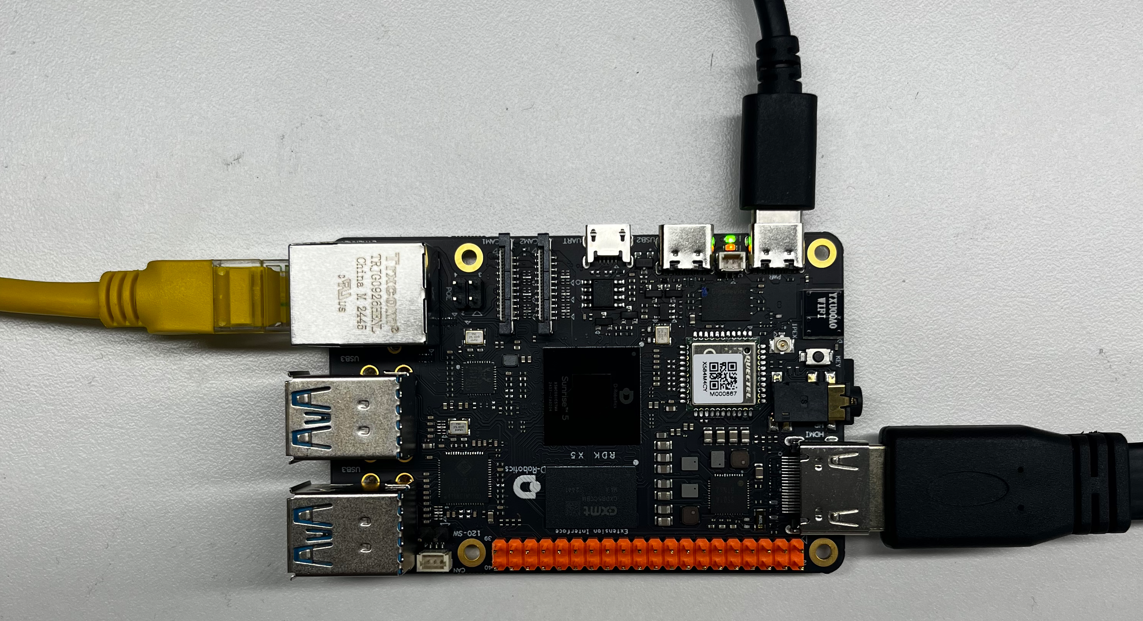
This example does not require a mouse and keyboard, so here we connect an HDMI display, Ethernet cable interface, and power cable
Quick Start
Code and Board Location
Navigate to /app/cdev_demo/rtsp2display location, you can see the rtsp2display example contains 2 files
root@ubuntu:/app/cdev_demo/rtsp2display# tree
.
├── Makefile
├── live555MediaServer
└── rtsp2display.c
Compilation and Execution
We can directly use make in this directory to compile the rtsp2display executable file.
root@ubuntu:/app/cdev_demo/rtsp2display# tree
.
├── Makefile
├── live555MediaServer
├── rtsp2display
├── rtsp2display.c
└── rtsp2display.o
Execution Effect
-
First we need to prepare the input data. Here we can copy existing data from the board, such as the 1920x1080.h264 file from
/opt/tros/humble/lib/hobot_codec/config/1920x1080.h264directory to the current directory for separate operation without affecting the original data. -
Second we use
systemctl stop lightdmto stop the display service. -
Then open live555MediaServer in the current directory and run it in the background.
-
Next we use
sudo ./rtsp2display -i rtsp://127.0.0.1/1920x1080.h264 -t tcpcommand. The default execution result is to decode the h264 file transmitted via rtsp and display it on the connected monitor. -
Finally use the
./decoder2displaycommand. The default execution result is to decode the 1920x1080.h264 file and display it on the monitor.
root@ubuntu:/app/cdev_demo/rtsp2display# cp /opt/tros/humble/lib/hobot_codec/config/1920x1080.h264 ./
root@ubuntu:/app/cdev_demo/rtsp2display# ./live555MediaServer &
        version 1.01 (LIVE555 Streaming Media library version 2020.07.09).
Play streams from this server using the URL
        rtsp://192.168.127.10/<filename>
where <filename> is a file present in the current directory.
Each file's type is inferred from its name suffix:
        ".264" => a H.264 Video Elementary Stream file
        ".265" => a H.265 Video Elementary Stream file
        ".aac" => an AAC Audio (ADTS format) file
        ".ac3" => an AC-3 Audio file
        ".amr" => an AMR Audio file
        ".dv" => a DV Video file
        ".m4e" => a MPEG-4 Video Elementary Stream file
        ".mkv" => a Matroska audio+video+(optional)subtitles file
        ".mp3" => a MPEG-1 or 2 Audio file
        ".mpg" => a MPEG-1 or 2 Program Stream (audio+video) file
        ".ogg" or ".ogv" or ".opus" => an Ogg audio and/or video file
        ".ts" => a MPEG Transport Stream file
                (a ".tsx" index file - if present - provides server 'trick play' support)
        ".vob" => a VOB (MPEG-2 video with AC-3 audio) file
        ".wav" => a WAV Audio file
        ".webm" => a WebM audio(Vorbis)+video(VP8) file
See http://www.live555.com/mediaServer/ for additional documentation.
(We use port 80 for optional RTSP-over-HTTP tunneling, or for HTTP live streaming (for indexed Transport Stream files only).)
root@ubuntu:/app/cdev_demo/rtsp2display#
After executing the above commands, we have effectively started the streaming media server. The next step is to use rtsp2display to obtain the h264 file transmitted via rtsp.
Similarly, we still need to use the systemctl stop lightdm command to stop the display service for optimal display effect.
Then we use the sudo ./rtsp2display -i rtsp://127.0.0.1/1920x1080.h264 -t tcp command to decode the h264 file transmitted via rtsp and display it on the connected monitor. The execution effect is as follows:
root@ubuntu:/app/cdev_demo/rtsp2display# systemctl stop lightdm
root@ubuntu:/app/cdev_demo/rtsp2display# sudo ./rtsp2display -i rtsp://127.0.0.1/1920x1080.h264 -t tcp
avformat_open_input ok!
avformat_find_stream_info ok!
Input #0, rtsp, from 'rtsp://127.0.0.1/1920x1080.h264':
  Metadata:
    title           : H.264 Video, streamed by the LIVE555 Media Server
    comment         : 1920x1080.h264
  Duration: N/A, start: 0.041667, bitrate: N/A
  Stream #0:0: Video: h264 (High), yuv420p(progressive), 1920x1080 [SAR 1:1 DAR 16:9], 24 fps, 24 tbr, 90k tbn, 48 tbc
av_dump_format ok!
Opened DRM device: /dev/dri/card0
1920x1080
1360x768
1280x1024
1280x720
1024x768
800x600
720x576
720x480
640x480
rtsp_w:1920,rtsp_h:1080
display_w:1920,dispaly_h:1080
Opened DRM device: /dev/dri/card0
DRM is available, using libdrm for rendering.
------------------------------------------------------
Plane 0:
  Plane ID: 41
  Src W: 1920
  Src H: 1080
  CRTC X: 0
  CRTC Y: 0
  CRTC W: 1920
  CRTC H: 1080
  Format: NV12
  Z Pos: 0
  Alpha: 65535
  Pixel Blend Mode: 1
  Rotation: -1
  Color Encoding: -1
  Color Range: -1
------------------------------------------------------
Setting DRM client capabilities...
Setting up KMS...
CRTC ID: 31
CRTC ID: 63
Number of connectors: 1
Connector ID: 74
    Type: 11
    Type Name: HDMI-A
    Connection: Connected
    Modes: 32
    Subpixel: 1
    Mode 0: 1920x1080 @ 60Hz
    Mode 1: 1920x1080 @ 60Hz
    Mode 2: 1920x1080 @ 60Hz
    Mode 3: 1920x1080i @ 60Hz
    Mode 4: 1920x1080i @ 60Hz
    Mode 5: 1920x1080 @ 50Hz
    Mode 6: 1920x1080i @ 50Hz
    Mode 7: 1280x1024 @ 60Hz
    Mode 8: 1440x900 @ 60Hz
    Mode 9: 1360x768 @ 60Hz
    Mode 10: 1280x720 @ 60Hz
    Mode 11: 1280x720 @ 60Hz
    Mode 12: 1280x720 @ 50Hz
    Mode 13: 1024x768 @ 60Hz
    Mode 14: 800x600 @ 60Hz
    Mode 15: 720x576 @ 50Hz
    Mode 16: 720x576 @ 50Hz
    Mode 17: 720x576 @ 50Hz
    Mode 18: 720x576i @ 50Hz
    Mode 19: 720x576i @ 50Hz
    Mode 20: 720x480 @ 60Hz
    Mode 21: 720x480 @ 60Hz
    Mode 22: 720x480 @ 60Hz
    Mode 23: 720x480 @ 60Hz
    Mode 24: 720x480 @ 60Hz
    Mode 25: 720x480i @ 60Hz
    Mode 26: 720x480i @ 60Hz
    Mode 27: 720x480i @ 60Hz
    Mode 28: 720x480i @ 60Hz
    Mode 29: 640x480 @ 60Hz
    Mode 30: 640x480 @ 60Hz
    Mode 31: 640x480 @ 60Hz
2000/01/01 12:19:07.245 !INFO [CamInitVseParam][0418]Setting VSE channel-0: input_width:1920, input_height:1080, dst_w:1920, dst_h:1080
================= VP Modules Status ====================
======================== VFLOW =========================
(active)[S0] vse0_C0
========================= SIF ==========================
========================= ISP ==========================
========================= VSE ==========================
------------------- flow0 info -------------------
input_fps:0/0
input_width:1920
input_height:1080
input_format:2
input_bitwidth:8
dns0 channel: roi [0][0][1920][1080], target [1920][1080], fps [0/0]
========================= VENC =========================
========================= VDEC =========================
----decode param----
dec_idx  dec_id feed_mode pix_fmt bitstream_buf_size bitstream_buf_count frame_buf_count
      0    h264         1       1            3110912                   6               6
----h264 decode param----
dec_idx  dec_id reorder_enable skip_mode bandwidth_Opt
      0    h264              1         0             1

----decode frameinfo----
dec_idx  dec_id display_width display_height
      0    h264             0              0
----decode status----
dec_idx  dec_id cur_input_buf_cnt cur_output_buf_cnt total_input_buf_cnt total_output_buf_cnt     fps
      0    h264                 0                  0                   0                    0       0
========================= JENC =========================
======================= Buffer =========================
----------------------------------------------
flowid module cid chn FREE  REQ  PRO  COM USED
----------------------------------------------
0      vse0   0   0     16    0    0    0    0
0      vse0   0   8      0    3    0    0    0

----------------------------------------------
flowid module cid chn FREE  REQ  PRO  COM USED
----------------------------------------------
0      vse0   0   0     16    0    0    0    0
0      vse0   0   8      0    3    0    0    0

========================= END ===========================
sp_open_vps success!
2000/01/01 12:19:07.254 !INFO [BindTo][0088]BindTo_CHN:-1

2000/01/01 12:19:07.254 !INFO [BindTo][0093]m_prev_module_chn:0

2000/01/01 12:19:07.254 !INFO [BindTo][0088]BindTo_CHN:-1

2000/01/01 12:19:07.254 !INFO [BindTo][0093]m_prev_module_chn:0

2000/01/01 12:19:07.291 !INFO [SetImageFrame][0495]N2D init done!

Created new framebuffer: fb_id=78 for dma_buf_fd=21
add mapping dma_buf_fd:21 fb_id:78, mapping_count: 1
Created new framebuffer: fb_id=79 for dma_buf_fd=22
add mapping dma_buf_fd:22 fb_id:79, mapping_count: 2
Could not read frame ---(error 'End of file')
The content displayed on the screen is as follows

Detailed Introduction
Example Program Parameter Options Explanation
We can directly execute the target file to confirm the parameter options explanation
root@ubuntu:/app/cdev_demo/rtsp2display# ./rtsp2display
Usage: rtsp2display [OPTION...]
decode2display sample -- An example of streaming video decoding to the display

  -i, --input=path           rtsp url
  -t, --type=type            tcp or udp
  -?, --help                 Give this help list
      --usage                Give a short usage message

Mandatory or optional arguments to long options are also mandatory or optional
for any corresponding short options.
Where
-i is a mandatory option, representing the input video file path
-t is a mandatory option, representing whether to use tcp or udp network transmission protocol
Software Architecture Explanation
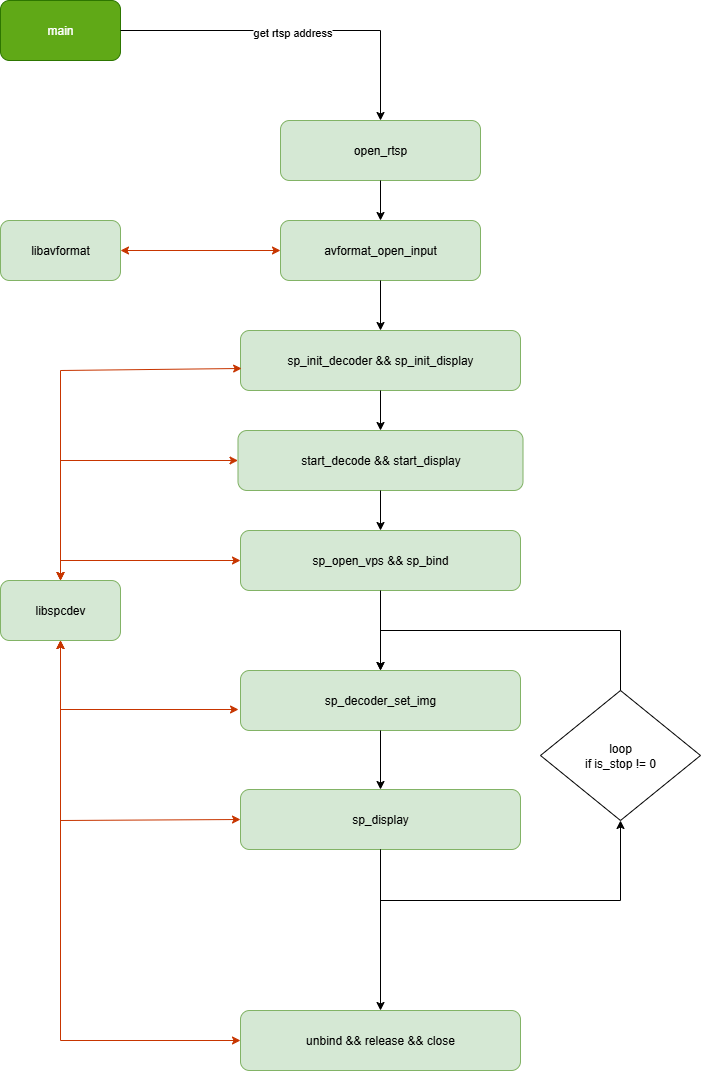
We combine the example introduction to understand the software architecture explanation. First, use ffmpeg's libavformat interface to parse and verify packet headers, etc., initialize the decoder, VPS, display and other related modules,
then bind the decoder->vps->display pathway, and then transmit the data parsed by libavformat to the decoder through sp_decoder_set_img. The decoder then sends the data through the already bound pathway
via vps to the display for display.
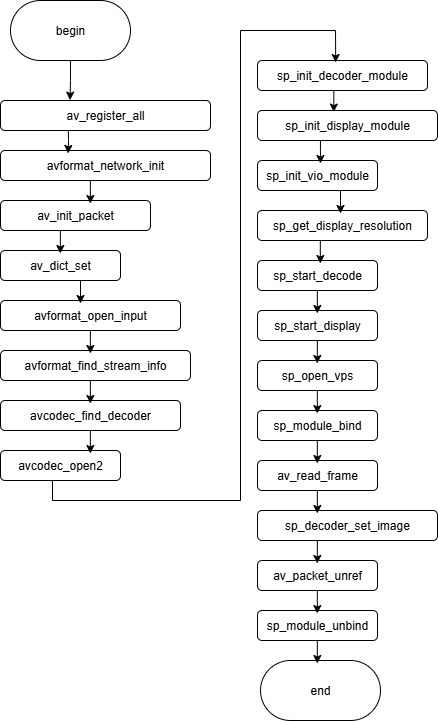
API Process Explanation
FAQ
Q: Why does the example use live555MediaServer?
A: To establish the streaming media pathway. First, we need to understand the data flow, which is roughly: "H.264 file → live555MediaServer → network RTSP stream → rtsp2display → decoding → processing → display". live555MediaServer converts the static H.264 file into a dynamic RTSP video stream, allowing rtsp2display to obtain the network RTSP stream for decoding processing.
Q: Can live555MediaServer be replaced?
A: Yes, there are multiple ways to set up a streaming media server. Cloud-based options include Alibaba Cloud, AWS; self-built options include various choices besides live555, such as SRS, Nginx-rtmp, MediaSoup, etc.