RDK X5 CAN communication
This handbook follows the recorded course slides, including wiring, commands, measured results, and the scope of verification.
Two reproducible layers: a real robot application and an onboard controller loopback.
Two CAN paths, two kinds of evidence
First observe CAN in a robot application, then verify the X5 onboard controller independently.
USB-to-CAN
Run one official reset through the already validated robot control path.
Onboard CAN
Identify can4 and enable the controller's internal loopback mode.
Closed Evidence
All 100 frames match while controller error counters remain zero.
CAN supports reliable multi-node control
Identifier
The frame ID expresses priority and application meaning.
Differential Bus
External CAN_H and CAN_L reject common-mode interference.
Controller
Linux exposes the controller through SocketCAN.
Acceptance
Compare ID, length, and payload—not only interface presence.
Separate application proof from controller proof
RobotCalibrated
USB-to-CANDrive actuators
ResetVisible motion
can4Internal loopback
100/100Frame match
Robot reset shows practical CAN value
After the robot is moved slightly away from its default pose, the official control flow returns the joints toward the reset target through USB-to-CAN.
Visible Motion
The body and joints perform a continuous controlled reset.
Reuse the Team Path
Keep the deployed SDK, configuration, and default pose.
Course Evidence
CAN carries real actuator control, not just terminal text.
What does the motion prove?
The USB-to-CAN motion and onboard loopback complement each other, but they are not interchangeable.
- The existing robot, USB-to-CAN adapter, and actuator path complete an official reset
- Joint feedback changes before and after motion
- One reset is not a walking or dancing acceptance test
- The robot motion does not use the X5 white SH1.0 connector
- The following can4 loopback verifies the onboard controller separately
X5 onboard CAN and external connector
can4 is the X5 onboard m_can controller. This lesson uses controller-internal loopback, so the SH1.0 connector does not need an external node.
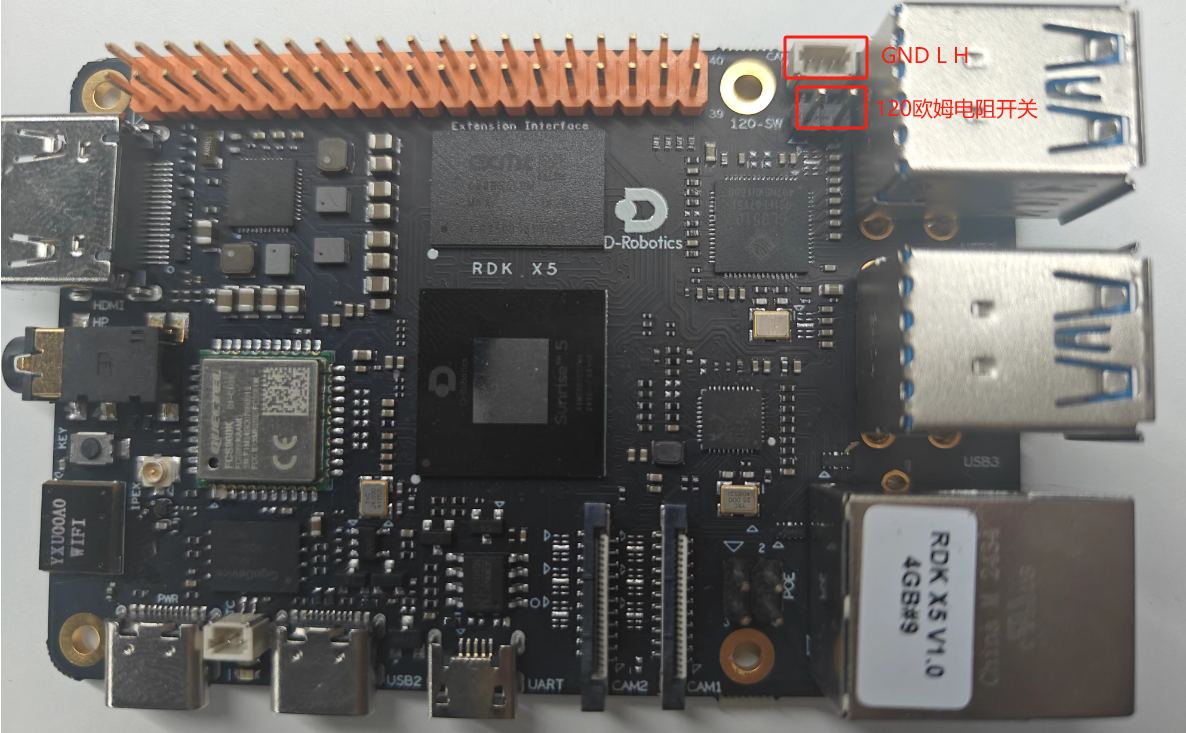
can4: real onboard controller | internal loopback needs no cable
Internal loopback still uses real hardware
Preparecan4 DOWN
ModeLOOPBACK ON
Bitrate1 Mbps
FramesID 0x5A5
CompareSequence + data
Configure, transfer, and restore
Software echo is disabled so SocketCAN self-echo cannot be mistaken for controller loopback.
Interface Setup
Run only when the interface starts DOWN.
Test Frames
Compare ID, length, and payload for every frame.
The terminal shows every test stage
The recording identifies can4, displays the loopback setup, counts frames, and ends with PASS.
Transmit
Generate 100 classic CAN frames with incrementing sequence numbers.
Receive
Read the same frames back through the physical controller path.
Judge
Report PASS only after 100 of 100 frames match, then restore state.
X5 onboard loopback result
Interface
can4 / m_can / SPI5.0
Bitrate
1,000,000 bit/s
Frame
Standard ID 0x5A5, 8 bytes
Result
100 sent, 100 received, 100 matched
Restore a clean state after testing
The test does not configure the robot USB-CAN interfaces can0 through can3 and leaves no background process.
- Close both test sockets
- Return can4 to DOWN
- Turn LOOPBACK and LISTEN-ONLY off
- Confirm berr-counter tx=0 and rx=0
- Do not reload drivers, reboot, or change the device tree
Check loopback failures in order
Confirm the interface and mode first, then rule out software echo and filtering.
Step 1
Use can4, not the robot USB-to-CAN interfaces can0 through can3.
Step 2
Do not enable listen-only while transmitting.
Step 3
Disable sender-side software echo to avoid duplicate frames.
Step 4
After exit, confirm can4 is DOWN and both modes are OFF.
RDK X5 CAN verification complete
A real robot reset and an onboard controller loopback demonstrate both application and development capability.
Visible Application
USB-to-CAN drives an official robot reset.
Testable Controller
can4 completes a 1 Mbps internal loopback.
Clear Scope
Internal loopback is not an external harness or motor-protocol test.