手势识别
功能介绍
手势识别算法示例订阅包含人手框、人手关键点信息的算法 msg,利用 BPU 进行推理,发布包含手势信息的智能结果 msg。
算法支持的手势识别类别,以及手势类别在算法 msg(Attribute 成员,type 为"gesture")中对应的数值如下:
- 静态手势
| 手势 | 说明 | 数值 |
|---|---|---|
| ThumbUp | 竖起大拇指 | 2 |
| Victory | “V” 手势 | 3 |
| Mute | “嘘”手势 | 4 |
| Palm | 手掌 | 5 |
| Okay | OK 手势 | 11 |
| ThumbLeft | 大拇指向左 | 12 |
| ThumbRight | 大拇指向右 | 13 |
| Awesome | 666 手势 | 14 |
- 动态手势
| 手势 | 说明 | 数值 |
|---|---|---|
| PinchMove | 三指捏合拖动 | 15 |
| PinchRotateAntiClockwise | 三指捏合逆时针画圈 | 16 |
| PinchRotateClockwise | 三指捏合顺时针画圈 | 17 |
代码仓库:
(https://github.com/D-Robotics/hand_lmk_detection)
(https://github.com/D-Robotics/hand_gesture_detection)
(https://github.com/D-Robotics/mono2d_body_detection)
应用场景:手势识别算法集成了人手关键点检测,手势分析等技术,使得计算机能够将人的手势解读为对应指令,可实现手势控制以及手语翻译等功能,主要应用于智能家居,智能座舱、智能穿戴设备等领域。
小车手势控制案例:小车手势控制
基于手势识别以及人体姿态分析实现游戏人物控制案例:玩转 X3 派,健身游戏两不误
支持平台
| 平台 | 运行方式 | 示例功能 |
|---|---|---|
| RDK X3, RDK X3 Module | Ubuntu 20.04 (Foxy), Ubuntu 22.04 (Humble) | 启动 MIPI/USB 摄像头,并通过 Web 展示推理渲染结果 |
| RDK X5, RDK X5 Module | Ubuntu 22.04 (Humble) | 启动 MIPI/USB 摄像头,并通过 Web 展示推理渲染结果 |
算法信息
| 模型 | 平台 | 输入尺寸 | 推理帧率(fps) |
|---|---|---|---|
| gestureDet | X3 | 8x21 | 2020 |
| 模型 | 平台 | 输入尺寸 | 推理帧率(fps) |
|---|---|---|---|
| gestureDet | X5 | 8x21 | 1252.44 |
准备工作
RDK 平台
-
RDK 已烧录好 Ubuntu 系统镜像。
-
RDK 已成功安装 TogetheROS.Bot。
-
RDK 已安装 MIPI 或者 USB 摄像头。
-
确认 PC 机能够通过网络访问 RDK。
使用介绍
手势识别(hand_gesture_detection)package 订阅人手关键点检测 package 发布的人手关键点检测结果,经过推理后发布算法 msg,通过 websocket package 实现在 PC 端浏览器上渲染显示发布的图片和对应的算法结果。
启动动态手势识别
launch 启动脚本默认只启动静态手势识别,可以在运行时使用 is_dynamic_gesture 参数切换为只启动动态手势识别,例如: ros2 launch hand_gesture_detection hand_gesture_detection.launch.py is_dynamic_gesture:=True 。
以下示例默认只启动静态手势识别。
使用 MIPI 摄像头
- Foxy
- Humble
# 配置tros.b环境
source /opt/tros/setup.bash
# 配置tros.b环境
source /opt/tros/humble/setup.bash
- Humble
# 配置tros.b环境
source /opt/tros/humble/setup.bash
# 从tros.b的安装路径中拷贝出运行示例需要的配置文件。
cp -r /opt/tros/${TROS_DISTRO}/lib/mono2d_body_detection/config/ .
cp -r /opt/tros/${TROS_DISTRO}/lib/hand_lmk_detection/config/ .
cp -r /opt/tros/${TROS_DISTRO}/lib/hand_gesture_detection/config/ .

# 配置MIPI摄像头
export CAM_TYPE=mipi

# 启动launch文件
ros2 launch hand_gesture_detection hand_gesture_detection.launch.py
使用 USB 摄像头
- Foxy
- Humble
# 配置tros.b环境
source /opt/tros/setup.bash
# 配置tros.b环境
source /opt/tros/humble/setup.bash
- Humble
# 配置tros.b环境
source /opt/tros/humble/setup.bash
# 从tros.b的安装路径中拷贝出运行示例需要的配置文件。
cp -r /opt/tros/${TROS_DISTRO}/lib/mono2d_body_detection/config/ .
cp -r /opt/tros/${TROS_DISTRO}/lib/hand_lmk_detection/config/ .
cp -r /opt/tros/${TROS_DISTRO}/lib/hand_gesture_detection/config/ .

# 配置USB摄像头
export CAM_TYPE=usb

# 启动launch文件
ros2 launch hand_gesture_detection hand_gesture_detection.launch.py
使用本地图片回灌
- Humble
# 配置tros.b环境
source /opt/tros/humble/setup.bash
- Humble
# 配置tros.b环境
source /opt/tros/humble/setup.bash
# 从tros.b的安装路径中拷贝出运行示例需要的配置文件。
cp -r /opt/tros/${TROS_DISTRO}/lib/mono2d_body_detection/config/ .
cp -r /opt/tros/${TROS_DISTRO}/lib/hand_lmk_detection/config/ .
cp -r /opt/tros/${TROS_DISTRO}/lib/hand_gesture_detection/config/ .

# 配置本地图片回灌
export CAM_TYPE=fb

# 启动launch文件
ros2 launch hand_gesture_detection hand_gesture_detection.launch.py publish_image_source:=config/person_face_hand.jpg publish_image_format:=jpg publish_output_image_w:=960 publish_output_image_h:=544 publish_fps:=30
结果分析
在运行终端输出如下信息:
[hand_gesture_detection-5] [C][32711][08-12][09:39:39:575][configuration.cpp:49][EasyDNN]EasyDNN version: 0.4.11
[hand_gesture_detection-5] [DNN] Runtime version = 1.9.7_(3.14.5 HBRT)
[hand_gesture_detection-5] [WARN] [1660268379.611419981] [hand gesture det node]: input_idx: 0, tensorType = 8, tensorLayout = 0
[hand_gesture_detection-5] [WARN] [1660268379.619313022] [hand gesture det node]: Create subscription with topic_name: /hobot_hand_lmk_detection
[hand_gesture_detection-5] [WARN] [1660268379.629207314] [hand gesture det node]: ai_msg_pub_topic_name: /hobot_hand_gesture_detection
[mono2d_body_detection-3] (MOTMethod.cpp:39): MOTMethod::Init config/iou2_euclid_method_param.json
[mono2d_body_detection-3]
[mono2d_body_detection-3] (IOU2.cpp:34): IOU2 Mot::Init config/iou2_euclid_method_param.json
[mono2d_body_detection-3]
[mono2d_body_detection-3] (MOTMethod.cpp:39): MOTMethod::Init config/iou2_method_param.json
[mono2d_body_detection-3]
[mono2d_body_detection-3] (IOU2.cpp:34): IOU2 Mot::Init config/iou2_method_param.json
[mono2d_body_detection-3]
[mono2d_body_detection-3] (MOTMethod.cpp:39): MOTMethod::Init config/iou2_method_param.json
[mono2d_body_detection-3]
[mono2d_body_detection-3] (IOU2.cpp:34): IOU2 Mot::Init config/iou2_method_param.json
[mono2d_body_detection-3]
[mono2d_body_detection-3] (MOTMethod.cpp:39): MOTMethod::Init config/iou2_method_param.json
[mono2d_body_detection-3]
[mono2d_body_detection-3] (IOU2.cpp:34): IOU2 Mot::Init config/iou2_method_param.json
[mono2d_body_detection-3]
[hand_gesture_detection-5] [WARN] [1660268381.026173815] [hand_gesture_det]: Sub smart fps 31.16
[hand_gesture_detection-5] [WARN] [1660268381.206196565] [hand_gesture_det]: Pub smart fps 30.17
[hand_gesture_detection-5] [WARN] [1660268382.054034899] [hand_gesture_det]: Sub smart fps 30.19
[hand_gesture_detection-5] [WARN] [1660268382.234087357] [hand_gesture_det]: Pub smart fps 30.19
[hand_gesture_detection-5] [WARN] [1660268383.055988982] [hand_gesture_det]: Sub smart fps 29.97
[hand_gesture_detection-5] [WARN] [1660268383.235230316] [hand_gesture_det]: Pub smart fps 30.00
[hand_gesture_detection-5] [WARN] [1660268384.087152150] [hand_gesture_det]: Sub smart fps 30.10
[hand_gesture_detection-5] [WARN] [1660268384.256141566] [hand_gesture_det]: Pub smart fps 30.39
输出 log 显示,程序运行成功,推理时算法输入和输出帧率为 30fps,每秒钟刷新一次统计帧率。
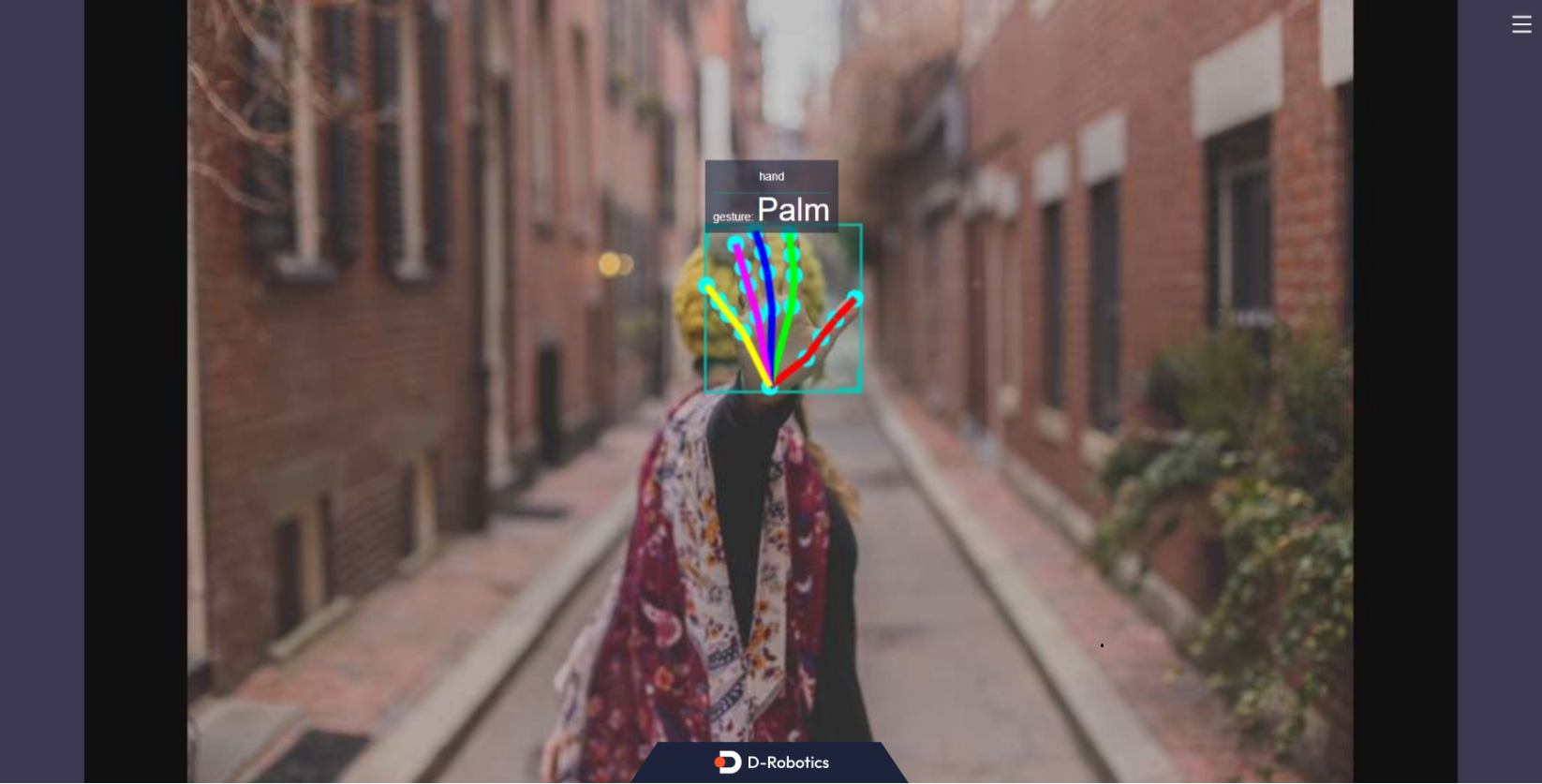
输出 log 显示,订阅到的算法 msg 中有一个 hand(包含人手框和人手关键点检测结果),手势识别算法输出的手势分类结果是 “Palm” 手势(分类结果为 5)。
在 PC 端的浏览器输入 http://IP:8000 即可查看图像和算法渲染效果(IP 为 RDK 的 IP 地址):