5.4.9 智能盒子
功能介绍
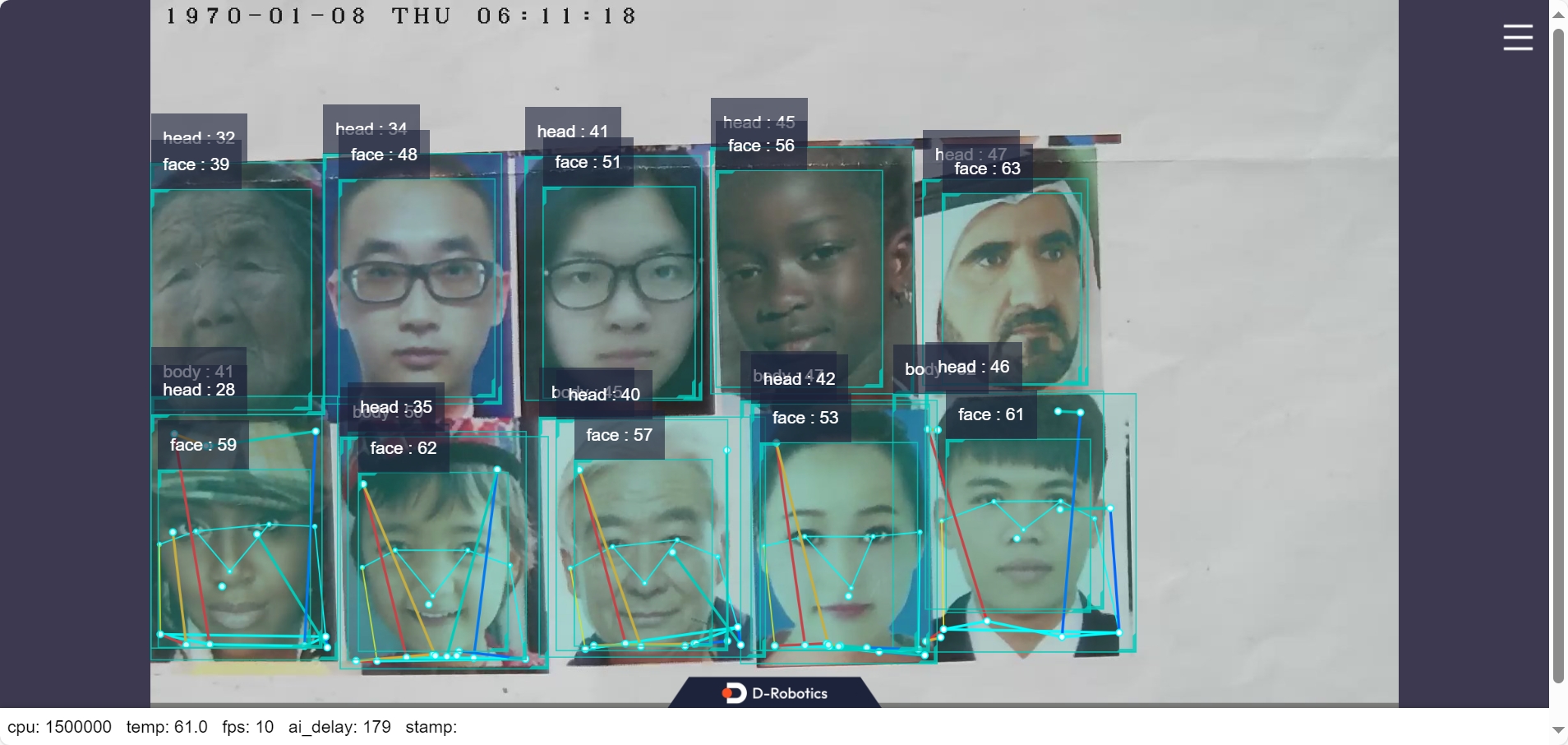
智能盒子 App 功能为实现 IPC 视频流输入后智能分析,App 由 RTSP 视频流、视频解码、人体人脸检测、图像编码、Web 展示端组成,流程如下图:
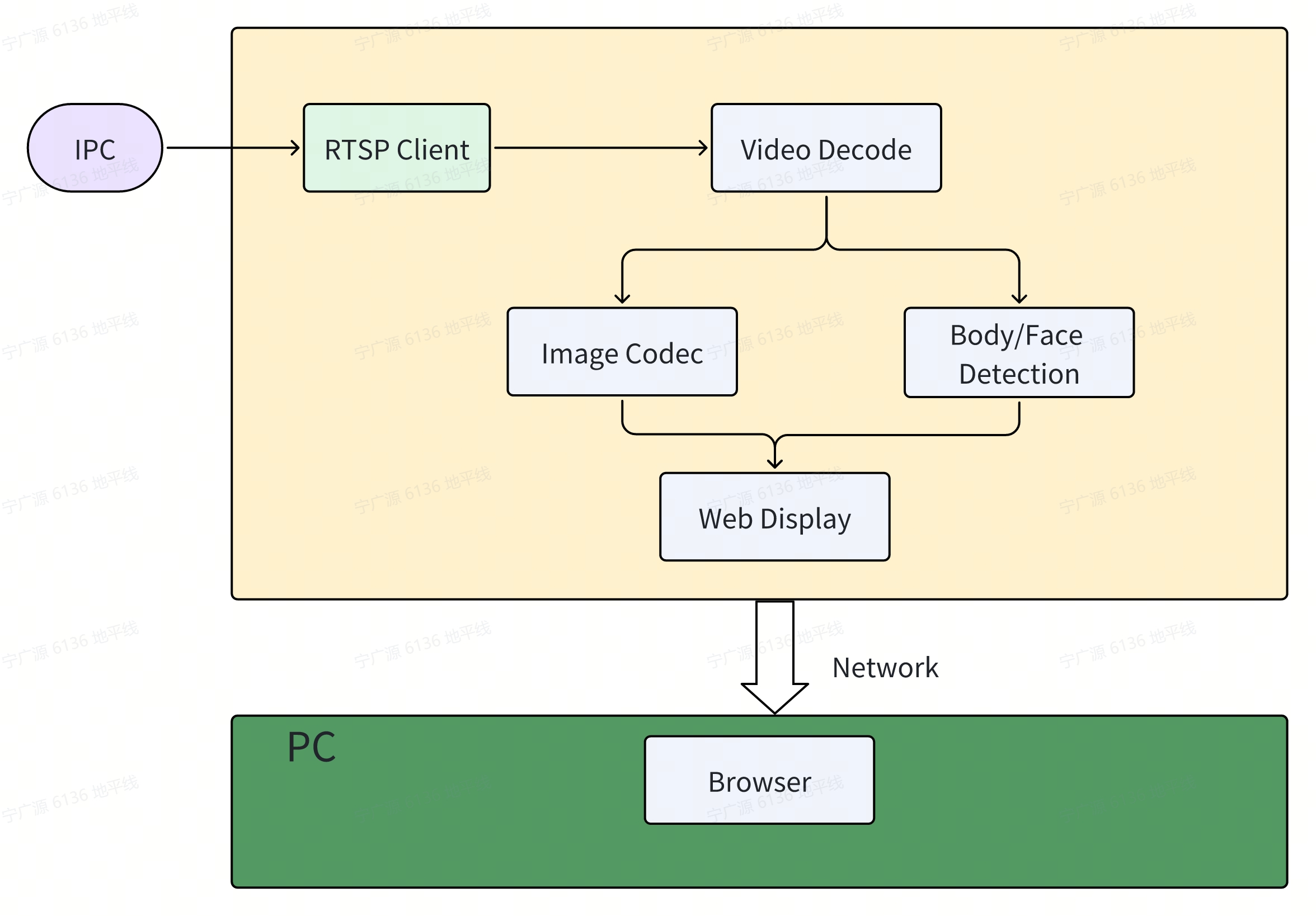
对应实际的客户应用中显示部分由客户的业务系统完成,智能盒子的主要功能由 RTSP 视频流、视频解码、人体人脸检测,智能结果和图像发布给客户的业务系统,流程如下图:

代码仓库: (https://github.com/D-Robotics/hobot_rtsp_client.git)
支持平台
| 平台 | 运行方式 |
|---|---|
| RDK X3, RDK X3 Module | Ubuntu 20.04 (Foxy), Ubuntu 22.04 (Humble) |
| RDK X5, RDK X5 Module | Ubuntu 22.04 (Humble) |
| RDK S100, RDK S100P | Ubuntu 22.04 (Humble) |
| RDK S600 | Ubuntu 24.04 (Jazzy) |
准备工作
-
RDK 已烧录好 RDK OS 系统。
-
RDK 安装 TogetheROS.Bot 参照apt 安装与升级。
-
准备支持传输 H264/H265 码流 RTSP 协议的 IPC 设备,并且配置同一网段的 IP 地址。
-
和 RDK 在同一网段(有线或者连接同一无线网,IP 地址前三段[192.168.1.x]需保持一致)的 PC.
-
系统配置成性能模式
sudo bash -c "echo performance > /sys/devices/system/cpu/cpufreq/policy0/scaling_governor"
- 启动多路时,ion_size 配置成 1G,请参考srpi-config 配置
- 启动多路时,ion_size 配置成 1G,请参考srpi-config 配置
- 启动多路时,ion_size 配置成 1G,请参考srpi-config 配置
- 启动多路时,ion_size 配置成 1G,请参考srpi-config 配置
使用介绍
多路启动的方法
channle 1(终端 1):
- Foxy
- Humble
# 配置tros.b环境
source /opt/tros/setup.bash
# 配置tros.b环境
source /opt/tros/humble/setup.bash
- Humble
# 配置tros.b环境
source /opt/tros/humble/setup.bash
- Humble
# 配置tros.b环境
source /opt/tros/humble/setup.bash
- Jazzy
# 配置tros.b环境
source /opt/tros/jazzy/setup.bash
# 设置不同的域
export ROS_DOMAIN_ID=101

# 从TogetheROS的安装路径中拷贝出运行示例需要的配置文件。
cp -r /opt/tros/${TROS_DISTRO}/lib/dnn_node_example/config/ .

# 启动launch文件
ros2 launch hobot_rtsp_client hobot_rtsp_client_ai_websocket_plugin.launch.py hobot_rtsp_url_num:=1 hobot_rtsp_url_0:='rtsp://admin:admin123@10.112.148.57:554/0' hobot_transport_0:='udp'  websocket_channel:=0
channle 2(终端 2):
- Foxy
- Humble
# 配置tros.b环境
source /opt/tros/setup.bash
# 配置tros.b环境
source /opt/tros/humble/setup.bash
- Humble
# 配置tros.b环境
source /opt/tros/humble/setup.bash
- Humble
# 配置tros.b环境
source /opt/tros/humble/setup.bash
- Jazzy
# 配置tros.b环境
source /opt/tros/jazzy/setup.bash
# 设置不同的域
export ROS_DOMAIN_ID=102

# 从TogetheROS的安装路径中拷贝出运行示例需要的配置文件。
cp -r /opt/tros/${TROS_DISTRO}/lib/dnn_node_example/config/ .

# 启动launch文件
ros2 launch hobot_rtsp_client hobot_rtsp_client_ai_websocket_plugin.launch.py hobot_rtsp_url_num:=1 hobot_rtsp_url_0:='rtsp://admin:admin123@10.112.148.58:554/0' hobot_transport_0:='udp'  websocket_channel:=1
...
注意
- 不同的 channel 设置不同的 ROS_DOMAIN_ID 和 websocket_channel。
- 上述展示 2 个通道的方法,依据相关的方法启动其他通道 3~8 等。
- launch 脚本带"_plugin",将以 component 模式启动;如 hobot_rtsp_client_ai_websocket_plugin.launch.py 和 hobot_rtsp_client_ai_plugin.launch.py
- launch 脚本带"_websocket",可以实现 web 的浏览;如 hobot_rtsp_client_ai_websocket_plugin.launch.py 和 hobot_rtsp_client_ai_websocket.launch.py
- 为了增加连接通道的能力,需要多视频流降帧,需要从 IPC 进行帧率配置。
算法模型切换
launch 脚本中默认的算法引用 yolov8;
请参考 hobot_rtsp_client_ai_websocket_plugin.launch.py
    ComposableNode(
        package='dnn_node_example',
        plugin='DnnExampleNode',
        name='dnn_example',
        parameters=[
            {"config_file": 'config/yolov8workconfig.json'},
            {"dump_render_img": 0},
            {"feed_type": 1},
            {"is_shared_mem_sub": 0},
            {"msg_pub_topic_name": "/hobot_dnn_detection"}

        ],
        extra_arguments=[{'use_intra_process_comms': True}],
    )
如果引用算法 yolov5,请修改 config_file 为"config/yolov5xworkconfig.json",参考YOLO,
结果分析
在 RDK 板端运行终端输出如下信息:
[hobot_codec_republish-2] [WARN] [1732169402.355433988] [hobot_codec_decoder]: Sub imgRaw fps = -1774563328
[hobot_codec_republish-2] [WARN] [1732169402.906547961] [hobot_codec_decoder]: sub h264 1920x1080, fps: 24.7706, pub nv12, fps: 9.17431, comm delay [-8.8148]ms, codec delay [171.2000]ms
[dnn_node_example-4] [WARN] [1732169402.906916796] [mono2d_body_det]: SharedMemImgProcess Recved img encoding: nv12, h: 1080, w: 1920, step: 1920, index: 2508, stamp: 1732169402_735947000, data size: 3133440, comm delay [170.9541]ms
[hobot_codec_republish-3] [WARN] [1732169403.274412126] [hobot_codec_encoder]: sub nv12 1920x1088, fps: 10.8055, pub jpeg, fps: 10.8055, comm delay [164.9091]ms, codec delay [7.6364]ms
[dnn_node_example-4] [WARN] [1732169403.321086039] [mono2d_body_det]: input fps: 10.81, out fps: 10.81, infer time ms: 92, post process time ms: 10
[hobot_codec_republish-2] [WARN] [1732169403.946849482] [hobot_codec_decoder]: sub h264 1920x1080, fps: 25, pub nv12, fps: 10.5769, comm delay [-7.0000]ms, codec delay [168.2727]ms
启另一个终端使用 ros2 topic list 命令可以查询到 RDK 的 topic 信息:
$ export ROS_DOMAIN_ID=101
$ ros2 topic list
/hobot_dnn_detection
/image_decode
/image_mjpeg
/parameter_events
/rosout
/rtsp_image_ch_0
其中 /rtsp_image_ch_0 是 RDK 发布的通过 RTSP 获取 IPC 视频后发布的视频, /hobot_dnn_detection
是 RDK 发布的包含人体检测结果的算法 msg, /image_decode 是 RDK 接收 H264 后解码的 NV12 图片, /image_mjpeg 是 RDK 编码后的 JPEG 图片。
在 PC 端的浏览器输入 http://IP:8000 ,分屏配置
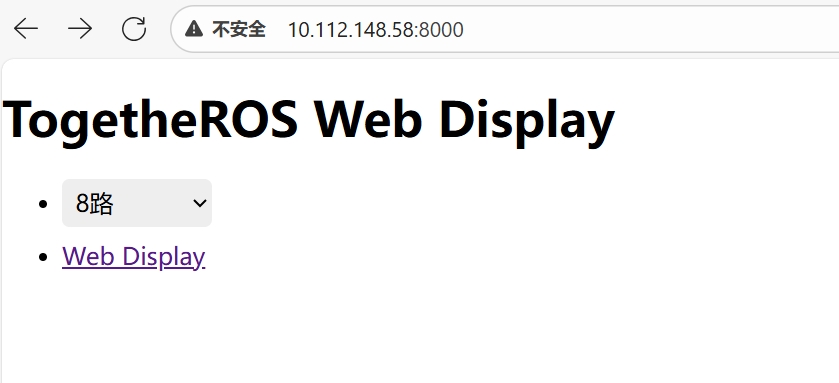
人体人脸检测框,关键点和姿态检测结果在 web 端展示渲染效果(IP 为 RDK 的 IP 地址):