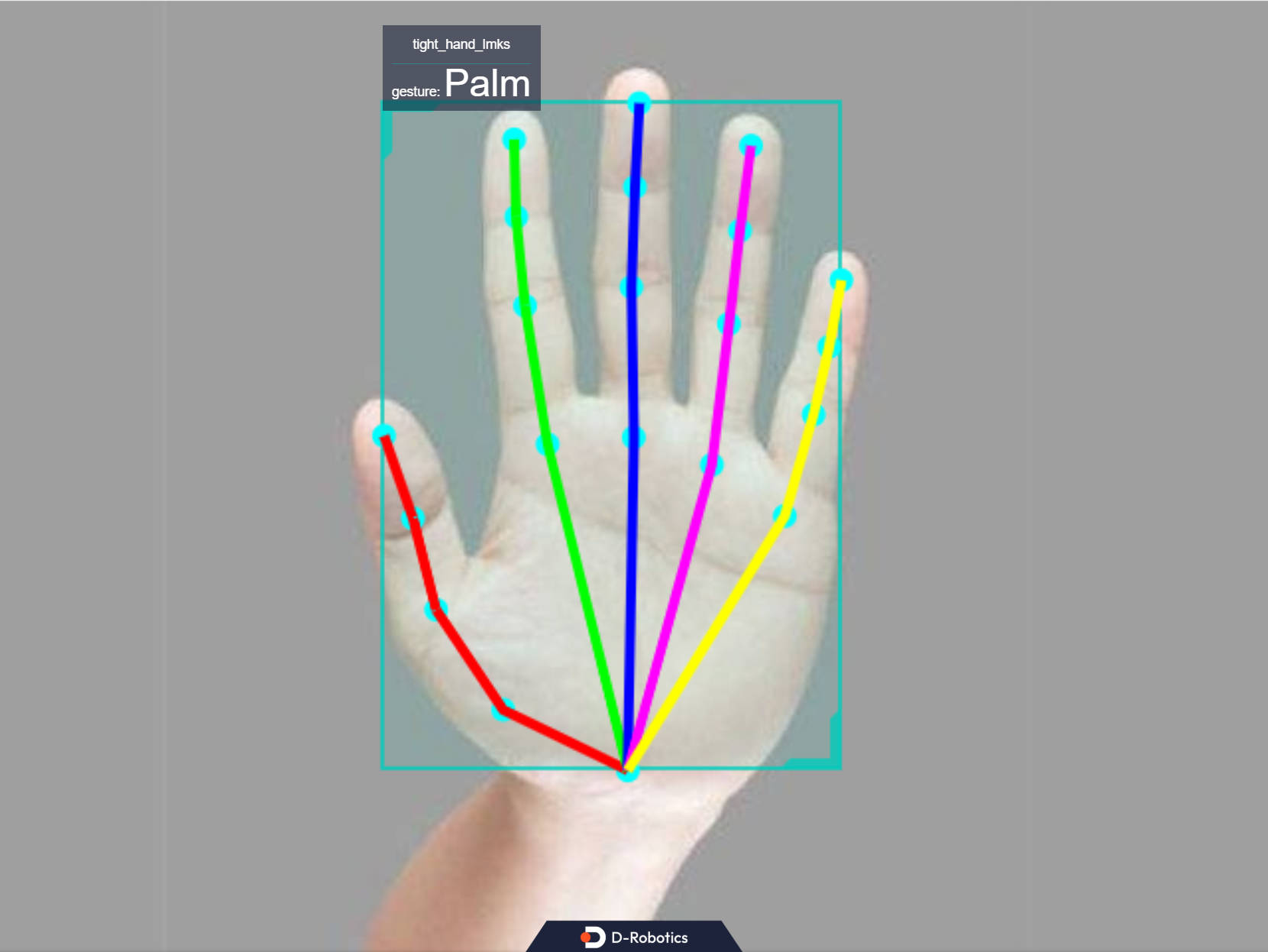
Hand Keypoints and Gesture Recognition (MediaPipe)
Feature Introduction
This hand keypoints detection algorithm example subscribes to image data and smart messages containing hand bounding box information, performs inference using the BPU, and publishes algorithm messages containing hand keypoints and gesture information.
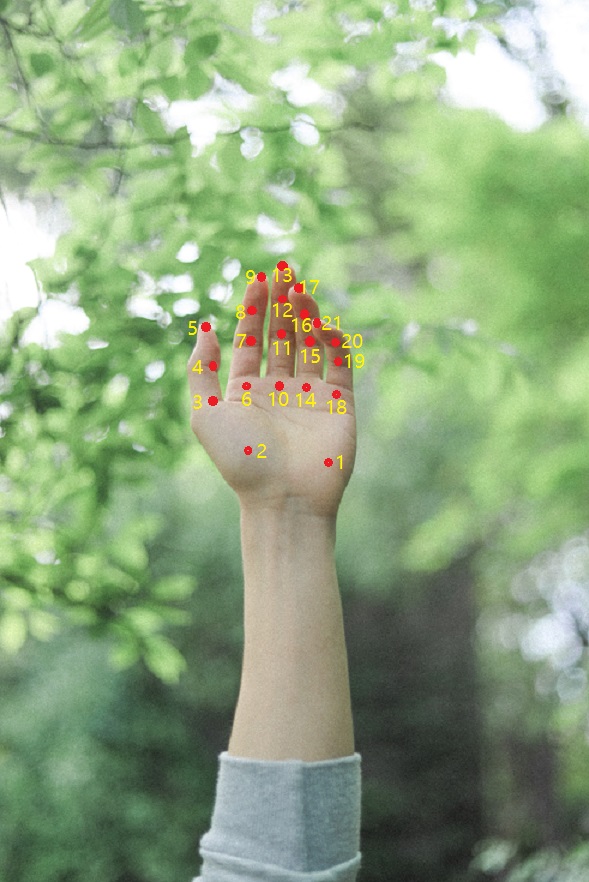
Hand keypoint indices are shown in the figure below:
Code repositories:
(https://github.com/D-Robotics/palm_detection_mediapipe)
(https://github.com/D-Robotics/hand_landmarks_mediapipe)
The gesture recognition categories supported by the algorithm, along with their corresponding numeric values in the algorithm message (Attribute member with type "gesture"), are listed below:
| Gesture | Description | Value |
|---|---|---|
| ThumbUp | Thumbs up | 2 |
| Victory | "V" sign | 3 |
| Mute | "Shh" gesture | 4 |
| Palm | Open palm | 5 |
| Okay | OK gesture | 11 |
| ThumbLeft | Thumb left | 12 |
| ThumbRight | Thumb right | 13 |
| Awesome | "666" gesture | 14 |
Application scenarios: The gesture recognition algorithm integrates hand keypoint detection and gesture analysis technologies, enabling computers to interpret human gestures as corresponding commands. This supports functionalities such as gesture control and sign language translation, primarily applied in smart homes, intelligent cockpits, wearable devices, and similar domains.
Example use case – Gesture-controlled robot car: Robot Car Gesture Control
Supported Platforms
| Platform | System | Function |
|---|---|---|
| RDK X5, RDK X5 Module | Ubuntu 22.04 (Humble) | Start MIPI/USB camera and display inference results via web |
| RDK S100, RDK S100P | Ubuntu 22.04 (Humble) | Start MIPI/USB camera and display inference results via web |
Algorithm Information
| Model | Platform | Input Size | Inference FPS |
|---|---|---|---|
| mediapipe | X5 | 224x224 | 911.98 |
| mediapipe | S100 | 224x224 | 1114 |
Prerequisites
RDK Platform
- RDK has been flashed with the Ubuntu 22.04 system image.
- TogetherROS.Bot has been successfully installed on the RDK.
- An MIPI or USB camera has been installed on the RDK.
- Ensure your PC can access the RDK over the network.
- Install the necessary packages:
apt install tros-humble-palm-detection-mediapipe
apt install tros-humble-hand-landmarks-mediapipe
Usage Instructions
The hand_landmarks_mediapipe package subscribes to images published by the sensor package and hand bounding box detection results published by the human detection and tracking package. After performing inference, it publishes algorithm messages. These results, together with the original images, are rendered and displayed in a web browser on the PC via the websocket package.
Use MIPI Camera to Publish Images
# Configure the tros.b environment
source /opt/tros/humble/setup.bash
# Copy required configuration files for running the example from the tros.b installation path.
cp -r /opt/tros/${TROS_DISTRO}/lib/palm_detection_mediapipe/config/ .
cp -r /opt/tros/${TROS_DISTRO}/lib/hand_landmarks_mediapipe/config/ .

# Configure MIPI camera
export CAM_TYPE=mipi

# Launch the launch file
ros2 launch hand_landmarks_mediapipe hand_landmarks.launch.py
Publishing Images Using a USB Camera
# Configure the tros.b environment
source /opt/tros/humble/setup.bash
# Copy required configuration files for running the example from the tros.b installation path.
cp -r /opt/tros/${TROS_DISTRO}/lib/palm_detection_mediapipe/config/ .
cp -r /opt/tros/${TROS_DISTRO}/lib/hand_landmarks_mediapipe/config/ .

# Configure USB camera
export CAM_TYPE=usb

# Launch the launch file
ros2 launch hand_landmarks_mediapipe hand_landmarks.launch.py
Replaying Local Images
# Configure the tros.b environment
source /opt/tros/humble/setup.bash
# Copy required configuration files for running the example from the tros.b installation path.
cp -r /opt/tros/${TROS_DISTRO}/lib/palm_detection_mediapipe/config/ .
cp -r /opt/tros/${TROS_DISTRO}/lib/hand_landmarks_mediapipe/config/ .

# Configure local image replay
export CAM_TYPE=fb

# Launch the launch file
ros2 launch hand_landmarks_mediapipe hand_landmarks.launch.py publish_image_source:=config/example.jpg publish_image_format:=jpg publish_output_image_w:=640 publish_output_image_h:=480
Result Analysis
The following messages appear in the terminal output during execution:
[palm_detection_mediapipe-4] [DNN]: 3.7.3_(4.2.11 HBRT)
[hand_landmarks_mediapipe-3] [WARN] [1757389272.651945922] [mono2d_hand_lmk]: Get model name: hand_224_224 from load model.
[palm_detection_mediapipe-4] [WARN] [1757389272.653466536] [mono2d_palm_det]: Get model name: palm_det_192_192 from load model.
[palm_detection_mediapipe-4] [WARN] [1757389272.657688231] [mono2d_palm_det]: Enabling zero-copy
[palm_detection_mediapipe-4] [WARN] [1757389272.657755005] [mono2d_palm_det]: Create hbmem_subscription with topic_name: /hbmem_img
[hand_landmarks_mediapipe-3] [WARN] [1757389272.658734823] [mono2d_hand_lmk]: Enabling zero-copy
[hand_landmarks_mediapipe-3] [WARN] [1757389272.658829973] [mono2d_hand_lmk]: Create hbmem_subscription with topic_name: /hbmem_img
[hand_landmarks_mediapipe-3] [WARN] [1757389272.679073504] [mono2d_hand_lmk]: Loaned messages are only safe with const ref subscription callbacks. If you are using any other kind of subscriptions, set the ROS_DISABLE_LOANED_MESSAGES environment variable to 1 (the default).
[palm_detection_mediapipe-4] [WARN] [1757389272.679083479] [mono2d_palm_det]: Loaned messages are only safe with const ref subscription callbacks. If you are using any other kind of subscriptions, set the ROS_DISABLE_LOANED_MESSAGES environment variable to 1 (the default).
[hand_landmarks_mediapipe-3] [WARN] [1757389272.679384552] [mono2d_hand_lmk]: SharedMemImgProcess Recved img encoding: nv12, h: 480, w: 640, step: 640, index: 0, stamp: 1757389272_411007134, data size: 460800, comm delay [268.3575]ms
[palm_detection_mediapipe-4] [WARN] [1757389272.679384452] [mono2d_palm_det]: SharedMemImgProcess Recved img encoding: nv12, h: 480, w: 640, step: 640, index: 0, stamp: 1757389272_411007134, data size: 460800, comm delay [268.3576]ms
[hand_landmarks_mediapipe-3] [WARN] [1757389273.715343396] [mono2d_hand_lmk]: input fps: 13.58, out fps: 13.94, infer time ms: 71, post process time ms: 1
[palm_detection_mediapipe-4] [WARN] [1757389273.723452363] [mono2d_palm_det]: input fps: 13.59, out fps: 13.94, infer time ms: 71, post process time ms: 0
[palm_detection_mediapipe-4] [WARN] [1757389275.711869066] [mono2d_palm_det]: SharedMemImgProcess Recved img encoding: nv12, h: 480, w: 640, step: 640, index: 33, stamp: 1757389275_710984298, data size: 460800, comm delay [0.8785]ms
[hand_landmarks_mediapipe-3] [WARN] [1757389275.711873416] [mono2d_hand_lmk]: SharedMemImgProcess Recved img encoding: nv12, h: 480, w: 640, step: 640, index: 33, stamp: 1757389275_710984298, data size: 460800, comm delay [0.8835]ms
[hobot_codec_republish-2] [WARN] [1757389277.211724002] [hobot_codec_decoder]: Pub img fps [9.66]
[hand_landmarks_mediapipe-3] [WARN] [1757389278.811834846] [mono2d_hand_lmk]: SharedMemImgProcess Recved img encoding: nv12, h: 480, w: 640, step: 640, index: 64, stamp: 1757389278_810957877, data size: 460800, comm delay [0.8710]ms
The log output indicates successful program execution. After initialization, each inference takes approximately 0.87 ms.
Enter http://IP:8000 in your PC's web browser to view the rendered images and algorithm results (replace IP with the RDK’s IP address):