5.2.6 Model Inference
Overview
This section describes how to use model inference: feed a local image for inference, obtain the rendered output image, and save it locally.
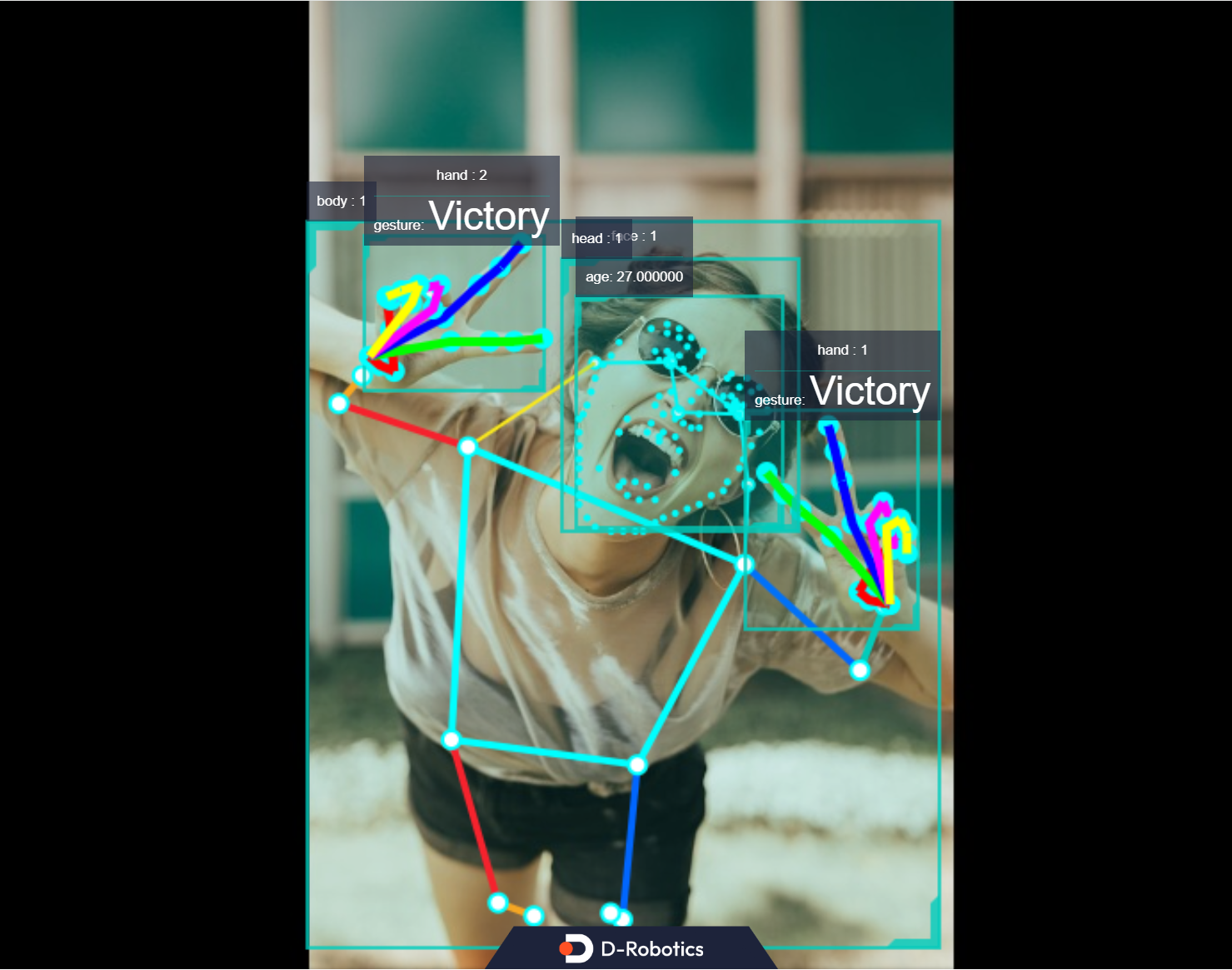
Finally, it demonstrates the combined inference and fusion results of body detection, age recognition, face landmark detection, hand landmark detection, and gesture recognition algorithms in TROS applications. The example uses MIPI/USB camera or local feedback input and displays inference rendering results via the web.
Code repository: https://github.com/D-Robotics/hobot_dnn
Supported Platforms
| Platform | Runtime Environment |
|---|---|
| RDK X3, RDK X3 Module | Ubuntu 20.04 (Foxy), Ubuntu 22.04 (Humble) |
| RDK X5, RDK X5 Module | Ubuntu 22.04 (Humble) |
For model inference on RDK S100/S600 platforms, refer to the Boxs algorithm repository.
Prerequisites
RDK Platform
-
RDK has been flashed with the Ubuntu system image.
-
TogetheROS.Bot has been successfully installed on RDK.
Usage
Use the local JPEG image and model in the hobot_dnn configuration file (FCOS object detection model, supporting 80 detection categories including people, animals, fruits, and vehicles) for feedback-based inference and save the rendered image.
- Foxy
- Humble
# Configure tros.b environment
source /opt/tros/setup.bash
# Configure tros.b environment
source /opt/tros/humble/setup.bash
# Copy the configuration files required for the example from the tros.b installation path. config contains the model used by the example and the local image for feedback
cp -r /opt/tros/${TROS_DISTRO}/lib/dnn_node_example/config/ .

# Use a local JPG image for feedback inference and save the rendered image
ros2 launch dnn_node_example dnn_node_example_feedback.launch.py dnn_example_config_file:=config/fcosworkconfig.json dnn_example_image:=config/target.jpg
After successful execution, the rendered image is automatically saved in the working directory with the filename render_feedback_0_0.jpeg . Press Ctrl+C to exit the program.
For parameter descriptions in the run command and how to subscribe to and use images published by the camera for algorithm inference, refer to README.md in the dnn_node_example package source code.
Result Analysis
The terminal outputs the following information during execution:
[example-1] [INFO] [1679901151.612290039] [ImageUtils]: target size: 6
[example-1] [INFO] [1679901151.612314489] [ImageUtils]: target type: couch, rois.size: 1
[example-1] [INFO] [1679901151.612326734] [ImageUtils]: roi.type: couch, x_offset: 83 y_offset: 265 width: 357 height: 139
[example-1] [INFO] [1679901151.612412454] [ImageUtils]: target type: potted plant, rois.size: 1
[example-1] [INFO] [1679901151.612426522] [ImageUtils]: roi.type: potted plant, x_offset: 379 y_offset: 173 width: 131 height: 202
[example-1] [INFO] [1679901151.612472961] [ImageUtils]: target type: book, rois.size: 1
[example-1] [INFO] [1679901151.612497709] [ImageUtils]: roi.type: book, x_offset: 167 y_offset: 333 width: 67 height: 22
[example-1] [INFO] [1679901151.612522859] [ImageUtils]: target type: vase, rois.size: 1
[example-1] [INFO] [1679901151.612533487] [ImageUtils]: roi.type: vase, x_offset: 44 y_offset: 273 width: 26 height: 45
[example-1] [INFO] [1679901151.612557172] [ImageUtils]: target type: couch, rois.size: 1
[example-1] [INFO] [1679901151.612567740] [ImageUtils]: roi.type: couch, x_offset: 81 y_offset: 265 width: 221 height: 106
[example-1] [INFO] [1679901151.612606444] [ImageUtils]: target type: potted plant, rois.size: 1
[example-1] [INFO] [1679901151.612617518] [ImageUtils]: roi.type: potted plant, x_offset: 138 y_offset: 314 width: 45 height: 38
[example-1] [WARN] [1679901151.612652352] [ImageUtils]: Draw result to file: render_feedback_0_0.jpeg
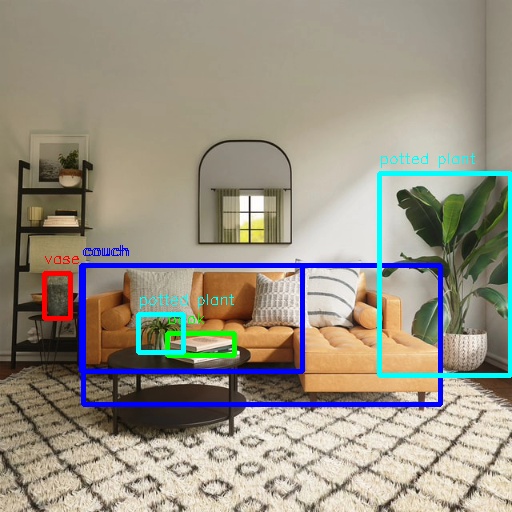
The output log shows that the algorithm inferred 6 targets from the input image and output the category ( target type ) and bounding box coordinates (top-left x coordinate x_offset , y coordinate y_offset , width width , and height height ) for each target. The saved rendered image filename is render_feedback_0_0.jpeg .
Rendered image render_feedback_0_0.jpeg :
Multi-Algorithm Inference
This section describes running multiple algorithms simultaneously and displaying the fused inference results on the web.
This feature is supported only in TROS Humble 2.3.1 and later versions.
TROS release notes: Release Notes. Version check method: apt Installation and Upgrade.
Publish images using MIPI/USB camera
# Configure tros.b environment
source /opt/tros/humble/setup.bash

# Copy the configuration files required for the example from the tros.b installation path.
cp -r /opt/tros/${TROS_DISTRO}/lib/mono2d_body_detection/config/ .
cp -r /opt/tros/${TROS_DISTRO}/lib/hand_lmk_detection/config/ .
cp -r /opt/tros/${TROS_DISTRO}/lib/hand_gesture_detection/config/ .

# Configure MIPI camera
export CAM_TYPE=mipi
# Command to use USB camera: export CAM_TYPE=usb

# Start launch file
ros2 launch hand_gesture_detection hand_gesture_fusion.launch.py
Use local image feedback
# Configure tros.b environment
source /opt/tros/humble/setup.bash
# Copy the configuration files required for the example from the tros.b installation path.
cp -r /opt/tros/${TROS_DISTRO}/lib/mono2d_body_detection/config/ .
cp -r /opt/tros/${TROS_DISTRO}/lib/hand_lmk_detection/config/ .
cp -r /opt/tros/${TROS_DISTRO}/lib/hand_gesture_detection/config/ .

# Configure local feedback image
export CAM_TYPE=fb

# Start launch file
ros2 launch hand_gesture_detection hand_gesture_fusion.launch.py publish_image_source:=config/person_face_hand.jpg publish_image_format:=jpg publish_output_image_w:=960 publish_output_image_h:=544 publish_fps:=30
Enter http://IP:8000 in a PC browser to view the image and algorithm rendering results (IP is the RDK IP address):