3.3.6 SPI Application
The RDK S100 exposes the SPI0 bus on physical pins 19, 21, 23, 24, 26 of the 40PIN header, supporting two chip selects with an I/O voltage of 3.3V.
Please refer to /app/40pin_samples/test_spi.py for detailed information on how to use SPI.
The pins mentioned below are provided as examples only. Port values may differ across platforms; always verify against your actual hardware setup. Alternatively, you can directly use the code under the /app/40pin_samples/ directory, which has already been verified on the board.
Loopback Test
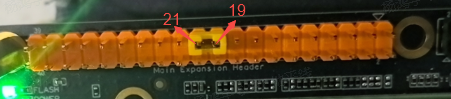
Connect MISO and MOSI together physically in hardware, then run the SPI test program to perform write and read operations. The expected result is that the data read back should be exactly identical to the data written.
Hardware Connection
Directly connect MISO and MOSI together using a jumper wire:
Test Procedure
- Run
python3 /app/40pin_samples/test_spi.py - Select the bus number and chip select number from the printed list of SPI controllers as input options. For example, to test
spidev0.0, enter0for bothbus numandcs num, then press Enter:
List of enabled spi controllers:
/dev/spidev0.0  /dev/spidev0.1
Please input SPI bus num:0
Please input SPI cs num:0
- Once the program runs correctly, it will continuously print
0x55 0xAA. If it prints0x00 0x00instead, the SPI loopback test has failed.
Starting demo now! Press CTRL+C to exit
0x55 0xAA
0x55 0xAA
Test Code
#!/usr/bin/env python3

import sys
import signal
import os
import time

# Import the spidev module
import spidev

def signal_handler(signal, frame):
    sys.exit(0)

def BytesToHex(Bytes):
    return ''.join(["0x%02X " % x for x in Bytes]).strip()

def spidevTest():
    # Set SPI bus number (0, 1, 2) and chip select (0, 1)
    spi_bus = input("Please input SPI bus num:")
    spi_device = input("Please input SPI cs num:")
    # Create an object of the spidev class to access spidev-based Python functions.
    spi = spidev.SpiDev()
    # Open the SPI bus handle
    spi.open(int(spi_bus), int(spi_device))

    # Set SPI frequency to 12MHz
    spi.max_speed_hz = 12000000

    print("Starting demo now! Press CTRL+C to exit")

    # Send [0x55, 0xAA]; the received data should also be [0x55, 0xAA]
    try:
        while True:
            resp = spi.xfer2([0x55, 0xAA])
            print(BytesToHex(resp))
            time.sleep(1)

    except KeyboardInterrupt:
        spi.close()

if __name__ == '__main__':
    signal.signal(signal.SIGINT, signal_handler)
    print("List of enabled spi controllers:")
    os.system('ls /dev/spidev*')

    spidevTest()