5.5.5 Trash Detection
Introduction
The mono2d_trash_detection package is a 2D trash object detection algorithm example developed based on the hobot_dnn package. Unlike previous feature demonstrations, this example uses the 2D trash detection task to show how to train a model with an open-source framework, convert the model with the D-Robotics toolchain, and complete the full algorithm deployment workflow on the D-Robotics RDK robot operating system.
This package supports subscribing directly to sensors/msg/Image topics and supports inference from local images. Algorithm results are published via topics and rendered visually on a Web page. When feeding back local images, rendered images are saved in the current directory.
Code repository: (https://github.com/D-Robotics/mono2d_trash_detection.git)
Application scenarios: indoor and outdoor trash detection to identify trash in a scene. Can be used with robots for trash search and trash pickup (with a robotic arm) app design.
Algorithm Introduction
This package uses the PaddlePaddle open-source framework and the PPYOLO model for trash detection task design and training. The specific model configuration is ppyolo_r18vd_coco.yml.
Supported object detection categories:
| Category | Description | Data Type |
|---|---|---|
| trash | Trash bounding box | Roi |
Supported Platforms
| Platform | Runtime Environment | Example Features |
|---|---|---|
| RDK X3, RDK X3 Module | Ubuntu 20.04 (Foxy), Ubuntu 22.04 (Humble) | · Start MIPI/USB camera/local feedback; inference rendering displayed on Web/saved locally |
Preparation
During deployment, we do not consider the internal structure of the algorithm model. We only focus on pre-processing and post-processing, such as image reading, image resize, detection head decoder, non-maximum suppression (NMS), and so on. These pre- and post-processing methods are generally consistent across similar models and are highly reusable, so a base deployment package can be used for rapid deployment.
The D-Robotics RDK robot operating system provides the dnn_node_example deployment package for rapid deployment of basic algorithms. Currently supported common algorithms include image classification, 2D object detection, and semantic segmentation. Among them, 2D object detection integrates Faster R-CNN, FCOS, YOLOv2, YOLOv3, YOLOv5, SSD, and EfficientNet for users to choose from.
This example uses dnn_node_example and replaces the D-Robotics cross-compiled model, post-processing configuration file, and detection category configuration file to adapt to a custom detection model.
If pre- and post-processing differ from the above models and cannot be quickly adapted, refer to the dnn_node_sample example for custom deployment.
RDK Platform
-
RDK has been flashed with the Ubuntu system image.
-
TogetheROS.Bot has been successfully installed on RDK.
-
Obtain the D-Robotics cross-compiled model (e.g., ppyolo_trashdet_416x416_nv12.bin in this example)
-
Post-processing configuration file (e.g., ppyoloworkconfig.json in this example)
-
Detection category configuration file (e.g., trash_coco.list in this example)
Post-Processing Configuration File Description
The config_file configuration file uses JSON format. This example uses ppyoloworkconfig.json with the following configuration:
  {
    "model_file": Path to the model file

    "model_name": Model name

    "dnn_Parser": Select the built-in post-processing algorithm; this example uses the same parser as YOLOv3, so set to "yolov3"

    "model_output_count": Number of model output branches

    "class_num": Number of detection categories

    "cls_names_list": Specific labels for detection categories

    "strides": Stride of each output branch

    "anchors_table": Preset anchor ratios

    "score_threshold": Confidence threshold

    "nms_threshold": NMS post-processing IOU threshold

    "nms_top_k": Number of boxes selected after NMS post-processing
  }
Note: The actual size of each preset anchor is anchors_table x strides .
Usage
Full algorithm development and deployment workflow:
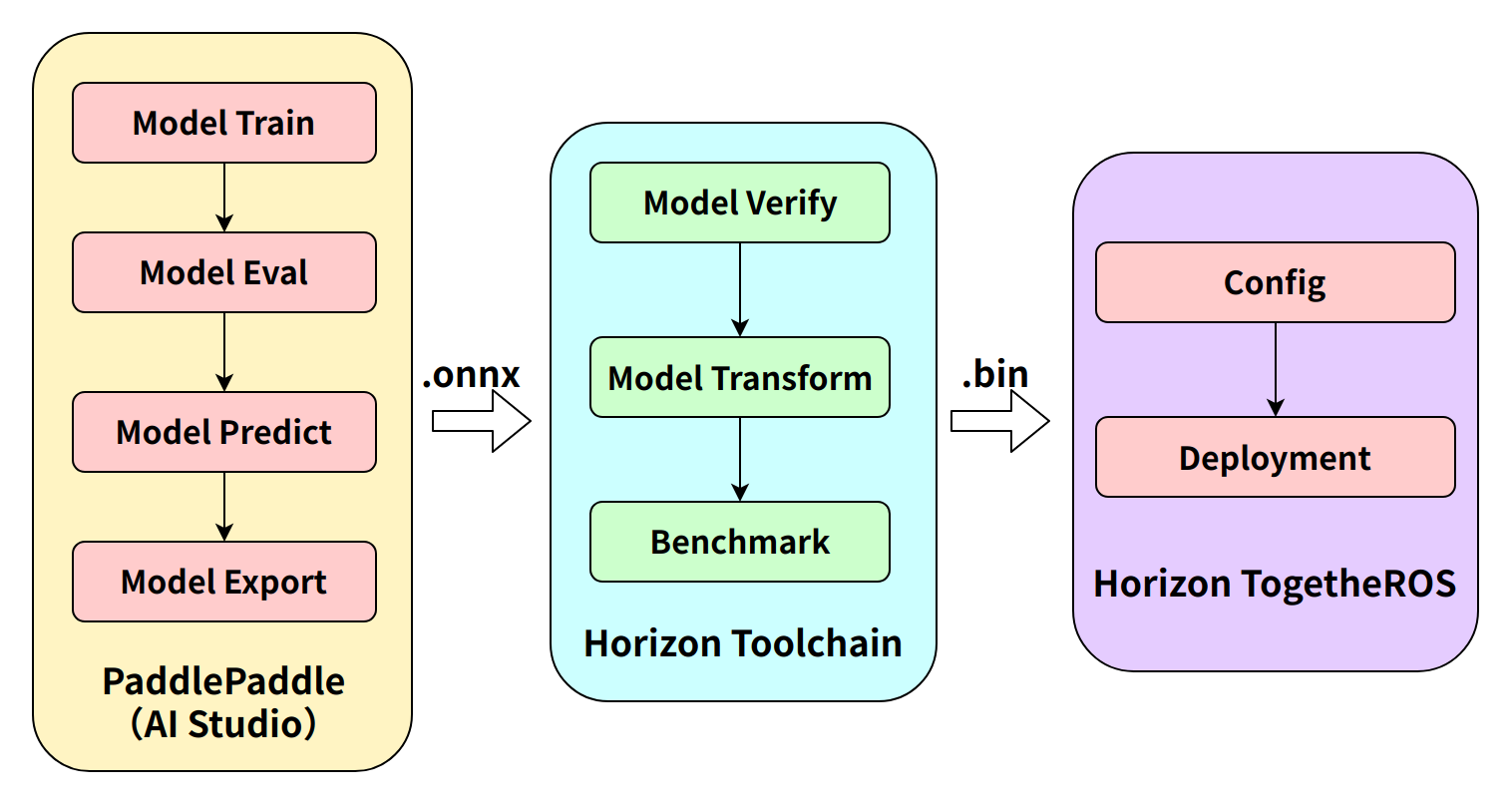
Step 1 (Paddle model training) and step 2 (toolchain model conversion) are described in the links below. This section mainly covers on-board deployment.
Model training: PPYOLO Trash Detection + RDK Deployment (Part 1)
Model conversion: PPYOLO Trash Detection + RDK Deployment (Part 2)
The package publishes algorithm messages containing semantic segmentation and object detection information. Users can subscribe to the published messages for application development.
RDK Platform
Publish Images Using MIPI Camera
- Foxy
- Humble
# Configure tros.b environment
source /opt/tros/setup.bash
# Configure tros.b environment
source /opt/tros/humble/setup.bash
# Copy the configuration files required to run the example from the tros installation path.
cp -r /opt/tros/${TROS_DISTRO}/lib/mono2d_trash_detection/config/ .

# Configure MIPI camera
export CAM_TYPE=mipi

# Launch launch file
ros2 launch dnn_node_example dnn_node_example.launch.py dnn_example_config_file:=config/ppyoloworkconfig.json dnn_example_msg_pub_topic_name:=ai_msg_mono2d_trash_detection dnn_example_image_width:=1920 dnn_example_image_height:=1080
Publish Images Using USB Camera
- Foxy
- Humble
# Configure tros.b environment
source /opt/tros/setup.bash
# Configure tros.b environment
source /opt/tros/humble/setup.bash
# Copy the configuration files required to run the example from the tros installation path.
cp -r /opt/tros/${TROS_DISTRO}/lib/mono2d_trash_detection/config/ .

# Configure USB camera
export CAM_TYPE=usb

# Launch launch file
ros2 launch dnn_node_example dnn_node_example.launch.py dnn_example_config_file:=config/ppyoloworkconfig.json dnn_example_msg_pub_topic_name:=ai_msg_mono2d_trash_detection dnn_example_image_width:=1920 dnn_example_image_height:=1080
Use a Single Feedback Image
- Foxy
- Humble
# Configure tros.b environment
source /opt/tros/setup.bash
# Configure tros.b environment
source /opt/tros/humble/setup.bash
# Copy the configuration files required to run the example from the tros installation path.
cp -r /opt/tros/${TROS_DISTRO}/lib/mono2d_trash_detection/config/ .

# Launch launch file
ros2 launch dnn_node_example dnn_node_example_feedback.launch.py dnn_example_config_file:=config/ppyoloworkconfig.json dnn_example_image:=config/trashDet0028.jpg
Result Analysis
Publish Images Using MIPI Camera
After the package initializes, the running terminal outputs the following information:
[example-3] [WARN] [1665644838.299475772] [example]: This is dnn node example!
[example-3] [WARN] [1665644838.439577121] [example]: Parameter:
[example-3]  feed_type(0:local, 1:sub): 1
[example-3]  image: config/test.jpg
[example-3]  image_type: 0
[example-3]  dump_render_img: 0
[example-3]  is_shared_mem_sub: 1
[example-3]  config_file: config/ppyoloworkconfig.json
[example-3]  msg_pub_topic_name_: ai_msg_mono2d_trash_detection
[example-3] [WARN] [1665644838.441379412] [example]: Parameter:
[example-3]  model_file_name: config/ppyolo_trashdet_416x416_nv12.bin
[example-3]  model_name: ppyolo_trashdet_416x416_nv12
[example-3] [WARN] [1665644838.441523485] [example]: model_file_name_: config/ppyolo_trashdet_416x416_nv12.bin, task_num: 4
[example-3] [C][34177][10-13][15:07:18:448][configuration.cpp:49][EasyDNN]EasyDNN version: 0.4.11
[example-3] [BPU_PLAT]BPU Platform Version(1.3.1)!
[example-3] [HBRT] set log level as 0. version = 3.14.5
[example-3] [DNN] Runtime version = 1.9.7_(3.14.5 HBRT)
[example-3] [WARN] [1665644838.688580704] [dnn]: Run default SetOutputParser.
[example-3] [WARN] [1665644838.688758775] [dnn]: Set output parser with default dnn node parser, you will get all output tensors and should parse output_tensors in PostProcess.
[example-3] [WARN] [1665644838.691224728] [example]: Create ai msg publisher with topic_name: ai_msg_mono2d_trash_detection
[example-3] [WARN] [1665644838.698936232] [example]: Create img hbmem_subscription with topic_name: /hbmem_img
[example-3] [WARN] [1665644839.926634917] [example]: Sub img fps: 32.45, Smart fps: 33.07, infer time ms: 36, post process time ms: 5
[example-3] [WARN] [1665644840.950361855] [example]: Sub img fps: 30.30, Smart fps: 30.21, infer time ms: 40, post process time ms: 3
[example-3] [WARN] [1665644841.971040371] [example]: Sub img fps: 30.39, Smart fps: 30.48, infer time ms: 36, post process time ms: 7
[example-3] [WARN] [1665644842.972618649] [example]: Sub img fps: 29.94, Smart fps: 29.88, infer time ms: 36, post process time ms: 3
[example-3] [WARN] [1665644843.982243911] [example]: Sub img fps: 29.62, Smart fps: 29.70, infer time ms: 36, post process time ms: 3
[example-3] [WARN] [1665644844.995728928] [example]: Sub img fps: 29.79, Smart fps: 29.73, infer time ms: 36, post process time ms: 6
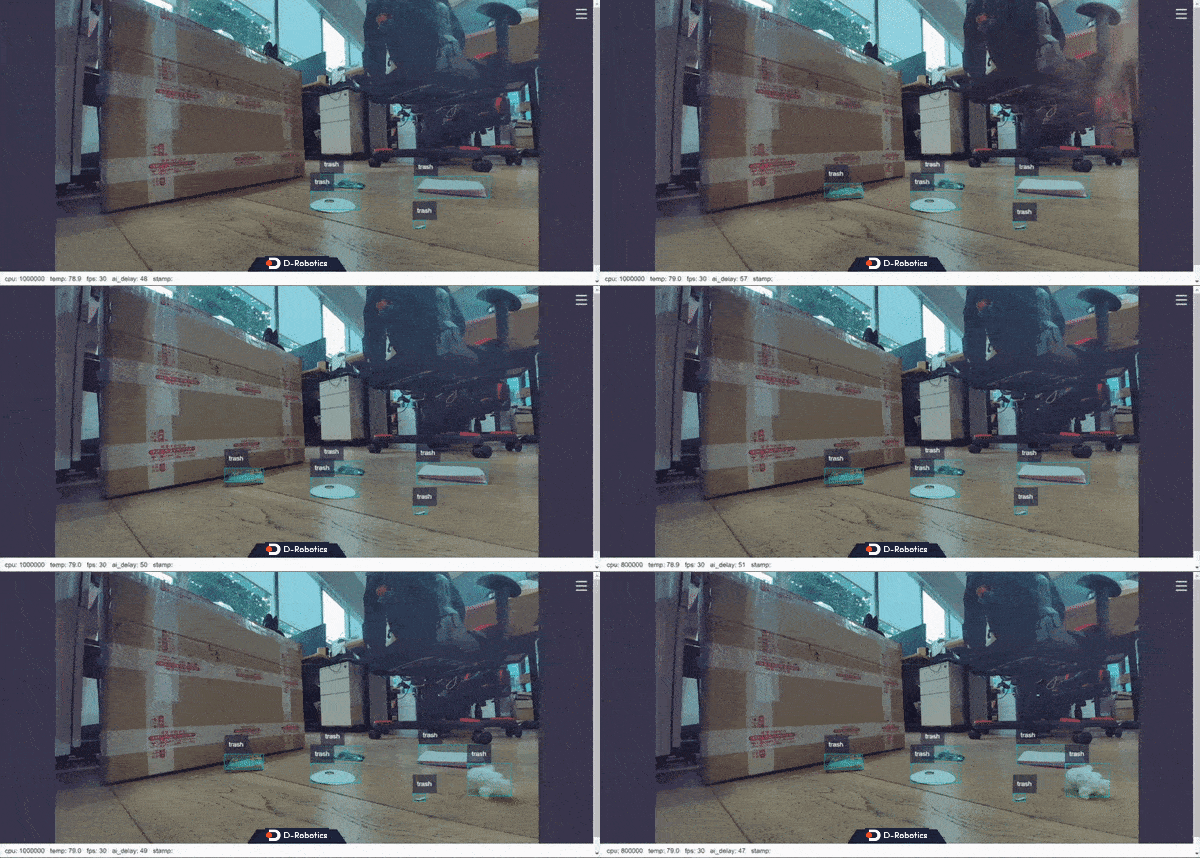
Real-time running effect:
Use a Single Feedback Image
After the package initializes, the terminal outputs the following information:
[example-1] [INFO] [1665646256.967568866] [dnn]: The model input 0 width is 416 and height is 416
[example-1] [WARN] [1665646256.967698807] [dnn]: Run default SetOutputParser.
[example-1] [WARN] [1665646256.967754550] [dnn]: Set output parser with default dnn node parser, you will get all output tensors and should parse output_tensors in PostProcess.
[example-1] [INFO] [1665646256.967794962] [dnn impl]: Set default output parser
[example-1] [INFO] [1665646256.967972439] [dnn]: Task init.
[example-1] [INFO] [1665646256.970036756] [dnn]: Set task_num [4]
[example-1] [INFO] [1665646256.970176988] [example]: The model input width is 416 and height is 416
[example-1] [WARN] [1665646256.970260061] [example]: Create ai msg publisher with topic_name: hobot_dnn_detection
[example-1] [INFO] [1665646256.977452592] [example]: Dnn node feed with local image: config/trashDet0028.jpg
[example-1] [INFO] [1665646257.027170005] [dnn]: task id: 3 set bpu core: 2
[example-1] [INFO] [1665646257.057492754] [example]: Output from frame_id: feedback, stamp: 0.0
[example-1] [INFO] [1665646257.063816821] [PostProcessBase]: out box size: 1
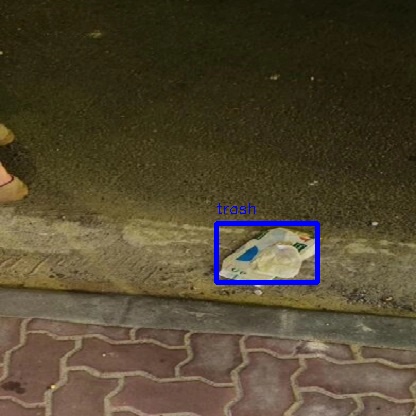
[example-1] [INFO] [1665646257.064070497] [PostProcessBase]: det rect: 216.061 223.173 317.97 282.748, det type: trash, score:0.80733
[example-1] [INFO] [1665646257.064206479] [ClassificationPostProcess]: out cls size: 0
[example-1] [INFO] [1665646257.068688365] [ImageUtils]: target size: 1
[example-1] [INFO] [1665646257.068836554] [ImageUtils]: target type: trash, rois.size: 1
[example-1] [INFO] [1665646257.068884048] [ImageUtils]: roi.type: , x_offset: 216 y_offset: 223 width: 101 height: 59
[example-1] [WARN] [1665646257.071375688] [ImageUtils]: Draw result to file: render_feedback_0_0.jpeg
Local rendering effect: