MobileNet_SSD
功能介绍
MobileNet_SSD 目标检测算法示例使用图片作为输入,利用 BPU 进行算法推理,发布包含目标类别和检测框的算法 msg。
Mobilenet_SSD 是从 (https://github.com/chuanqi305/MobileNet-SSD) 获得的 caffe 模型,使用VOC 数据集进行训练,支持的目标检测类型包括人、动物、水果、交通工具等共 20 种类型。
代码仓库: (https://github.com/D-Robotics/hobot_dnn)
应用场景:MobileNet_SSD 是以 MobileNet 为基础的目标检测算法,具有速度快,易于部署的优点,可实现物体检测、垃圾识别等功能,主要应用于自动驾驶、智能家居等领域。
人脸检测案例: (https://github.com/bruceyang2012/Face-detection-with-mobilenet-ssd)
车牌检测案例: (https://github.com/soonhahwang/Mobilenet-SSD-to-detect-Licence-Plate)
支持平台
| 平台 | 运行方式 | 示例功能 |
|---|---|---|
| RDK X3, RDK X3 Module | Ubuntu 20.04 (Foxy), Ubuntu 22.04 (Humble) | · 启动 MIPI/USB 摄像头,并通过 web 展示推理渲染结果 · 使用本地回灌,渲染结果保存在本地 |
| RDK X5, RDK X5 Module | Ubuntu 22.04 (Humble) | · 启动 MIPI/USB 摄像头,并通过 web 展示推理渲染结果 · 使用本地回灌,渲染结果保存在本地 |
算法信息
| 模型 | 平台 | 输入尺寸 | 推理帧率(fps) |
|---|---|---|---|
| ssd_mobilenet | X3 | 1x3x300x300 | 141.60 |
| 模型 | 平台 | 输入尺寸 | 推理帧率(fps) |
|---|---|---|---|
| ssd_mobilenet | X5 | 1x3x300x300 | 453.98 |
准备工作
RDK 平台
-
RDK 已烧录好 Ubuntu 系统镜像。
-
RDK 已成功安装 TogetheROS.Bot。
-
RDK 已安装 MIPI 或者 USB 摄像头,无摄像头的情况下通过回灌本地 JPEG/PNG 格式图片或者 MP4、H.264 和 H.265 的视频方式体验算法效果。
-
确认 PC 机能够通过网络访问 RDK。
使用介绍
RDK 平台
使用 MIPI 摄像头发布图片
MobileNet_SSD 目标检测算法示例订阅 sensor package 发布的图片,经过推理后发布算法 msg,通过 websocket package 实现在 PC 端浏览器上渲染显示发布的图片和对应的算法结果。
- Foxy
- Humble
# 配置tros.b环境
source /opt/tros/setup.bash
# 配置tros.b环境
source /opt/tros/humble/setup.bash
- Humble
# 配置tros.b环境
source /opt/tros/humble/setup.bash
# 配置MIPI摄像头
export CAM_TYPE=mipi

# 启动launch文件
ros2 launch dnn_node_example dnn_node_example.launch.py dnn_example_config_file:=config/mobilenet_ssd_workconfig.json dnn_example_image_width:=480 dnn_example_image_height:=272
使用 USB 摄像头发布图片
- Foxy
- Humble
# 配置tros.b环境
source /opt/tros/setup.bash
# 配置tros.b环境
source /opt/tros/humble/setup.bash
- Humble
# 配置tros.b环境
source /opt/tros/humble/setup.bash
# 配置USB摄像头
export CAM_TYPE=usb

# 启动launch文件
ros2 launch dnn_node_example dnn_node_example.launch.py dnn_example_config_file:=config/mobilenet_ssd_workconfig.json dnn_example_image_width:=480 dnn_example_image_height:=272
使用本地图片回灌
MobileNet_SSD 目标检测算法示例使用本地 JPEG/PNG 格式图片回灌,经过推理后将算法结果渲染后的图片存储在本地的运行路径下。
- Foxy
- Humble
# 配置tros.b环境
source /opt/tros/setup.bash
# 配置tros.b环境
source /opt/tros/humble/setup.bash
- Humble
# 配置tros.b环境
source /opt/tros/humble/setup.bash
# 启动launch文件
ros2 launch dnn_node_example dnn_node_example_feedback.launch.py dnn_example_config_file:=config/mobilenet_ssd_workconfig.json dnn_example_image:=config/target.jpg
结果分析
使用摄像头发布图片
在运行终端输出如下信息:
[example-3] [WARN] [1655095279.473675326] [example]: Create ai msg publisher with topic_name: hobot_dnn_detection
[example-3] [WARN] [1655095279.473789113] [example]: Create img hbmem_subscription with topic_name: /hbmem_img
[example-3] [WARN] [1655095280.697388819] [img_sub]: Sub img fps 31.16
[example-3] [WARN] [1655095280.710505278] [example]: Smart fps 31.50
[example-3] [WARN] [1655095281.697831409] [img_sub]: Sub img fps 30.00
[example-3] [WARN] [1655095281.743811574] [example]: Smart fps 30.01
[example-3] [WARN] [1655095282.730768103] [img_sub]: Sub img fps 30.04
[example-3] [WARN] [1655095282.744084511] [example]: Smart fps 30.00
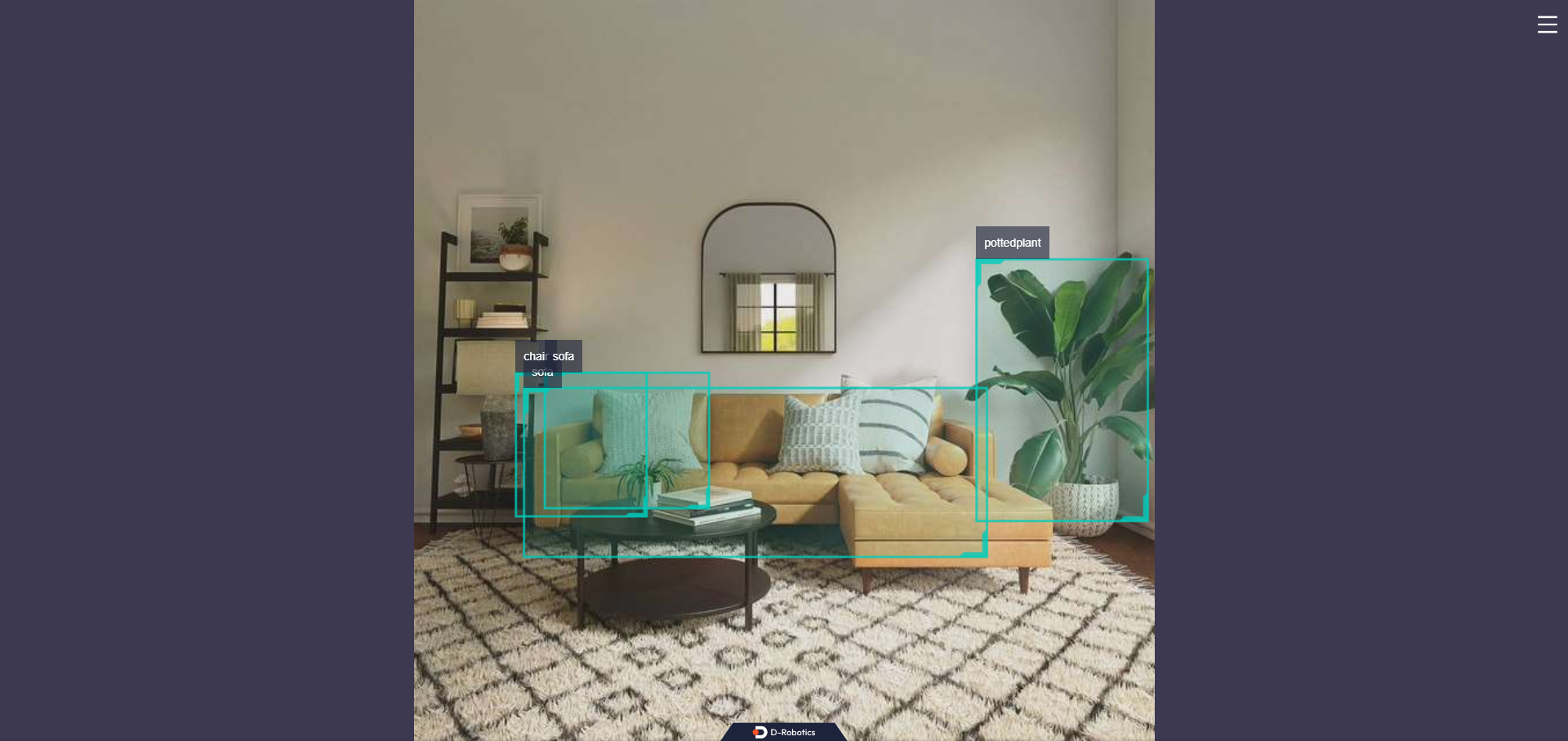
输出 log 显示,发布算法推理结果的 topic 为 hobot_dnn_detection ,订阅图片的 topic 为 /hbmem_img ,订阅到的图片和算法推理输出帧率约为 30fps。
在 PC 端的浏览器输入 http://IP:8000 即可查看图像和算法渲染效果(IP 为 RDK 的 IP 地址):
使用本地图片回灌
在运行终端输出如下信息:
[example-1] [INFO] [1654930510.201326806] [example]: Output from image_name: config/target.jpg, frame_id: feedback, stamp: 0.0
[example-1] [INFO] [1654930510.201485092] [PostProcessBase]: outputs size: 12
[example-1] [INFO] [1654930510.201581047] [PostProcessBase]: out box size: 2
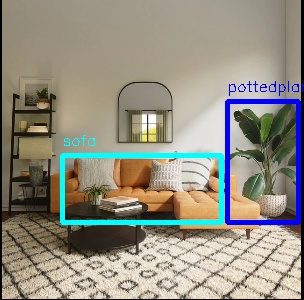
[example-1] [INFO] [1654930510.201672794] [PostProcessBase]: det rect: 227.27 101.873 299.219 223.667, det type: pottedplant, score:0.995207
[example-1] [INFO] [1654930510.201778415] [PostProcessBase]: det rect: 62.3792 155.731 221.676 223.179, det type: sofa, score:0.982129
输出 log 显示,算法使用输入的图片推理出 2 个目标,并输出了目标检测框坐标(输出的坐标顺序分别是人体框的左上的 x 和 y 坐标,和右下的 x 和 y 坐标)和类别。存储的渲染图片文件名为 render_feedback_0_0.jpeg,渲染图片效果: