5.5.5 Trash Detection
Feature Introduction
The mono2d_trash_detection package is a 2D trash object detection algorithm example developed based on the hobot_dnn package. Unlike previous functional demonstrations, this example uses a 2D trash detection task to illustrate the complete workflow: training a model using an open-source framework, converting the model with D-Robotics toolchains, and deploying the algorithm end-to-end on the D-Robotics RDK robotic operating system.
This package supports directly subscribing to topics of type sensors/msg/Image, as well as performing inference on local images. While publishing algorithm results via ROS topics, it simultaneously renders visualizations on a web page. When processing local images, the rendered output will be saved in the current directory.
Code repository: (https://github.com/D-Robotics/mono2d_trash_detection.git)
Application scenarios: Indoor and outdoor trash detection—identifying trash in scenes for applications such as robotic trash searching or trash collection (in conjunction with robotic arms).
Algorithm Overview
This package leverages the PaddlePaddle open-source framework and utilizes the PPYOLO model for trash detection task design and training. The specific model configuration used is ppyolo_r18vd_coco.yml.
The supported object detection categories are as follows:
| Category | Description | Data Type |
|---|---|---|
| trash | Trash bounding box | Roi |
Supported Platforms
| Platform | Runtime Environment | Example Features |
|---|---|---|
| RDK X3, RDK X3 Module | Ubuntu 20.04 (Foxy), Ubuntu 22.04 (Humble) | • Launch MIPI/USB camera or local image replay; inference results displayed on Web or saved locally |
| X86 | Ubuntu 20.04 (Foxy) | • Launch local image replay; inference results displayed on Web or saved locally |
Prerequisites
During deployment, we do not consider internal model architecture details but focus instead on pre- and post-processing stages. Pre-processing includes operations like image loading and resizing, while post-processing involves detection head decoding and Non-Maximum Suppression (NMS). These pre- and post-processing methods are largely consistent across similar models and thus highly reusable, enabling rapid deployment via base deployment packages.
D-Robotics RDK provides the dnn_node_example deployment package for quick integration of fundamental algorithms. Currently supported common algorithms include image classification, 2D object detection, and semantic segmentation. Specifically for 2D object detection, integrated models include Faster R-CNN, FCOS, YOLOv2, YOLOv3, YOLOv5, SSD, and EfficientDet for user selection.
This example utilizes dnn_node_example and adapts it to a custom detection model by replacing the D-Robotics cross-compiled model, post-processing configuration file, and detection class label file.
If your model’s pre- or post-processing differs significantly from the above and cannot be quickly adapted, please refer to the dnn_node_sample example for custom deployment guidance.
RDK Platform
- RDK has been flashed with Ubuntu 20.04 or Ubuntu 22.04 system image.
- TogetherROS.Bot has been successfully installed on the RDK.
- Obtain the D-Robotics cross-compiled model (e.g.,
ppyolo_trashdet_416x416_nv12.binin this example). - Post-processing configuration file (e.g.,
ppyoloworkconfig.jsonin this example). - Detection class label file (e.g.,
trash_coco.listin this example).
X86 Platform
- The X86 environment has been set up with Ubuntu 20.04 system image.
- tros.b has been successfully installed in the X86 environment.
- Obtain the cross-compiled model (e.g.,
ppyolo_trashdet_416x416_nv12.binin this example). - Post-processing configuration file (e.g.,
ppyoloworkconfig.jsonin this example). - Detection class label file (e.g.,
trash_coco.listin this example).
Post-Processing Configuration File Explanation
The config_file is in JSON format. This example uses ppyoloworkconfig.json, with the following structure:
{
  "model_file": Path to the model file,

  "model_name": Model name,

  "dnn_Parser": Specifies the built-in post-processing algorithm. This example uses the same parser as YOLOv3, so it is set to "yolov3",

  "model_output_count": Number of model output branches,

  "class_num": Number of detection classes,

  "cls_names_list": Specific class labels for detection,

  "strides": Stride value for each output branch,

  "anchors_table": Predefined anchor ratios,

  "score_threshold": Confidence score threshold,

  "nms_threshold": IOU threshold for NMS post-processing,

  "nms_top_k": Maximum number of bounding boxes retained after NMS
}
Note: The actual anchor sizes are calculated as anchors_table × strides.
Usage Guide
Complete algorithm development and deployment workflow:
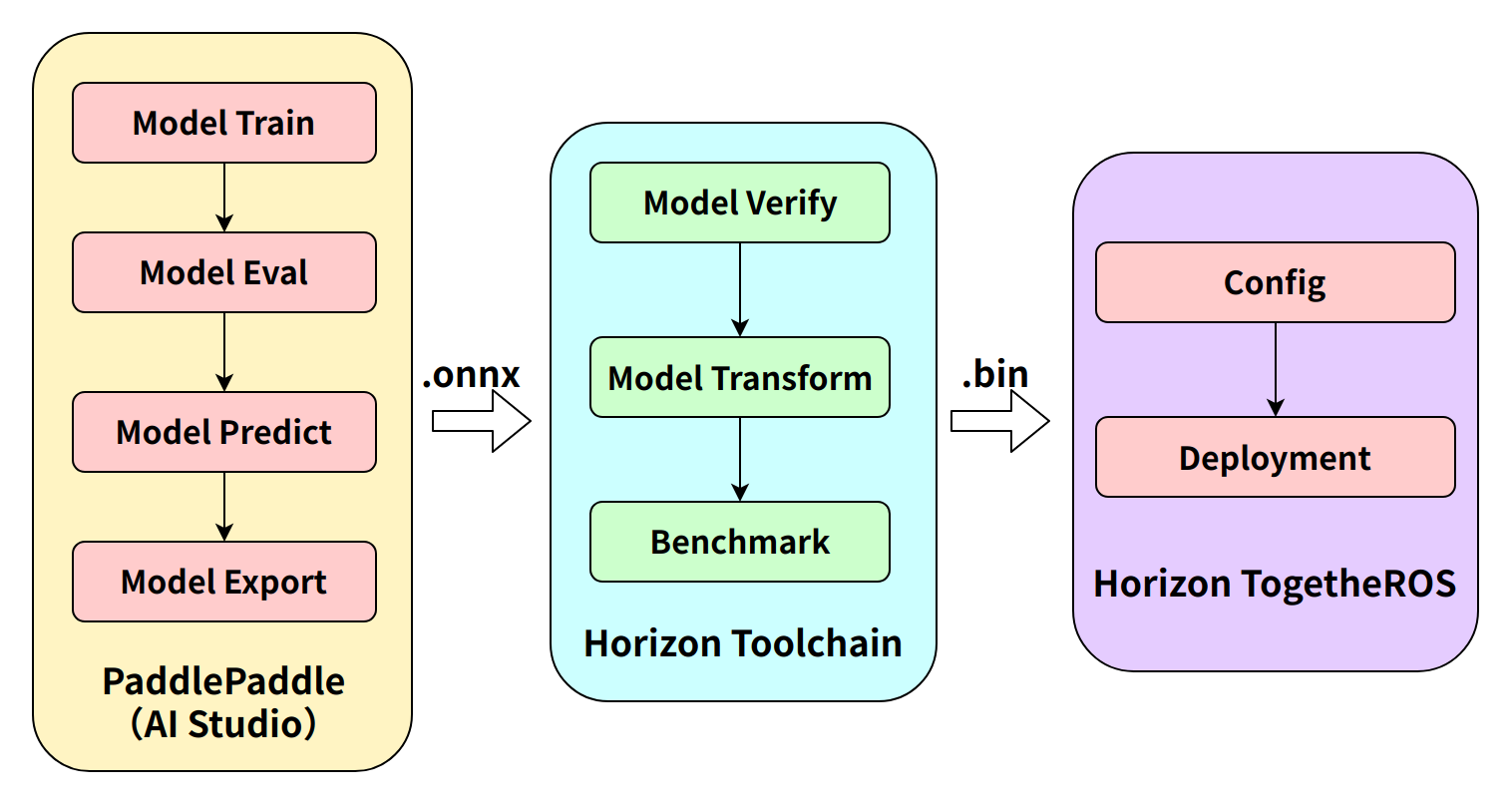
Steps 1 (Paddle model training) and 2 (toolchain model conversion) are covered in the links below. This document focuses primarily on on-device deployment procedures.
Model Training: PPYOLO Trash Detection + RDK Deployment (Part 1)
Model Conversion: PPYOLO Trash Detection + RDK Deployment (Part 2)
The package publishes algorithm messages containing both semantic segmentation and object detection information. Users can subscribe to these messages for application development.
RDK Platform
Publish images using a MIPI camera
- Foxy
- Humble
# Configure tros.b environment
source /opt/tros/setup.bash
# Configure tros.b environment
source /opt/tros/humble/setup.bash
# Copy required configuration files from the tros installation path.
cp -r /opt/tros/${TROS_DISTRO}/lib/mono2d_trash_detection/config/ .

# Configure MIPI camera
export CAM_TYPE=mipi

# Launch the launch file
ros2 launch dnn_node_example dnn_node_example.launch.py dnn_example_config_file:=config/ppyoloworkconfig.json dnn_example_msg_pub_topic_name:=ai_msg_mono2d_trash_detection dnn_example_image_width:=1920 dnn_example_image_height:=1080
Publish images using a USB camera
- Foxy
- Humble
# Configure tros.b environment
source /opt/tros/setup.bash
# Configure tros.b environment
source /opt/tros/humble/setup.bash
# Copy required configuration files from the tros installation path.
cp -r /opt/tros/${TROS_DISTRO}/lib/mono2d_trash_detection/config/ .

# Configure USB camera
export CAM_TYPE=usb

# Launch the launch file
ros2 launch dnn_node_example dnn_node_example.launch.py dnn_example_config_file:=config/ppyoloworkconfig.json dnn_example_msg_pub_topic_name:=ai_msg_mono2d_trash_detection dnn_example_image_width:=1920 dnn_example_image_height:=1080
Use a single local image for replay
- Foxy
- Humble
# Configure tros.b environment
source /opt/tros/setup.bash
# Configure the tros.b environment
source /opt/tros/humble/setup.bash
# Copy the configuration files required to run the example from the tros installation path.
cp -r /opt/tros/${TROS_DISTRO}/lib/mono2d_trash_detection/config/ .

# Launch the launch file
ros2 launch dnn_node_example dnn_node_example_feedback.launch.py dnn_example_config_file:=config/ppyoloworkconfig.json dnn_example_image:=config/trashDet0028.jpg
X86 Platform
Using a single replay image
- Foxy
- Humble
# Configure the tros.b environment
source /opt/tros/setup.bash
# Configure the tros.b environment
source /opt/tros/humble/setup.bash
# Copy the configuration files required to run the example from the tros installation path.
cp -r /opt/tros/${TROS_DISTRO}/lib/mono2d_trash_detection/config/ .

# Run the trash detection package and save the rendered image locally
ros2 run dnn_node_example example --ros-args -p feed_type:=0 -p image:=config/trashDet0028.jpg -p image_type:=0 -p dump_render_img:=1 -p dnn_example_config_file:=config/ppyoloworkconfig.json
Result Analysis
Publishing images using an MIPI camera
After package initialization, the following messages appear in the terminal:
[example-3] [WARN] [1665644838.299475772] [example]: This is dnn node example!
[example-3] [WARN] [1665644838.439577121] [example]: Parameter:
[example-3]  feed_type(0:local, 1:sub): 1
[example-3]  image: config/test.jpg
[example-3]  image_type: 0
[example-3]  dump_render_img: 0
[example-3]  is_shared_mem_sub: 1
[example-3]  config_file: config/ppyoloworkconfig.json
[example-3]  msg_pub_topic_name_: ai_msg_mono2d_trash_detection
[example-3] [WARN] [1665644838.441379412] [example]: Parameter:
[example-3]  model_file_name: config/ppyolo_trashdet_416x416_nv12.bin
[example-3]  model_name: ppyolo_trashdet_416x416_nv12
[example-3] [WARN] [1665644838.441523485] [example]: model_file_name_: config/ppyolo_trashdet_416x416_nv12.bin, task_num: 4
[example-3] [C][34177][10-13][15:07:18:448][configuration.cpp:49][EasyDNN]EasyDNN version: 0.4.11
[example-3] [BPU_PLAT]BPU Platform Version(1.3.1)!
[example-3] [HBRT] set log level as 0. version = 3.14.5
[example-3] [DNN] Runtime version = 1.9.7_(3.14.5 HBRT)
[example-3] [WARN] [1665644838.688580704] [dnn]: Run default SetOutputParser.
[example-3] [WARN] [1665644838.688758775] [dnn]: Set output parser with default dnn node parser, you will get all output tensors and should parse output_tensors in PostProcess.
[example-3] [WARN] [1665644838.691224728] [example]: Create ai msg publisher with topic_name: ai_msg_mono2d_trash_detection
[example-3] [WARN] [1665644838.698936232] [example]: Create img hbmem_subscription with topic_name: /hbmem_img
[example-3] [WARN] [1665644839.926634917] [example]: Sub img fps: 32.45, Smart fps: 33.07, infer time ms: 36, post process time ms: 5
[example-3] [WARN] [1665644840.950361855] [example]: Sub img fps: 30.30, Smart fps: 30.21, infer time ms: 40, post process time ms: 3
[example-3] [WARN] [1665644841.971040371] [example]: Sub img fps: 30.39, Smart fps: 30.48, infer time ms: 36, post process time ms: 7
[example-3] [WARN] [1665644842.972618649] [example]: Sub img fps: 29.94, Smart fps: 29.88, infer time ms: 36, post process time ms: 3
[example-3] [WARN] [1665644843.982243911] [example]: Sub img fps: 29.62, Smart fps: 29.70, infer time ms: 36, post process time ms: 3
[example-3] [WARN] [1665644844.995728928] [example]: Sub img fps: 29.79, Smart fps: 29.73, infer time ms: 36, post process time ms: 6
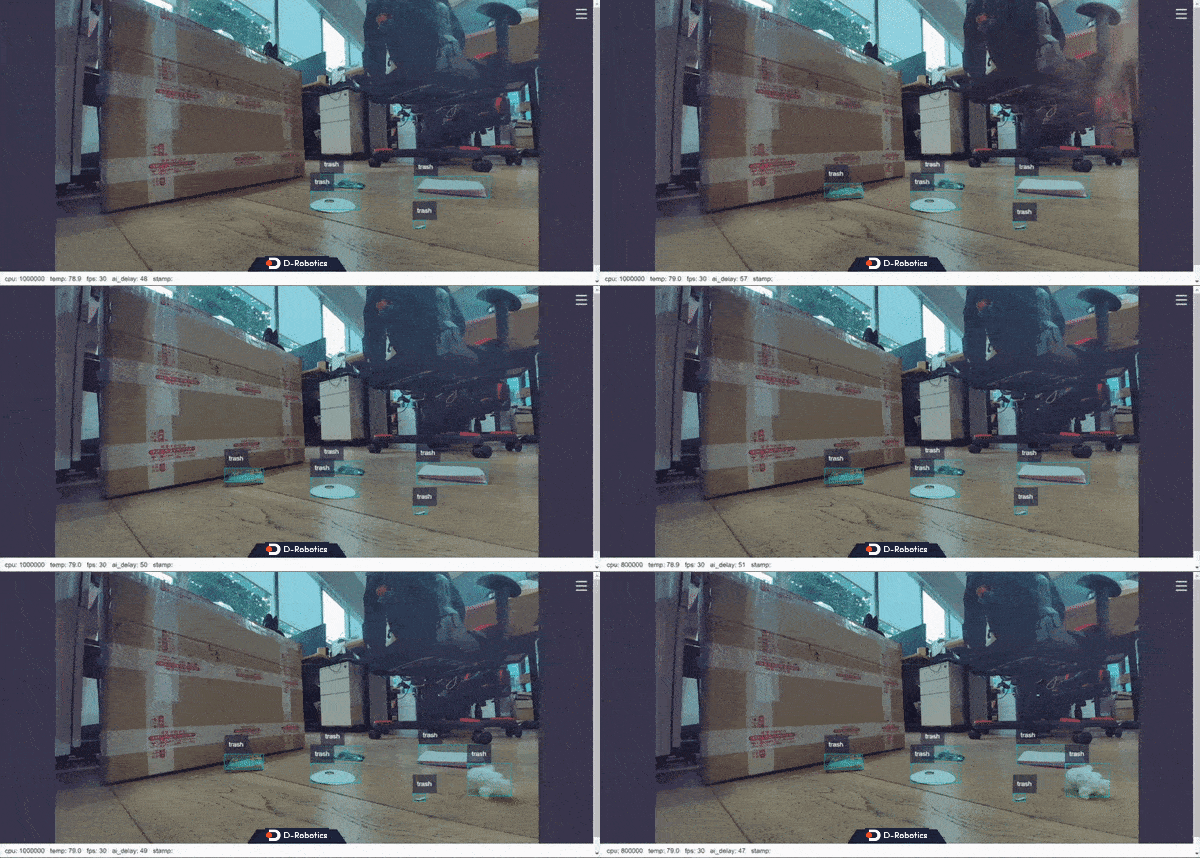
Real-time running effect:
Using a single replay image
After package initialization, the following messages appear in the terminal:
[example-1] [INFO] [1665646256.967568866] [dnn]: The model input 0 width is 416 and height is 416
[example-1] [WARN] [1665646256.967698807] [dnn]: Run default SetOutputParser.
[example-1] [WARN] [1665646256.967754550] [dnn]: Set output parser with default dnn node parser, you will get all output tensors and should parse output_tensors in PostProcess.
[example-1] [INFO] [1665646256.967794962] [dnn impl]: Set default output parser
[example-1] [INFO] [1665646256.967972439] [dnn]: Task init.
[example-1] [INFO] [1665646256.970036756] [dnn]: Set task_num [4]
[example-1] [INFO] [1665646256.970176988] [example]: The model input width is 416 and height is 416
[example-1] [WARN] [1665646256.970260061] [example]: Create ai msg publisher with topic_name: hobot_dnn_detection
[example-1] [INFO] [1665646256.977452592] [example]: Dnn node feed with local image: config/trashDet0028.jpg
[example-1] [INFO] [1665646257.027170005] [dnn]: task id: 3 set bpu core: 2
[example-1] [INFO] [1665646257.057492754] [example]: Output from frame_id: feedback, stamp: 0.0
[example-1] [INFO] [1665646257.063816821] [PostProcessBase]: out box size: 1
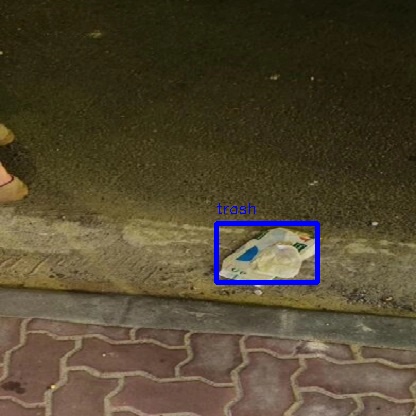
[example-1] [INFO] [1665646257.064070497] [PostProcessBase]: det rect: 216.061 223.173 317.97 282.748, det type: trash, score:0.80733
[example-1] [INFO] [1665646257.064206479] [ClassificationPostProcess]: out cls size: 0
[example-1] [INFO] [1665646257.068688365] [ImageUtils]: target size: 1
[example-1] [INFO] [1665646257.068836554] [ImageUtils]: target type: trash, rois.size: 1
[example-1] [INFO] [1665646257.068884048] [ImageUtils]: roi.type: , x_offset: 216 y_offset: 223 width: 101 height: 59
[example-1] [WARN] [1665646257.071375688] [ImageUtils]: Draw result to file: render_feedback_0_0.jpeg
Local rendering result: