7.7 VDSP Development Guide
Basic Debugging Guide
CPU Side Development
Image Loading and Unloading
The S100 system does not start the VDSP FW (Firmware) by default during boot. Users need to manually load and unload the FW using commands, as shown below:
echo -n <firmware path> > /sys/module/firmware_class/parameters/path

#S100 VDSP0
# Set VDSP0 FW name:
echo <firmware name> > /sys/class/remoteproc/remoteproc_vdsp0/firmware
# Load VDSP0 FW:
echo start > /sys/class/remoteproc/remoteproc_vdsp0/state
# Unload VDSP0 FW:
echo stop > /sys/class/remoteproc/remoteproc_vdsp0/state
Users can modify the FW path using the following command (must be an absolute path):
echo -n <firmware path> > /sys/module/firmware_class/parameters/path
Users can adjust the FW name before loading, based on their own naming:
#S100 VDSP0
echo <firmware name> > /sys/class/remoteproc/remoteproc_vdsp0/firmware
Users need to modify the original image, configure init.rc, so that the init process automatically loads the VDSP image after kernel startup.
# First, copy the compiled FW image (e.g., vdsp0) to /userdata
echo -n <firmware path> > /sys/module/firmware_class/parameters/path
#S100 VDSP0
echo <firmware name> > /sys/class/remoteproc/remoteproc_vdsp0/firmware
echo start > /sys/class/remoteproc/remoteproc_vdsp0/state
Check FW Version
#S100 VDSP0
cat /sys/class/remoteproc/remoteproc_vdsp0/version # for vdsp0
Check VDSP Running Status
# running indicates loaded, offline indicates not loaded
#S100 VDSP0
cat /sys/class/remoteproc/remoteproc_vdsp0/state # for vdsp0
Heartbeat Monitoring
Disabled by default. It can be enabled or disabled using the following commands; the heartbeat monitoring and sending cycle is 100ms. If 7 consecutive heartbeats are lost, an error will be reported, and VDSP will be reset.
# Enable heartbeat monitoring
echo Y > /sys/module/hobot_remoteproc/parameters/heartbeat_enable
# Disable heartbeat monitoring
echo N > /sys/module/hobot_remoteproc/parameters/heartbeat_enable
Operating VDSP via Function Interface
Use the libvdsp.so dynamic link library to load DSP programs, enabling functions such as loading, starting, stopping, resetting, and obtaining DSP status. For API introduction, refer to VDSP Start/Stop Control Interface.
Message Connection and Sending
Currently, users can only use the system's predefined service names. The available service names are listed in the table below:
| VDSP | Service Name | Function | Must Start | Default Start on VDSP Side |
|---|---|---|---|---|
| DSP0/1 | dcore0_device_op/dcore1_device_op | Debug control for DSP by system software. Already used by system software. Users cannot register or use again. | Yes | Yes |
| DSP0/1 | dcore0_acore_heart/dcore1_acore_heart | Used for heartbeat mechanism, currently not in use. Users can use for other purposes. | No | No |
| DSP0/1 | dcore0_rpmsg_bpu/dcore1_rpmsg_bpu | BPU-related control, currently not in use. Users can use for other purposes. | No | No |
| DSP0/1 | dcore0_rpmsg_op/dcore1_rpmsg_op | Toolchain operator-related control, currently not in use. Users can use for other purposes. | No | No |
| VDSP | Service Name | Function | Must Start | Default Start on VDSP Side |
|---|---|---|---|---|
| DSP0 | dcore0_device_op | Debug control for DSP by system software. Already used by system software. Users cannot register or use again. | Yes | Yes |
| DSP0 | dcore0_acore_heart | Used for heartbeat mechanism, currently not in use. Users can use for other purposes. | No | No |
| DSP0 | dcore0_rpmsg_bpu | BPU-related control, currently not in use. Users can use for other purposes. | No | No |
| DSP0 | dcore0_rpmsg_op | Toolchain operator-related control, currently not in use. Users can use for other purposes. | No | No |
APIs available for users are listed in the table below:
| Interface | Function | Header File | Related Library |
|---|---|---|---|
| hb_rpmsg_connect_server | Connect to service | rpmsg_lib.h | librpmsg.so |
| hb_rpmsg_disconnect_server | Disconnect service | rpmsg_lib.h | librpmsg.so |
| hb_rpmsg_send | Send message | rpmsg_lib.h | librpmsg.so |
| hb_rpmsg_recv | Receive message | rpmsg_lib.h | librpmsg.so |
Note: The same service channel does not support concurrent reception or transmission by multiple processes or threads.
Heap Related Development
VDSP provides interfaces for dynamically allocating and freeing heap memory, supports configuring custom memory alignment sizes, and allows checking the current heap status. When VDSP needs to dynamically allocate heap memory, the following interfaces can be used.
| Interface | Function | Related Header File |
|---|---|---|
| hb_mem_heap_initialize | Initialize memory allocator interface | hb_mem_allocator.h |
| hb_mem_heap_deinitialize | De-initialize memory allocator interface | hb_mem_allocator.h |
| hb_mem_heap_alloc | Allocate heap space | hb_mem_allocator.h |
| hb_mem_heap_free | Free allocated heap space | hb_mem_allocator.h |
| hb_mem_heap_get_status | Get current heap status | hb_mem_allocator.h |
VDSP Side Development
The steps to obtain the code are as follows:
(1) First, obtain the release package and unzip it to confirm that the vdsp source code is present. If not, contact the relevant person at Dija to obtain it.
(2) The vdsp source code can be found in the vdsp path.
Linux Environment Setup
Obtain the build package to set up the compilation environment. For the build package, please contact the relevant person at Dija.
This document only provides instructions for setting up and compiling in a Linux environment. For debugging documents mentioned in the xplorer, please contact the relevant person at Dija.
Command to install the build in a Linux environment:
tar -zxvf Vision_Q8_linux.tgz \
   && mv RI-2023.11-linux/Vision_Q8/ /opt/xtensa/XtDevTools/install/builds/RI-2023.11-linux/ \
   && rm -rf RI-2023.11-linux

/opt/xtensa/XtDevTools/install/builds/RI-2023.11-linux/Vision_Q8/install --xtensa-tools \
   /opt/xtensa/XtDevTools/install/tools/RI-2023.11-linux/XtensaTools/
Compilation
Steps to compile after obtaining the code:
(1) cd vdsp_fw
(2) bash make.sh
The static library is generated in the library directory:
library/libvdsp0.a
The binary image is generated in the samples directory:
samples/{subdir}/vdsp0
Debugging Guide
Log Viewing
Logs from VDSP FW are output via the serial port.
Note that VDSP FW shares a serial port with other modules, such as BL31 and optee. If VDSP FW outputs too many logs, it may block the log output of these modules and trigger a watchdog. Additionally, VDSP FW logs and kernel logs are both output to the serial port, which can interfere with each other. Users can reduce the kernel log level to prevent interference:
echo 0 > /proc/sys/kernel/printk
When a serial port is unavailable, users can log in to the board via SSH. The hrut_remoteproc_log service starts by default in the background:
#S100 VDSP0 default startup command at boot, log save path: /log/dsp0/message
hrut_remoteproc_log -b /sys/class/remoteproc/remoteproc_vdsp0/log -f /log/dsp0/message -r 2048 -n 200
Similarly, VDSP FW logs are written to shared memory and stored in the file system by the CPU-side log service process. Therefore, users can view logs in the following paths, but note that these logs are not real-time.
#S100 VDSP0 log path:
/log/dsp0/message
/log/dsp0/archive/
# message is a temporary file. When full, it is written to the archive/ directory. When the number of files in this directory reaches a certain limit, older files are deleted.
Log Printing Interface
Using the printf interface, logs are output via the serial port.
It is recommended to use the DSP_ERR, DSP_WARN, DSP_INFO, and DSP_DBG interfaces. These interfaces output logs via the serial port and also write them to shared memory. The CPU-side log service then stores the log information in the file system.
Notes on using DSP_* interfaces:
- Header file:
hb_vdsp_log.h - Interface usage example. For instance, when entering an exception branch and needing to print a log, use the
DSP_ERRinterface:DSP_ERR("Input parameter invalid.\n");
Thread Status Viewing
The following command can be used to view thread status on the VDSP side via the serial port. Note that collecting and outputting this data may affect VDSP performance.
Usage: First, enable #define THREAD_STACK_CHECK (1) in the code. Second, enable stack tracing before starting a new thread, as shown below:
(void)hb_enable_stack_track(dev_thread_stack, sizeof(dev_thread_stack)/sizeof(dev_thread_stack[0]));
#S100 VDSP0:
echo on > /sys/devices/virtual/misc/vdsp0/vdsp_ctrl/dspthread
echo off > /sys/devices/virtual/misc/vdsp0/vdsp_ctrl/dspthread
Coredump Viewing
System software initialization related to coredump mainly involves two parts: registering exceptions and enabling the watchdog.
hb_wdt_on();
hb_enable_coredump();
Currently, XOS can handle the following exception types:
/*  EXCCAUSE register values:  */
/*  General Exception causes (Bits 3:0 of EXCCAUSE register)  */

/* No exception */
#define EXCCAUSE_NONE                   UINT32_C(0)
/* Instruction usage */
#define EXCCAUSE_INSTRUCTION            UINT32_C(1)
/* Addressing usage */
#define EXCCAUSE_ADDRESS                UINT32_C(2)
/* External causes */
#define EXCCAUSE_EXTERNAL               UINT32_C(3)
/* Debug exception */
#define EXCCAUSE_DEBUG                  UINT32_C(4)
/* Syscall exception */
#define EXCCAUSE_SYSCALL                 UINT32_C(5)
/* Hardware failure */
#define EXCCAUSE_HARDWARE               UINT32_C(6)
/* Memory management */
#define EXCCAUSE_MEMORY                 UINT32_C(7)
/* Coprocessor */
#define EXCCAUSE_CP_DISABLED            UINT32_C(8)
/*  Reserved 9-15  */
Exception handlers should not be registered for exception reasons 4 (debug exception), 5 (SYSCALL exception), and 8 (coprocessor exception) on VQ8, as they are reserved for system use. Note: Types 9-15 are also reserved and should not be registered.
Offline debugging method: When VDSP encounters a coredump, Acore writes all potentially used memory spaces (iram/dram0/dram1/reserved ddr) into the specified file system. The path is as follows:
#vdsp0
/log/coredump/
Create a new restore.script.sh script. Set the paths of the 4 memory dump files according to the actual project storage location. Copy the obtained CPU registers to the corresponding positions in this script, as shown below:
python import thread_aware_rtos
python thread_aware_rtos.k.rtos_support.dump_analysis_mode = True
b main
run

restore vdsp0_ddr_2024-05-06-02-50-03.hex binary 0xf0000000
restore vdsp0_iram_2024-05-06-02-50-03.hex binary 0x08080000
restore vdsp0_dram0_2024-05-06-02-50-03.hex binary 0x08000000
restore vdsp0_dram1_2024-05-06-02-50-03.hex binary 0x08040000

set $ar0 = 0xf00502a8
set $ar1 = 0xf3fdded0
set $ar2 = 0xf3fddd00
set $ar3 = 0x34
set $ar4 = 0x1b
set $ar5 = 0x5d
set $ar6 = 0x53
set $ar7 = 0x58
set $ar8 = 0xf0050192
set $ar9 = 0xf3fddeb0
set $ar10 = 0x4f
set $ar11 = 0xf3fddd00
set $ar12 = 0x0
set $ar13 = 0xf3fddee0
set $ar14 = 0xf3fddce0
set $ar15 = 0xf3fddd1b
set $ar16 = 0xf0065978
set $ar17 = 0xf3fddb60
set $ar18 = 0x4f
set $ar19 = 0xf002bea4
set $ar20 = 0x0
set $ar21 = 0xffffffb1
set $ar22 = 0x4f
set $ar23 = 0xffffffff
set $ar24 = 0x808100f
set $ar25 = 0xf3fddf00
set $ar26 = 0xf3fddf10
set $ar27 = 0x53113
set $ar28 = 0xf0050280
set $ar29 = 0xffffffff
set $ar30 = 0x0
set $ar31 = 0xf3fddf70
set $ps = 0x68
set $wb = 0x40000311
set $pc = 0xf0050057
python thread_aware_rtos.k.rtos_support.XOS_initialized = True
Open the xt-gdb command line (either xplorer or command line mode) and execute the following operations in order:
xt-gdb vdsp0 (executable object file)
(xt-gdb) >> source restore.script.sh
(xt-gdb) >> run
ctrl+c // Cancel run
(xt-gdb) >> stepi
(xt-gdb) >> info threads
(xt-gdb) >> bt
The backtrace debug information is displayed as follows:
(xt-gdb) bt
#0  _RMCDump () at /vdsp/bsp_project/coredump/RegDump.S:90
#1  0xf0050192 in Exc_Dump_Regs () at bsp_project/coredump/Exc_Dump_Regs.c:110
#2  0xf00502a8 in dafault_exchandler (frame=0xf3fddf10) at bsp_project/coredump/coredump.c:125
#3  0x0808100f in _GeneralException (cause=..., exccause=...) at ./xos_vectors_xea3_v2.S
#4  0xf00504b8 in hb_platform_init () at bsp_project/driver/devcontrol/devcontrol.c:152
#5  0xf0030306 in main (argc=1, argv=0xf0073704) at main.c:68
Stack Usage Viewing
For an explanation of stack usage, it is recommended to read the Xtensa® XOS Reference Manual: <VDSP installation path>/xtensa/XtDevTools/downloads/<version>/docs/xos_rm.pdf.
MPU Configuration
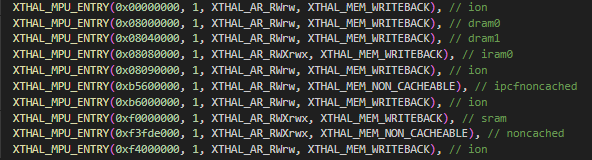
The currently deployed MPU has two main functions: first, to limit the range of addresses VDSP can access; accessing addresses outside the MPU-allowed range will cause a coredump error. Second, it can configure attributes of address segments. For detailed introduction, please refer to the Xtensa® System Software Reference Manual: <VDSP installation path>/xtensa/XtDevTools/downloads/<version>/docs/xos_rm.pdf.
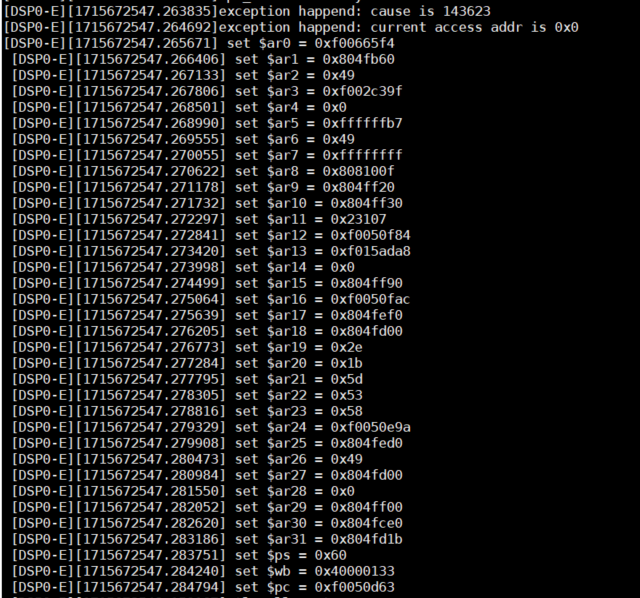
The VDSP address mapping and MPU protection are shown in the figure below. Accessing addresses outside the MPU protection range will result in a coredump error.
The error log is shown in the figure below. The error address is 0x0, indicating access to an address that is not permitted:
Currently, the attribute configuration for VDSP addresses mainly includes three parts:
(1) Attribute configuration for ION space: XTHAL_MEM_WRITEBACK
(2) Attribute configuration for the two shared memory regions: XTHAL_MEM_NON_CACHEABLE
(3) Attribute configuration for segments other than (1) and (2): XTHAL_MEM_WRITEBACK
Cadence Documentation Path Location
After installing Xplorer, you can view the downloaded documentation paths at the following location: <VDSP installation path>/xtensa/XtDevTools/downloads/RI-2023.11/docs.
FAQ
What are the methods for time consumption statistics on the VDSP side?
Users can use gettimeofday() to get the time directly, or use XT_RSR_CCOUNT() to get the count number and convert it to time. The former requires including the #include <sys/time.h> header file. The latter is recommended for more precise time statistics. Printing logs in scenarios with high time consumption requirements is not recommended.
Additionally, users can refer to the Xtensa® Software Development Toolkit User's Guide: <VDSP installation path>/xtensa/XtDevTools/downloads/<version>/docs/sw_dev_toolkit_ug.pdf.
How to modify LSP?
(1) Copy a template lsp.
(2) Edit memmap.xmm.
(3) Regenerate memmap by executing the command: xt-genldscripts -b custom_lsp/q8-min-rt/.
When debugging with xos tools and encountering "toolchain not found," first confirm whether the xos build environment is established.
If established, configure environment variables, e.g., set a temporary environment variable: export PATH=$PATH:[*]/XtensaTools/bin.
What if starting (load) or stopping (unload) FW on the CPU side is unsuccessful?
Possibly, the service was not started when stopping, or the service was already started when starting.
How to add a user thread on the VDSP side?
Example code:
ret = xos_thread_create(&dev_thread_tcb, 0, dev_thread_func, 0, "dev_control", dev_thread_stack, STACK_SIZE_1, TRACE_THREAD_PRIO, 0, 0);
Here, dev_thread_func represents the created thread function, used to implement the functionality the user wants to handle within the thread function. dev_thread_stack points to the starting address of the thread stack (allocated by the user). STACK_SIZE_1 is the stack size. TRACE_THREAD_PRIO is the thread priority, ranging from 0 to 15, with lower numbers indicating higher priority.
How to get the device ID on the VDSP side?
You can use xthal_get_prid().
Which library to use for idma on the VDSP side?
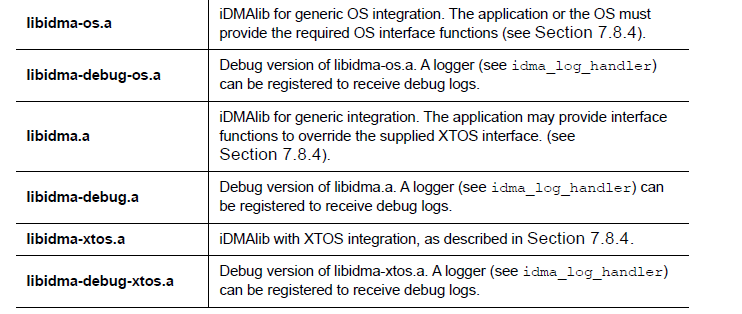
Please use libidma-os or libidma-debug-os, as we use xos.
What if printing variables of type int64_t/uint64_t/float results in errors?
If variables defined as int64_t/uint64_t/float output abnormal values when printed, but function normally during usage (e.g., size comparisons), this is because the xtensa/xtutil.h header file replaces functions like printf, vsnprintf with xt_printf, xt_vsnprintf. Users need to comment out the xtutil.h header file and use the native printf, vsnprintf interfaces.
Standard C library functions like printf cannot be used in interrupt handlers; otherwise, the system will hang.
What if VDSP gets stuck during operation?
Check if the address of the variable pointer is aligned:
(1) Addresses of pointers to (int64_t *) type variables need 8-byte alignment.
(2) Addresses of pointers to (int32_t *) type variables need 4-byte alignment.
(3) Addresses of pointers to (int16_t *) type variables need 2-byte alignment.
Confirm whether standard C library functions like printf are used in interrupt handlers. Currently, interrupt handlers do not support their use.
What if a seg segment overflow error occurs during sim soft simulation?
You need to modify the sim's xmm file. Path: xtensa/xtensa/XtDevTools/install/builds/RI-2023.11-win32/Vision_Q8/xtensa-elf/lib/sim/memmap.xmm. Increase the value of the corresponding overflow segment. Open cmd under xplorer:
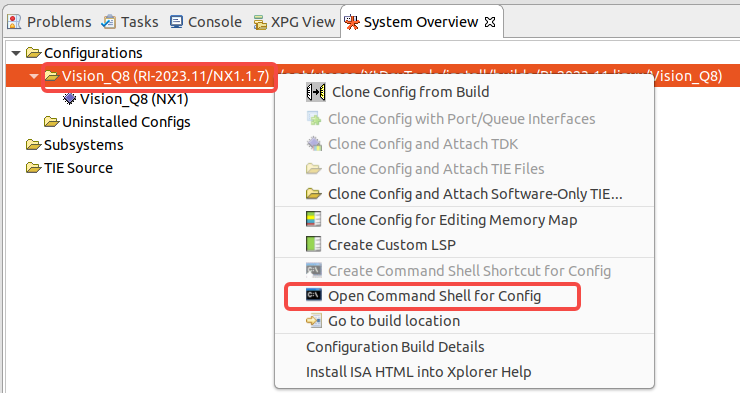
Navigate to the xtensa-elf/lib path:
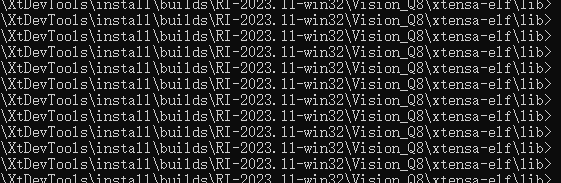
Execute xt-genldscripts -b sim. Success is indicated as follows:

Recompile the vdsp project and proceed with sim soft simulation.
What if an abnormal stop occurs during Idma transfer?
If this happens, check if a runtime is set in the idma init function. Setting it to 0 disables the time limit:

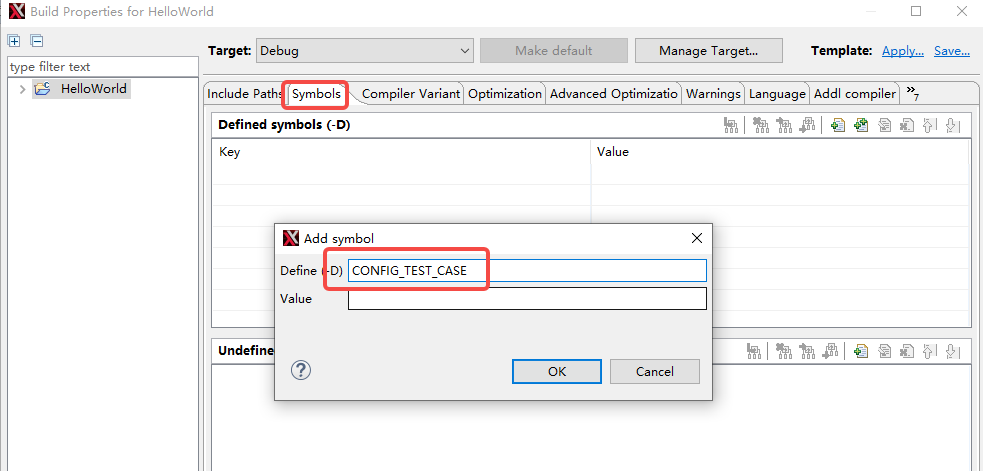
What if an image compiled in a Windows environment prompts "dcore0_rpmsg_op server not start"?
You need to manually add CONFIG_TEST_CASE in Build Properties:
What if thread status viewing does not work in an environment with more than 32 total threads?
This is because when implementing the thread dump function, the array size for storing thread information is defined as 32 by default. You can increase the array size to support viewing status for more than 32 threads.
For example, the following modification supports viewing status for up to 64 threads:
static int32_t cycle_check(void * arg, int32_t unused)
{
    const int32_t countMax = 64;
Adaptation Notes for VDSP Exit Process
The system relies on the normal operation of the dev_control thread. Users control whether it is started by the hb_platform_init function via the enable macro CONFIG_PLATFORM_INIT_BUILTIN_THREADS. If the user does not enable it, they need to create the corresponding thread themselves. Additionally, user threads must follow the procedure below:
(1) Add exit judgment logic in the user task loop thread: Call the function hb_is_thread_stop. A return value of 1 indicates the thread needs to exit immediately.
VDSP Log Usage Scenario Restrictions
(1) Current interrupt handlers do not support directly or indirectly using the standard C library's printf. Using it will cause VDSP to hang.
(2) Direct or indirect use of the standard C library's printf before hb_platform_init is not supported. Using it may cause low-probability boot failures.
VDSP Compilation Notes
(1) Platform macros need to be defined. Macros for different platforms include: CONFIG_ARCH_HOBOT_SOC_SIGIE, CONFIG_ARCH_HOBOT_SOC_SIGIP, CONFIG_ARCH_HOBOT_SOC_SIGIB.
(2) By default, different VDSP COREs can load the same FW. Therefore, there is no need to define CONFIG_VDSP macros (CONFIG_VDSP0/CONFIG_VDSP1 are no longer used).
Safe Power-Off and Sleep Process
(1) During the safe power-off and sleep process, the driver checks the VDSP Firmware status and ensures it has entered a stopped state before proceeding with corresponding actions. It is also recommended to implement the VDSP exit process in the APP.
VDSP sample
Function Overview
This section introduces the VDSP use case for the S100 series SOC chip platform. This use case implements VDSP start/stop, inter-core message transmission and reception, and VDSP image processing.
Software Architecture Description
Development needs to be carried out simultaneously on both the ARM side and the VDSP side. The current implementation is based on the RPMSG IPC communication mechanism to achieve client/server business interaction logic.
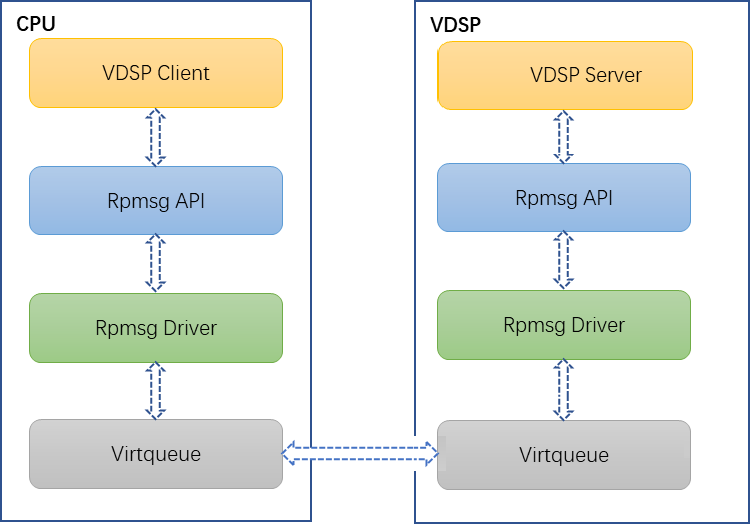
ARM Side Development Process
The main tasks for the ARM side user are loading the VDSP Firmware, connecting to the services on the VDSP side, and sending rpmsg computation requests to the VDSP side as a client.
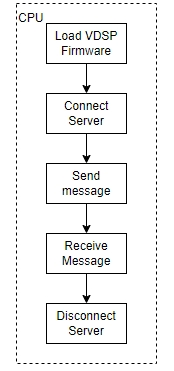
VDSP Side Development Process
The main tasks on the VDSP side are initializing its operating environment, starting relevant services (the VDSP side can start multiple services as a server, supporting a one-to-one mode), receiving and replying to information from the client side via the rpmsg mechanism. Additionally, other threads can be started for business development.
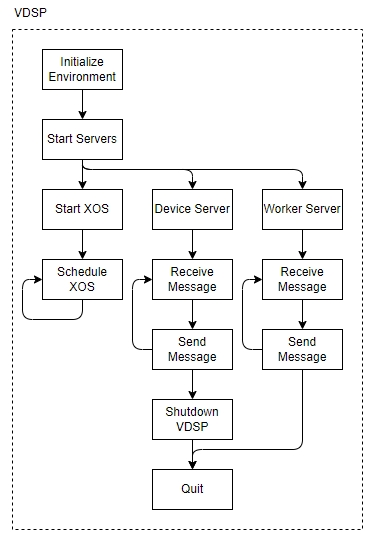
This Use Case Process Description:
The interaction process between the ARM side and the VDSP is as follows:
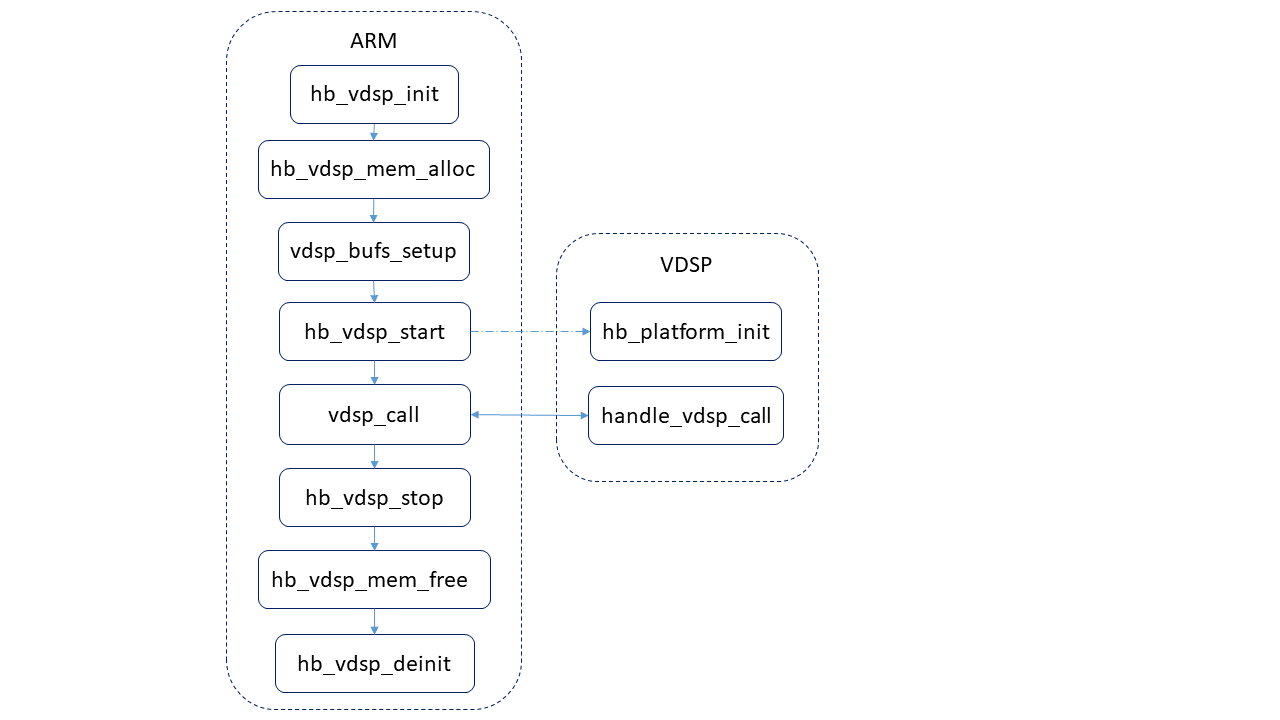
ARM Side:
- Start VDSP
- Connect to rpmsg server (dcore0_rpmsg_op)
- Send rpmsg to VDSP
- Receive rpmsg sent by VDSP
- Disconnect from rpmsg server
- Stop VDSP
VDSP Side:
- Initialize environment
- Start rpmsg server (dcore0_rpmsg_op)
- Receive rpmsg sent by ARM
- Parse the received rpmsg data and execute the corresponding image processing function
- Reply to ARM with rpmsg containing the execution result
Code Location and Directory Structure
Code Paths
- Code locations:
  ARM side: {sdk_dir}/source/hobot-sp-samples/debian/app/vdsp_demo/
  DSP side: {sdk_dir}/vdsp_fw/samples/libxi-sample/
- Directory structure:
# Source and binary file directory structure, excluding build framework files (Makefile, Kconfig, etc.)
  ARM:
     └── src
         └── vdsp_sample.c

  DSP:
     └── main.c
Compilation
Compilation Instructions
Compilation commands
# ARM side sample compilation can be done directly on the board. The path of the sample on the board is as follows:
/app/vdsp_demo/vdsp_sample
# Compilation command
cd /app/vdsp_demo/vdsp_sample && Makefile

# VDSP compilation command
cd vdsp_fw && ./make.sh

# VDSP side output file:
{sdk_dir}/vdsp_fw/samples/libxi-sample/vdsp0-{build_type}
Running
Supported Platforms
S100
Hardware Environment Setup
N/A
Running Parameter Description
The following lists the input parameters supported by the vdsp sample. Descriptions of all parameters can be obtained using --help.
| Parameter Name | Usage | Default Value |
|---|---|---|
dsp_id | dsp_id=<0> Specify VDSP 0 | 0 |
vdsp_pathname | vdsp_pathname=*, Specify VDSP firmware path | /app/vdsp_demo/vdsp_sample/res/q8sample |
sample-type | sample-type=<0,1>, Specify sample type: 0 for basic sample, 1 for full link sample | 1 |
help | Print help information | — |
Running Result Description
root@ubuntu:/app/vdsp_demo/vdsp_sample# ./vdsp_sample
vdsp_sample_cxt_s:
        vdsp_id:0
        vdsp_pathname:/app/vdsp_demo/vdsp_sample/res/q8sample
vdsp_call_params_s:
        cmd:xi-sample-flip
        type:1
        buf_width:128
        buf_height:128
        vdsp_buf0:0xfffc0000
        vdsp_buf1:0xfffd0000
recv_buf: 0
After the execution finishes, the above log output will be obtained. recv_buf returning 0 indicates normal execution.
VDSP API Introduction
Inter-core Communication RPMSG Interface
Inter-core Communication RPMSG Header Files and Libraries
-
VDSP side
Header file: hb_rpmsg_interface.h
Library: None
-
Acore side
Header file: hb_rpmsg_interface.h
Library: librpmsg.so
Inter-core Communication RPMSG API Return Values
VDSP side
#define RPMSG_ERR_INVALID_ARG               (-1)
#define RPMSG_ERR_PATH_NOT_LINK             (-2)
#define RPMSG_ERR_SERVER_NOT_CONNECT        (-3)
#define RPMSG_ERR_OUT_OF_RES                 (-4)
#define RPMSG_ERR_SEND_BUF_OVERSIZE         (-5)
#define RPMSG_ERR_NO_MEM                     (-6)
#define RPMSG_ERR_TIMEOUT                    (-7)
#define RPMSG_ERR_RECV_BUF_OVERFLOW          (-8)
#define RPMSG_ERR_INVALID_SERVER             (-9)
#define RPMSG_ERR_CRC_CHECK                  (-10)
Acore side
#define RPMSG_ERR_INVALID_ARG           (-1)
#define RPMSG_ERR_INVALID_SERVER        (-2)
#define RPMSG_ERR_OUT_OF_RES             (-3)
#define RPMSG_ERR_KER_USR_TRANS          (-4)
#define RPMSG_ERR_SEND_BUF_OVERSIZE      (-5)
#define RPMSG_ERR_NO_MEM                  (-6)
#define RPMSG_ERR_TIMEOUT                  (-7)
#define RPMSG_ERR_SIGNAL_STOP              (-8)
#define RPMSG_ERR_RECV_BUF_OVERFLOW        (-9)
#define RPMSG_ERR_NOT_START_SERVER         (-10)
#define RPMSG_ERR_CRC_CHECK                 (-11)
#define RPMSG_ERR_DRV_VERSION               (-12)
#define RPMSG_ERR_UNKNOWN_ERR               (-13)
Inter-core Communication RPMSG (VDSP side) API
hb_rpmsg_start_server
【Function Declaration】
int32_t hb_rpmsg_start_server(const char* server_name, uint32_t flags, rl_ept_rx_cb_t rx_cb, void* rx_cb_data, uint32_t timeout, rpmsg_handle** handle);
【Parameter Description】
- [IN] server_name: Service name
- [IN] flags: Communication characteristics
- [IN] rx_cb: Callback function for receiving messages
- [IN] rx_cb_data: Callback parameter
- [IN] timeout: Receive timeout (in ms)
- [OUT] handle: Represents the rpmsg communication handle
Available service names for users:
VDSP0
- dcore0_acore_heart.
- dcore0_rpmsg_bpu.
- dcore0_rpmsg_op.
VDSP1
- dcore1_acore_heart.
- dcore1_rpmsg_bpu.
- dcore1_rpmsg_op.
S100 does not have VDSP1, please pay attention when using.
【Description】
Usage of Flags parameter (using bitwise operators):
- RPMSG_F_BLOCK Blocking transmission
- RPMSG_F_NONBLOCK Non-blocking transmission
- RPMSG_F_CRC_CHECK Support CRC check
【Return Value】
- Success: 0
- Failure: Negative error code for exception, refer to Inter-core Communication RPMSG API Return Values
【Function Description】
Start rpmsg communication service
【Example Code】
#include <hb_rpmsg_interface.h>
#include <hb_vdsp_log.h>
#include <platform.h>

#ifdef CNFIG_VDSP0
static char test_server_name[] = "dcore0_rpmsg_op";
#elif CNFIG_VDSP1
static char test_server_name[] = "dcore1_rpmsg_op";
#endif
#define CORE_COM_TX_RX_PAYLOAD_SIZE     (240)
#define MAX_PAYLAD (CORE_COM_TX_RX_PAYLOAD_SIZE)
static char buffer_rev[MAX_PAYLAD] = {0};
static char temp_hope[MAX_PAYLAD] ="I am test string,hope you can see me";

int32_t mycallback(void *payload, uint32_t payload_len, uint32_t src, void *priv)
{
    printf("[vdsp0],mycallback test! payload is 0x%x ,payload_len is %d, \
        src is %d\n",payload,payload_len,src);
    memcpy((void*)buffer_rev, payload, payload_len);
}

int32_t rpmsg_test()
{
    int32_t ret;
    rpmsg_handle *handle = NULL;

    //recv, block
    ret = hb_rpmsg_start_server(test_server_name, RPMSG_F_BLOCK |
    RPMSG_F_QUEUE_RECV, mycallback, NULL,0, &handle);
    if(ret != 0) {
        DSP_ERR("hb_rpmsg_start_server fail!,ret = %d\n", ret);
        hb_rpmsg_stop_server(handle);
        return -1;
    }
    DSP_INF("%s server start,(block/recv) way!!\n", test_server_name);
    ret = hb_rpmsg_recv(handle, buffer_rev, MAX_PAYLAD);
    if (ret < 0) {
        DSP_ERR("hb_rpmsg_recv(block/recv) failed, ret = %d\n", ret);
        hb_rpmsg_stop_server(handle);
        return -1;
    }
    DSP_INF("hb_rpmsg_recv(block/recv), buffer_rev : %s\n", buffer_rev);
    ret = hb_rpmsg_send(handle, buffer_rev, MAX_PAYLAD);
    if (ret < 0) {
        DSP_ERR("rpmsg_send error [[[%d]]]\n", ret);
        hb_rpmsg_stop_server(handle);
        return -1;
    }
    ret = hb_rpmsg_stop_server(handle);
    if (ret < 0) {
        DSP_ERR("server:%s stop error [[[%d]]]\n", test_server_name, ret);
        return -1;
    }
    DSP_INF("%s server stop(block/recv)!!\n", test_server_name);
    return 0;
}
hb_rpmsg_stop_server
【Function Declaration】
int32_t hb_rpmsg_stop_server(rpmsg_handle* handle);
【Parameter Description】
- [IN] handle: Represents the rpmsg communication handle
【Return Value】
- Success: 0
- Failure: Negative error code for exception, refer to Inter-core Communication RPMSG API Return Values
【Function Description】
Stop rpmsg communication service
【Example Code】
Refer to hb_rpmsg_start_server
hb_rpmsg_send
【Function Declaration】
int32_t hb_rpmsg_send(const rpmsg_handle* handle, char *buf, uint32_t len);
【Parameter Description】
- [IN] handle: Represents the rpmsg communication handle
- [IN] buf: Address of data to be sent
- [IN] len: Length of data to be sent, optional values: 1 ~ 240
【Return Value】
- Success: Number of bytes actually sent
- Failure: Negative error code for exception, refer to Inter-core Communication RPMSG API Return Values
【Function Description】
Send communication service frame data
【Example Code】
Refer to hb_rpmsg_start_server
hb_rpmsg_recv
【Function Declaration】
int32_t hb_rpmsg_recv(rpmsg_handle* handle, char* buf, uint32_t len);
【Parameter Description】
- [IN] handle: Represents the rpmsg communication handle
- [OUT] buf: Address for receiving data
- [IN] len: Length of data to receive, optional values: 1 ~ 240
【Return Value】
- Success: Number of bytes actually received
- Failure: Negative error code for exception, refer to Inter-core Communication RPMSG API Return Values
【Function Description】
Receive communication service frame data
【Example Code】
Refer to hb_rpmsg_start_server
hb_rpmsg_send_timeout
【Function Declaration】
int32_t hb_rpmsg_send_timeout(const rpmsg_handle* handle, char* buf, uint32_t len, uint32_t timeout);
【Parameter Description】
- [IN] handle: Represents the rpmsg communication handle
- [IN] buf: Address of data to be sent
- [IN] len: Length of data to be sent, optional values: 1 ~ 240
- [IN] timeout: Sending blocking duration
【Return Value】
- Success: Number of bytes actually sent
- Failure: Negative error code for exception, refer to Inter-core Communication RPMSG API Return Values
【Function Description】
Send communication service frame data with timeout parameter
【Example Code】
#include <hb_rpmsg_interface.h>
#include <hb_vdsp_log.h>
#include <platform.h>

#ifdef CNFIG_VDSP0
static char test_server_name[] = "dcore0_rpmsg_op";
#elif CNFIG_VDSP1
static char test_server_name[] = "dcore1_rpmsg_op";
#endif
#define CORE_COM_TX_RX_PAYLOAD_SIZE     (240)
#define MAX_PAYLAD (CORE_COM_TX_RX_PAYLOAD_SIZE)
static char buffer_rev[MAX_PAYLAD] = {0};
static char temp_hope[MAX_PAYLAD] ="I am test string,hope you can see me";

int32_t mycallback(void *payload, uint32_t payload_len, uint32_t src, void *priv)
{
    printf("[vdsp0],mycallback test! payload is 0x%x ,payload_len is %d, \
        src is %d\n",payload,payload_len,src);
    memcpy((void*)buffer_rev, payload, payload_len);
}

int32_t rpmsg_test()
{
    int32_t ret;
    rpmsg_handle *handle = NULL;

    //recv, block
    ret = hb_rpmsg_start_server(test_server_name, RPMSG_F_BLOCK |
    RPMSG_F_QUEUE_RECV, mycallback, NULL,0, &handle);
    if(ret != 0) {
        DSP_ERR("hb_rpmsg_start_server fail!,ret = %d\n", ret);
        hb_rpmsg_stop_server(handle);
        return -1;
    }
    DSP_INF("%s server start,(block/recv) way!!\n", test_server_name);
    ret = hb_rpmsg_recv_timeout(handle, buffer_rev, MAX_PAYLAD, 1000u);
    if (ret < 0) {
        DSP_ERR("hb_rpmsg_recv(block/recv) failed, ret = %d\n", ret);
        hb_rpmsg_stop_server(handle);
        return -1;
    }
    DSP_INF("hb_rpmsg_recv(block/recv), buffer_rev : %s\n", buffer_rev);
    ret = hb_rpmsg_send_timeout(handle, buffer_rev, MAX_PAYLAD, 1000u);
    if (ret < 0) {
        DSP_ERR("rpmsg_send error [[[%d]]]\n", ret);
        hb_rpmsg_stop_server(handle);
        return -1;
    }
    ret = hb_rpmsg_stop_server(handle);
    if (ret < 0) {
        DSP_ERR("server:%s stop error [[[%d]]]\n", test_server_name, ret);
        return -1;
    }
    DSP_INF("%s server stop(block/recv)!!\n", test_server_name);
    return 0;
}
hb_rpmsg_recv_timeout
【Function Declaration】
int32_t hb_rpmsg_recv_timeout(rpmsg_handle* handle, char* buf, uint32_t len, uint32_t timeout);
【Parameter Description】
- [IN] handle: Represents the rpmsg communication handle
- [OUT] buf: Address for receiving data
- [IN] len: Length of data to receive, optional values: 1 ~ 240
- [IN] timeout: Receiving blocking time
【Return Value】
- Success: Number of bytes actually received
- Failure: Negative error code for exception, refer to Inter-core Communication RPMSG API Return Values
【Function Description】
Receive communication service frame data with timeout parameter
【Example Code】
Refer to hb_rpmsg_send_timeout
Inter-core Communication RPMSG (Acore side) API
hb_rpmsg_connect_server
【Function Declaration】
int32_t hb_rpmsg_connect_server(char *server_name, int flags, int timeout, rpmsg_handle **handle);
【Parameter Description】
- [IN] server_name: Service name
- [IN] flags: Communication characteristics
- [IN] timeout: Timeout in blocking mode (in ms)
- [OUT] handle: Returns the rpmsg communication handle
【Description】
Usage of Flags parameter (using bitwise operators):
- RPMSG_F_BLOCK Blocking transmission
- RPMSG_F_NONBLOCK Non-blocking transmission
- RPMSG_F_CRC_CHECK Support CRC check
【Return Value】
- Success: 0
- Failure: Negative error code for exception, refer to Inter-core Communication RPMSG API Return Values
【Function Description】
Connect to communication service
【Example Code】
#include <stdio.h>
#include <stdlib.h>
#include <pthread.h>
#include <unistd.h>
#include <rpmsg_lib.h>
void usage(char *s)
{
    printf("usage: %s server_name timeout(ms)\n", s);
}
int main(int argc, char *argv[])
{
    int ret = 0;
    struct rpmsg_handle *handle = NULL;
    char buffer[240] = {0};
    int timeout = 0;
    int cnt_max_connect = 10;
    uint32_t major, minor, patch;
    char *p;

    if (argc != 3) {
        usage(argv[0]);
        return -1;
    }
    timeout = atoi(argv[2]);
    if (timeout < 0) {
        printf("invalid timeout: %d\n", timeout);
        usage(argv[0]);
        return -1;
    }
    ret = hb_rpmsg_get_version(&major, &minor, &patch);
    if (ret < 0) {
        printf("rpmsg get version failed\n");
        return ret;
    } else {
        printf("rpmsg verion: %u.%u.%u\n", major, minor, patch);
    }
    reconnect:
    ret = hb_rpmsg_connect_server(argv[1], RPMSG_F_BLOCK, timeout,
    &handle);
    if (ret < 0) {
        --cnt_max_connect;
        if ((ret == RPMSG_ERR_NOT_START_SERVER) && (cnt_max_connect)) {
            printf("rpmsg_connect_server error[%d]: %s\n", ret,
                hb_rpmsg_error_message(ret));
            usleep(100 * 1000);
            goto reconnect;
        } else {
            printf("rpmsg_connect_server error[%d]: %s\n", ret,
                hb_rpmsg_error_message(ret));
            return -1;
        }
    }
    while (1) {
        ret = hb_rpmsg_send(handle, buffer, 240);
        if (ret < 0) {
            printf("rpmsg_send error[%d]: %s\n", ret,
                hb_rpmsg_error_message(ret));
            hb_rpmsg_disconnect_server(handle);
            return -1;
        } else
            printf("recv log: %s\n", buffer);
            ret = hb_rpmsg_recv(handle, buffer, 240);
            if (ret < 0) {
                printf("rpmsg_recv error[%d]: %s\n", ret,
                    hb_rpmsg_error_message(ret));
                hb_rpmsg_disconnect_server(handle);
                return -1;
            }
        }
    }
    return 0;
}
hb_rpmsg_disconnect_server
【Function Declaration】
int32_t hb_rpmsg_disconnect_server(rpmsg_handle* handle);
【Parameter Description】
- [IN] handle: Represents the rpmsg communication handle
【Return Value】
- Success: 0
- Failure: Negative error code for exception, refer to Inter-core Communication RPMSG API Return Values
【Function Description】
Disconnect communication service
【Example Code】
Refer to hb_rpmsg_connect_server
hb_rpmsg_send
【Function Declaration】
int32_t hb_rpmsg_send(const rpmsg_handle* handle, char *buf, int32_t len);
【Parameter Description】
- [IN] handle: Represents the rpmsg communication handle
- [IN] buf: Address of data to be sent
- [IN] len: Length of data to be sent, optional values: 1 ~ 240
【Return Value】
- Success: Number of bytes actually sent
- Failure: Negative error code for exception, refer to Inter-core Communication RPMSG API Return Values
【Function Description】
Send specific communication service frame data
【Example Code】
Refer to hb_rpmsg_connect_server
hb_rpmsg_recv
【Function Declaration】
int32_t hb_rpmsg_recv(rpmsg_handle* handle, char* buf, int32_t len);
【Parameter Description】
- [IN] handle: Represents the rpmsg communication handle
- [OUT] buf: Address for receiving data
- [IN] len: Length of data to receive, optional values: 1 ~ 240
【Return Value】
- Success: Number of bytes actually received
- Failure: Negative error code for exception, refer to Inter-core Communication RPMSG API Return Values
【Function Description】
Receive communication service frame data
hb_rpmsg_send_timeout
【Function Declaration】
int32_t hb_rpmsg_send_timeout(const rpmsg_handle* handle, char *buf, int32_t len, int32_t timeout);
【Parameter Description】
- [IN] handle: Represents the rpmsg communication handle
- [IN] buf: Address of data to be sent
- [IN] len: Length of data to be sent, optional values: 1 ~ 240
- [IN] timeout: Sending blocking duration
【Return Value】
- Success: Number of bytes actually sent
- Failure: Negative error code for exception, refer to Inter-core Communication RPMSG API Return Values
【Function Description】
Send communication service frame data with timeout parameter
【Example Code】
#include <stdio.h>
#include <stdlib.h>
#include <pthread.h>
#include <unistd.h>
#include <rpmsg_lib.h>
void usage(char *s)
{
    printf("usage: %s server_name timeout(ms)\n", s);
}
int main(int argc, char *argv[])
{
    int ret = 0;
    struct rpmsg_handle *handle = NULL;
    char buffer[240] = {0};
    int timeout = 0;
    int cnt_max_connect = 10;
    if (argc != 3) {
        usage(argv[0]);
        return -1;
    }
    timeout = atoi(argv[2]);
    if (timeout < 0) {
        printf("invalid timeout: %d\n", timeout);
        usage(argv[0]);
        return -1;
    }
    reconnect:
    ret = hb_rpmsg_connect_server(argv[1], RPMSG_F_BLOCK, timeout,
    &handle);
    if (ret < 0) {
        --cnt_max_connect;
        if ((ret == RPMSG_ERR_NOT_START_SERVER) && (cnt_max_connect)) {
            printf("rpmsg_connect_server error[%d]: %s\n", ret,
                hb_rpmsg_error_message(ret));
            usleep(100 * 1000);
            goto reconnect;
        } else {
            printf("rpmsg_connect_server error[%d]: %s\n", ret,
                hb_rpmsg_error_message(ret));
            return -1;
        }
    }
    while (1) {
        ret = hb_rpmsg_send_timeout(handle, buffer, 240, 1000);
        if (ret < 0) {
            printf("rpmsg_send error[%d]: %s\n", ret,
                hb_rpmsg_error_message(ret));
            hb_rpmsg_disconnect_server(handle);
            return -1;
        } else
            printf("recv log: %s\n", buffer);
            ret = hb_rpmsg_recv_timeout(handle, buffer, 240, 1000);
            if (ret < 0) {
                printf("rpmsg_recv error[%d]: %s\n", ret,
                    hb_rpmsg_error_message(ret));
                hb_rpmsg_disconnect_server(handle);
                return -1;
            }
        }
    }
    return 0;
}
hb_rpmsg_recv_timeout
【Function Declaration】
int32_t hb_rpmsg_recv_timeout(rpmsg_handle* handle, char* buf, int32_t len, int32_t timeout);
【Parameter Description】
- [IN] handle: Represents the rpmsg communication handle
- [OUT] buf: Address for receiving data
- [IN] len: Length of data to receive, optional values: 1 ~ 240
- [IN] timeout: Receiving blocking time
【Return Value】
- Success: Number of bytes actually received
- Failure: Negative error code for exception, refer to Inter-core Communication RPMSG API Return Values
【Function Description】
Receive communication service frame data with timeout parameter
【Example Code】
Refer to hb_rpmsg_send_timeout
hb_rpmsg_get_version
【Function Declaration】
int32_t hb_rpmsg_get_version(uint32_t* major, uint32_t* minor, uint32_t* patch);
【Parameter Description】
- [OUT] major: major version number
- [OUT] minor: minor version number
- [OUT] patch: patch
【Return Value】
- Success: 0
- Failure: Negative error code for exception, refer to Inter-core Communication RPMSG API Return Values
【Function Description】
Get rpmsg dynamic library version number
【Example Code】
Refer to hb_rpmsg_connect_server
hb_rpmsg_error_message
【Function Declaration】
const char* hb_rpmsg_error_message(int32_t error_code);
【Parameter Description】
- [IN] error_code: Error code
【Return Value】
- Success: Error description string
- Failure: NULL
【Function Description】
Convert error code to error description string
【Example Code】
Refer to hb_rpmsg_connect_server
Inter-core Communication IPCFHAL Interface
Inter-core Communication IPCFHAL Header Files and Libraries
-
VDSP side
Header files: hb_ipcfhal_interface.h ipcf_hal_errno.h
Library: None
-
Acore side
Header files: hb_ipcfhal_interface.h ipcf_hal_errno.h
Library: libhbipcfhal.so
Inter-core Communication IPCFHAL API Return Values
#define IPCF_HAL_E_OK           0/**< General OK*/
#define IPCF_HAL_E_NOK          1/**< General Not OK*/
#define IPCF_HAL_E_CONFIG_FAIL      2/**< Config fail*/
#define IPCF_HAL_E_WRONG_CONFIGURATION  3/**< Wrong configuration*/
#define IPCF_HAL_E_NULL_POINTER     4/**< A null pointer was passed as an argument*/
#define IPCF_HAL_E_PARAM_INVALID    5/**< A parameter was invalid*/
#define IPCF_HAL_E_LENGTH_TOO_SMALL 6/**< Length too small*/
#define IPCF_HAL_E_INIT_FAILED      7/**< Initialization failed*/
#define IPCF_HAL_E_UNINIT       8/**< Called before initialization*/
#define IPCF_HAL_E_BUFFER_OVERFLOW  9/**< Source address or destination address Buffer overflow*/
#define IPCF_HAL_E_ALLOC_FAIL       10/**< Source alloc fail*/
#define IPCF_HAL_E_TIMEOUT      11/**< Expired the time out*/
#define IPCF_HAL_E_REINIT       12/**< Re initilize*/
#define IPCF_HAL_E_BUSY         13/**< Busy*/
#define IPCF_HAL_E_CHANNEL_INVALID  14/**< Channel is invalid*/
API return values are the negative values of the above macro definitions.
Inter-core Communication IPCFHAL (VDSP side) API
hb_ipcfhal_init
【Function Declaration】
int32_t hb_ipcfhal_init(ipcfhal_chan_t *channel);
【Parameter Description】
- [IN] channel: ipcfhal channel information
【Return Value】
- Success: =0
- Failure: <0, refer to Inter-core Communication IPCFHAL API Return Values
【Function Description】
IPCFHAL initialization
【IPCFHAL Initialization Example Code】
For complete code compilation and execution, refer to /app/vdsp_demo/vdsp_ipcfhal_sample/READTME.md
#define CFG_FILE "config.json"
#define DATA_LEN 1024

static int32_t ipcfhal_thread_func(void *arg, int32_t unused) {
  int32_t ret;
  char *ch_name = "cpu-vdsp-ins0ch0";
  ipcfhal_chan_t channel;
  uint8_t rx_data[DATA_LEN] = {0};
  uint8_t tx_data[DATA_LEN] = {0};
  int32_t timeout = -1;
  uint32_t major, minor, patch;

  ret = vdsp_server_ready(BOOT_COMPLETE_EVENT_MASK_BIT1 | BOOT_COMPLETE_EVENT_MASK_BIT2);

  ret = hb_ipcfhal_get_version(&major, &minor, &patch);
  if (ret < 0) {
    return ret;
  } else {
    printf("ipcfhal verion: %u.%u.%u\n", major, minor, patch);
  }

  ret = hb_ipcfhal_getchan_byjson(ch_name, &channel, CFG_FILE);
  if (ret < 0)
    return ret;
  ret = hb_ipcfhal_init(&channel);
  if (ret < 0)
    return ret;
  ret = hb_ipcfhal_config(&channel);
  if (ret < 0)
    return ret;

  while (hb_is_thread_stop() != 1) {
    memset(tx_data, 0x55, DATA_LEN);
    ret = hb_ipcfhal_send(tx_data, DATA_LEN, &channel);
    if (ret < 0)
      continue;

    memset((void *)rx_data, 0, DATA_LEN);
    ret = hb_ipcfhal_recv(rx_data, DATA_LEN, timeout, &channel);
    if (ret < 0)
      continue;
    for (int i = 0; i < DATA_LEN; i++) {
      if (rx_data[i] != 0x55) {
        DSP_ERR("recv rx_data[%d] err. 0x%x\n", i, rx_data[i]);
        break;
      }
    }
    xos_thread_sleep_msec(2);
  }

  return ret;
}
hb_ipcfhal_getchan_byjson
【Function Declaration】
int32_t hb_ipcfhal_getchan_byjson(const char *name, ipcfhal_chan_t *channel, const char *json_file);
【Parameter Description】
- [IN] name: ipcfhal channel name
- [IN] json_file: ipcfhal json configuration file
- [OUT] channel: ipcfhal channel information
【Return Value】
- Success: channel id
- Failure: <0, refer to Inter-core Communication IPCFHAL API Return Values
【Function Description】
IPCFHAL gets channel from json configuration file
【Example Code】
Refer to hb_ipcfhal_init
hb_ipcfhal_config
【Function Declaration】
int32_t hb_ipcfhal_config(ipcfhal_chan_t *channel);
【Parameter Description】
- [IN] channel: ipcfhal channel information
【Return Value】
- Success: >=0
- Failure: <0, refer to Inter-core Communication IPCFHAL API Return Values
【Function Description】
IPCFHAL configure channel
【Example Code】
Refer to hb_ipcfhal_init
hb_ipcfhal_send
【Function Declaration】
int32_t hb_ipcfhal_send(const uint8_t *data, int16_t length, ipcfhal_chan_t *channel);
【Parameter Description】
- [IN] data: Data buffer to send
- [IN] length: Length of the buffer to send
- [IN] channel: ipcfhal channel information
【Return Value】
- Success: Number of bytes actually sent
- Failure: <0, refer to Inter-core Communication IPCFHAL API Return Values
【Function Description】
IPCFHAL send message
【Example Code】
Refer to hb_ipcfhal_init
hb_ipcfhal_recv
【Function Declaration】
int32_t hb_ipcfhal_recv(uint8_t *data, int16_t length, int32_t timeout, ipcfhal_chan_t *channel);
【Parameter Description】
- [IN] length: Maximum length of the buffer
- [IN] timeout: 0 non-blocking, >0 blocking timeout ms, -1 blocking.
- [IN] channel: ipcfhal channel information
- [OUT] data: Buffer for received data
【Return Value】
- Success: Number of bytes actually received
- Failure: <0, refer to Inter-core Communication IPCFHAL API Return Values
【Function Description】
IPCFHAL receive message
【Example Code】
Refer to hb_ipcfhal_init
hb_ipcfhal_deinit
【Function Declaration】
int32_t hb_ipcfhal_deinit(ipcfhal_chan_t *channel);
【Parameter Description】
- [IN] channel: ipcfhal channel information
【Return Value】
- Success: =0
- Failure: <0, refer to Inter-core Communication IPCFHAL API Return Values
【Function Description】
IPCFHAL de-initialization
【Example Code】
Refer to hb_ipcfhal_init
hb_ipcfhal_trans_err
【Function Declaration】
int32_t hb_ipcfhal_trans_err(int32_t err_code, char **err_str);
【Parameter Description】
- [IN] err_code: Return value error code
- [OUT] err_str: Converted error string
【Return Value】
- Success: =0
- Failure: <0, refer to Inter-core Communication IPCFHAL API Return Values
【Function Description】
Convert IPCFHAL error code to error string
【Example Code】
Refer to hb_ipcfhal_init
hb_ipcfhal_get_version
【Function Declaration】
int32_t hb_ipcfhal_get_version(uint32_t *major, uint32_t *minor, uint32_t *patch);
【Parameter Description】
- [OUT] major: libhbipcfhal major version number
- [OUT] minor: libhbipcfhal minor version number
- [OUT] patch: libhbipcfhal patch version number
【Return Value】
- Success: =0
- Failure: <0, refer to Inter-core Communication IPCFHAL API Return Values
【Function Description】
Get the version number of the IPCFHAL library
【Example Code】
Refer to hb_ipcfhal_init
hb_ipcfhal_register_callback
【Function Declaration】
int32_t hb_ipcfhal_register_callback(uint8_t *user_data, user_cb_t user_cb, ipcfhal_chan_t *channel);
【Parameter Description】
- [IN] user_data: User data
- [IN] user_cb: User callback function
- [IN] channel: ipcfhal channel information
【Return Value】
- Success: =0
- Failure: !0, refer to Inter-core Communication IPCFHAL API Return Values
【Function Description】
IPCFHAL register callback function, VDSP side reception mode configured as callback mode; when parameter is NULL, unregister callback function, VDSP side reception mode configured as recv mode; using callback for multiple channels in the same instance will block execution, callbacks between channels of different instances will execute concurrently.
【IPCFHAL Register Callback Function Example Code】
static void test_ipcfhal_callback_func(uint8_t *userdata, int32_t instance, int32_t chan_id,
            uint8_t *buf, uint64_t size)
{
    printf("userdata[0x%llx] ins[%d] ch[%d] buf[0x%llx] size[%llu]\n",
        (uint64_t)userdata, instance, chan_id, (uint64_t)buf, size);
    *userdata = 1u;
}

static int32_t hb_libipchal_register_callback_func(void)
{
    int32_t ret = 0;
    uint8_t user_flag = 0;
    uint32_t cnt = 100u;
    uint8_t rx_data[1024] = {0};
    ipcfhal_chan_t channel;

    printf("hb_libipchal_register_callback_func start\n");
    (void)hb_ipcfhal_getchan_byjson("cpu-vdsp-ch0", &channel, "ipcf_config.json");
    (void)hb_ipcfhal_init(&channel);
    (void)hb_ipcfhal_config(&channel);
    (void)hb_ipcfhal_register_callback(&user_flag, test_ipcfhal_callback_func, &channel);

    while ((user_flag == 0) && (cnt--) ) {
        xos_thread_sleep_msec(100);
    }

    (void)hb_ipcfhal_register_callback(NULL, NULL, &channel);
    (void)hb_ipcfhal_deinit(&channel);
    printf("hb_libipchal_register_callback_func end\n");

    return 0;
}
Inter-core Communication IPCFHAL (Acore side) API
hb_ipcfhal_init
【Function Declaration】
int32_t hb_ipcfhal_init(ipcfhal_chan_t *channel);
【Parameter Description】
- [IN] channel: ipcfhal channel
【Return Value】
- Success: =0
- Failure: !0, refer to Inter-core Communication IPCFHAL API Return Values
【Function Description】
IPCFHAL initialization
【IPCFHAL Initialization Example Code】
For complete code compilation and execution, refer to /app/vdsp_demo/vdsp_ipcfhal_sample/READTME.md
{
  "log_level": 0,
  "config_num": 2,
  "config_num_max":256,
  "config_0": {
    "name": "cpu2vdsp_ins22ch0",
    "instance": 22,
    "channel": 0,
    "pkg_size_max": 4096,
    "fifo_size": 64000,
    "fifo_type": 0,
    "ipcf_dev_path":"/dev/ipcdrv",
    "ipcf_dev_name":"ipcdrv"
  },
  "config_1": {
    "name": "cpu2vdsp_ins22ch1",
    "instance": 22,
    "channel": 1,
    "pkg_size_max": 4096,
    "fifo_size": 64000,
    "fifo_type": 0,
    "ipcf_dev_path":"/dev/ipcdrv",
    "ipcf_dev_name":"ipcdrv"
  }
}

/*************************************************************************
 *                     COPYRIGHT NOTICE
 *            Copyright 2022-2024, D-Robotics Co., Ltd.
 *                   All rights reserved.
 *************************************************************************/

/******************************************************************************/
/*----------------------------------Includes----------------------------------*/
/******************************************************************************/
#include <sys/time.h>
#include <unistd.h>
#include <stdio.h>
#include <string.h>
#include <getopt.h>
#include <pthread.h>
#include <semaphore.h>
#include <signal.h>
#include <stdint.h>
#include <stdio.h>
#include <stdlib.h>
#include <string.h>

#include <logging.h>
#include <hb_vdsp_mgr.h>
#include "hb_ipcf_hal.h"
#include "ipcf_hal_errno.h"
/******************************************************************************/
/*-----------------------------------Macros-----------------------------------*/
/******************************************************************************/
#define SMP_1KB_LEN		(1024)/**< sample send and recv data length*/
#define SMP_TIMEOUT_VAL		(1000)/**< sample recv timeout value*/
#define SMP_USLEEP_1MS		(1000u)/**< sample sleep 1ms*/
#define SMP_USLEEP_10MS		(10000u)/**< sample sleep 10ms*/
#define SMP_SLEEP_1S		(1u)/**< sample sleep 1s*/
#define SMP_RUN_TIME		(10l)/**< sample run time, unit: s*/
#define SMP_100CNT		(100u)/**< sample 100 counts*/
#define SMP_CHAN_NUM		(1)/**< sample channel number*/
#define SMP_THREAD_NUM		(SMP_CHAN_NUM * 2)/**< sample thread number*/
#define SMP_ROLL_POS		(4)/**< sample rolling count position*/
#define SMP_CFG_FILE	"/app/vdsp_demo/vdsp_ipcfhal_sample/ipcfhal_config.json"

/******************************************************************************/
/*-------------------------Function Prototypes--------------------------------*/
/******************************************************************************/
void *send_pthread(void *argv);
void *recv_pthread(void *argv);

/******************************************************************************/
/*---------------------------- Local Function -------------------------------*/
/******************************************************************************/
/*thread arg*/
struct th_arg_t {
  ipcfhal_chan_t ch;/**< ipcfhal channel*/
  bool Is_Enable;/**< thread status*/
  uint32_t data_len;/**< send data length*/
  uint32_t sleep_time;/**< send period*/
  bool result;/**< thread running result*/
};

volatile sig_atomic_t g_running = true;

void signal_handler(int sig) {
  if (sig == SIGINT)
    g_running = false;
}

static void *tx_pthread(void *argv)
{
  int32_t ret = 0;
  struct th_arg_t *pth_arg = (struct th_arg_t *)argv;
  uint8_t tx_data[SMP_1KB_LEN] = {0u};

  if (pth_arg == NULL) {
    return NULL;
  }

  while (pth_arg->Is_Enable) {
    memset(tx_data, 0x55, SMP_1KB_LEN);
    ret = hb_ipcfhal_send(tx_data, pth_arg->data_len, &pth_arg->ch);
    if (ret != (int32_t)pth_arg->data_len) {/*return data_len*/
      pr_err("Ins[%u]Ch[%u] send failed\n",
        pth_arg->ch.instance, pth_arg->ch.id);
      pth_arg->result = false;
    }
    usleep(pth_arg->sleep_time);
  }

  pr_info("[%s End]Ins[%u]Ch[%u]\n",
    __func__, pth_arg->ch.instance, pth_arg->ch.id);

  return NULL;
}

static void *rx_pthread(void *argv)
{
  int32_t ret = 0;
  struct th_arg_t *pth_arg = (struct th_arg_t *)argv;
  uint8_t data[SMP_1KB_LEN] = {0u};
  int32_t timeout = SMP_TIMEOUT_VAL;

  if (pth_arg == NULL) {
    return NULL;
  }

  while (pth_arg->Is_Enable) {
    memset(data, 0u, pth_arg->data_len);
    ret = hb_ipcfhal_recv(data, SMP_1KB_LEN, timeout, &pth_arg->ch);
    if (ret != -IPCF_HAL_E_TIMEOUT && ret < 0) {
      pr_err("Ins[%u]Ch[%u] recv failed: %d\n",
        pth_arg->ch.instance, pth_arg->ch.id, ret);
      pth_arg->Is_Enable = false;
      pth_arg->result = false;
      break;
    }

    if (ret >= 0) {
      for (int i = 0; i < SMP_1KB_LEN; i++) {
        if (data[i] != 0x55) {
          pr_err("recv data[%d] err. 0x%x\n", i, data[i]);
          break;
        }
      }
    } else if (ret == -IPCF_HAL_E_TIMEOUT) {
      pth_arg->result = false;
    }

    usleep(pth_arg->sleep_time);
  }
  pr_info("[%s End]Ins[%u]Ch[%u]\n",
    __func__, pth_arg->ch.instance, pth_arg->ch.id);

  return NULL;
}

/******************************************************************************/
/*---------------------------- Global Function -------------------------------*/
/******************************************************************************/
int main(int argc, char *argv[])
{
  const char *json_path = SMP_CFG_FILE;
  struct timespec test_start_time, test_cur_time;
  int32_t ret = 0;
  bool result = true;
  pthread_t thread_tid[SMP_THREAD_NUM];
  struct th_arg_t thread_arg[SMP_CHAN_NUM];
  const char *chan_name[SMP_CHAN_NUM] = {
    "cpu2vdsp_ins22ch0"
  };
  int32_t vdsp_id = 0;
  int32_t timeout = 1000;
  const char *vdsp_pathname = "/app/vdsp_demo/vdsp_ipcfhal_sample/res/q8sample";

  signal(SIGINT, signal_handler);

  ret = hb_vdsp_init(vdsp_id);
  if (ret) {
    pr_err("vdsp init failed, ret %d\n", ret);
    return ret;
  }

  ret = hb_vdsp_start(vdsp_id, timeout, vdsp_pathname);
  if (ret) {
    pr_err("vdsp start failed, ret %d\n", ret);
    return ret;
  }

  for (int32_t i = 0; i < SMP_CHAN_NUM; i++) {
    /*step1: get channel info by json file*/
    ret = hb_ipcfhal_getchan_byjson(chan_name[i], &thread_arg[i].ch, json_path);
    if (ret < 0) {/* return channel id*/
      pr_err("%s not found, ret %d\n", chan_name[i], ret);
      hb_vdsp_stop(vdsp_id);
      hb_vdsp_deinit(vdsp_id);
      return ret;
    }

    /*step2: init channel*/
    ret = hb_ipcfhal_init(&thread_arg[i].ch);
    if (ret < 0) {
      pr_err("%s init failed, ret %d\n", thread_arg[i].ch.name, ret);
      for (int32_t j = 0; j < i; j++) {
        hb_ipcfhal_deinit(&thread_arg[j].ch);
      }
      hb_vdsp_stop(vdsp_id);
                        hb_vdsp_deinit(vdsp_id);
      return ret;
    }

    /*step3: config channel*/
    ret = hb_ipcfhal_config(&thread_arg[i].ch);
    if (ret < 0) {
      pr_err("%s config failed, ret %d\n", thread_arg[i].ch.name, ret);
      for (int32_t j = 0; j <= i; j++) {
        hb_ipcfhal_deinit(&thread_arg[j].ch);
      }
      hb_vdsp_stop(vdsp_id);
                        hb_vdsp_deinit(vdsp_id);
      return ret;
    }

    /*step4: set thread arg*/
    thread_arg[i].sleep_time = SMP_USLEEP_10MS;
    thread_arg[i].data_len = SMP_1KB_LEN;
    thread_arg[i].Is_Enable = true;
    thread_arg[i].result = true;
    (void)pthread_create(&thread_tid[i], NULL, rx_pthread, &thread_arg[i]);
    (void)pthread_create(&thread_tid[i+1], NULL, tx_pthread, &thread_arg[i]);
  }

  /*step5: run send and recv thread*/
  clock_gettime(CLOCK_MONOTONIC, &test_start_time);
  clock_gettime(CLOCK_MONOTONIC, &test_cur_time);
  while (g_running) {
    for (int32_t i = 0; i < SMP_CHAN_NUM; i++) {
      if (thread_arg[i].Is_Enable == false)
        break;
    }
    if (test_cur_time.tv_sec - test_start_time.tv_sec > SMP_RUN_TIME)
      break;

    sleep(SMP_SLEEP_1S);
    clock_gettime(CLOCK_MONOTONIC, &test_cur_time);
  }

  /*step6: deinit channel*/
  for (int32_t i = 0; i < SMP_CHAN_NUM; i++) {
    void *ret;
    thread_arg[i].Is_Enable = false;//stop thread
    usleep(SMP_USLEEP_10MS);
    pthread_join(thread_tid[i], &ret);
    pthread_join(thread_tid[i+1], &ret);
    (void)hb_ipcfhal_deinit(&thread_arg[i].ch);

    result = (result && thread_arg[i].result);
  }

  if (result == false) {
    pr_err("[ipc-sample] ipc sample running failed\n");
  } else {
    pr_info("[ipc-sample] ipc sample running success\n");
  }

  ret = hb_vdsp_stop(vdsp_id);
  if (ret) {
    pr_err("vdsp stop failed, ret %d\n", ret);
    return ret;
  }

  ret = hb_vdsp_deinit(vdsp_id);
  if (ret) {
    pr_err("vdsp deinit failed, ret %d\n", ret);
    return ret;
  }
  return ret;
}
hb_ipcfhal_getchan_byjson
【Function Declaration】
int32_t hb_ipcfhal_getchan_byjson(const char *name, ipcfhal_chan_t *channel, const char *json_file);
【Parameter Description】
- [IN] name: ipcfhal channel name
- [IN] json_file: ipcfhal json configuration file
- [OUT] channel: ipcfhal channel information
【Return Value】
- Success: >=0
- Failure: <0, refer to Inter-core Communication IPCFHAL API Return Values
【Function Description】
IPCFHAL gets channel from json configuration file. After channel initialization, users are not allowed to modify structure member values.
【Example Code】
Refer to hb_ipcfhal_init
hb_ipcfhal_config
【Function Declaration】
int32_t hb_ipcfhal_config(ipcfhal_chan_t *channel);
【Parameter Description】
- [IN] channel: ipcfhal channel information
【Return Value】
- Success: >=0
- Failure: <0, refer to Inter-core Communication IPCFHAL API Return Values
【Function Description】
IPCFHAL configure channel
【Example Code】
Refer to hb_ipcfhal_init
hb_ipcfhal_send
【Function Declaration】
int32_t hb_ipcfhal_send(const uint8_t *data, uint32_t length, ipcfhal_chan_t *channel);
【Parameter Description】
- [IN] data: Data buffer to send
- [IN] length: Length of the buffer to send
- [IN] channel: Channel information
【Return Value】
- Success: Number of bytes actually sent
- Failure: <0, refer to Inter-core Communication IPCFHAL API Return Values
【Function Description】
IPCFHAL send message
【Example Code】
Refer to hb_ipcfhal_init
hb_ipcfhal_recv
【Function Declaration】
int32_t hb_ipcfhal_recv(uint8_t *data, uint32_t length, int32_t timeout, ipcfhal_chan_t *channel);
【Parameter Description】
- [IN] length: Maximum length of the buffer
- [IN] timeout: 0 non-blocking, >0 blocking timeout ms, -1 blocking
- [IN] channel: Channel information
- [OUT] data: Buffer for received data
【Return Value】
- Success: Number of bytes actually received
- Failure: <0, refer to Inter-core Communication IPCFHAL API Return Values
【Function Description】
IPCFHAL receive message
【Example Code】
Refer to hb_ipcfhal_init
hb_ipcfhal_deinit
【Function Declaration】
int32_t hb_ipcfhal_deinit(ipcfhal_chan_t *channel);
【Parameter Description】
- [IN] channel: Channel information
【Return Value】
- Success: =0
- Failure: !0, refer to Inter-core Communication IPCFHAL API Return Values
【Function Description】
IPCFHAL de-initialization
【Example Code】
Refer to hb_ipcfhal_init
hb_ipcfhal_trans_err
【Function Declaration】
int32_t hb_ipcfhal_trans_err(int32_t err_code, char **err_str);
【Parameter Description】
- [IN] err_code: Return value error code
- [OUT] err_str: Converted error string
【Return Value】
- Success: =0
- Failure: !0, refer to Inter-core Communication IPCFHAL API Return Values
【Function Description】
Convert IPCFHAL error code to error string
【Example Code】
Refer to hb_ipcfhal_init
hb_ipcfhal_get_version
【Function Declaration】
int32_t hb_ipcfhal_get_version(uint32_t *major, uint32_t *minor, uint32_t *patch);
【Parameter Description】
- [OUT] major: libhbipcfhal major version number
- [OUT] minor: libhbipcfhal minor version number
- [OUT] patch: libhbipcfhal patch version number
【Return Value】
- Success: =0
- Failure: !0, refer to Inter-core Communication IPCFHAL API Return Values
【Function Description】
Get the version number of the IPCFHAL library
【Example Code】
Refer to hb_ipcfhal_init
HEAP Allocation Interface
HEAP Allocation Header Files and Link Libraries
-
VDSP Side
Header File: hb_mem_allocator.h
Link Library: None
HEAP Allocation API Return Values
#define HB_MEM_OK                                    0
#define HB_MEM_ERR_INVALID_PARAMS                    (-16777215)
#define HB_MEM_ERR_REPEAT_INIT                       (-16777214)
#define HB_MEM_ERR_HEAP_BUSY                         (-16777213)
#define HB_MEM_ERR_INSUFFICIENT_MEM                  (-16777212)
HEAP Allocation API
hb_mem_heap_initialize
【Function Declaration】
int32_t hb_mem_heap_initialize(hb_mem_heap_t heap_id, void *start_vaddr, size_t heap_size, uint32_t align);
【Parameter Description】
- [IN] heap_id: Valid heap index, optional values: 0, 1
- [IN] start_vaddr: Starting address of the heap
- [IN] heap_size: Size of the heap
- [IN] align: Alignment size of the heap space
【Return Value】
- Success: =0
- Failure: <0, refer to HEAP Allocation API Return Values
【Function Description】
Initializes the heap allocation interface
【Example Code】
int32_t ret;
void *start_vaddr[2] = {(void *)heapDRAM0, heapDRAM1};
size_t heap_size[2] = {sizeof(heapDRAM0), sizeof(heapDRAM1)};
ret = hb_mem_heap_initialize(HB_MEMRY_HEAP_DRAM_0, start_vaddr[0],
    heap_size[0], 0x10000);
if (ret < 0) {
    printf("hb_mem_heap_initialize failed ret = %d\n", ret);
    return ret;
}
ret = hb_mem_heap_deinitialize(HB_MEMRY_HEAP_DRAM_0);
if (ret < 0) {
    printf("hb_mem_heap_deinitialize failed ret = %d\n", ret);
    return ret;
}
return 0;
hb_mem_heap_deinitialize
【Function Declaration】
int32_t hb_mem_heap_deinitialize(hb_mem_heap_t heap_id);
【Parameter Description】
- [IN] heap_id: Valid heap index, optional values: 0, 1
【Return Value】
- Success: =0
- Failure: <0, refer to HEAP Allocation API Return Values
【Function Description】
Deinitializes the heap allocation interface
【Example Code】
int32_t ret;
void *start_vaddr[2] = {(void *)heapDRAM0, heapDRAM1};
size_t heap_size[2] = {sizeof(heapDRAM0), sizeof(heapDRAM1)};
ret = hb_mem_heap_initialize(HB_MEMRY_HEAP_DRAM_0, start_vaddr[0],
    heap_size[0], 0x10000);
if (ret < 0) {
    printf("hb_mem_heap_initialize failed ret = %d\n", ret);
    return ret;
}
ret = hb_mem_heap_deinitialize(HB_MEMRY_HEAP_DRAM_0);
if (ret < 0) {
    printf("hb_mem_heap_deinitialize failed ret = %d\n", ret);
    return ret;
}
return 0;
hb_mem_heap_alloc
【Function Declaration】
int32_t hb_mem_heap_alloc(hb_mem_heap_t heap_id, size_t req_size, uint32_t align, void ** vaddr);
【Parameter Description】
- [IN] heap_id: Valid heap index, optional values: 0, 1
- [IN] req_size: Size of allocation in bytes
- [IN] align: Alignment size of the heap space
- [OUT] vaddr: Starting address of the allocated buffer
【Return Value】
- Success: =0
- Failure: <0, refer to HEAP Allocation API Return Values
【Function Description】
Heap allocation interface
【Example Code】
int32_t ret;
void *start_vaddr[2] = {(void *)heapDRAM0, heapDRAM1};
size_t heap_size[2] = {sizeof(heapDRAM0), sizeof(heapDRAM1)};
uint32_t malloc_alignment = 64;
void *vaddr = NULL;
ret = hb_mem_heap_initialize(HB_MEMRY_HEAP_DRAM_0, start_vaddr[0],
heap_size[0], 0x10000);
if (ret < 0) {
    printf("hb_mem_heap_initialize failed ret = %d\n", ret);
    return ret;
}
ret = hb_mem_heap_alloc(HB_MEMRY_HEAP_DRAM_0, heap_size[0],
    malloc_alignment, &vaddr);
if (ret < 0) {
    printf("hb_mem_heap_alloc failed ret = %d\n", ret);
    hb_mem_heap_deinitialize(HB_MEMRY_HEAP_DRAM_0);
    return ret;
}
ret = hb_mem_heap_free(HB_MEMRY_HEAP_DRAM_0, vaddr);
if (ret < 0) {
    printf("hb_mem_heap_free failed ret = %d\n", ret);
    hb_mem_heap_deinitialize(HB_MEMRY_HEAP_DRAM_0);
    return ret;
}
ret = hb_mem_heap_deinitialize(HB_MEMRY_HEAP_DRAM_0);
return 0;
hb_mem_heap_free
【Function Declaration】
int32_t hb_mem_heap_free(hb_mem_heap_t heap_id, void *vaddr);
【Parameter Description】
- [IN] heap_id: Valid heap index, optional values: 0, 1
- [IN] vaddr: Starting address of the allocated buffer
【Return Value】
- Success: =0
- Failure: <0, refer to HEAP Allocation API Return Values
【Function Description】
Frees allocated heap space
【Example Code】
int32_t ret;
void *start_vaddr[2] = {(void *)heapDRAM0, heapDRAM1};
size_t heap_size[2] = {sizeof(heapDRAM0), sizeof(heapDRAM1)};
uint32_t malloc_alignment = 64;
void *vaddr = NULL;
ret = hb_mem_heap_initialize(HB_MEMRY_HEAP_DRAM_0, start_vaddr[0],
heap_size[0], 0x10000);
if (ret < 0) {
    printf("hb_mem_heap_initialize failed ret = %d\n", ret);
    return ret;
}
ret = hb_mem_heap_alloc(HB_MEMRY_HEAP_DRAM_0, heap_size[0],
    malloc_alignment, &vaddr);
if (ret < 0) {
    printf("hb_mem_heap_alloc failed ret = %d\n", ret);
    hb_mem_heap_deinitialize(HB_MEMRY_HEAP_DRAM_0);
    return ret;
}
ret = hb_mem_heap_free(HB_MEMRY_HEAP_DRAM_0, vaddr);
if (ret < 0) {
    printf("hb_mem_heap_free failed ret = %d\n", ret);
    hb_mem_heap_deinitialize(HB_MEMRY_HEAP_DRAM_0);
    return ret;
}
ret = hb_mem_heap_deinitialize(HB_MEMRY_HEAP_DRAM_0);
if (ret < 0) {
    printf("hb_mem_heap_deinitialize failed ret = %d\n", ret);
    return ret;
}
return 0;
hb_mem_heap_get_status
【Function Declaration】
int32_t hb_mem_heap_get_status(hb_mem_heap_t heap_id, hb_mem_heap_status_t *heap_status);
【Parameter Description】
- [IN] heap_id: Valid heap index, optional values: 0, 1
- [OUT] heap_status: Heap status information
【Return Value】
- Success: =0
- Failure: <0, refer to HEAP Allocation API Return Values
【Function Description】
Retrieves the heap allocation status
【Example Code】
int32_t ret;
void *start_vaddr[2] = {(void *)heapDRAM0, heapDRAM1};
size_t heap_size[2] = {sizeof(heapDRAM0), sizeof(heapDRAM1)};
hb_mem_heap_status_t heap_status = {0, };
ret = hb_mem_heap_initialize(HB_MEMRY_HEAP_DRAM_0, start_vaddr[0],
    heap_size[0], 0x10000);
if (ret < 0) {
    printf("hb_mem_heap_initialize failed ret = %d\n", ret);
    return ret;
}
ret = hb_mem_heap_get_status(HB_MEMRY_HEAP_DRAM_0, &heap_status);
if (ret < 0) {
    printf("hb_mem_heap_get_status failed ret = %d\n", ret);
    hb_mem_heap_deinitialize(HB_MEMRY_HEAP_DRAM_0);
    return ret;
}
ret = hb_mem_heap_deinitialize(HB_MEMRY_HEAP_DRAM_0);
if (ret < 0) {
    printf("hb_mem_heap_deinitialize failed ret = %d\n", ret);
    return ret;
}
return 0;
VDSP Start/Stop Control Interface
VDSP Start/Stop Control Header Files and Link Libraries
-
Acore Side
Header File: hb_vdsp_mgr.h
Link Library: libvdsp.so
VDSP Start/Stop Control API Return Values
#define HB_VDSP_OK                      (0)
#define HB_VDSP_OPEN_DEV_ERR                    (-1)
#define HB_VDSP_START_IOCTL_ERR                 (-2)
#define HB_VDSP_STOP_IOCTL_ERR                  (-4)
#define HB_VDSP_GET_STATUS_IOCTL_ERR                (-5)
#define HB_VDSP_RESET_IOCTL_ERR                 (-6)
#define HB_VDSP_PARAM_INVALID                   (-7)
#define HB_VDSP_SET_PATH_ERR                    (-8)
#define HB_VDSP_SET_NAME_ERR                    (-9)
#define HB_VDSP_CLOSE_DEV_ERR                   (-10)
#define HB_VDSP_ERR_IOC_GET_VERSION_INFO            (-11)
#define HB_VDSP_ERR_IOC_MEM_ALLOC               (-12)
#define HB_VDSP_ERR_IOC_MEM_FREE                (-13)
#define HB_VDSP_ERR_IOC_SMMU_MAP                (-14)
#define HB_VDSP_ERR_IOC_SMMU_UNMAP              (-15)
#define HB_VDSP_ERR_INIT                    (-16)
#define HB_VDSP_ERR_DEINIT                  (-17)
#define HB_VDSP_ERR_NOT_INITED                  (-18)
#define HB_VDSP_ERR_ALLOC_COM_BUF               (-19)
#define HB_VDSP_ERR_FREE_MEMBUF                 (-20)
#define HB_VDSP_ERR_GET_COM_BUF_WITH_VADDR          (-21)
#define HB_VDSP_ERR_SMMU_MAP                    (-22)
#define HB_VDSP_ERR_SMMU_UNMAP                  (-23)
#define HB_VDSP_ERR_CHECK_VERSION               (-24)
#define HB_VDSP_ERR_INSUFFICIENT_MEM                (-25)
#define HB_VDSP_ERR_MISMATCH_INTERFACE              (-26)
#define HB_VDSP_ERR_RBTREE_CREATE_NODE              (-27)
#define HB_VDSP_ERR_RBTREE_INSERT_NODE              (-28)
#define HB_VDSP_ERR_RBTREE_SEARCH_NODE              (-29)
VDSP Start/Stop Control API
hb_vdsp_get_version
【Function Declaration】
int32_t hb_vdsp_get_version(uint32_t *major, uint32_t *minor, uint32_t *patch);
【Parameter Description】
- [OUT] major: libvdsp major version number
- [OUT] minor: libvdsp minor version number
- [OUT] patch: libvdsp patch version number
【Return Value】
- Success: 0
- Failure: Negative error code, refer to VDSP Start/Stop Control API Return Values
【Function Description】
Retrieves the version number of the VDSP start/stop control library
【Example Code for Retrieving VDSP Library Version】
#include <hb_vdsp_mgr.h>

int32_t boot_lib_version_test(int32_t dsp_id)
{
    int32_t ret = 0;
    uint32_t major, minor, patch;

    ret = hb_vdsp_get_version(&major, &minor, &patch);
    if (ret != HB_VDSP_OK) {
        printf("%s dsp%d hb_vdsp_get_version ret-%d fail !\n", __func__, dsp_id, ret);
        return ret;
    }

    printf("%s Get version %d.%d.%d.\n", TAG, major, minor, patch);

    return ret;
}
hb_vdsp_init
【Function Declaration】
int32_t hb_vdsp_init(int32_t dsp_id);
【Parameter Description】
- [IN] dsp_id: DSP number, values 0 or 1, corresponding to dsp0 and dsp1
【Return Value】
- Success: 0
- Failure: Negative error code, refer to VDSP Start/Stop Control API Return Values
【Function Description】
Initializes the VDSP start/stop control library
【Example Code for Initializing VDSP Library】
#include <hb_vdsp_mgr.h>

int32_t boot_lib_init_test(int32_t dsp_id)
{
    int32_t ret = 0;

    ret = hb_vdsp_init(dsp_id);
    if (ret != HB_VDSP_OK) {
        printf("%s dsp%d hb_vdsp_init ret-%d fail !\n", __func__, dsp_id, ret);
        return ret;
    }

    ret = hb_vdsp_deinit(dsp_id);
    if (ret != HB_VDSP_OK) {
        printf("%s dsp%d hb_vdsp_deinit ret-%d fail !\n", __func__, dsp_id, ret);
        return ret;
    }

    return ret;
}
hb_vdsp_deinit
【Function Declaration】
int32_t hb_vdsp_deinit(int32_t dsp_id);
【Parameter Description】
- [IN] dsp_id: DSP number, values 0 or 1, corresponding to dsp0 and dsp1
【Return Value】
- Success: 0
- Failure: Negative error code, refer to VDSP Start/Stop Control API Return Values
【Function Description】
Releases the VDSP start/stop control library
【Example Code】
Refer to hb_vdsp_init
hb_vdsp_start
【Function Declaration】
int32_t hb_vdsp_start(int32_t dsp_id, int32_t timeout, const char *pathname);
【Parameter Description】
- [IN] dsp_id: DSP number, values 0 or 1, corresponding to dsp0 and dsp1
- [IN] timeout: 0 for asynchronous; -1 for synchronous; >0 for synchronous timeout in ms
- [IN] pathname: Full path of the VDSP image, including the image name
【Return Value】
- Success: 0
- Failure: Negative error code, refer to VDSP Start/Stop Control API Return Values
【Function Description】
Starts the VDSP
【Example Code for Synchronous VDSP Start】
#include <hb_vdsp_mgr.h>

#define VDSP_BOOT_MODE_ASYNC        (0)
#define VDSP_BOOT_MODE_SYNC         (-1)

int32_t boot_lib_sync_test(int32_t dsp_id, const char* pathname)
{
    int32_t ret = 0;
    int32_t status = 0;

    ret = hb_vdsp_init(dsp_id);
    if (ret != HB_VDSP_OK) {
        printf("%s dsp%d hb_vdsp_init ret-%d fail !\n", __func__, dsp_id, ret);
        return ret;
    }

    ret = hb_vdsp_start(dsp_id, VDSP_BOOT_MODE_SYNC, pathname);
    if (ret != HB_VDSP_OK) {
        printf("%s dsp%d hb_vdsp_start ret-%d fail !\n", __func__, dsp_id, ret);
        hb_vdsp_deinit(dsp_id);
        return ret;
    }

    ret = hb_vdsp_get_status(dsp_id, &status);
    if (ret != HB_VDSP_OK) {
        printf("%s dsp%d hb_vdsp_get_status ret-%d fail !\n", __func__, dsp_id, ret);
        hb_vdsp_stop(dsp_id);
        hb_vdsp_deinit(dsp_id);
        return ret;
    }

    ret = hb_vdsp_stop(dsp_id);
    if (ret != HB_VDSP_OK) {
        printf("%s dsp%d hb_vdsp_stop ret-%d fail !\n", __func__, dsp_id, ret);
        hb_vdsp_deinit(dsp_id);
        return ret;
    }

    ret = hb_vdsp_deinit(dsp_id);
    if (ret != HB_VDSP_OK) {
        printf("%s dsp%d hb_vdsp_deinit ret-%d fail !\n", __func__, dsp_id, ret);
        return ret;
    }

    printf("%s dsp%d boot sync pass !\n", __func__, dsp_id);
    return ret;
}

boot_lib_sync_test(0, "/app/vdsp_demo/vdsp_sample/res/q8sample");
boot_lib_sync_test(1, "/app/vdsp_demo/vdsp_sample/res/q8sample");
【Example Code for Asynchronous VDSP Start】
#include <hb_vdsp_mgr.h>
#include <poll.h>

#define VDSP_BOOT_MODE_ASYNC        (0)
#define VDSP_BOOT_MODE_SYNC         (-1)

int32_t boot_lib_async_test(int32_t dsp_id, const char* pathname)
{
    int32_t ret = 0;
    struct pollfd pollfds;
    int32_t fd;

    ret = hb_vdsp_init(dsp_id);
    if (ret != HB_VDSP_OK) {
        printf("%s dsp%d hb_vdsp_init ret-%d fail !\n", __func__, dsp_id, ret);
        return ret;
    }

    ret = hb_vdsp_start(dsp_id, VDSP_BOOT_MODE_ASYNC, pathname);
    if (ret != HB_VDSP_OK) {
        printf("%s dsp%d hb_vdsp_start ret-%d fail !\n", __func__, dsp_id, ret);
        hb_vdsp_deinit(dsp_id);
        return ret;
    }

    ret = hb_vdsp_get_fd(dsp_id, &fd);
    if (ret != HB_VDSP_OK) {
        printf("%s dsp%d hb_vdsp_get_fd ret-%d fail !\n", __func__, dsp_id, ret);
        hb_vdsp_stop(dsp_id);
        hb_vdsp_deinit(dsp_id);
        return ret;
    }

    pollfds.fd = fd;
    pollfds.events = POLLIN | POLLRDNORM;

    printf("%s dsp%d poll entry pollfds.events=0x%x fd-%d.\n", __func__, dsp_id, pollfds.events, fd);

    ret = poll(&pollfds, 1, 600);
    printf("%s dsp%d poll return pollfds.revents=0x%x ret-%d.\n", __func__, dsp_id, pollfds.revents, ret);
    if (ret <= 0) {
        printf("%s dev poll err: %d, %s\n", __func__, errno, strerror(errno));
        hb_vdsp_close_fd(fd);
        hb_vdsp_stop(dsp_id);
        hb_vdsp_deinit(dsp_id);
        return ret;
    }

    ret = hb_vdsp_close_fd(fd);
    if (ret != HB_VDSP_OK) {
        printf("%s dsp%d hb_vdsp_close_fd ret-%d fail !\n", __func__, dsp_id, ret);
        hb_vdsp_stop(dsp_id);
        hb_vdsp_deinit(dsp_id);
        return ret;
    }

    ret = hb_vdsp_stop(dsp_id);
    if (ret != HB_VDSP_OK) {
        printf("%s dsp%d hb_vdsp_stop ret-%d fail !\n", __func__, dsp_id, ret);
        hb_vdsp_deinit(dsp_id);
        return ret;
    }

    ret = hb_vdsp_deinit(dsp_id);
    if (ret != HB_VDSP_OK) {
        printf("%s dsp%d hb_vdsp_deinit ret-%d fail !\n", __func__, dsp_id, ret);
        return ret;
    }

    printf("%s dsp%d boot async pass !\n", __func__, dsp_id);
    return ret;
}

boot_lib_async_test(0, "/app/vdsp_demo/vdsp_sample/res/q8sample");
boot_lib_async_test(1, "/app/vdsp_demo/vdsp_sample/res/q8sample");
hb_vdsp_stop
【Function Declaration】
int32_t hb_vdsp_stop(int32_t dsp_id);
【Parameter Description】
- [IN] dsp_id: DSP number, values 0 or 1, corresponding to dsp0 and dsp1
【Return Value】
- Success: 0
- Failure: Negative error code, refer to VDSP Start/Stop Control API Return Values
【Function Description】
Stops the VDSP
【Example Code】
Refer to hb_vdsp_start
hb_vdsp_get_status
【Function Declaration】
int32_t hb_vdsp_get_status(int32_t dsp_id, int32_t *status);
【Parameter Description】
- [IN] dsp_id: DSP number, values 0 or 1, corresponding to dsp0 and dsp1
- [OUT] status: VDSP running status
【Return Value】
- Success: 0
- Failure: Negative error code, refer to VDSP Start/Stop Control API Return Values
【Function Description】
Retrieves the VDSP running status
::: tip This interface does not support concurrent use in multi-process or multi-thread environments. :::
【Example Code】
Refer to hb_vdsp_start
hb_vdsp_reset
【Function Declaration】
int32_t hb_vdsp_reset(int32_t dsp_id);
【Parameter Description】
- [IN] dsp_id: DSP number, values 0 or 1, corresponding to dsp0 and dsp1
【Return Value】
- Success: 0
- Failure: Negative error code, refer to VDSP Start/Stop Control API Return Values
【Function Description】
Resets the VDSP
【Example Code】
#include <hb_vdsp_mgr.h>

#define VDSP_BOOT_MODE_ASYNC        (0)
#define VDSP_BOOT_MODE_SYNC         (-1)

int32_t boot_lib_reset_test(int32_t dsp_id, const char* pathname)
{
    int32_t ret = 0;
    int32_t status = RPROC_OFFLINE;

    ret = hb_vdsp_init(dsp_id);
    if (ret != HB_VDSP_OK) {
        printf("%s dsp%d hb_vdsp_init ret-%d fail !\n", __func__, dsp_id, ret);
        return ret;
    }

    ret = hb_vdsp_start(dsp_id, VDSP_BOOT_MODE_SYNC, pathname);
    if (ret != HB_VDSP_OK) {
        printf("%s dsp%d hb_vdsp_start ret-%d fail !\n", __func__, dsp_id, ret);
        hb_vdsp_deinit(dsp_id);
        return ret;
    }

    ret = hb_vdsp_get_status(dsp_id, &status);
    if (ret != HB_VDSP_OK) {
        printf("%s dsp%d hb_vdsp_get_status ret-%d fail !\n", __func__, dsp_id, ret);
        hb_vdsp_stop(dsp_id);
        hb_vdsp_deinit(dsp_id);
        return ret;
    }

    ret = hb_vdsp_reset(dsp_id);
    if (ret != HB_VDSP_OK) {
        ALOGE("%s dsp%d hb_vdsp_reset ret-%d fail !\n", __func__, dsp_id, ret);
        hb_vdsp_stop(dsp_id);
        hb_vdsp_deinit(dsp_id);
        return ret;
    }

    ret = hb_vdsp_stop(dsp_id);
    if (ret != HB_VDSP_OK) {
        printf("%s dsp%d hb_vdsp_stop ret-%d fail !\n", __func__, dsp_id, ret);
        hb_vdsp_deinit(dsp_id);
        return ret;
    }

    ret = hb_vdsp_deinit(dsp_id);
    if (ret != HB_VDSP_OK) {
        printf("%s dsp%d hb_vdsp_deinit ret-%d fail !\n", __func__, dsp_id, ret);
        return ret;
    }

    printf("%s dsp%d reset pass !\n", __func__, dsp_id);
    return ret;
}

boot_lib_reset_test(0, "/app/vdsp_demo/vdsp_sample/res/q8sample");
boot_lib_reset_test(1, "/app/vdsp_demo/vdsp_sample/res/q8sample");
hb_vdsp_set_path
【Function Declaration】
int32_t hb_vdsp_set_path(int32_t dsp_id, const char* path);
【Parameter Description】
- [IN] dsp_id: DSP number, values 0 or 1, corresponding to dsp0 and dsp1
- [IN] path: Full path of the VDSP image, excluding the image name
【Return Value】
- Success: 0
- Failure: Negative error code, refer to VDSP Start/Stop Control API Return Values
【Function Description】
Sets the VDSP image path
【Example Code】
#include <hb_vdsp_mgr.h>

#define VDSP_BOOT_MODE_ASYNC        (0)
#define VDSP_BOOT_MODE_SYNC         (-1)

int32_t boot_lib_set_pathname_test(int32_t dsp_id, const char* path, const char* name)
{
    int32_t ret = 0;
    int32_t status = 0;

    ret = hb_vdsp_init(dsp_id);
    if (ret != HB_VDSP_OK) {
        printf("%s dsp%d hb_vdsp_init ret-%d fail !\n", __func__, dsp_id, ret);
        return ret;
    }

    ret = hb_vdsp_set_path(dsp_id, path);
    if (ret != HB_VDSP_OK) {
        printf("%s dsp%d hb_vdsp_set_path ret-%d fail !\n", __func__, dsp_id, ret);
        hb_vdsp_deinit(dsp_id);
        return ret;
    }

    ret = hb_vdsp_set_name(dsp_id, name);
    if (ret != HB_VDSP_OK) {
        printf("%s dsp%d hb_vdsp_set_name ret-%d fail !\n", __func__, dsp_id, ret);
        hb_vdsp_deinit(dsp_id);
        return ret;
    }

    ret = hb_vdsp_start(dsp_id, VDSP_BOOT_MODE_SYNC, NULL);
    if (ret != HB_VDSP_OK) {
        printf("%s dsp%d hb_vdsp_start ret-%d fail !\n", __func__, dsp_id, ret);
        hb_vdsp_deinit(dsp_id);
        return ret;
    }

    ret = hb_vdsp_get_status(dsp_id, &status);
    if (ret != HB_VDSP_OK) {
        printf("%s dsp%d hb_vdsp_get_status ret-%d fail !\n", __func__, dsp_id, ret);
        hb_vdsp_stop(dsp_id);
        hb_vdsp_deinit(dsp_id);
        return ret;
    }

    ret = hb_vdsp_stop(dsp_id);
    if (ret != HB_VDSP_OK) {
        printf("%s dsp%d hb_vdsp_stop ret-%d fail !\n", __func__, dsp_id, ret);
        hb_vdsp_deinit(dsp_id);
        return ret;
    }

    ret = hb_vdsp_deinit(dsp_id);
    if (ret != HB_VDSP_OK) {
        printf("%s dsp%d hb_vdsp_deinit ret-%d fail !\n", __func__, dsp_id, ret);
        return ret;
    }

    printf("%s dsp%d set path & name pass !\n", __func__, dsp_id);
    return ret;
}

boot_lib_set_pathname_test(0, "/app/testcase/S05_VDSP/testsuite", "q8sample");
boot_lib_set_pathname_test(1, "/app/testcase/S05_VDSP/testsuite", "q8sample");
hb_vdsp_set_name
【Function Declaration】
int32_t hb_vdsp_set_name(int32_t dsp_id, const char* name);
【Parameter Description】
- [IN] dsp_id: DSP number, values 0 or 1, corresponding to dsp0 and dsp1
- [IN] name: VDSP image name
【Return Value】
- Success: 0
- Failure: Negative error code, refer to VDSP Start/Stop Control API Return Values
【Function Description】
Sets the VDSP image name
【Example Code】
Refer to hb_vdsp_set_path
hb_vdsp_get_fd
【Function Declaration】
int32_t hb_vdsp_get_fd(int32_t dsp_id, int32_t *retfd);
【Parameter Description】
- [IN] dsp_id: DSP number, values 0 or 1, corresponding to dsp0 and dsp1
- [OUT] retfd: VDSP device file descriptor handle
【Return Value】
- Success: 0
- Failure: Negative error code, refer to VDSP Start/Stop Control API Return Values
【Function Description】
Opens and returns the VDSP device file descriptor handle
【Example Code】
Refer to hb_vdsp_start
hb_vdsp_close_fd
【Function Declaration】
int32_t hb_vdsp_close_fd(int32_t fd);
【Parameter Description】
- [IN] fd: VDSP device file descriptor handle
【Return Value】
- Success: 0
- Failure: Negative error code, refer to VDSP Start/Stop Control API Return Values
【Function Description】
Closes the VDSP device
【Example Code】
Refer to hb_vdsp_start
hb_vdsp_mem_alloc
【Function Declaration】
int32_t hb_vdsp_mem_alloc(int32_t dsp_id, uint64_t size, int64_t flags, uint64_t *va, uint64_t *iova);
【Parameter Description】
- [IN] dsp_id: DSP number, values 0 or 1, corresponding to dsp0 and dsp1
- [IN] size: Size of memory to allocate
- [IN] flags: Flags for memory allocation using libhbmem
- [OUT] va: Virtual address of memory allocated using libhbmem
- [OUT] iova: Mapped VDSP device address
【Return Value】
- Success: 0
- Failure: Negative error code, refer to VDSP Start/Stop Control API Return Values
【Function Description】
Allocates memory via libvdsp and maps it to a VDSP-accessible device address
【Example Code for Allocating and Mapping Memory】
#include <hb_vdsp_mgr.h>

int32_t boot_lib_mem_alloc_test(int32_t dsp_id)
{
    int32_t ret = 0;
    uint64_t usize = 64 * 1024;
    int64_t hbmem_flags = HB_MEM_USAGE_CPU_READ_OFTEN | HB_MEM_USAGE_CPU_WRITE_OFTEN;
    uint64_t p_va=0;
    uint64_t p_iova=0;

    ret = hb_vdsp_init(dsp_id);
    if (ret != HB_VDSP_OK) {
        printf("%s dsp%d hb_vdsp_init ret-%d fail !\n", __func__, dsp_id, ret);
        return ret;
    }

    ret = hb_vdsp_mem_alloc(dsp_id, usize, hbmem_flags, &p_va, &p_iova);
    if (ret != HB_VDSP_OK) {
        printf("%s dsp%d hb_vdsp_mem_alloc ret-%d fail !\n", __func__, dsp_id, ret);
    hb_vdsp_deinit(dsp_id);
        return ret;
    }

    ret = hb_vdsp_mem_free(dsp_id, p_va);
    if (ret != HB_VDSP_OK) {
        printf("%s dsp%d hb_vdsp_mem_free ret-%d fail !\n", __func__, dsp_id, ret);
    hb_vdsp_deinit(dsp_id);
        return ret;
    }

    ret = hb_vdsp_deinit(dsp_id);
    if (ret != HB_VDSP_OK) {
        printf("%s dsp%d hb_vdsp_deinit ret-%d fail !\n", __func__, dsp_id, ret);
        return ret;
    }

    return ret;
}
hb_vdsp_mem_free
【Function Declaration】
int32_t hb_vdsp_mem_free(int32_t dsp_id, uint64_t va);
【Parameter Description】
- [IN] dsp_id: DSP number, values 0 or 1, corresponding to dsp0 and dsp1
- [IN] va: Virtual address of memory allocated using libhbmem
【Return Value】
- Success: 0
- Failure: Negative error code, refer to VDSP Start/Stop Control API Return Values
【Function Description】
Unmaps the VDSP device address and frees memory via libvdsp
【Example Code】
Refer to hb_vdsp_mem_alloc
hb_vdsp_mmu_map
【Function Declaration】
int32_t hb_vdsp_mmu_map(int32_t dsp_id, uint64_t va, uint64_t size, uint64_t *iova);
【Parameter Description】
- [IN] dsp_id: DSP number, values 0 or 1, corresponding to dsp0 and dsp1
- [IN] va: Virtual address of memory allocated using libhbmem
- [IN] size: Size of memory to map
- [OUT] iova: Mapped VDSP device address
【Return Value】
- Success: 0
- Failure: Negative error code, refer to VDSP Start/Stop Control API Return Values
【Function Description】
Maps a virtual address to a VDSP-accessible device address via libvdsp; map supports multiple mappings of the same address, map and unmap must be used in pairs. The interval specified by the input parameters va and size must not exceed the actual size of the allocated buffer.
【Example Code for Mapping Memory to Device Address】
#include <hb_vdsp_mgr.h>

int32_t boot_lib_mem_map_test(int32_t dsp_id)
{
    int32_t ret = 0;
    int64_t flags = HB_MEM_USAGE_CPU_READ_OFTEN | HB_MEM_USAGE_CPU_WRITE_OFTEN;
    hb_mem_common_buf_t com_buf = {0, };
    hb_mem_common_buf_t info = {0, };
    uint64_t usize = 64 * 1024;
    uint64_t p_iova=0;

    ret = hb_mem_module_open();
    if (ret != 0) {
        printf("%s dsp%d hb_mem_module_open ret-%d fail !\n", __func__, dsp_id, ret);
        return ret;
    }

    ret = hb_mem_alloc_com_buf(usize, flags, &com_buf);
    if (ret != 0) {
        printf("%s dsp%d hb_mem_alloc_com_buf ret-%d fail !\n", __func__, dsp_id, ret);
        hb_mem_module_close();
        return ret;
    }
    if (com_buf.fd < 0) {
        printf("%s dsp%d com_buf.fd %d fail !\n", __func__, dsp_id, com_buf.fd);
        hb_mem_module_close();
        return ret;
    }

    ret = hb_mem_get_com_buf(com_buf.fd, &info);
    if (ret != 0) {
        printf("%s dsp%d hb_mem_get_com_buf ret-%d fail !\n", __func__, dsp_id, ret);
        hb_mem_free_buf(com_buf.fd);
        hb_mem_module_close();
        return ret;
    }

    ret = hb_vdsp_init(dsp_id);
    if (ret != HB_VDSP_OK) {
        printf("%s dsp%d hb_vdsp_init ret-%d fail !\n", __func__, dsp_id, ret);
        hb_mem_free_buf(com_buf.fd);
        hb_mem_module_close();
        return ret;
    }

    ret = hb_vdsp_mmu_map(dsp_id, (uint64_t)com_buf.virt_addr, usize, &p_iova);
    if (ret != HB_VDSP_OK) {
        printf("%s dsp%d hb_vdsp_mmu_map ret-%d fail !\n", __func__, dsp_id, ret);
        hb_vdsp_deinit(dsp_id);
        hb_mem_free_buf(com_buf.fd);
        hb_mem_module_close();
        return ret;
    }

    ret = hb_vdsp_mmu_unmap(g_i_vdsp_id, (uint64_t)com_buf.virt_addr);
    if (ret != HB_VDSP_OK) {
        printf("%s dsp%d hb_vdsp_mmu_unmap ret-%d fail !\n", __func__, dsp_id, ret);
        hb_vdsp_deinit(dsp_id);
        hb_mem_free_buf(com_buf.fd);
        hb_mem_module_close();
        return ret;
    }

    ret = hb_vdsp_deinit(dsp_id);
    if (ret != HB_VDSP_OK) {
        printf("%s dsp%d hb_vdsp_deinit ret-%d fail !\n", __func__, dsp_id, ret);
        hb_mem_free_buf(com_buf.fd);
        hb_mem_module_close();
        return ret;
    }

    ret = hb_mem_free_buf(com_buf.fd);
    if (ret != 0) {
        printf("%s dsp%d hb_mem_free_buf ret-%d fail !\n", __func__, dsp_id, ret);
    hb_mem_module_close();
        return ret;
    }

    ret = hb_mem_module_close();
    if (ret != 0) {
        printf("%s dsp%d hb_mem_module_close ret-%d fail !\n", __func__, dsp_id, ret);
        return ret;
    }

    return ret;
}
hb_vdsp_mmu_unmap
【Function Declaration】
int32_t hb_vdsp_mmu_unmap(int32_t dsp_id, uint64_t va);
【Parameter Description】
- [IN] dsp_id: DSP number, values 0 or 1, corresponding to dsp0 and dsp1
- [IN] va: Virtual address of memory allocated using libhbmem
【Return Value】
- Success: 0
- Failure: Negative error code, refer to VDSP Start/Stop Control API Return Values
【Function Description】
Unmaps the VDSP device address via libvdsp
【Example Code】
Refer to hb_vdsp_mmu_map