Pi05
Workflow overview
Training
   pi05_base  (HF pretrained)
        │  finetune  (v3.0 dataset, 30 fps)
        ▼
   checkpoints/030000/pretrained_model  (bf16, chunk=50, absolute actions)

        │
        ▼
Quantization + compilation (oe_llm_s600/pi05_conver/)
   floating-point reference → floating-point baseline / reference dump
   calibration              → fake-quant weights + time-mod LUT
   fake-quant evaluation    → fake-quant accuracy (calibration set)
   compilation              → 3× HBM (w8 nash-p)

        │
        ▼
On-device deployment and running
   3× HBM + norm_stats_runtime.json + tokenizer/
   server (vla_sdk_demo) + client (case_client)
- Model: PaliGemma (gemma_2b) + Gemma action expert (gemma_300m), 3 cameras + 14-dim state/action, chunk=50, 10 denoising steps.
- Quantization: int8 weights (w8) + fake-quant calibration, compiled to nash-p HBM.
Results
Hardware List
Pi0 & Pi05 do not require a specific robotic arm or structure — the table below is only a reference hardware list. Other arms and other structures work just as well, but you must re-collect the data, retrain, and re-quantize/compile.
| Equipment | Qty | Image |
|---|---|---|
| RDK S600 development kit | 1 | 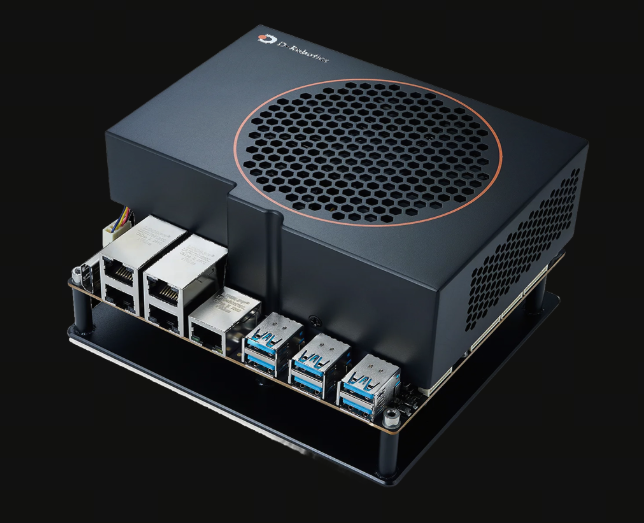 |
| AgileX Piper robotic arm | 2 | 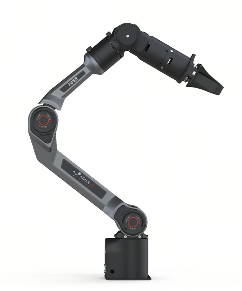 |
| RealSense D435i | 3 | 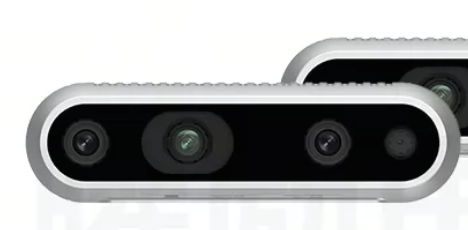 |
| Robotic arm stand | 1 | 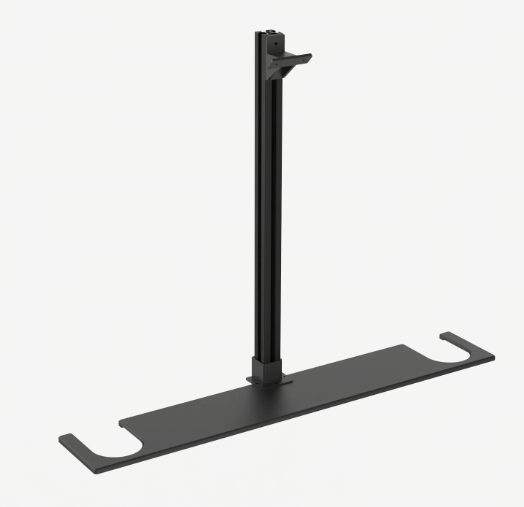 |
| Wrist camera 3D-printed mount | 2 | 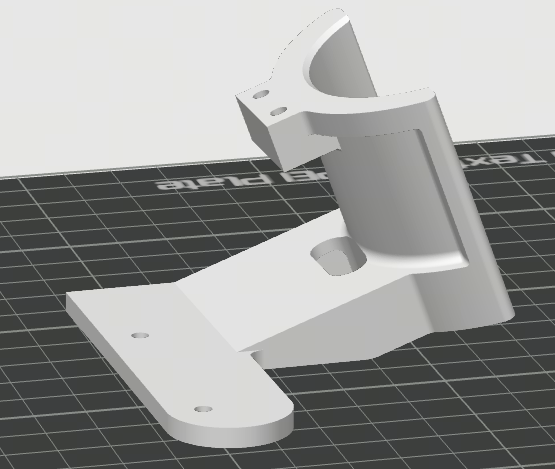 |
| Head camera 3D-printed mount | 1 | 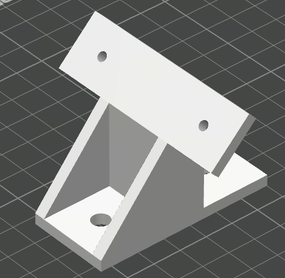 |
Get the toolkit
wget https://archive.d-robotics.cc/downloads/rdk_demo/rdk_s600_demo/pi05_s600.tar.gz
Training
Code: https://github.com/huggingface/lerobot (lerobot 0.6.2 d451fe4).
Environment setup
| Purpose | conda environment | Notes |
|---|---|---|
| Training | lerobot |
|
-
After the base environment is set up, activate the
lerobottraining environment, enter the repository, and install the dependencies.conda activate lerobot
git clone https://github.com/huggingface/lerobot.git
cd lerobot
pip install -e ".[core_scripts]" # For robot workflows (recording, replaying, calibrate)
pip install -e ".[training]" # For training policies
pip install -e ".[all]" # Everything (all policies, envs, hardware, dev tools) -
Dataset format: training uses v3.0 (
CODEBASE_VERSION=v3.0); v2.1 must first be converted to v3.0 (convert_dataset_v21_to_v30.py). For the v2.1/v3.0 directory structure comparison, see Dataset format. Run the local conversion from the directory where you clonedlerobot(the parent oflerobot), and replace--rootwith your data path:python lerobot/src/lerobot/scripts/convert_dataset_v21_to_v30.py \
--repo-id=xxx \
--root=xxx \
--push-to-hub=falsewarning-
Training depends on two Hugging Face resources:
-
The pretrained weights
lerobot/pi05_base. If you can reach Hugging Face normally, you do not need to download them in advance;lerobot-trainpulls them automatically by repository name. If your network is poor, follow the commands below to download the weights locally first, then setHF_HUB_OFFLINE=1when training and point--policy.pretrained_pathat the local copy. -
google/paligemma-3b-pt-224is a gated model, so you must be granted access before downloading it: sign in to Hugging Face, open google/paligemma-3b-pt-224, click Acknowledge license to accept the Gemma license, fill in your information, and once access is granted, you can download the model.
-
-
If your network is poor, or the training command sets
HF_HUB_OFFLINE=1(which reads only local files and no longer contacts Hugging Face), download everything in advance under thelerobotdirectory. Use./pi05_baseas--policy.pretrained_path; after downloading, changetokenizer_nameinpi05_base/policy_preprocessor.jsonto./paligemma-3b-pt-224.cd lerobot
hf download lerobot/pi05_base --local-dir ./pi05_base
hf download google/paligemma-3b-pt-224 --local-dir ./paligemma-3b-pt-224
-
-
To monitor training in wandb, sign in first:
wandb login YOUR_API_KEY
Training command
The example data is not publicly available. Collect your own data for the robot and the task. Replace xxx in --dataset.repo_id and --dataset.root with your dataset id and path.
# Start the lerobot environment
cd lerobot
conda activate lerobot

# Fine-tune from pi05_base (use rename_map if the dataset needs remapping)
HF_HUB_OFFLINE=1 lerobot-train \
  --dataset.repo_id=xxx \
  --dataset.root=xxx \
  --policy.type=pi05 \
  --output_dir=./outputs/pi05_training \
  --job_name=pi05_training \
  --policy.pretrained_path=./pi05_base \
  --policy.gradient_checkpointing=true \
  --policy.dtype=bfloat16 \
  --policy.compile_model=true \
  --policy.freeze_vision_encoder=true \
  --policy.train_expert_only=true \
  --policy.push_to_hub=false \
  --policy.normalization_mapping='{"ACTION":"MEAN_STD","STATE":"MEAN_STD","VISUAL":"IDENTITY"}' \
  --policy.device=cuda \
  --batch_size=32 --num_workers=1 --steps=30000 --save_freq=5000 --seed=1000 \
  --wandb.enable=true \
  --wandb.project=pi05_training \
  --rename_map '{"state":"observation.state","head_cam":"observation.images.head_cam",
"left_cam":"observation.images.left_cam","right_cam":"observation.images.right_cam"}'

# To resume from a checkpoint, refer to the following command:
HF_HUB_OFFLINE=1 lerobot-train \
  --config_path=outputs/pi05_training/checkpoints/030000/pretrained_model \
  --resume=true --steps=60000 --dataset.eval_split=0.05 --eval_steps=1000
Key configuration
train_config.json / config.json
| Item | Value |
|---|---|
| policy | pi05 (gemma_2b + gemma_300m) |
| batch | 32 |
| steps | 30000 |
| dtype | bfloat16 compile_model=true compile_mode=max-autotune |
| freeze | true |
| train_expert_only | true |
| chunk | 50 |
| action / state | 14-dim output (padded to 32); 14-dim state (padded to 32) |
| normalization | ACTION/STATE=MEAN_STD VISUAL=IDENTITY |
| tokenizer | tokenizer_max_length=200 |
Training resources and time
| Item | Value |
|---|---|
| Machine | 1× NVIDIA RTX 5090 32GB (32607 MiB, driver 610.57.04) + Intel i9-14900KF (32 threads) |
| GPU memory usage | ~21.9 GB |
| batch | 32 |
| Precision | bfloat16 |
| Memory optimization | gradient_checkpointing=true freeze_vision_encoder=true train_expert_only=true compile_model=true |
| Training steps | 30000 |
| Data duration | 35s |
| Number of samples | 300 |
| Time for this stage | ~17.5 h |
Dataset format
lerobot has two dataset formats, v2.1 and v3.0. The training environment used here, lerobot (0.6.2, CODEBASE_VERSION=v3.0), can read only v3.0. The example data is not publicly available. Collect your own data for the robot and the task.
v2.1
.
├── meta/
│   ├── info.json              codebase_version = "v2.1"
│   ├── tasks.jsonl            {"task_index":0,"task":"Fold the towel from bottom to top twice, then from right to left."}
│   ├── episodes.jsonl         {"episode_index","tasks","length"}
│   ├── episodes_stats.jsonl   {"episode_index","stats":{feature:{min,max,mean,std,count}}}
│   └── modality.json          segment index for state/action/endpose/...
├── data/
│   └── chunk-000/
│       ├── episode_000000.parquet     ← one file per episode (320 in total)
│       └── ...
└── videos/
    └── chunk-000/
        ├── head_cam/episode_000000.mp4
        ├── left_cam/episode_000000.mp4
        └── right_cam/episode_000000.mp4
v3.0
.
├── meta/
│   ├── info.json              codebase_version = "v3.0"
│   ├── tasks.parquet          task_index | task
│   ├── stats.json             aggregated stats
│   └── episodes/
│       └── chunk-000/
│           └── file-000.parquet      ← one row per episode (data/video index + from/to_ts + length + stats columns for each feature)
├── data/
│   └── chunk-000/
│       ├── file-000.parquet          ← aggregated by data_files_size_in_mb
│       └── ...
└── videos/
    ├── head_cam/chunk-000/file-000.mp4     ← video_key moved before chunk, aggregated by video_files_size_in_mb
    ├── left_cam/chunk-000/file-000.mp4
    └── right_cam/chunk-000/file-000.mp4
Key differences
| Item | v2.1 | v3.0 |
|---|---|---|
| data | one file per episode | multiple episodes aggregated into one file |
| video | one video file per episode | multiple episodes aggregated into one video file |
| Per-episode metadata | episodes.jsonl + episodes_stats.jsonl | meta/episodes/chunk-XXX/file-XXX.parquet |
| task | tasks.jsonl | tasks.parquet |
| info.json | no per-feature fps; has total_videos/total_chunks | fps for each feature; has data_files_size_in_mb |
| modality.json | present | absent |
- If you train directly on a v2.1 dataset, lerobot 0.6.2 throws
BackwardCompatibilityError. Convert it to v3.0 first with the commands in Environment setup. - The feature names in the datasets used here are all flat names (such as
head_camandstate), while the policy expectsobservation.images.*andobservation.state. Add--rename_mapduring training; for a mapping example, see Training command. - When
info.json.features.*.info.video.codecisav1, decoding depends onffmpeg. Installffmpegon the training machine and make sure it is onPATH.
Quantization and compilation
Get the SDK
Download and extract the official LLM SDK before quantization and compilation. ~/VLA is an example working directory. Set SDK again in each new shell.
mkdir -p ~/VLA/oe_llm_s600/pi05_sdk
cd ~/VLA/oe_llm_s600/pi05_sdk
wget https://archive.d-robotics.cc/toolchain/llm/s100_s600_llm/llm_2.0.0/D-Robotics_LLM_2.0.0_S600_S100_SDK.tar.gz
tar -xzf D-Robotics_LLM_2.0.0_S600_S100_SDK.tar.gz
export SDK=$HOME/VLA/oe_llm_s600/pi05_sdk/D-Robotics_LLM_2.0.0_S600_S100_SDK
cd ~/VLA
Environment setup
If a Pi0 quantization environment already exists, reuse it instead of creating another one.
conda create -n oellm python=3.10 -y
conda activate oellm
pip install torch==2.8.0+cu128 torchvision==0.23.0+cu128 torchaudio==2.8.0+cu128 --index-url https://download.pytorch.org/whl/cu128
pip install $SDK/package/host/*.whl          # horizon / hbdk / hbm
pip install -r $SDK/llm_compression/requirements.txt
pip install numpy==1.26.4
pip install --force-reinstall setuptools==80.10.2

# Create the pi05_conver folder; put the files needed for quantization and the generated artifacts in it
mkdir oe_llm_s600/pi05_conver
Data and model preparation
Use pi05_s600/host/prep_pi05.py to generate the model directory, calibration data, and norm_stats_runtime.json. Then use prepare_sdk20.py to generate the official SDK samples.json and sdk20/ configuration. Change the dataset path to the actual path.
cd ~/VLA
conda activate lerobot
python3 pi05_s600/host/prep_pi05.py \
  --ckpt-dir lerobot/outputs/pi05_training/checkpoints/030000 \
  --dataset-root xxx \
  --output-dir oe_llm_s600/pi05_conver --num-samples 30 \
  --tokenizer lerobot/paligemma-3b-pt-224/tokenizer.model --copy-tokenizer

conda activate oellm
python3 pi05_s600/tools/apply_sdk_patches.py --sdk "$SDK" --scope host
python3 pi05_s600/host/prepare_sdk20.py \
  --assets oe_llm_s600/pi05_conver \
  --checkpoint lerobot/outputs/pi05_training/checkpoints/030000
~/VLAis only an example working directory and can be replaced with an existing one. Change the dataset path to the actual path.
| Artifact | Description | |
|---|---|---|
| Model directory | <output-dir>/model_<step>/config.json | Pi05Config architecture constants: max_token_len=200, no uses_state |
<output-dir>/model_<step>/model.safetensors | Generated automatically from the native ckpt by stripping the model. prefix | |
<output-dir>/model_<step>/paligemma_tokenizer.model | tokenizer symlink (located automatically from --ckpt-dir by default) | |
| Calibration data | <output-dir>/pi05_calib_image/{sid}/image_{0,1,2}.jpg | head / left / right (640×480, quality 95) |
<output-dir>/pi05_action_calib_data/{sid}/state.npyaction.npyx_t.npy | [14] raw + [50,32] flow noise | |
<output-dir>/pi05_prompt.json | [{"text": ...} x N] (reads the dataset tasks by default) | |
<output-dir>/norm_stats.json | mean/std/q01/q99 of actions (full statistics) | |
| On-device norm | <output-dir>/norm_stats_runtime.json | mean/std/q01/q99 of state + actions (used by the on-device runtime) |
| Official SDK inputs | <output-dir>/sdk20/samples.json | data_path for calibration and evaluation |
<output-dir>/sdk20/float.yml | Floating-point reference. evaluation.calib_ckpt_load_path has been removed | |
<output-dir>/sdk20/case.yml | Calibration, fake-quant evaluation, and compilation. Later commands use these generated files | |
- Sampling convention: frames are sampled at equal intervals across the whole dataset, the camera order is fixed as head→left→right, and action/state store raw physical values.
- --ckpt-dir is the input (the native lerobot model directory).
- --model-dir is the output (the converted llm_compression directory, default <output-dir>/model_<step>).
- The model. prefix is stripped inside the script.
Quantize and compile
In pi05_conver/, run the floating-point reference, calibration, fake-quant evaluation, and compilation in order:
conda activate oellm
cd ~/VLA/oe_llm_s600/pi05_conver
export PYTHONPATH="$SDK:$SDK/llm_compression/lightcompress:${PYTHONPATH:-}"

# 1. Floating-point reference
python3 ~/VLA/pi05_s600/host/native_float_reference.py --config_path "$PWD/sdk20/float.yml"
# 2. Calibration. Calls the official calib.py with gradient recording disabled
python3 ~/VLA/pi05_s600/host/calib_no_grad.py --config_path "$PWD/sdk20/case.yml"
# 3. Fake-quant evaluation
TORCH_FORCE_NO_WEIGHTS_ONLY_LOAD=1 bash "$SDK/llm_compression/scripts/torch_eval.sh" --config_path "$PWD/sdk20/case.yml"
# 4. Compile HBM
TORCH_FORCE_NO_WEIGHTS_ONLY_LOAD=1 bash "$SDK/llm_compression/scripts/compile.sh" --config_path "$PWD/sdk20/case.yml"
Key entries in sdk20/case.yml:
model:
  type: Pi05
  path: .../model_030000
  # norm_stats_path uses the runtime statistics that include state + actions
  norm_stats_path: .../norm_stats_runtime.json
  model_list: [visual, lm, action]
  model_dtype: bfloat16
  q_config: accuracy
  vision_token_num: 256
  num_views: 3
  action_horizon: 50
  max_token_len: 200
  discrete_state_input: true
  valid_state_dim: 14
  enable_time_mod_lut: true
calibration:
  dataset_type: vla_dataset
  calibration_step: 30
  # data_path points at sdk20/samples.json
evaluation:
  dataset_type: vla_dataset
  eval_step: 30
  use_delta_joint_actions: false
  use_quantiles_norm: false
  vla_eval:
    eval_stages: [calib]
    valid_action_dim: 14
    skip_dump_if_exists: false
compile:
  opt_level: 2
  jobs: 32
  lm: {enable_hpc: true, core_num: 4, max_l2m_size: 25165824}
  action: {enable_hpc: false, core_num: 4, max_l2m_size: 25165824}
Artifacts
| File | Component | Size |
|---|---|---|
| xxxx_vision_224x224_w8_nash-p_corenum_1.hbm | SigLIP | ~487 MB |
| xxxx_llm_action_horizon_50_w8_nash-p_corenum_4.hbm | Gemma-2B LM | ~3.56 GB |
| xxxx_action_horizon_50_w8_nash-p_corenum_4.hbm | Gemma-300M action expert | ~492 MB |
- Quantization accuracy: for model accuracy metrics, see Quantization accuracy; to check and tune the accuracy of a quantized model, see the "Accuracy evaluation" chapter of the OELLM 2.0 manual, which is not covered here.
- Compilation time (Intel Core i9-14900KF): visual ~26min + lm ~2h15min + action ~54min ≈ 3.5h.
On-device deployment and running
Copy the three HBM files, the SDK, and the new source package to the board.
- Extract the source package to
/root/VLA/pi05_s600and the SDK to/root/VLA/oe_llm_s600/pi05_sdk. - Put the three HBM files in
/root/VLA/pi05_models, together withnorm_stats_runtime.jsonthat includes state and actions (renamed tonorm_stats.json),tokenizer.json,tokenizer_config.json, andtokenizer.model(renamed topaligemma_tokenizer.model). - If compilation also exports a time-mod LUT file, copy that file as well.
Required files at runtime
Model files (/root/VLA/pi05_models):
/root/VLA/pi05_models/
├── model_030000_vision_224x224_w8_nash-p_corenum_1.hbm
├── model_030000_language_w8_nash-p_corenum_4.hbm
├── model_030000_action_ah_50_w8_nash-p_corenum_4.hbm
├── norm_stats.json                            # norm_stats_runtime.json, renamed; must include state + actions
├── paligemma_tokenizer.model                  # tokenizer.model, renamed
└── tokenizer.json / tokenizer_config.json
Case configuration (/root/VLA/pi05_s600):
/root/VLA/pi05_s600/
├── configs/runtime.json                       # model configuration generated by configure.py
├── configs/network.json                       # network configuration (127.0.0.1:30005)
└── configs/client.yaml                        # client and arm configuration
Build the runtime
Install the board build dependencies, apply the patch, build the full runtime, and generate the case configuration:
apt-get update
apt-get install -y build-essential cmake pkg-config libopencv-dev libprotobuf-dev \
  protobuf-compiler python3-venv ffmpeg patch

export SDK=/root/VLA/oe_llm_s600/pi05_sdk/D-Robotics_LLM_2.0.0_S600_S100_SDK
python3 /root/VLA/pi05_s600/tools/apply_sdk_patches.py --sdk "$SDK" --scope board
source "$SDK/oellm_runtime_s600/env.sh" 4
cd "$SDK/oellm_runtime_s600/examples/vla_demo/pi0"
BUILD_TARGET=full MODE=full bash build_demo.sh
cd /root/VLA/pi05_s600
bash case_client/setup.sh
./case_client/.venv/bin/python -m pip install pillow pyarrow
./case_client/.venv/bin/python board/configure.py --model-dir /root/VLA/pi05_models
Runtime configuration reference
The example uses configs/runtime.template.json from the package. The runtime loads configs/runtime.json generated by board/configure.py. The template already names the three HBM files, and the generator binds the model directory to /root/VLA/pi05_models.
configs/runtime.template.json
{
  "runtime_type": "Pi0Sdk",
  "model": {
    "version": "0.5",
    "denoise_num": 10,
    "work_path": ".",
    "model_runner": {
      "visual": "model_030000_vision_224x224_w8_nash-p_corenum_1.hbm",
      "lm": "model_030000_language_w8_nash-p_corenum_4.hbm",
      "action": "model_030000_action_ah_50_w8_nash-p_corenum_4.hbm"
    },
    "backends": {
      "visual": [1, 2, 3],
      "lm": [1, 2, 3, 4],
      "action": [1, 2, 3, 4]
    },
    "state_size": 14,
    "num_flow_steps": 10,
    "use_rtc": true
  },
  "interface": {
    "action_horizon": 50,
    "raw_state_size": 14,
    "raw_action_size": 14,
    "image_mask": [true, true, true]
  },
  "processing": {
    "preproc": true,
    "postproc": true,
    "filter": {"type": "none", "fs": 0},
    "use_absolute_action": true,
    "use_quantiles_norm": false,
    "delta_action_mask": [1, 1, 1, 1, 1, 1, 0, 1, 1, 1, 1, 1, 1, 0],
    "inject_state": true
  },
  "dfx": {
    "dump": false,
    "dump_per_chunk": false,
    "dump_dir": "./output/",
    "stub_dir": "./stub/"
  },
  "warm_start": {"enabled": false},
  "rtc": {
    "execution_horizon": 15,
    "leftover_count": 10,
    "inference_delay": 9,
    "max_guidance_weight": 5.0,
    "prefix_attention_schedule": "linear",
    "control_frequency": 30.0,
    "use_model_prev": true
  }
}
configs/network.json
{
  "default_mode": "network",
  "modes": ["local", "network"],
  "io": {
    "input_dir": "./inputs",
    "output_dir": "./outputs/openloop",
    "multi_chunk": true,
    "reset_filter_first": true
  },
  "demo": {"infer_nums": 1, "image_count": 3, "language_count": 1, "state_count": 1},
  "network": {"server_ip": "127.0.0.1", "server_port": 30005, "timeout": 120}
}
- Keep
runtime_type=Pi0Sdk,model.versionas"0.5",state_size=14, andprocessing.inject_state=true. - Set
model.num_flow_steps=10and keepdenoise_num=10. The filter isprocessing.filter.type=nonewithfs=0, andwarm_start.enabled=false. Keep the original RTC parameters and setrtc.use_model_prev=true. - The client sends the raw state. The runtime normalizes it with the checkpoint MEAN_STD statistics (float32, epsilon=1e-8), then discretizes the valid 14 dimensions into text. This matches the Pi05 board patch in this package. Do not apply Pi0's 32-dimension continuous state padding rule.
- Fill the camera serial numbers and the left/right arm CAN mapping in
configs/client.yaml. Both CAN buses are 1 Mbps. Use the bundled configuration for the other parameters. - Input images: you can send 640×480 and let the board resize it (the board's ResizeWithPadToBuffer is not anti-aliased, matching the training torch path).
- Runtime port:
configs/network.json(server_port=30005).
Open-loop test
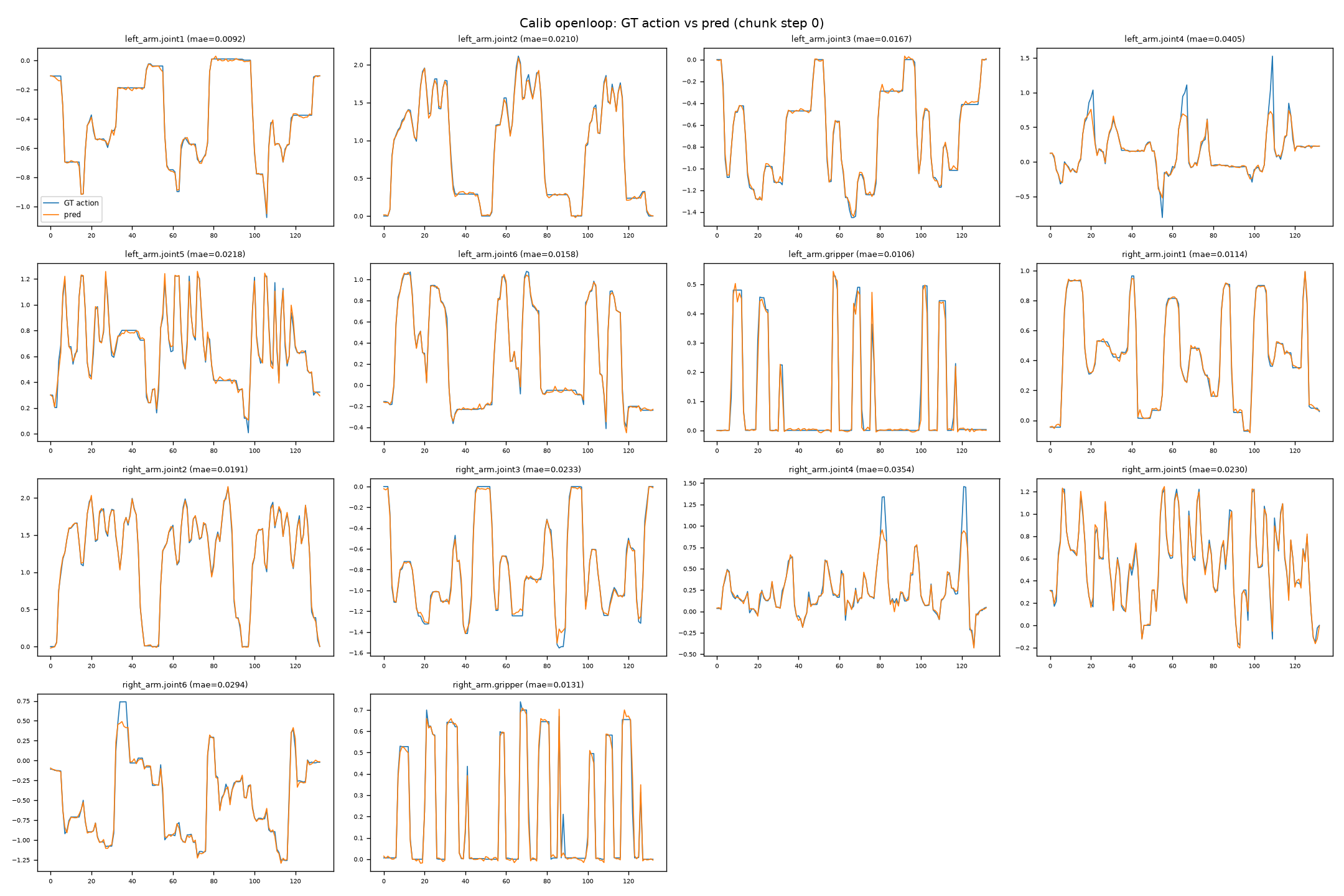
Without hardware, teleoperation, or the arm client, feed GT observations (images + state) to the on-device HBM step by step and compare the predicted actions with the GT. The on-device script is pi05_s600/board/openloop_infer_piper.py. The result is prediction records and error statistics, and does not depend on the old plotting script.
Data extraction (training machine side)
Use pi05_s600/host/extract_episodes_v3.py to extract the specified episodes from a v3.0 dataset. Replace xxx in --dataset-root with the v3.0 data directory. Keep episodes 0, 3, and 5 and stride=30:
conda activate lerobot
# Extract episodes 0/3/5, one sample every 30 frames in each episode (≈ the start of each chunk)
python3 pi05_s600/host/extract_episodes_v3.py \
  --dataset-root xxx \
  --episodes 0 3 5 --stride 30 -o eval_data
# To sample 20 evenly spaced samples per episode: add --num-per-episode 20
Copy the output to /root/VLA/eval_data on the board. The input layout stays the same:
eval_data/calib_image/<sid>/image_{0,1,2}.jpg        # head_cam, left_cam, right_cam
eval_data/action_calib_data/<sid>/state.npy          # [14] raw
eval_data/action_calib_data/<sid>/action.npy         # [14] GT (chunk step0, raw)
eval_data/action_calib_data/<sid>/x_t.npy            # [50,32] (not used on the board)
eval_data/prompt.json · norm_stats.json · manifest.json
Open-loop test on the board
Reuse the client environment from the earlier section, load env.sh 4 from the same SDK, and add vla_demo/pi0/dist to LD_LIBRARY_PATH:
cd /root/VLA
export SDK=/root/VLA/oe_llm_s600/pi05_sdk/D-Robotics_LLM_2.0.0_S600_S100_SDK
source "$SDK/oellm_runtime_s600/env.sh" 4
export LD_LIBRARY_PATH="$SDK/oellm_runtime_s600/examples/vla_demo/pi0/dist:${LD_LIBRARY_PATH:-}"
./pi05_s600/case_client/.venv/bin/python pi05_s600/board/openloop_infer_piper.py \
  --model pi05 --model-dir /root/VLA/pi05_models \
  --model-config /root/VLA/pi05_s600/configs/runtime.json \
  --sdk-root "$SDK/oellm_runtime_s600" \
  --demo-dir "$SDK/oellm_runtime_s600/examples/vla_demo/pi0" \
  --eval-data /root/VLA/eval_data --output-dir /root/VLA/pi05_s600/outputs/openloop --no-plots \
  --model-config-patch '{"model":{"use_rtc":false}}'
--model pi05. Using pi0 HBM with the pi05 preset reports[layout] suffix_pad=1 invalid ... suffix layout mismatch with HBM(version/suffix mismatch).--model-dirdetermines which directory's three.hbmfiles are read.norm_statsdefaults to--model-dir/norm_stats.jsonand must contain state.- GT observations extracted with
stride=30are not continuous. The default RTC reuses the previous prediction cache and inflates the open-loop error. The--model-config-patchabove disables RTC only for this independent-sample open-loop run. Real-robot runs still use the RTC settings inconfigs/runtime.json. - Open-loop timing is measured inside the runtime. The script aggregates every sample profile and reports the mean and P95.
- The command includes
--no-plots. It writes prediction records and error statistics, and does not call the old plotting script. Omit--no-plotsto produce the prediction curves shown in the figure below. Open-loop does not start the arm client.
Run on the real robot
The client is board/pi05_live_client.py. The prompt is read from the YAML. Task timing starts only after the runtime connects. Do not add --prompt. Connecting enables both arms automatically. Confirm the e-stop and the workspace on site before running.
Check the devices and home the arms in /root/VLA/pi05_s600/case_client:
cd /root/VLA/pi05_s600/case_client
./run_arm.sh --list
# Enable both 1 Mbps CAN buses according to the on-site mapping, for example:
# sudo ip link set can_left up type can bitrate 1000000
# sudo ip link set can_right up type can bitrate 1000000
./run_arm.sh --config ../configs/client.yaml
./run_arm.sh --config ../configs/client.yaml --home
After homing and laying the towel flat, start the client first, then start the runtime.
# Board terminal 1
cd /root/VLA/pi05_s600
./case_client/.venv/bin/python board/pi05_live_client.py --config configs/client.yaml --duration 120
# Board terminal 2
export SDK=/root/VLA/oe_llm_s600/pi05_sdk/D-Robotics_LLM_2.0.0_S600_S100_SDK
cd "$SDK/oellm_runtime_s600/examples/vla_demo/pi0"
source "$SDK/oellm_runtime_s600/env.sh" 4
export LD_LIBRARY_PATH="$PWD/dist:${LD_LIBRARY_PATH:-}"
./dist/vla_sdk_demo --oellm_config /root/VLA/pi05_s600/configs/runtime.json \
  --demo_config /root/VLA/pi05_s600/configs/network.json --mode network
- Configuration:
configs/client.yaml(prompt, server port, camera serial numbers, 14-dim joint names, and the CAN ports, gripper stroke and force, andsleep_positionunderarms). - Check that the camera serial numbers and the arm CAN port names match the hardware on site. Both CAN buses are 1 Mbps.
- The client process listens on
server.host:server.port(default0.0.0.0:30005), and the on-device runtime connects to it.
Network communication protocol
-
Roles and direction: the on-device runtime (dist/vla_sdk_demo --mode network) is the TCP client and actively connect()s to the client machine; the client side (the machine hosting the camera/arm nodes of the arm_interface deployment chain; reference implementation: deploy/src/inference_runner/inference_runner/oellm_tcp.py::OellmTcpClient) is the TCP server. The address and port are in
configs/network.jsonundernetwork.server_ip,network.server_port, andnetwork.timeout(default127.0.0.1:30005). -
Framing: each frame = [4-byte big-endian length][protobuf byte stream]. On the board, vla_demo_network.h reads and writes the length header with htonl/ntohl and sends/receives with SerializeToString/ParseFromString; the client aligns with struct.pack(">I", len). Requests and responses use the same message type (MultiModalInput).
-
Message definition (oellm_runtime/examples/vla_demo/common/src/msg.proto):
message Time  { int64 sec = 1; int32 nsec = 2; }
message Header {
  uint32 seq = 1;      // auto-incrementing sequence number
  Time   stamp = 2;    // capture time
  string frame_id = 3;
  uint32 type = 4;     // image type (RGB/BGR)
  bool   reset = 5;    // reset the rollout (RTC: clear the cache at task start)
  bool   view_only = 6;
}
message Tensor {
  enum DataType { FLOAT64=0; UINT8=1; STRING=2; FLOAT32=3; INT32=4; FP16=5; }
  DataType       dtype = 1;
  repeated int32 shape = 2;   // int32 (cross-architecture)
  bytes          data  = 3;   // raw bytes
}
message MultiModalInput {
  Header         header    = 1;
  repeated Tensor images   = 2;  // num_views images (pi05=3), shape=[3,H,W] CHW, DT_UINT8
  repeated Tensor languages= 3;  // prompt text, DT_STRING (tokenized internally on the board)
  repeated Tensor states   = 4;  // state vector, DT_FLOAT64 (inject_state=true, injected into the prompt)
} -
Request → response: the client sends images/languages/states (plus the optional RTC constraints in fields 5/6), and the board returns a MultiModalInput of the same type, with the actions placed in languages[0] (dtype FLOAT64 or FP16, with shape = the original dimensions [action_horizon, action_dim]); the client's decode_response reads languages[0] accordingly.
-
pi05 injects state into the prompt (inject_state=true): the client sends raw values and the runtime host side normalizes them (see below).
Request format and normalization
| Field | dtype | shape | Content | Normalized |
|---|---|---|---|---|
| images[i] | DT_UINT8 (FLOAT32/FP16 also accepted) | [3, H, W] (CHW, RGB) | Raw camera pixels 0–255 | Not normalized; for UINT8 the runtime performs ResizeWithPad(→224×224) + normalization internally |
| languages[0] | DT_STRING (or DT_INT32) | [] (or [token_len]) | Raw prompt text (UTF-8), or already-tokenized token ids | Not applicable (text); tokenized internally by the runtime (pi05 inject_state=true, so state is injected into the prompt) |
| states[0] | DT_FLOAT64 | [14] | Raw joint values (6 joints per arm + gripper, raw physical values) | Not normalized; the runtime host side normalizes with the state.mean/std from norm_stats_runtime.json before feeding the HBM (preproc=true) |
| prev_actions (field 5) | DT_FLOAT64 | [n*14] flattened | The unexecuted tail of the previous chunk (raw) | Not normalized; handled on the engine side using the action statistics |
- preproc=true (default): states must be sent raw (DT_FLOAT64) — the network layer sets state_raw=true based on the dtype, and only then does the runtime normalize; sending DT_FLOAT32 is treated as "already normalized" (state_raw=false), so do not pre-normalize on the client.
- preproc=false: the input must already be preprocessed — states must be normalized values with length == state_size(=14), and languages must be sent as DT_INT32 token ids (prompt text cannot be converted to tokens offline); otherwise an error is reported.
- If images set obs.image_size=[0,0] (no scaling), the client passes the raw camera image (for example 1280×720) to the runtime, which then performs ResizeWithPad to 224×224 and normalization uniformly.
- The actions in the response-side languages[0] are absolute joint actions in the model output space (combined with processing such as use_absolute_action/filter), so their scale differs from that of the request tensors above.
Troubleshooting
Training / data
| Symptom | Root cause | Fix |
|---|---|---|
| Loading hangs / requests to Hugging Face time out | An offline environment still tries to reach the network | HF_HUB_OFFLINE=1; mirror the base weights locally through hf-mirror |
| tokenizer fails to load (gated) | google/paligemma-3b-pt-224 requires authorization | Download locally and change the path in pi05_base/policy_preprocessor.json; the ckpt saved after training carries its own tokenizer/ |
| A v2.1 dataset cannot be read | lerobot ≥0.4 throws BackwardCompatibilityError | Use v3.0 for training/calibration; for v2.1 use drrm(0.3.3) or convert to v3.0 first (for the format differences see Dataset format) |
| The dataset keys are flat names | The training feature names do not match the policy | Use --rename_map to map head_cam→observation.images.head_cam and so on |
On-device runtime
| Symptom | Root cause | Fix | Effect |
|---|---|---|---|
| Actions are completely wrong | num_flow_steps is not 10 (velocity is fed back as x_t) | model.num_flow_steps=10 | 0.4955 → 0.4172 |
| Actions are completely wrong | use_absolute_action defaults to false (state is added again) | use_absolute_action=true | Magnitude 1.99 → 1.00 |
| norm_stats fails to initialize | norm_stats.json contains only actions and no state | Use norm_stats_runtime.json (which contains state) | — |
Data / configuration
| Item | Training side | On-device |
|---|---|---|
| Normalization | MEAN_STD; 14-dim state/action | norm_stats_runtime.json (state+actions) |
| Action space | Absolute actions | use_absolute_action=true |
| state | Injected into the prompt (inject_state) | inject_state=true + state_size=14 |
| Images | Stored at 480×640, resized to 224 inside the model | First resized to 224 with openpi resize_with_pad |
Acceptance metrics
Quantization accuracy
For reference only for this task; calibration set of 30 samples, fake-quant vs float.
| Stage | Metric | Value |
|---|---|---|
| calib_eval | action MAE | 0.009048 |
| calib_eval | action RMSE | 0.016222 |
| calib_eval | action cosine | 0.999232 |
| calib_eval | tensor MAE | 0.015608 |
| calib_eval | tensor cosine | 0.999274 |
The timings above are measured inside the runtime: preproc 0.1ms + visual 20ms + lm 108ms + action 125ms + postproc 0.1ms ≈ 255-270ms. This is the high-accuracy version; to improve inference performance, refer to the balanced and high-performance versions in the OELLM toolchain.
Resource usage reference on the real robot
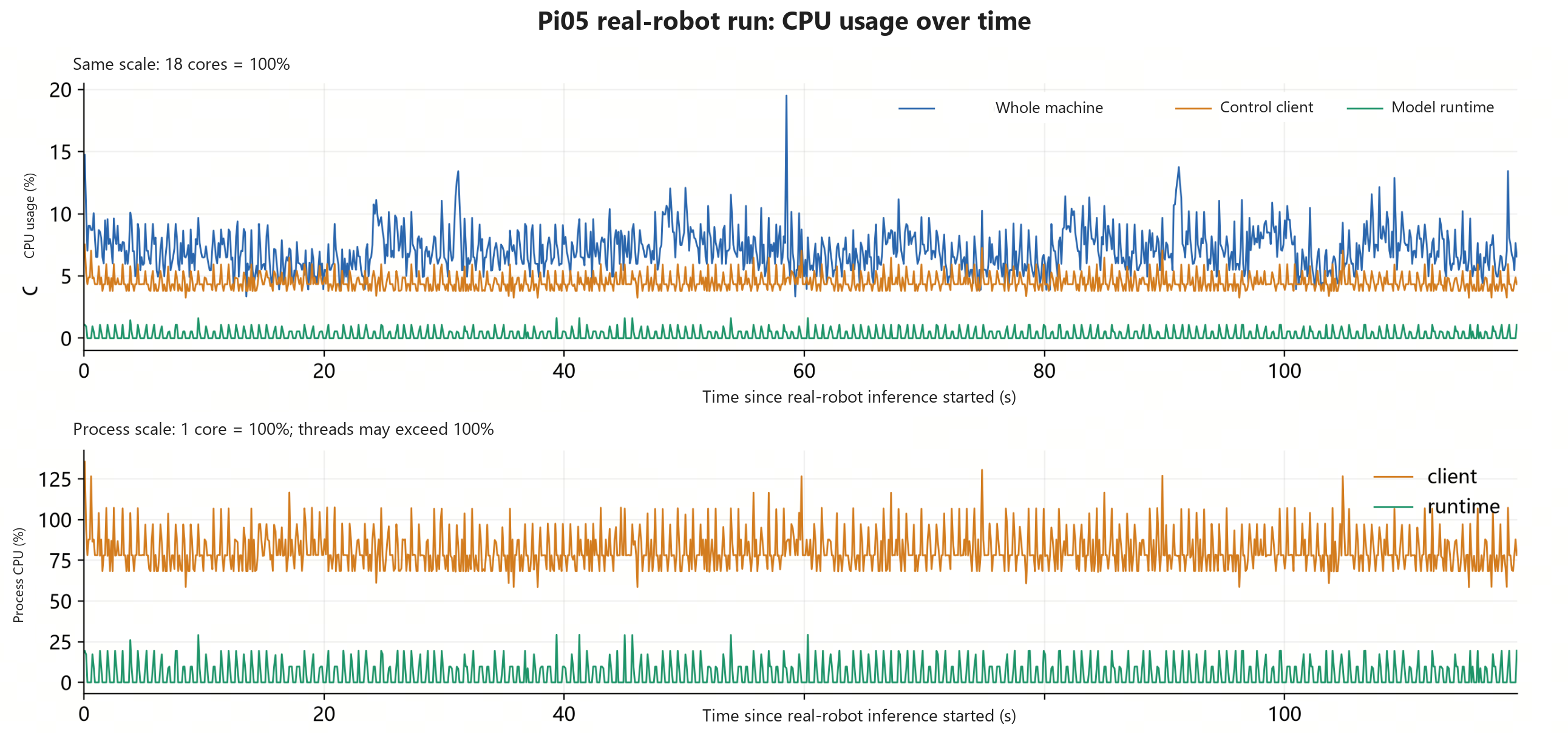
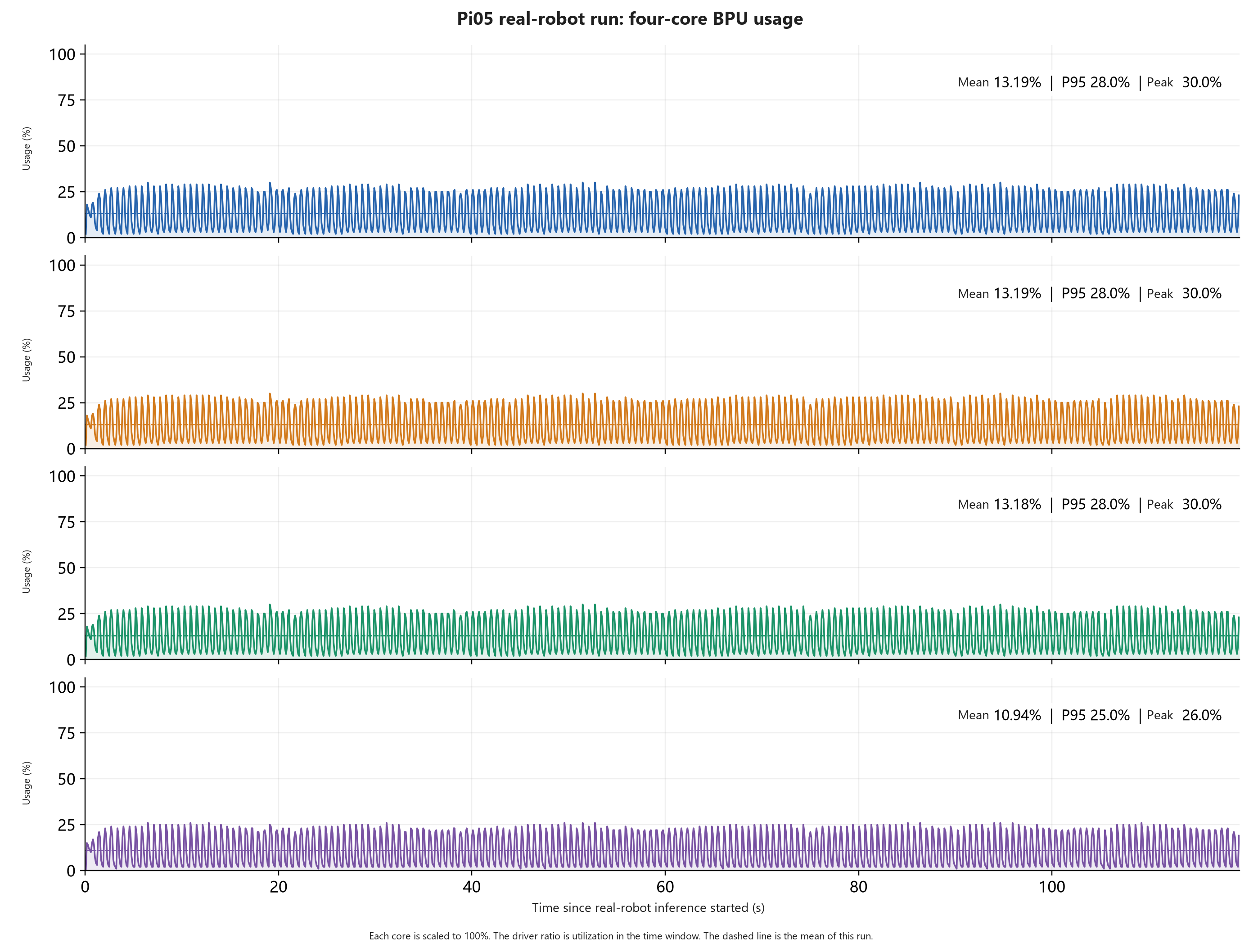
CPU and four-core BPU usage on the S600 while folding a towel on the real robot.
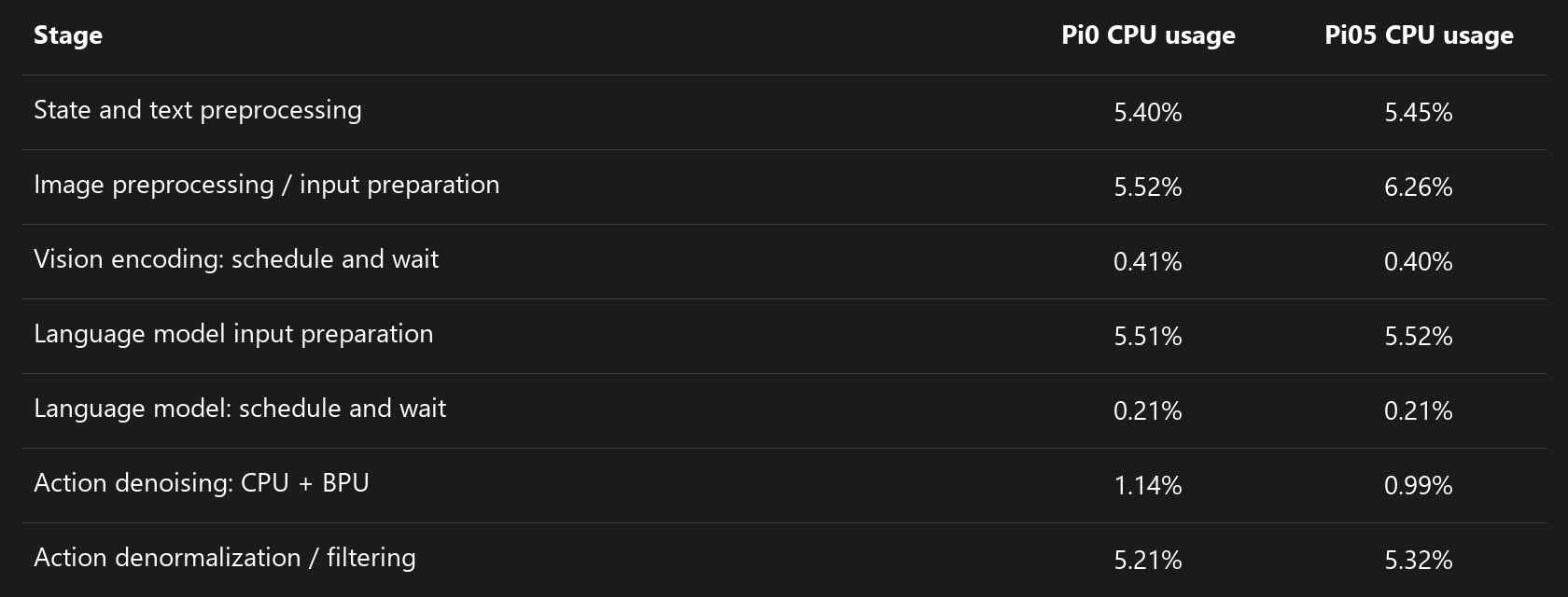
CPU usage
Four-core BPU usage
Per-stage CPU usage