Pi0
Workflow overview
Training
   pi0_base  (HF pretrained)
        │  finetune  (v3.0 dataset, 30 fps)
        ▼
   checkpoints/030000/pretrained_model  (bf16, chunk=50, absolute actions)

        │
        ▼
Quantization + compilation (oe_llm_s600/pi0_conver/)
   floating-point reference → floating-point baseline / reference dump
   calibration              → fake-quant weights (pi0 has no time-mod LUT)
   fake-quant evaluation    → fake-quant accuracy (calibration set)
   compilation              → 3× HBM (w8 nash-p)

        │
        ▼
On-device deployment and running
   3× HBM + norm_stats_runtime.json + tokenizer/
   server (vla_sdk_demo) + client (case_client)
- Model: PaliGemma (gemma_2b) + Gemma action expert (gemma_300m), 3 cameras + 14-dim state/action (padded to 32), chunk=50, 10 denoising steps.
- Quantization: int8 weights (w8) / action expert W8A16, compiled to nash-p HBM.
Results
Hardware List
Pi0 & Pi05 do not require a specific robotic arm or structure — the table below is only a reference hardware list. Other arms and other structures work just as well, but you must re-collect the data, retrain, and re-quantize/compile.
| Equipment | Qty | Image |
|---|---|---|
| RDK S600 development kit | 1 | 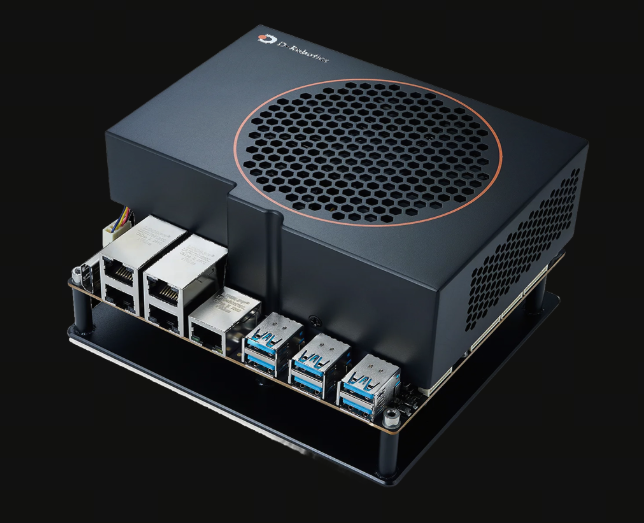 |
| AgileX Piper robotic arm | 2 | 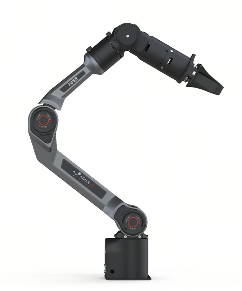 |
| RealSense D435i | 3 | 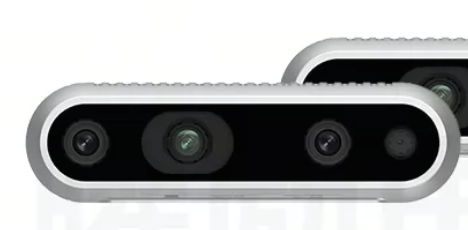 |
| Robotic arm stand | 1 | 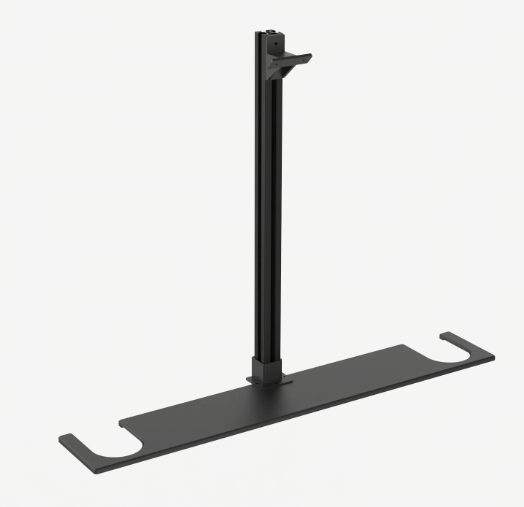 |
| Wrist camera 3D-printed mount | 2 | 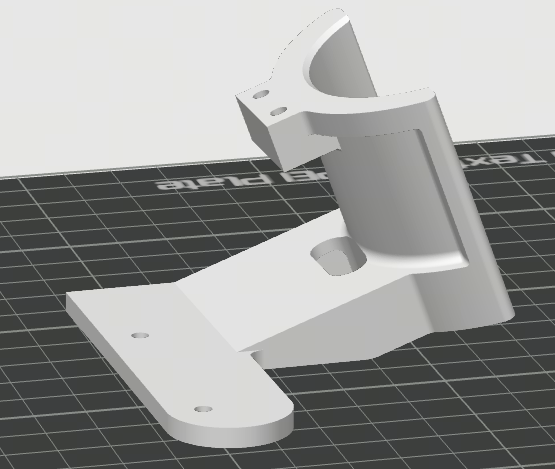 |
| Head camera 3D-printed mount | 1 | 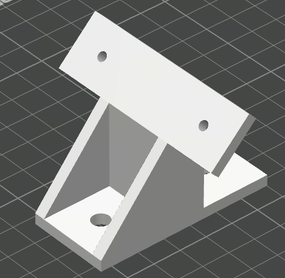 |
Get the toolkit
wget https://archive.d-robotics.cc/downloads/rdk_demo/rdk_s600_demo/pi0_s600.tar.gz
Training
Code: https://github.com/huggingface/lerobot (lerobot 0.6.2 d451fe4).
Environment setup
| Purpose | conda environment | Notes |
|---|---|---|
| Training | lerobot |
|
-
After the base environment is set up, activate the
lerobottraining environment, enter the repository, and install the dependencies.conda activate lerobot
git clone https://github.com/huggingface/lerobot.git
cd lerobot
pip install -e ".[core_scripts]" # For robot workflows (recording, replaying, calibrate)
pip install -e ".[training]" # For training policies
pip install -e ".[all]" # Everything (all policies, envs, hardware, dev tools) -
Dataset format: training uses v3.0 (
CODEBASE_VERSION=v3.0); v2.1 must first be converted to v3.0 (convert_dataset_v21_to_v30.py). For the v2.1/v3.0 directory structure comparison, see Dataset format. Run the local conversion from the directory where you clonedlerobot(the parent oflerobot), and replace--rootwith your data path:python lerobot/src/lerobot/scripts/convert_dataset_v21_to_v30.py \
--repo-id=xxx \
--root=xxx \
--push-to-hub=falsewarning-
Training depends on two Hugging Face resources:
-
The pretrained weights
lerobot/pi0_base. If you can reach Hugging Face normally, you do not need to download them in advance;lerobot-trainpulls them automatically by repository name. If your network is poor, follow the commands below to download the weights locally first, then setHF_HUB_OFFLINE=1when training and point--policy.pretrained_pathat the local copy. -
google/paligemma-3b-pt-224is a gated model, so you must be granted access before downloading it: sign in to Hugging Face, open google/paligemma-3b-pt-224, click Acknowledge license to accept the Gemma license, fill in your information, and once access is granted, you can download the model.
-
-
If your network is poor, or the training command sets
HF_HUB_OFFLINE=1(which reads only local files and no longer contacts Hugging Face), download everything in advance under thelerobotdirectory. Use./pi0_baseas--policy.pretrained_path; after downloading, changetokenizer_nameinpi0_base/policy_preprocessor.jsonto./paligemma-3b-pt-224.cd lerobot
hf download lerobot/pi0_base --local-dir ./pi0_base
hf download google/paligemma-3b-pt-224 --local-dir ./paligemma-3b-pt-224
-
-
To monitor training in wandb, sign in first:
wandb login YOUR_API_KEY
Training command
The example data is not publicly available. Collect your own data for the robot and the task. Replace xxx in --dataset.repo_id and --dataset.root with your dataset id and path.
# Start the lerobot environment
cd lerobot
conda activate lerobot

# Fine-tune from pi0_base (use rename_map if the dataset needs remapping)
HF_HUB_OFFLINE=1 lerobot-train \
    --dataset.repo_id=xxx \
    --dataset.root=xxx \
    --policy.type=pi0 \
    --output_dir=./outputs/pi0_training \
    --job_name=pi0_training \
    --policy.pretrained_path=./pi0_base \
    --policy.compile_model=true \
    --policy.gradient_checkpointing=true \
    --policy.dtype=bfloat16 \
    --policy.freeze_vision_encoder=true \
    --policy.train_expert_only=true \
    --policy.push_to_hub=false \
    --steps=30000 \
    --policy.device=cuda \
    --batch_size=32 \
    --wandb.enable=true \
    --wandb.project=pi0_training \
    --rename_map '{"state":"observation.state","head_cam":"observation.images.head_cam",
"left_cam":"observation.images.left_cam","right_cam":"observation.images.right_cam"}'

# To resume from a checkpoint, refer to the following command:
HF_HUB_OFFLINE=1 lerobot-train \
  --config_path=outputs/pi0_training/checkpoints/030000/pretrained_model \
  --resume=true --steps=60000 --dataset.eval_split=0.05 --eval_steps=1000
Key configuration
train_config.json / config.json
| Item | Value |
|---|---|
| policy | pi0 (gemma_2b + gemma_300m) |
| batch | 32 |
| steps | 30000 |
| dtype | bfloat16 compile_model=true compile_mode=max-autotune |
| freeze | true |
| train_expert_only | true |
| chunk | 50 |
| action / state | 14-dim output (padded to 32); 14-dim state (padded to 32) |
| normalization | ACTION/STATE=MEAN_STD VISUAL=IDENTITY |
| tokenizer | tokenizer_max_length=48 |
Training resources and time
| Item | Value |
|---|---|
| Machine | 1× NVIDIA RTX 5090 32GB (32607 MiB, driver 610.57.04) + Intel i9-14900KF (32 threads) |
| GPU memory usage | ~20.5 GB |
| batch | 32 |
| Precision | bfloat16 |
| Memory optimization | gradient_checkpointing=true freeze_vision_encoder=true train_expert_only=true compile_model=true |
| Training steps | 30000 |
| Data duration | 35s |
| Number of samples | 300 |
| Time for this stage | ~16.3 h |
Dataset format
lerobot has two dataset formats, v2.1 and v3.0. The training environment used here, lerobot (0.6.2, CODEBASE_VERSION=v3.0), can read only v3.0. The example data is not publicly available. Collect your own data for the robot and the task.
v2.1
.
├── meta/
│   ├── info.json              codebase_version = "v2.1"
│   ├── tasks.jsonl            {"task_index":0,"task":"Fold the towel from bottom to top twice, then from right to left."}
│   ├── episodes.jsonl         {"episode_index","tasks","length"}
│   ├── episodes_stats.jsonl   {"episode_index","stats":{feature:{min,max,mean,std,count}}}
│   └── modality.json          segment index for state/action/endpose/...
├── data/
│   └── chunk-000/
│       ├── episode_000000.parquet     ← one file per episode (320 in total)
│       └── ...
└── videos/
    └── chunk-000/
        ├── head_cam/episode_000000.mp4
        ├── left_cam/episode_000000.mp4
        └── right_cam/episode_000000.mp4
v3.0
.
├── meta/
│   ├── info.json              codebase_version = "v3.0"
│   ├── tasks.parquet          task_index | task
│   ├── stats.json             aggregated stats
│   └── episodes/
│       └── chunk-000/
│           └── file-000.parquet      ← one row per episode (data/video index + from/to_ts + length + stats columns for each feature)
├── data/
│   └── chunk-000/
│       ├── file-000.parquet          ← aggregated by data_files_size_in_mb
│       └── ...
└── videos/
    ├── head_cam/chunk-000/file-000.mp4     ← video_key moved before chunk, aggregated by video_files_size_in_mb
    ├── left_cam/chunk-000/file-000.mp4
    └── right_cam/chunk-000/file-000.mp4
Key differences
| Item | v2.1 | v3.0 |
|---|---|---|
| data | one file per episode | multiple episodes aggregated into one file |
| video | one video file per episode | multiple episodes aggregated into one video file |
| Per-episode metadata | episodes.jsonl + episodes_stats.jsonl | meta/episodes/chunk-XXX/file-XXX.parquet |
| task | tasks.jsonl | tasks.parquet |
| info.json | no per-feature fps; has total_videos/total_chunks | fps for each feature; has data_files_size_in_mb |
| modality.json | present | absent |
- If you train directly on a v2.1 dataset, lerobot 0.6.2 throws
BackwardCompatibilityError. Convert it to v3.0 first with the commands in Environment setup. - The feature names in the datasets used here are all flat names (such as
head_camandstate), while the policy expectsobservation.images.*andobservation.state. Add--rename_mapduring training; for a mapping example, see Training command. - When
info.json.features.*.info.video.codecisav1, decoding depends onffmpeg. Installffmpegon the training machine and make sure it is onPATH.
Quantization and compilation
Get the SDK
Download and extract the latest official LLM SDK before quantization and compilation.
mkdir -p ~/VLA/oe_llm_s600/pi0_sdk
cd ~/VLA/oe_llm_s600/pi0_sdk
wget https://archive.d-robotics.cc/toolchain/llm/s100_s600_llm/llm_2.0.0/D-Robotics_LLM_2.0.0_S600_S100_SDK.tar.gz
tar -xzf D-Robotics_LLM_2.0.0_S600_S100_SDK.tar.gz
export SDK=$HOME/VLA/oe_llm_s600/pi0_sdk/D-Robotics_LLM_2.0.0_S600_S100_SDK
~/VLA is only an example working directory. Replace it with any path, as long as export SDK points at the actual SDK root.
Environment setup
conda create -n oellm python=3.10 -y
conda activate oellm
pip install torch==2.8.0+cu128 torchvision==0.23.0+cu128 torchaudio==2.8.0+cu128 --index-url https://download.pytorch.org/whl/cu128
pip install $SDK/package/host/*.whl          # horizon / hbdk / hbm
pip install -r $SDK/llm_compression/requirements.txt
pip install numpy==1.26.4
pip install --force-reinstall setuptools==80.10.2

# Create the pi0_conver folder; put the files needed for quantization and the generated artifacts in it
mkdir oe_llm_s600/pi0_conver
Data and model preparation
Use pi0_s600/host/prep_pi0.py to generate the model directory, calibration data, norm_stats_runtime.json, and the configuration required for quantization. Then use prepare_sdk20.py to generate the official SDK samples.json and sdk20/ configuration.
cd ~/VLA
conda activate lerobot
python3 pi0_s600/host/prep_pi0.py \
  --ckpt-dir lerobot/outputs/pi0_training/checkpoints/030000 \
  --dataset-root xxx \
  --output-dir oe_llm_s600/pi0_conver \
  --num-samples 30 \
  --tokenizer lerobot/paligemma-3b-pt-224/tokenizer.model --copy-tokenizer

conda activate oellm
python3 pi0_s600/tools/apply_sdk_patches.py --sdk "$SDK" --scope host
python3 pi0_s600/host/prepare_sdk20.py \
  --assets oe_llm_s600/pi0_conver \
  --checkpoint lerobot/outputs/pi0_training/checkpoints/030000
~/VLAis only an example working directory and can be replaced with an existing one. Change the dataset path to the actual path.- Pi0 state is a continuous tensor: normalize it with the checkpoint MEAN_STD statistics, zero-pad it to 32 dimensions, and do not inject it into text.
- The host position-id and attention patches are used together with the on-device position-id patch.
| Artifact | Description | |
|---|---|---|
| Model directory | <output-dir>/model_<step>/config.json | Pi0 configuration: max_token_len=48 |
<output-dir>/model_<step>/model.safetensors | Generated automatically from the native ckpt by stripping the model. prefix | |
<output-dir>/model_<step>/paligemma_tokenizer.model | tokenizer symlink (located automatically from --ckpt-dir by default) | |
| Calibration data | <output-dir>/pi0_calib_image/{sid}/image_{0,1,2}.jpg | head / left / right (640×480, quality 95) |
<output-dir>/pi0_action_calib_data/{sid}/state.npyaction.npyx_t.npy | [14] raw + [50,32] flow noise | |
<output-dir>/pi0_prompt.json | [{"text": ...} x N] (reads the dataset tasks by default) | |
<output-dir>/norm_stats.json | mean/std/q01/q99 of actions (full statistics) | |
| On-device norm | <output-dir>/norm_stats_runtime.json | mean/std/q01/q99 of state + actions (used by the on-device runtime) |
| Official SDK inputs | <output-dir>/sdk20/samples.json | data_path for calibration and evaluation |
<output-dir>/sdk20/float.yml | Floating-point reference. evaluation.calib_ckpt_load_path has been removed | |
<output-dir>/sdk20/case.yml | Calibration, fake-quant evaluation, and compilation. Later commands use these generated files | |
- Sampling convention: frames are sampled at equal intervals across the whole dataset, the camera order is fixed as head→left→right, and action/state store raw physical values.
- --ckpt-dir is the input (the native lerobot model directory).
- --model-dir is the output (the converted llm_compression directory, default <output-dir>/model_<step>).
- The model. prefix is stripped inside the script.
Quantize and compile
conda activate oellm
cd ~/VLA/oe_llm_s600/pi0_conver
export PYTHONPATH="$SDK:$SDK/llm_compression/lightcompress:${PYTHONPATH:-}"

# 1. Floating-point reference
python3 ~/VLA/pi0_s600/host/native_float_reference.py --config_path "$PWD/sdk20/float.yml"
# 2. Calibration. Calls the official calib.py with gradient recording disabled
python3 ~/VLA/pi0_s600/host/calib_no_grad.py --config_path "$PWD/sdk20/case.yml"
# 3. Fake-quant evaluation
TORCH_FORCE_NO_WEIGHTS_ONLY_LOAD=1 bash "$SDK/llm_compression/scripts/torch_eval.sh" --config_path "$PWD/sdk20/case.yml"
# 4. Compile HBM
TORCH_FORCE_NO_WEIGHTS_ONLY_LOAD=1 bash "$SDK/llm_compression/scripts/compile.sh" --config_path "$PWD/sdk20/case.yml"
Key entries in sdk20/case.yml:
model:
  type: Pi0
  # path and norm_stats_path are filled in by the preparation script
  model_list: [visual, lm, action]
  model_dtype: bfloat16
  q_config: performance
  vision_token_num: 256
  num_views: 3
  action_horizon: 50
  max_token_len: 48
  discrete_state_input: false
  valid_state_dim: null
  enable_time_mod_lut: false
calibration:
  dataset_type: vla_dataset
  calibration_step: 30
  # data_path points at sdk20/samples.json
evaluation:
  dataset_type: vla_dataset
  eval_step: 30
  use_delta_joint_actions: false
  use_quantiles_norm: false
  vla_eval:
    eval_stages: [calib]
    valid_action_dim: 14
    skip_dump_if_exists: false
compile:
  opt_level: 2
  jobs: 32
  lm: {enable_hpc: true, core_num: 4, max_l2m_size: 25165824}
  action: {enable_hpc: false, core_num: 4, max_l2m_size: 25165824}
Quantization scheme (pi0_model.py::get_qconfig_setting("action")):
- Default: Linear qint16 in / qint8 w / fp16 out; qk/sv matmul qint16×qint16; norm/add/cat/gate fp16.
- Modules unique to pi0 and quantized by default: state_proj, action_time_mlp_in, action_time_mlp_out.
- model.action_w16=true → the action expert weights use qint16 (W16A16) instead of qint8 (W8A16).
Artifacts
| File | Component | Size |
|---|---|---|
| xxxx_vision_224x224_w8_nash-p_corenum_1.hbm | SigLIP | ~487 MB |
| xxxx_llm_action_horizon_50_w8_nash-p_corenum_4.hbm | Gemma-2B LM | ~3.45 GB |
| xxxx_action_horizon_50_w8_nash-p_corenum_4.hbm | Gemma-300M action expert | ~463 MB |
- Quantization accuracy: for model accuracy metrics, see Quantization accuracy; to check and tune the accuracy of a quantized model, see the "Accuracy evaluation" chapter of the OELLM 2.0 manual, which is not covered here.
- Compilation time (Intel Core i9-14900KF): visual ~23min + lm ~1h58min + action ~24min ≈ 2h46min.
On-device deployment and running
Copy the three compiled artifacts, the SDK, and the new source package to the board.
- Extract the source package to
/root/VLA/pi0_s600and the SDK to/root/VLA/oe_llm_s600/pi0_sdk. - Put the three HBM files in
/root/VLA/pi0_models. Keep the file names produced undersdk20/compile/. - Also copy
norm_stats_runtime.json(renamed tonorm_stats.json) and the PaliGemmatokenizer.json,tokenizer_config.json, andtokenizer.model(renamed topaligemma_tokenizer.model). The statistics must include both state and actions.
Required files at runtime
Model files (/root/VLA/pi0_models):
/root/VLA/pi0_models/
├── model_030000_vision_224x224_w8_nash-p_corenum_1.hbm
├── model_030000_language_w8_nash-p_corenum_4.hbm
├── model_030000_action_ah_50_w8_nash-p_corenum_4.hbm
├── norm_stats.json                            # norm_stats_runtime.json, renamed; must include state + actions
├── paligemma_tokenizer.model                  # tokenizer.model, renamed
└── tokenizer.json / tokenizer_config.json
Case configuration (/root/VLA/pi0_s600):
/root/VLA/pi0_s600/
├── configs/runtime.json                       # model configuration generated by configure.py
├── configs/network.json                       # network configuration (127.0.0.1:30005)
└── configs/client.yaml                        # client and arm configuration
Build the runtime
Install the board build dependencies, apply the patch, build the full runtime, and generate the case configuration:
apt-get update
apt-get install -y build-essential cmake pkg-config libopencv-dev libprotobuf-dev \
  protobuf-compiler python3-venv ffmpeg patch

export SDK=/root/VLA/oe_llm_s600/pi0_sdk/D-Robotics_LLM_2.0.0_S600_S100_SDK
python3 /root/VLA/pi0_s600/tools/apply_sdk_patches.py --sdk "$SDK" --scope board
source "$SDK/oellm_runtime_s600/env.sh" 4
cd "$SDK/oellm_runtime_s600/examples/vla_demo/pi0"
BUILD_TARGET=full MODE=full bash build_demo.sh
cd /root/VLA/pi0_s600
bash case_client/setup.sh
./case_client/.venv/bin/python -m pip install pillow pyarrow
./case_client/.venv/bin/python board/configure.py --model-dir /root/VLA/pi0_models
Runtime configuration reference
The example uses configs/runtime.template.json from the package. The runtime loads configs/runtime.json generated by board/configure.py. The template already names the three HBM files, and the generator binds the model directory to /root/VLA/pi0_models.
configs/runtime.template.json
{
  "runtime_type": "Pi0Sdk",
  "model": {
    "version": "0",
    "denoise_num": 10,
    "work_path": ".",
    "model_runner": {
      "visual": "model_030000_vision_224x224_w8_nash-p_corenum_1.hbm",
      "lm": "model_030000_language_w8_nash-p_corenum_4.hbm",
      "action": "model_030000_action_ah_50_w8_nash-p_corenum_4.hbm"
    },
    "backends": {
      "visual": [1, 2, 3],
      "lm": [1, 2, 3, 4],
      "action": [1, 2, 3, 4]
    },
    "state_size": 14,
    "num_flow_steps": 10,
    "use_rtc": true
  },
  "interface": {
    "action_horizon": 50,
    "raw_state_size": 14,
    "raw_action_size": 14,
    "image_mask": [true, true, true]
  },
  "processing": {
    "preproc": true,
    "postproc": true,
    "filter": {"type": "none", "fs": 0},
    "use_absolute_action": true,
    "use_quantiles_norm": false,
    "delta_action_mask": [1, 1, 1, 1, 1, 1, 0, 1, 1, 1, 1, 1, 1, 0],
    "inject_state": false
  },
  "dfx": {
    "dump": false,
    "dump_per_chunk": false,
    "dump_dir": "./output/",
    "stub_dir": "./stub/"
  },
  "warm_start": {"enabled": false},
  "rtc": {
    "execution_horizon": 15,
    "leftover_count": 10,
    "inference_delay": 9,
    "max_guidance_weight": 5.0,
    "prefix_attention_schedule": "linear",
    "control_frequency": 30.0,
    "use_model_prev": true
  }
}
configs/network.json
{
  "default_mode": "network",
  "modes": ["local", "network"],
  "io": {
    "input_dir": "./inputs",
    "output_dir": "./outputs/openloop",
    "multi_chunk": true,
    "reset_filter_first": true
  },
  "demo": {"infer_nums": 1, "image_count": 3, "language_count": 1, "state_count": 1},
  "network": {"server_ip": "127.0.0.1", "server_port": 30005, "timeout": 120}
}
- Keep three views,
action_horizon=50, a valid state/action size of 14, absolute actions, MEAN_STD, andprocessing.inject_state=false. - Set
model.num_flow_steps=10and keepdenoise_num=10. The filter isprocessing.filter.type=nonewithfs=0, andwarm_start.enabled=false. Keep the original RTC parameters and setrtc.use_model_prev=true. - The client sends the raw state. The runtime normalizes it with the checkpoint statistics, zero-pads it to 32 dimensions as a continuous input, and does not inject it into text.
- Input images: you can send 640×480 and let the board resize it (the board's ResizeWithPadToBuffer is not anti-aliased, matching the training torch path).
- Runtime port:
configs/network.json(server_port=30005).
Open-loop test
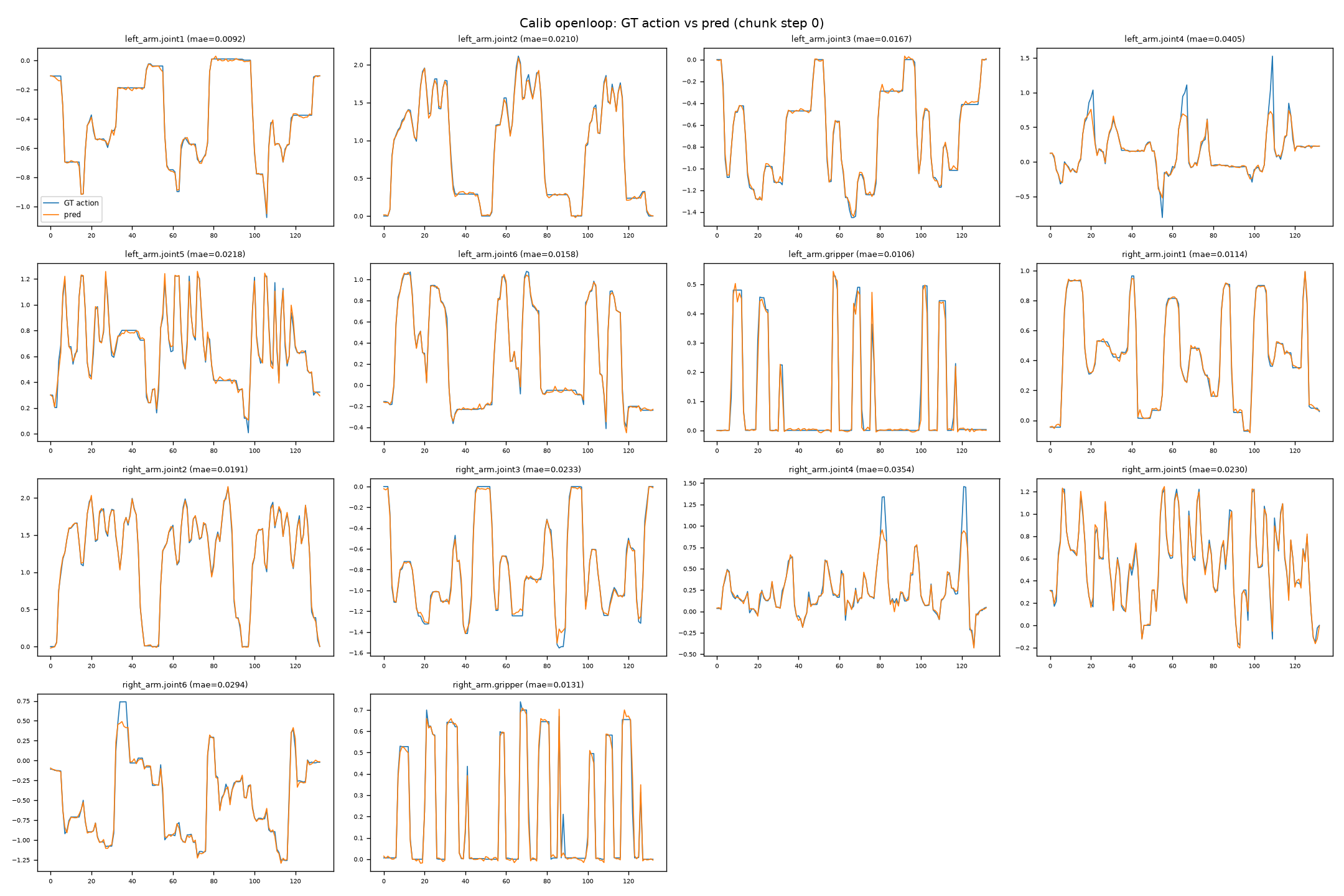
Without hardware or teleoperation, feed GT observations (images + state) to the on-device HBM step by step and compare the predicted actions with the GT. The on-device script is pi0_s600/board/openloop_infer_piper.py.
Data extraction (training machine side)
Use pi0_s600/host/extract_episodes_v3.py to extract the specified episodes from a v3.0 dataset. Replace xxx in --dataset-root with the v3.0 data directory. eval_data is an example output directory:
conda activate lerobot
# Extract episodes 0/3/5, one sample every 30 frames in each episode (≈ the start of each chunk)
python3 pi0_s600/host/extract_episodes_v3.py \
  --dataset-root xxx \
  --episodes 0 3 5 --stride 30 -o eval_data
# To sample 20 evenly spaced samples per episode: add --num-per-episode 20
Copy eval_data to /root/VLA/eval_data on the board. Output layout:
eval_data/calib_image/<sid>/image_{0,1,2}.jpg        # head_cam, left_cam, right_cam
eval_data/action_calib_data/<sid>/state.npy          # [14] raw
eval_data/action_calib_data/<sid>/action.npy         # [14] GT (chunk step0, raw)
eval_data/action_calib_data/<sid>/x_t.npy            # [50,32] (not used on the board)
eval_data/prompt.json · norm_stats.json · manifest.json
Open-loop test on the board
Use the client environment created in On-device deployment and running, and load env.sh 4 from the same SDK:
cd /root/VLA
export SDK=/root/VLA/oe_llm_s600/pi0_sdk/D-Robotics_LLM_2.0.0_S600_S100_SDK
source "$SDK/oellm_runtime_s600/env.sh" 4
export LD_LIBRARY_PATH="$SDK/oellm_runtime_s600/examples/vla_demo/pi0/dist:${LD_LIBRARY_PATH:-}"
./pi0_s600/case_client/.venv/bin/python pi0_s600/board/openloop_infer_piper.py \
  --model pi0 --model-dir /root/VLA/pi0_models \
  --model-config /root/VLA/pi0_s600/configs/runtime.json \
  --sdk-root "$SDK/oellm_runtime_s600" \
  --demo-dir "$SDK/oellm_runtime_s600/examples/vla_demo/pi0" \
  --eval-data /root/VLA/eval_data --output-dir /root/VLA/pi0_s600/outputs/openloop --no-plots \
  --model-config-patch '{"model":{"use_rtc":false}}'
--model pi0:--modeldefaults to pi05. Using pi0 HBM with the pi05 preset reports[layout] suffix_pad=1 invalid ... suffix layout mismatch with HBM(version/suffix mismatch).--model-dirdetermines which directory's three.hbmfiles are read.norm_statsdefaults to--model-dir/norm_stats.jsonand must contain state.- GT observations extracted with
stride=30are not continuous. The default RTC reuses the previous prediction cache and inflates the open-loop error. The--model-config-patchabove disables RTC only for this independent-sample open-loop run. Real-robot runs still use the RTC settings inconfigs/runtime.json. - Open-loop timing is measured inside the runtime. The script aggregates every sample profile and reports the mean and P95.
- The command includes
--no-plots. It writes prediction records and error statistics, and does not call the old plotting script. Omit--no-plotsto produce the prediction curves shown in the figure below.
Run on the real robot
The client directory is /root/VLA/pi0_s600/case_client. Connection, homing, and running all use ../configs/client.yaml. Connecting enables both arms automatically. Confirm the e-stop, the workspace, and the homing path on site before running.
cd /root/VLA/pi0_s600/case_client
./run_arm.sh --list
# Enable both 1 Mbps CAN buses according to the on-site mapping, for example:
# sudo ip link set can_left up type can bitrate 1000000
# sudo ip link set can_right up type can bitrate 1000000
./run_arm.sh --config ../configs/client.yaml
./run_arm.sh --config ../configs/client.yaml --home
After homing and laying the towel flat, start the client listener first, then start the runtime.
# Board terminal 1
cd /root/VLA/pi0_s600/case_client
./run_client.sh --config ../configs/client.yaml \
  --prompt "Fold the towel from bottom to top twice, then from right to left." \
  --record-commands --duration 120 --log-level INFO
# Board terminal 2
export SDK=/root/VLA/oe_llm_s600/pi0_sdk/D-Robotics_LLM_2.0.0_S600_S100_SDK
cd "$SDK/oellm_runtime_s600/examples/vla_demo/pi0"
source "$SDK/oellm_runtime_s600/env.sh" 4
export LD_LIBRARY_PATH="$PWD/dist:${LD_LIBRARY_PATH:-}"
./dist/vla_sdk_demo --oellm_config /root/VLA/pi0_s600/configs/runtime.json \
  --demo_config /root/VLA/pi0_s600/configs/network.json --mode network
- Configuration:
configs/client.yaml(server port, camera backend and order, 14-dim joint names, image size, RTC, output filtering, homing on exit, and the CAN ports, gripper stroke and force, andsleep_positionunderarms). - Check that the camera serial numbers and the arm CAN port names match the hardware on site.
- The client process listens on
server.host:server.port(default0.0.0.0:30005), and the on-device runtime connects to it.
Network communication protocol
-
Roles and direction: the on-device runtime (dist/vla_sdk_demo --mode network) is the TCP client and actively connect()s to the client machine; the client side (the machine hosting the camera/arm nodes of the arm_interface deployment chain; reference implementation: deploy/src/inference_runner/inference_runner/oellm_tcp.py::OellmTcpClient) is the TCP server. The address and port are in
configs/network.jsonundernetwork.server_ip,network.server_port, andnetwork.timeout(default127.0.0.1:30005). -
Framing: each frame = [4-byte big-endian length][protobuf byte stream]. On the board, vla_demo_network.h reads and writes the length header with htonl/ntohl and sends/receives with SerializeToString/ParseFromString; the client aligns with struct.pack(">I", len). Requests and responses use the same message type (MultiModalInput).
-
Message definition (oellm_runtime/examples/vla_demo/common/src/msg.proto):
message Time  { int64 sec = 1; int32 nsec = 2; }
message Header {
  uint32 seq = 1;      // auto-incrementing sequence number
  Time   stamp = 2;    // capture time
  string frame_id = 3;
  uint32 type = 4;     // image type (RGB/BGR)
  bool   reset = 5;    // reset the rollout (RTC: clear the cache at task start)
  bool   view_only = 6;
}
message Tensor {
  enum DataType { FLOAT64=0; UINT8=1; STRING=2; FLOAT32=3; INT32=4; FP16=5; }
  DataType       dtype = 1;
  repeated int32 shape = 2;   // int32 (cross-architecture)
  bytes          data  = 3;   // raw bytes
}
message MultiModalInput {
  Header         header    = 1;
  repeated Tensor images   = 2;  // 3 images, shape=[3,H,W] CHW, DT_UINT8
  repeated Tensor languages= 3;  // prompt text, DT_STRING (tokenized internally on the board)
  repeated Tensor states   = 4;  // state vector, DT_FLOAT64 (pi0 uses this tensor for state_proj)
} -
Request → response: the client sends images/languages/states (plus the optional RTC constraints in fields 5/6), and the board returns a MultiModalInput of the same type, with the actions placed in languages[0] (dtype FLOAT64 or FP16, with shape = the original dimensions [action_horizon, action_dim]).
-
pi0 sends state through the states tensor (inject_state=false, so it never enters the prompt): the client sends raw values and the runtime host side normalizes them (see below).
Request format and normalization
| Field | dtype | shape | Content | Normalized |
|---|---|---|---|---|
| images[i] | DT_UINT8 (FLOAT32/FP16 also accepted) | [3, H, W] (CHW, RGB) | Raw camera pixels 0–255 | Not normalized; for UINT8 the runtime performs ResizeWithPad(→224×224) + normalization internally |
| languages[0] | DT_STRING (or DT_INT32) | [] (or [token_len]) | Raw prompt text (UTF-8), or already-tokenized token ids | Not applicable (text); tokenized internally by the runtime (pi0 inject_state=false, so state is not injected into the prompt) |
| states[0] | DT_FLOAT64 | [14] | Raw joint values (6 joints per arm + gripper, raw physical values) | Not normalized; the runtime host side normalizes with the state.mean/std from norm_stats_runtime.json before feeding the HBM (preproc=true) |
| prev_actions (field 5) | DT_FLOAT64 | [n*14] flattened | The unexecuted tail of the previous chunk (raw) | Not normalized; handled on the engine side using the action statistics |
- preproc=true (default): states must be sent raw (DT_FLOAT64) — the network layer sets state_raw=true based on the dtype, and only then does the runtime normalize; sending DT_FLOAT32 is treated as "already normalized" (state_raw=false), so do not pre-normalize on the client.
- preproc=false: the input must already be preprocessed — states must be normalized values with length == state_size(=14), and languages must be sent as DT_INT32 token ids (prompt text cannot be converted to tokens offline); otherwise an error is reported.
- If images set obs.image_size=[0,0] (no scaling), the client passes the raw camera image (for example 1280×720) to the runtime, which then performs ResizeWithPad to 224×224 and normalization uniformly.
- The actions in the response-side languages[0] are absolute joint actions in the model output space (combined with processing such as use_absolute_action/filter), so their scale differs from that of the request tensors above.
Troubleshooting
Training / data
| Symptom | Root cause | Fix |
|---|---|---|
| Loading hangs / requests to Hugging Face time out | An offline environment still tries to reach the network | HF_HUB_OFFLINE=1; mirror the base weights locally through hf-mirror |
| tokenizer fails to load (gated) | google/paligemma-3b-pt-224 requires authorization | Download locally and change the path in pi05_base/policy_preprocessor.json; the ckpt saved after training carries its own tokenizer/ |
| A v2.1 dataset cannot be read | lerobot ≥0.4 throws BackwardCompatibilityError | Use v3.0 for training/calibration; for v2.1 use drrm(0.3.3) or convert to v3.0 first (for the format differences see Dataset format) |
| The dataset keys are flat names | The training feature names do not match the policy | Use --rename_map to map head_cam→observation.images.head_cam and so on |
On-device runtime
| Symptom | Root cause | Fix | Effect |
|---|---|---|---|
| Actions are completely wrong | num_flow_steps is not 10 (velocity is fed back as x_t) | model.num_flow_steps=10 | 0.4955 → 0.4172 |
| Actions are completely wrong | use_absolute_action defaults to false (state is added again) | use_absolute_action=true | Magnitude 1.99 → 1.00 |
| norm_stats fails to initialize | norm_stats.json contains only actions and no state | Use norm_stats_runtime.json (which contains state) | — |
Data / configuration
| Item | Training side | On-device |
|---|---|---|
| Normalization | MEAN_STD; 14-dim state/action | norm_stats_runtime.json (state+actions) |
| Action space | Absolute actions | use_absolute_action=true |
| state | Continuous input, zero-padded to 32 dims | inject_state=false + state_size=14 |
| Images | Stored at 480×640, resized to 224 inside the model | First resized to 224 with openpi resize_with_pad |
Acceptance metrics
Quantization accuracy
For reference only for this task; calibration set of 30 samples, fake-quant vs float.
| Stage | Metric | Value |
|---|---|---|
| calib_eval | action MAE | 0.001846 |
| calib_eval | action RMSE | 0.003304 |
| calib_eval | action cosine | 0.999772 |
| calib_eval | tensor MAE | 0.002611 |
| calib_eval | tensor cosine | 0.999775 |
The timings above are measured inside the runtime: preproc 0.1ms + visual ~20ms + lm ~100ms + action ~125ms + postproc 0.1ms ≈ 250-270ms. This is the high-accuracy version; to improve inference performance, refer to the balanced and high-performance versions in the OELLM toolchain.
Resource usage reference on the real robot
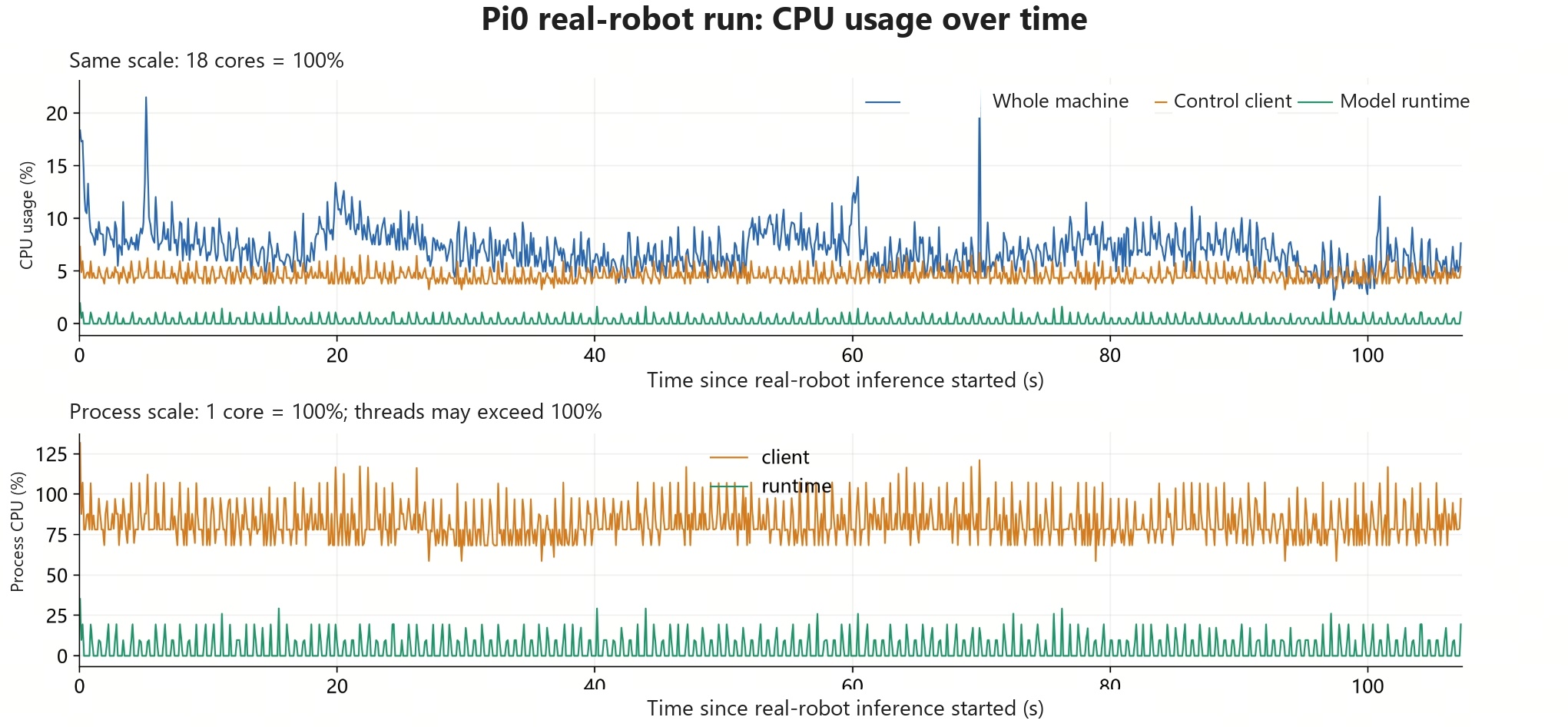
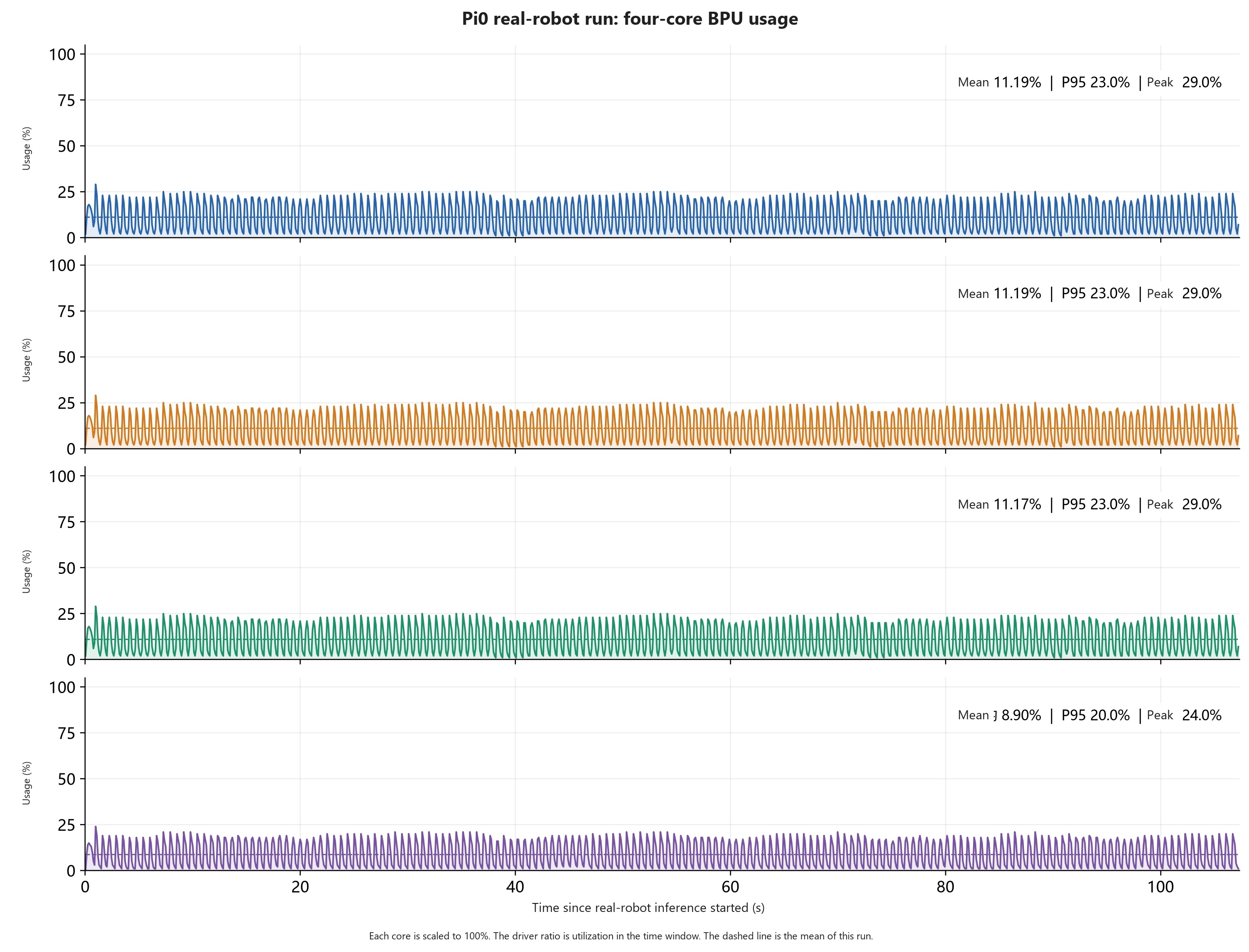
CPU and four-core BPU usage on the S600 while folding a towel on the real robot.
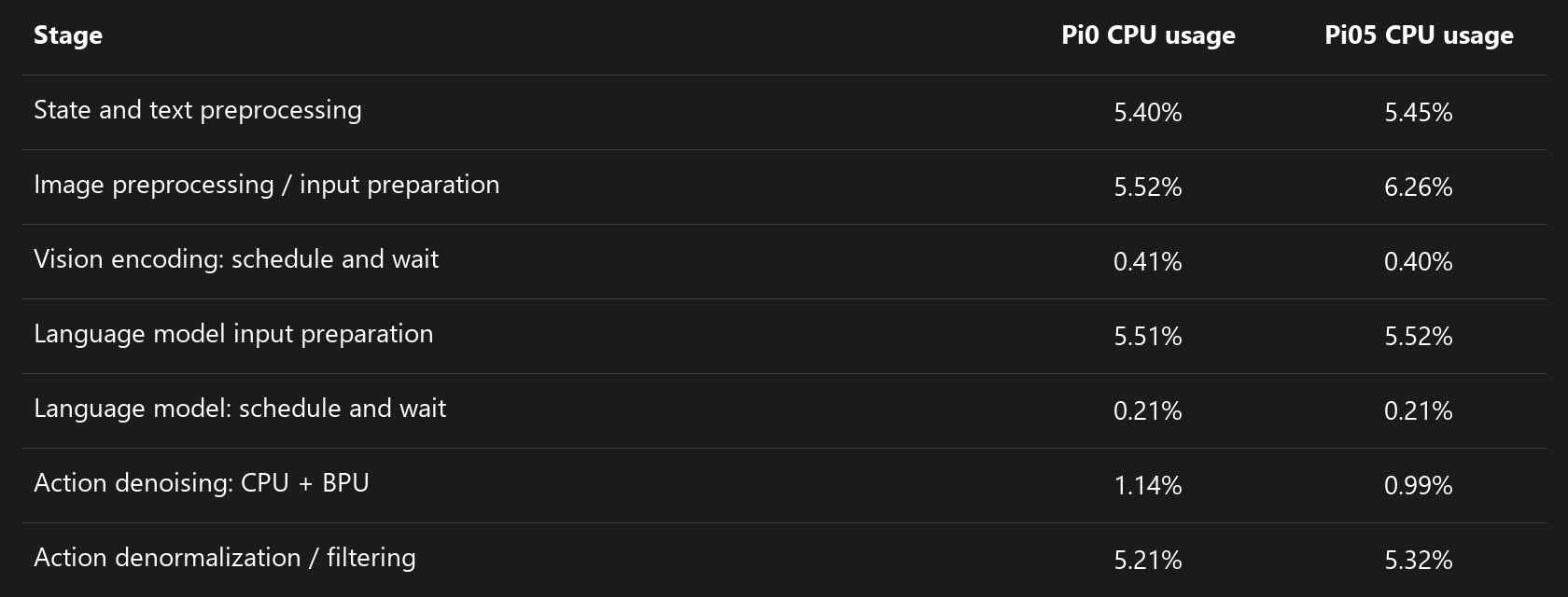
CPU usage
Four-core BPU usage
Per-stage CPU usage