ICM42688
Product Overview
The ICM42688 is a 6-axis IMU (3-axis gyroscope + 3-axis accelerometer) that connects to RDK development boards via I2C. The driver registers separate gyroscope and accelerometer IIO devices, making it easy to read angular velocity and linear acceleration raw values independently.
This document applies to RDK X5 / RDK X5 Module. System image 3.4.1 or later is recommended.
Installation
Hardware Connection
The example below uses the RDK stereo camera connection (you do not have to use a stereo camera; this only demonstrates using the sensor on the module):

- Connect the ICM42688 module to the RDK X5 MIPI connector according to the product manual.
- Ensure the module power supply and I2C address do not conflict.
Software Configuration
Run sudo srpi-config in a full-screen terminal:
- Go to
3 Interface Options→I6 IMU

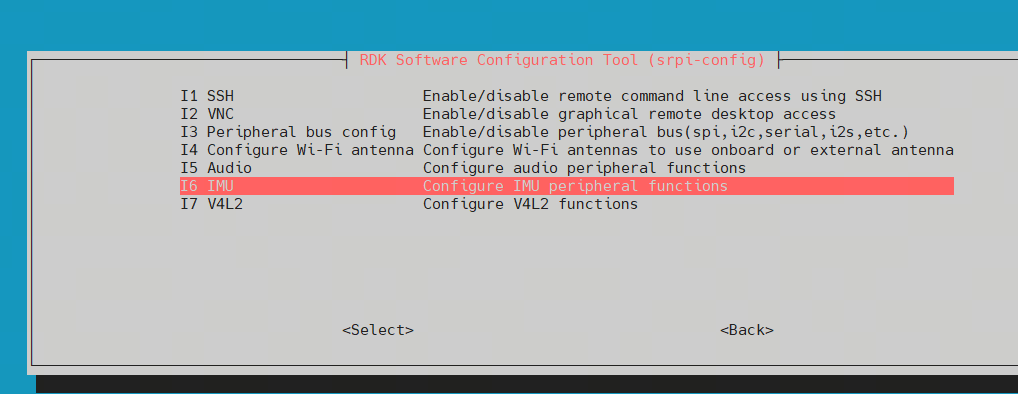
- Select the ICM42688 option (refer to the menu display)

- Select
Finish, confirm, and reboot


Uninstallation
- Go to
srpi-config→3 Interface Options→I6 IMU - Select
UNSET - Power off the board and remove the module
Operation
1. Check IIO Devices
ls /sys/bus/iio/devices/
2. Read Sensor Data
In the examples below, iio:device1 and iio:device2 numbers depend on actual registration results. Confirm via the name node first:
cat /sys/bus/iio/devices/iio:device1/name
cat /sys/bus/iio/devices/iio:device2/name
Expected example output:
root@ubuntu:~# cat /sys/bus/iio/devices/iio:device1/name
icm42688-gyro
root@ubuntu:~# cat /sys/bus/iio/devices/iio:device2/name
icm42688-accel

Read raw data:
cat /sys/bus/iio/devices/iio:device2/in_accel_x_raw
cat /sys/bus/iio/devices/iio:device1/in_anglvel_x_raw


If you can read the correct name and *_raw values for each axis, the ICM42688 is working properly.
Troubleshooting
- Device numbers differ from examples: Use
ls /sys/bus/iio/devices/andcat .../nameto identify actual nodes, then replacedevice1/device2in the commands. - Empty reads or errors: Confirm ICM42688 is enabled in
srpi-configand the board has been rebooted; check I2C wiring and address.
For fusion applications such as stereo IMU cameras, see Stereo IMU Camera.