Sunrise Camera Development Guide
Sunrise Camera System Design
System Block Diagram
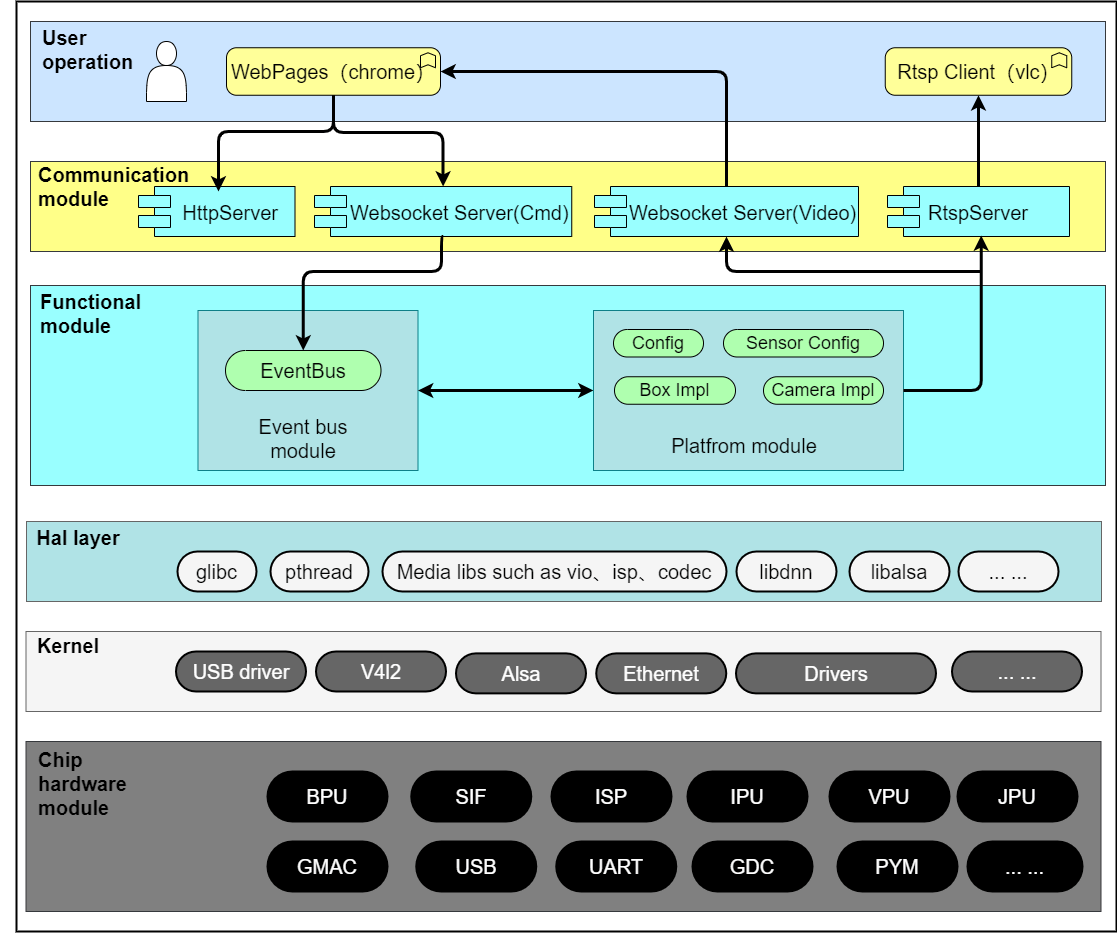
Sunrise Camera implements multiple application solutions, such as intelligent cameras and intelligent analytics boxes.
The Sunrise Camera source code includes the WebPages layer (user interaction layer), communication module layer, and functional module layer. This document primarily introduces the design of these three modules.
The HAL layer modules include multimedia-related module calling interface libraries, BPU module inference libraries, etc.
The kernel version includes standard driver libraries as well as the system BSP.
The software block diagram is shown below:
Microkernel Design
The microkernel architecture, also known as the "plug-in architecture," refers to a software design where the kernel is relatively small, and most core functionalities and business logic are implemented through plug-ins.
The kernel (core) typically contains only the minimal functionality required for system operation. Plug-ins are mutually independent, and communication between plug-ins should be minimized to avoid interdependencies.
Advantages and Disadvantages of the Architecture
Advantages
- Excellent extensibility: new features can be added simply by developing plug-ins.
- Functional isolation: plug-ins can be independently loaded and unloaded, facilitating deployment.
- High customizability to meet diverse development requirements.
- Supports incremental development, allowing features to be added gradually.
Disadvantages
- Poor scalability: the kernel is usually a single unit, making it difficult to implement in a distributed manner.
- Higher development complexity due to the need to manage communication between plug-ins and the kernel, as well as plug-in registration mechanisms.
Sunrise Camera Architecture Overview
Module Partitioning
| Module | Directory | Description |
|---|---|---|
| Event Bus Module | communicate | Implements event registration, reception, and distribution across modules. |
| Common Library Module | common | Provides common utility functions such as logging, locking, thread operations, queue operations, etc. |
| Camera Module | Platform | Contains chip-platform-specific code, encapsulating hardware-dependent components. |
| External Interaction Module | Transport | Handles external device interactions, including rtspserver, websocket, etc. |
| Main Program Entry | Main | Contains the main() function entry point. |
Top-level Code Structure
.
├── common						# Common library module code
├── communicate					# Event bus module
├── config						# Build configuration directory
├── main						# Main entry program
├── Makefile					# Build script
├── makefile.param				# Build configuration
├── Platform					# Camera module: platform-specific, application scenario, and chip IP-related code
├── start_app.sh				# Startup script
├── sunrise_camera.service 		# Auto-start configuration file
├── third_party					# Third-party dependencies
├── Transport					# Implementation of rtspserver and websocket modules
├── VERSION						# Version information
└── WebServer					# Web page program and resource files
Compilation
- Log in to the device and navigate to the directory:
/app/multimedia_samples/sunrise_camera - Execute the command:
make - The generated binary:
sunrise_camera
root@ubuntu:/app/multimedia_samples/sunrise_camera# ls sunrise_camera/bin/
log  sunrise_camera  www
Event Bus Module (communicate)
Overview
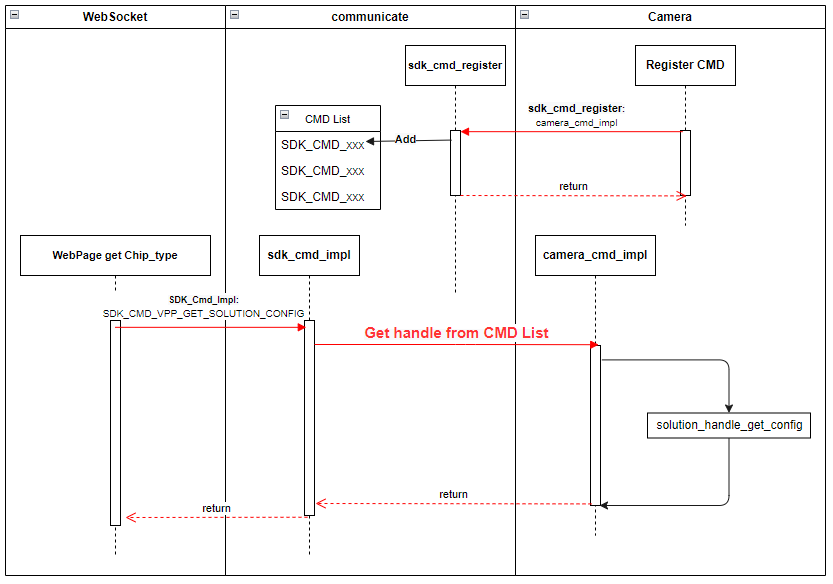
The event bus module serves as the minimal runtime unit. Based on compilation options, it invokes registration interface functions of different modules and handles the reception and dispatching of CMDs (commands) across modules.
When modules interact, if a received CMD has been registered and enabled, the event bus forwards it to the appropriate sub-module for processing and returns the result to the requesting module upon completion.
If a received CMD is either unregistered or disabled, the CMD invocation fails.
Functionality Description
- Static plug-in control for modules (enabling/disabling at compile time)
- CMD command forwarding between modules
Example:
The camera sub-module defines the command SDK_CMD_CAMERA_GET_CHIP_TYPE. After registering this CMD via the camera_cmd_register function, when the websocket sub-module receives a web request to query the chip type, it can invoke the camera sub-module's interface using the following code.
The entire process is illustrated below:
Module Code Structure
.
├── include
│   ├── sdk_common_cmd.h			# Defines all CMDs used by sub-modules in the system
│   ├── sdk_common_struct.h		    # Defines data structures corresponding to each CMD
│   └── sdk_communicate.h			# Declares module interface functions
├── Makefile
└── src
    └── sdk_communicate.c			# Implementation of interface functions
Interface Description
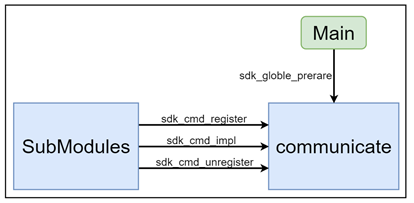
sdk_globle_prerare
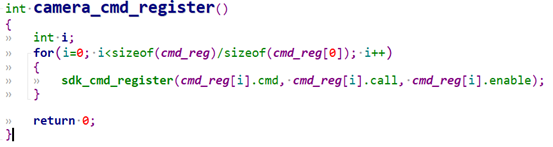
All sub-module xxx_cmd_register() functions are aggregated into this function. During main program startup, this interface is called to register and enable all required CMDs from sub-modules into the subsystem.
Each sub-module must implement its own xxx_cmd_register() function to register its CMDs. This is a fundamental prerequisite for the system to operate correctly.
Example:
sdk_cmd_register
Interface for CMD registration.
sdk_cmd_unregister
Interface for CMD unregistration.
sdk_cmd_impl
Sub-modules call this interface to invoke functionalities implemented by other sub-modules.
Common Library Module (common)
Overview
This module provides common utility libraries, including but not limited to logging, locking, thread wrappers, and base64 encoding/decoding.
It encapsulates commonly used classes and functions in programming to prevent redundant implementations of the same operations across multiple modules.
Updates to this module affect all other modules and should therefore be handled with caution.
Functionality Description
None
Module Code Structure
.
├── Makefile					# Build script
├── makefile.param
└── utils
    ├── include				    # Header files
    │   ├── aes256.h
    │   ├── base64.h
    │   ├── cJSON_Direct.h
    │   ├── cmap.h
    │   ├── common_utils.h
    │   ├── cqueue.h
    │   ├── gen_rand.h
    │   ├── lock_utils.h
    │   ├── mqueue.h
    │   ├── mthread.h
    │   ├── nalu_utils.h
    │   ├── sha256.h
    │   ├── stream_define.h
    │   ├── stream_manager.h
    │   └── utils_log.h
    ├── Makefile
    └── src                      # Source implementation files
        ├── aes256.c
        ├── base64.c
        ├── cJSON_Direct.c
        ├── cmap.c
        ├── common_utils.c
        ├── cqueue.c
        ├── gen_rand.c
        ├── lock_utils.c
        ├── mqueue.c
        ├── mthread.c
        ├── nalu_utils.c
        ├── sha256.c
        ├── stream_manager.c
        └── utils_log.c
Platform Module
Overview
The module mainly includes: video encoding, ISP control, image control, snapshot capture, video output, algorithm processing, etc.
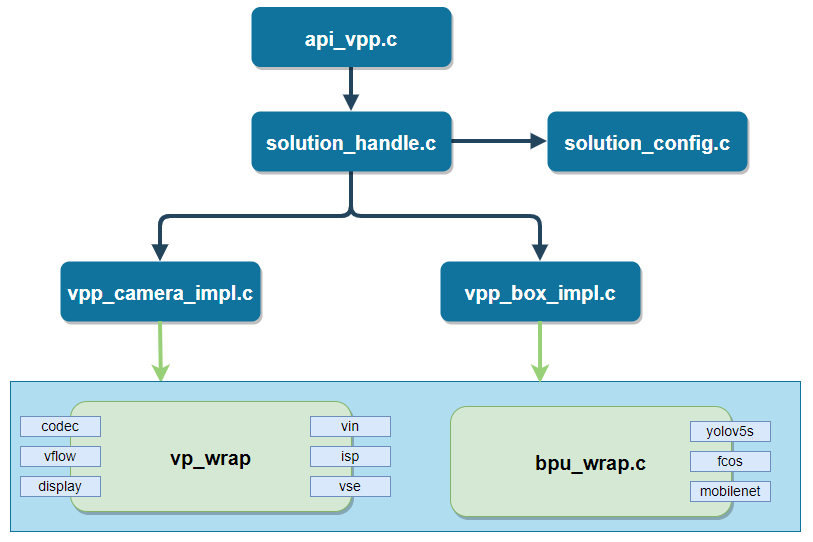
The internal structure of this module is as follows:
api_vpp serves as the entry point of this module and defines the supported CMD command set;
solution_handle handles application configuration reading/writing and assigns values to scene-related interfaces;
vpp_camera_impl and vpp_box_impl implement functionalities for specific application scenarios;
vp_wrap encapsulates the interfaces of the multimedia module;
bpu_wrap encapsulates the algorithm inference interfaces and post-processing methods.
Function Description
To add a new application scenario implementation, you only need to implement the interfaces defined in the vpp_ops_t structure.
typedef struct vpp_ops {
	int (*init_param)(void); // Initialize configuration parameters for modules such as VIN, VSE, VENC, BPU, etc.
	int (*init)(void); // SDK initialization based on configuration
	int (*uninit)(void); // Deinitialization
	int (*start)(void); // Start all media-related modules
	int (*stop)(void); // Stop
	// All CMDs supported by this module are implemented via the following two interfaces
	int (*param_set)(SOLUTION_PARAM_E type, char* val, unsigned int length);
	int (*param_get)(SOLUTION_PARAM_E type, char* val, unsigned int* length);
} vpp_ops_t;
The workflow for launching an application solution (using vpp_camera as an example) is as follows:
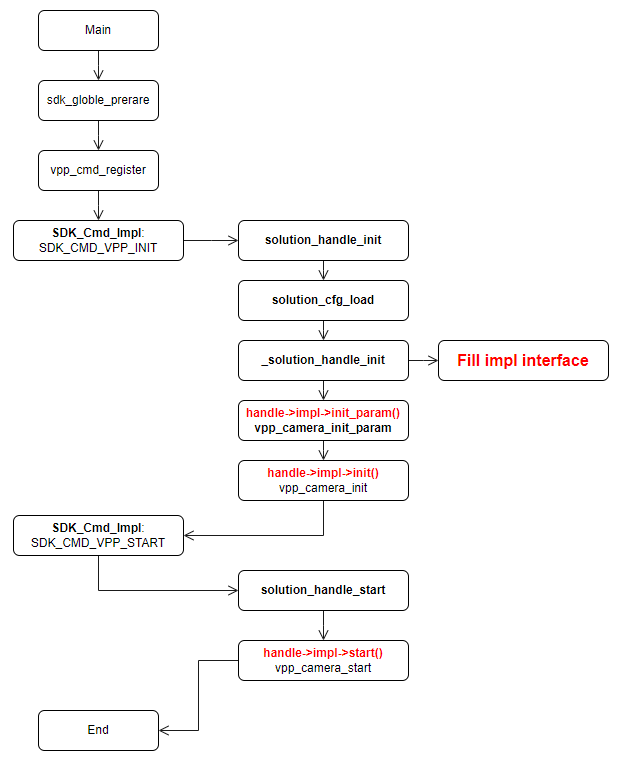
Initialization and startup procedures for other submodules can also refer to this flowchart.
Module Code Structure
Code path: Platform/S100
.
├── api                                   # CMD registration
├── bpu_wrap                              # Encapsulation for BPU algorithm interfaces
├── main                                  # Implementation of actual functional interfaces for CMD registration
├── Makefile                              # Build script
├── makefile.param                        # Build configuration
├── model_zoom                            # Algorithm model repository
├── test_data                             # Stores test video bitstream files and program configuration files
├── vpp_impl                              # Implementation of application scenario functionalities
├── vp_sensors -> ../../../vp_sensors/    # Camera Sensor configuration code, shared with other sample modules
└── vp_wrap                               # Encapsulation of multimedia interfaces
External Interaction Module (Transport)
Overview
This submodule specifically handles interactions with terminals or platforms following a defined transport protocol; it includes communication modules via network, RTSP server, and WebSocket.
The interaction module involves the most inter-module communication and must strictly adhere to design conventions. All data requests to other modules must be processed through defined module CMDs.
Media Server Module
This module encapsulates ZLMediaKit, exposing simple interfaces such as init, create_media, and push_video. Currently, it supports pushing H.264 and H.265 video streams.
For instructions on starting and using this module, please refer to the workflow described in the "Main Program Entry" section.
WebSocket Server Module
This module handles interactive operations from the web. After a user performs an operation on the web interface, the WebSocket server receives commands and parameters of a specific kind. These are processed in the handle_user_msg function within handle_user_massage.c. To add a new interactive command, implement it within this function.
Currently supported interactive commands include: scene switching, scene parameter retrieval and setting, chip type query, H.264 bitrate configuration, system time synchronization, WebSocket stream pulling and stopping, etc.
Main Program Entry (main)
Overview
Entry point of the main program and module startup.
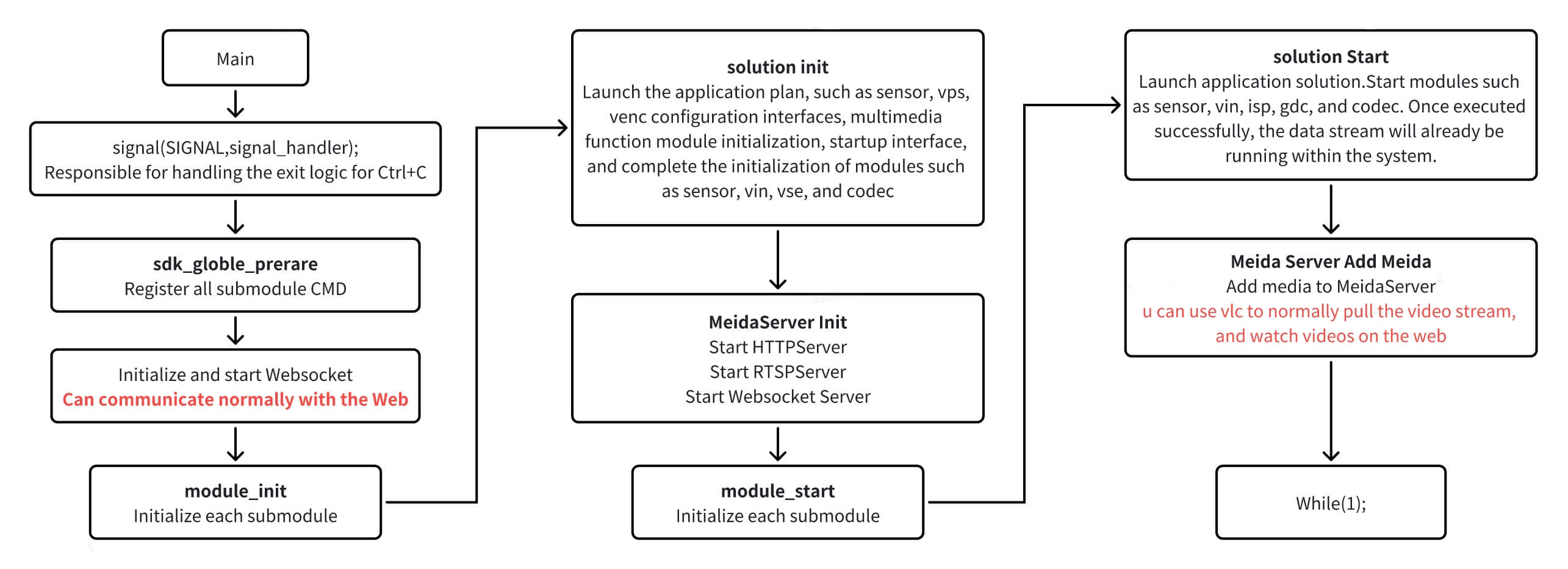
The current basic submodule startup sequence is as follows. Note that the startup order must follow the dependency relationships among submodules.
Execution Flow
WebServer
Overview
This module implements an HTTP-based web service using ZLMediaKit, allowing users to preview video streams and configure application scenarios directly through a web browser.
Function Description
The WebServer/www directory contains: resource files, web pages, CSS, and JavaScript programs.
Performing Algorithm Inference Using BPU
Overview
This module handles algorithm model loading, data pre-processing, inference, post-processing, and returns results in JSON format.
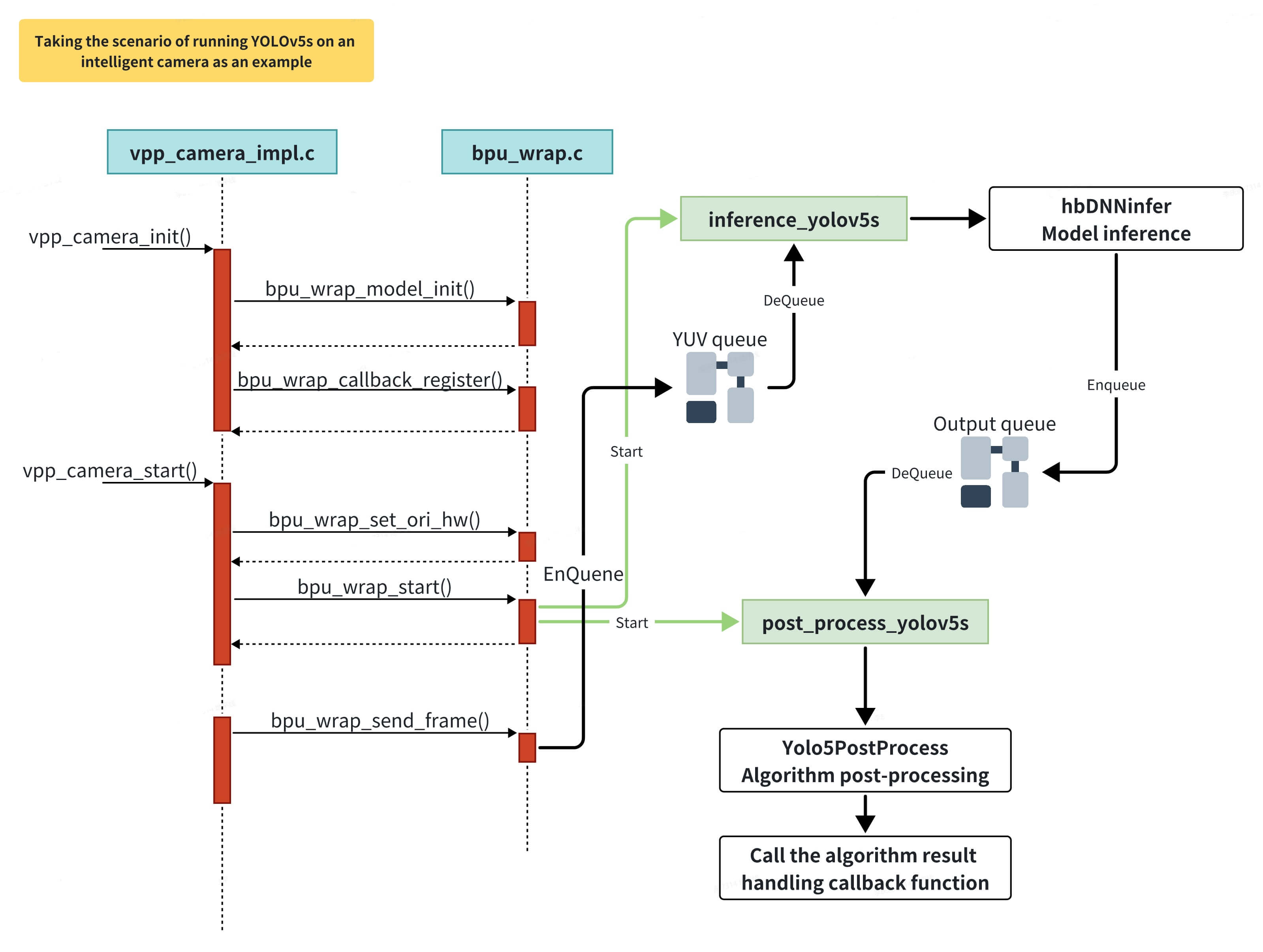
The module's runtime sequence is as follows:
Adding a New Model
Currently, sunrise_camera supports only a limited number of algorithm models. In practical applications, running additional models for testing is inevitable. This section describes the basic steps for adding a new algorithm model.
| Item | Source File | Description |
|---|---|---|
| Prepare algorithm model | Place under Platform/s100/model_zoom (*.hbm) | Add fixed-point algorithm models that can run on the development board. System-provided models are stored in /opt/hobot/model/s100/basic/. |
| Add model configuration | bpu_wrap.c | Add the new model's name, specify the model file path, and define inference and post-processing function interfaces in bpu_models. |
| Inference thread handler | bpu_wrap.c | In the handler, prepare output tensors, call hbDNNInfer for inference, and push results into the output queue. Example: inference_yolov5s |
| Post-processing thread | bpu_wrap.c | Retrieve algorithm results from the output queue, apply post-processing, and generate a JSON-formatted result string. If a callback is set, invoke it. Example: post_process_yolov5s |
| Post-processing code | yolov5_post_process.cpp | Each algorithm model requires corresponding post-processing logic—for example, mapping classification IDs to class names or mapping detection boxes back to original image coordinates. |
| Add rendering on Web UI | WebServer/www/js/DisplayWindowManager.js | Optional |
Preparing the Algorithm Model
Algorithm models runnable on the development board come with two possible file extensions: .bin and .hbm:
- .bin models: Generated via the algorithm toolchain (PTQ - Post-Training Quantization), using
.binas the suffix. - .hbm models: Directly trained using a fixed-point model training framework (QAT - Quantization-Aware Training).
For detailed development instructions regarding algorithm models, please refer to the Quantization Toolchain Development Guide.
Adding Initialization Code
Define the new algorithm model in the bpu_models array within bpu_wrap.c, specifying its name, model file path, inference function, and post-processing function:
bpu_model_descriptor bpu_models[] = {
	{
		.model_name = "yolov5s",                                   // Algorithm name; displayed on the web client for user selection
		.model_path = "../model_zoom/yolov5s_672x672_nv12.bin",    // Path to the algorithm model file
		.inference_func = inference_yolov5s,                       // Inference function
		.post_proc_func = post_process_yolov5s                     // Post-processing function; if simple, can be merged into the inference function
	},
	... (omitted) ...
};
When an algorithm task starts, it launches the corresponding inference and post-processing threads based on the model_name.
Inference Thread Handler Function
In the inference thread, prepare output result tensors; dequeue YUV data from the YUV queue; call HB_BPU_runModel to perform inference and obtain results; then push the results into the output queue for post-processing.
static void *inference_yolov5s(void *ptr)
{
	// Prepare model output node tensors; use 5 rotating output buffers for simplicity.
	// In theory, post-processing should be faster than inference.
	hbDNNTensor output_tensors[5][3];
	int32_t cur_ouput_buf_idx = 0;
	for (i = 0; i < 5; i++) {
		ret = prepare_output_tensor(output_tensors[i], dnn_handle);
		if (ret) {
			SC_LOGE("prepare model output tensor failed");
			return NULL;
		}
	}

	while (privThread->eState == E_THREAD_RUNNING) {
		// Get image data for algorithm processing; format is typically NV12 YUV
		if (mQueueDequeueTimed(&bpu_handle->m_input_queue, 100, (void**)&input_tensor) != E_QUEUE_OK)
			continue;

        // Perform model inference
		hbDNNInferCtrlParam infer_ctrl_param;
		HB_DNN_INITIALIZE_INFER_CTRL_PARAM(&infer_ctrl_param);
		ret = hbDNNInfer(&task_handle,
				&output,
				&input_tensor->m_dnn_tensor,
				dnn_handle,
				&infer_ctrl_param);

		// Enqueue data for post-processing
		Yolo5PostProcessInfo_t *post_info;
		post_info = (Yolo5PostProcessInfo_t *)malloc(sizeof(Yolo5PostProcessInfo_t));
		… …
		mQueueEnqueue(&bpu_handle->m_output_queue, post_info);
		cur_ouput_buf_idx++;
		cur_ouput_buf_idx %= 5;
	}
}
Post-Processing Thread Function
In the post-processing thread, retrieve algorithm results from the output queue, call the post-processing function, and then invoke the algorithm task callback to handle the results (currently, all effective callbacks send results directly to the web for rendering).
static void *post_process_yolov5s(void *ptr)
{
	tsThread *privThread = (tsThread*)ptr;
	Yolov5PostProcessInfo_t *post_info;

	mThreadSetName(privThread, __func__);

	bpu_handle_t *bpu_handle = (bpu_handle_t *)privThread->pvThreadData;
	while (privThread->eState == E_THREAD_RUNNING) {
		// Retrieve data from the post-processing data queue
		if (mQueueDequeueTimed(&bpu_handle->m_output_queue, 100, (void**)&post_info) != E_QUEUE_OK)
			continue;

		char *results = Yolov5PostProcess(post_info); // Perform post-processing, e.g., obtaining detection boxes, filtering out low-confidence results, and scaling detection box dimensions to match the display video resolution

		if (results) {
			if (NULL != bpu_handle->callback) {
				// Callback for algorithm task results; in the current application scenario, results are sent to the browser via WebSocket
				bpu_handle->callback(results, bpu_handle->m_userdata);
			} else {
				SC_LOGI("%s", results);
			}
			free(results);
		}
		if (post_info) {
			free(post_info);
			post_info = NULL;
		}
	}
	mThreadFinish(privThread);
	return NULL;
}
Post-processing Code
It is recommended that each algorithm model include a dedicated post-processing method:
- yolov5: yolo5_post_process.cpp
- mobilenet_v2: Classification model post-processing is relatively simple—just map the class ID to its corresponding label name.
The post-processing method should accomplish the following tasks:
Analyze the output results: for classification models, match class IDs to their label names; for detection models, map detection boxes from model output coordinates back to the original image coordinates.
Format the algorithm results into JSON. For ease of use, perform JSON formatting directly within the function (e.g., for transmission to a web client), so the output can be used immediately.
// YOLOv5 output tensor format:
// Three groups of grids are generated through three downsampling stages; each grid undergoes three predictions, and the final results are output.
char* Yolov5PostProcess(Yolov5PostProcessInfo_t *post_info) {
	hbDNNTensor *tensor = post_info->output_tensor;

	std::vector<Detection> dets;
	std::vector<Detection> det_restuls;
	uint32_t i = 0;
	char *str_dets;

	// Filter detection boxes based on confidence scores
	for (i = 0; i < default_yolov5_config.strides.size(); i++) {
		_postProcess(&tensor[i], post_info, i, dets);
	}
	// Apply Non-Maximum Suppression (NMS) to merge overlapping boxes, using an IoU threshold (0.65) and a maximum number of output boxes (5000)
	yolov5_nms(dets, post_info->nms_threshold, post_info->nms_top_k, det_restuls, false);
	std::stringstream out_string;

	// Convert algorithm results into JSON format
	out_string << "\"timestamp\": ";
	unsigned long timestamp = post_info->tv.tv_sec * 1000000 + post_info->tv.tv_usec;
	out_string << timestamp;
	out_string << ",\"detection_result\": [";
	for (i = 0; i < det_restuls.size(); i++) {
		auto det_ret = det_restuls[i];
		out_string << det_ret;
		if (i < det_restuls.size() - 1)
		out_string << ",";
	}
	out_string << "]" << std::endl;

	str_dets = (char *)malloc(out_string.str().length() + 1);
	str_dets[out_string.str().length()] = '\0';
	snprintf(str_dets, out_string.str().length(), "%s", out_string.str().c_str());
	return str_dets;
}
Add Rendering Logic on the Web Page
This section is optional. In the current implementation, all algorithm results are rendered on the web page. The data flow is as follows: after post-processing returns results in JSON format, they are sent to the web page via WebSocket. A canvas is implemented on the web page to render the algorithm results.
// Generic algorithm result callback function; currently sends results to the web via WebSocket
int32_t bpu_wrap_general_result_handle(char *result, void *userdata)
{
	int32_t ret = 0;
	int32_t pipeline_id = 0;
	char *ws_msg = NULL;

	if (userdata)
		pipeline_id = *(int*)userdata;

	// Add metadata to the JSON-formatted algorithm result
	// Allocate memory
	ws_msg = malloc(strlen(result) + 32);
	if (NULL == ws_msg) {
		SC_LOGE("Failed to allocate memory for ws_msg");
		return -1;
	}
	sprintf(ws_msg, "{\"kind\":10, \"pipeline\":%d,", pipeline_id + 1);
	strcat(ws_msg, result);
	strcat(ws_msg, "}");

	ret = SDK_Cmd_Impl(SDK_CMD_WEBSOCKET_SEND_MSG, (void*)ws_msg);
	free(ws_msg);
	return ret;
}
The file WebServer/www/js/WebSocketProtocolHandler.js already includes generic handling logic for classification and object detection algorithm results. To render results from a new type of algorithm model, you will need to modify the JavaScript code accordingly.
// Web page WebSocket message handler
handleMessage(event) {
	{
	... ( omitted ) ...
	try {
            const message = JSON.parse(event.data);
            if (message && message.kind) {
                // Parse the message type and invoke the corresponding callback
                switch (message.kind) {
					... ( omitted ) ...
                    case this.REQUEST_TYPES.ALOG_RESULT:
                        if (this.userCallbacks.onAlogResult) {
                            this.userCallbacks.onAlogResult(message);
                        }
                        break;
					... ( omitted ) ...
                    default:
                        console.warn(`Unknown command type: kind=${message.kind}`);
                }
            }
        } catch (error) {
            console.error("Failed to parse message:", error);
        }
    }
	... ( omitted ) ...
}