Open Domain Instance Segmentation
Example Introduction
The open domain instance segmentation example is a set of Python interface development code examples located in /app/pydev_demo/05_open_instance_seg_sample/, demonstrating how to use the hbm_runtime module for open domain object detection tasks. This example uses the YOLO-World model, which supports flexible object detection through text prompts without requiring a predefined list of categories.
Included model example:
root@ubuntu:/app/pydev_demo/05_open_instance_seg_sample$ tree -L 1
.
└── 01_yolo_world
Result Demonstration
The example detects objects in an image that match the text prompts and draws bounding boxes, category names, and confidence scores.

Hardware Preparation
Hardware Connection
This example only requires the RDK development board itself, with no additional peripheral connections needed. Ensure the development board is properly powered on and the system is started.

Quick Start
Code and On-Board Location
Navigate to /app/pydev_demo/05_open_instance_seg_sample/ to see the folder containing the open domain instance segmentation example:
root@ubuntu:/app/pydev_demo/05_open_instance_seg_sample# tree
.
└── 01_yolo_world
    ├── dog.jpeg
    ├── offline_vocabulary_embeddings.json
    ├── result.jpg
    ├── yolo_world.bin
    └── yoloworld.py
Compilation and Execution
Python examples do not require compilation and can be run directly.
cd /app/pydev_demo/05_open_instance_seg_sample/01_yolo_world
python yoloworld.py
Execution Result
root@ubuntu:/app/pydev_demo/05_open_instance_seg_sample/01_yolo_world# python yoloworld.py
[BPU_PLAT]BPU Platform Version(1.3.6)!
[HBRT] set log level as 0. version = 3.15.55.0
[DNN] Runtime version = 1.24.5_(3.15.55 HBRT)
[A][DNN][packed_model.cpp:247][Model](2000-01-01,10:59:17.916.291) [HorizonRT] The model builder version = 1.23.6
[W][DNN]bpu_model_info.cpp:491][Version](2000-01-01,10:59:18.311.878) Model: yolo_world. Inconsistency between the hbrt library version 3.15.55.0 and the model build version 3.15.49.0 detected, in order to ensure correct model results, it is recommended to use compilation tools and the BPU SDK from the same OpenExplorer package.
...
[Saved] Result saved to: result.jpg
Detailed Description
Example Program Parameter Options
The open domain instance segmentation example supports command-line parameter configuration. If no parameters are specified, the program will automatically load the test image in the same directory for inference using default values.
| Parameter | Description | Type | Default Value |
|---|---|---|---|
--model-path | BPU quantized model path (.bin) | str | /app/model/basic/yolo_world.bin |
--test-img | Input test image path | str | dog.jpeg |
--label-file | Vocabulary embedding file path (JSON format) | str | offline_vocabulary_embeddings.json |
--prompts | Text prompts, comma-separated (e.g., dog,cat) | str | dog |
--img-save-path | Path to save detection result image | str | result.jpg |
--priority | Inference priority (0~255, 255 is highest) | int | 0 |
--bpu-cores | List of BPU core indices (e.g., 0 1) | int list | [0] |
--nms-thres | Non-Maximum Suppression (NMS) threshold | float | 0.45 |
--score-thres | Confidence threshold | float | 0.05 |
Software Architecture Description
This section describes the software architecture and workflow of the open domain instance segmentation example, explaining the complete execution process from model loading to result output, helping to understand the overall code structure and data flow.
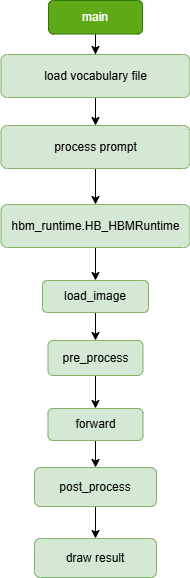
- Vocabulary Loading - Load vocabulary embedding vectors from a JSON file
- Prompt Processing - Parse user-provided text prompts and look up corresponding embedding vectors from the vocabulary
- Model Loading - Load the precompiled model file using the
hbm_runtimemodule - Image Loading - Read the input test image
- Image Preprocessing - Resize the image to model input dimensions, convert BGR to RGB, and transform to NCHW format
- Model Inference - Execute model forward computation on the BPU, inputting image tensors and text embedding vectors
- Result Post-processing - Use the post_utils library to parse inference results, perform decoding, confidence filtering, and NMS (Non-Maximum Suppression)
- Result Output - Draw detection boxes on the image and save the result image
API Flow Description
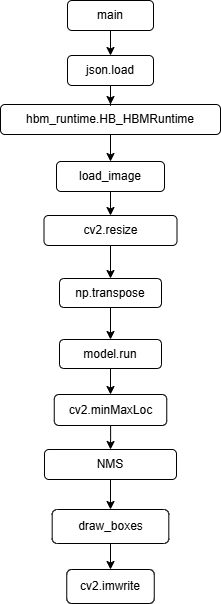
This section lists the main API interfaces used in the example program, describing the functionality, input parameters, and return values of each interface to help developers quickly understand the code implementation details and interface calling methods. Interfaces prefixed with cv2. are general OPENCV interfaces, those prefixed with np. are general Numpy interfaces, and the rest are hbm_runtime and related interfaces.
-
json.load(file)Load the vocabulary embedding file. Input: file path, Returns: vocabulary dictionary
-
hbm_runtime.HB_HBMRuntime(model_path)Load the precompiled model. Input: model file path
-
load_image(image_path)Load the test image. Input: image file path
-
cv2.resize(img, (0,0), fx,fy)Resize the image. Input: image, target dimensions, horizontal scaling factor, vertical scaling factor, Returns: resized image
-
np.transposeTranspose the array to convert the image from HWC to NCHW format
-
model.run(input_dict)Execute model inference. Input: dictionary containing image tensor and text embeddings, Returns: model output
-
cv2.minMaxLoc(array)Find the minimum and maximum values and their positions in the array. Input: model output, Returns: confidence minimum, confidence maximum, minimum position, maximum position
-
NMS(boxes, scores_np, nms_thres)Perform Non-Maximum Suppression. Input: detection boxes, confidence scores, categories, IoU threshold, Returns: retained indices
-
draw_boxes(img, boxes, cls_ids, scores, classes, rdk_colors)Draw detection results. Input: image, detection boxes, category IDs, confidence scores, category list, color mapping
-
cv2.imwrite(img_path, img)Save the final result. Input: save path, image
FAQ
Q: What should I do if I get a "ModuleNotFoundError: No module named 'hbm_runtime'" error when running the example?
A: Ensure that the RDK Python environment is correctly installed, including official dedicated inference libraries such as the hbm_runtime module.
Q: How can I change the test image?
A: Specify the image path using the --test-img parameter when running the command, for example: python yoloworld.py --test-img your_image.jpg
Q: What if a prompt is not found in the vocabulary?
A: Check whether the vocabulary file specified by --label-file contains that prompt. Open the JSON file to view the list of available vocabulary terms.
Q: How can I change the detection target?
A: Modify the --prompts parameter, for example: --prompts cat
Q: What if the detection results are inaccurate?
A: Try adjusting the --score-thres and --nms-thres parameters, or use more specific prompts. Also ensure the input image is of good quality.
Q: How can I adjust the detection threshold?
A: Modify the value of --score-thres in the code, for example changing it to 0.1 can increase detection sensitivity.
Q: How can I view the available prompts in the vocabulary?
A: Open the offline_vocabulary_embeddings.json file and look at the list of keys, which are the available prompts.
Q: How can I obtain other pretrained YOLO-World models?
A: Refer to the model_zoo repository or the toolchain base model repository