Lesson 11: RDK X5 40-pin GPIO and PWM
This lesson introduces the RDK X5 40-pin header, GPIO input, edge events, and hardware PWM. The two hands-on demos read a push button and control a hobby servo.
Hardware: RDK X5
Learning objectives
After this lesson, you will be able to:
- Locate pins with BOARD physical numbering
- Configure and read a GPIO input with
Hobot.GPIO - Explain polling, rising edges, falling edges, and interrupts
- Explain PWM frequency, period, and duty cycle
- Run the button-input and servo-control demos
RDK X5 pins used in this lesson
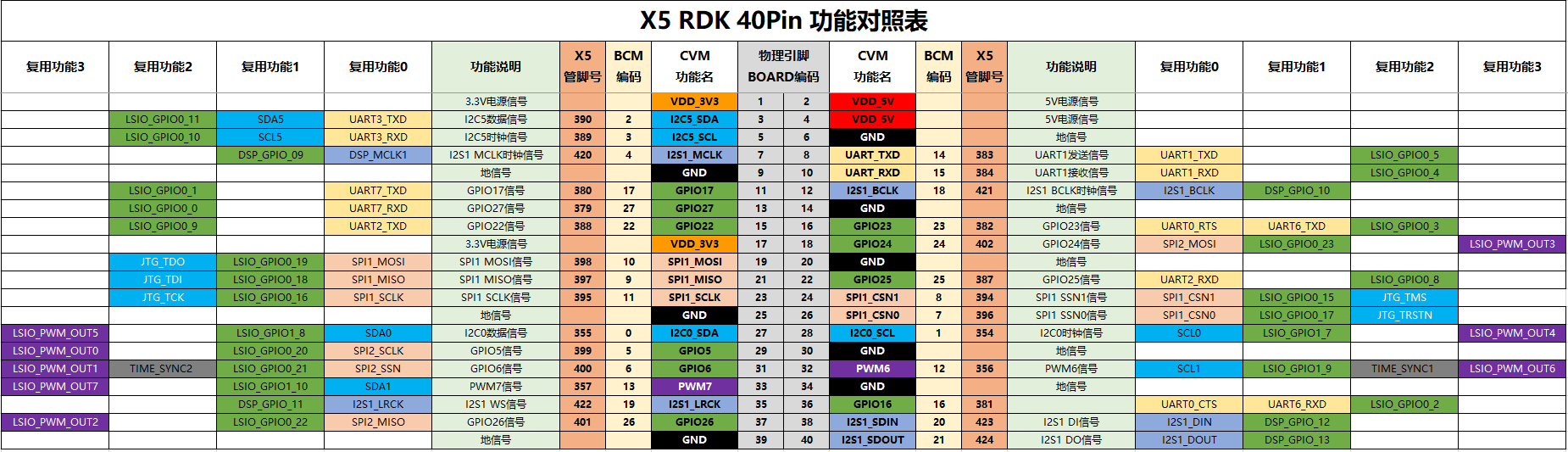
| BOARD pin | Function | Lesson use |
|---|---|---|
| 17 | 3.3 V | Button pull-up supply |
| 33 | PWM7 | Servo signal |
| 37 | GPIO26 | Button input |
| 39 | GND | Button ground and shared servo ground |
The GPIO logic level is 3.3 V. Do not connect 5 V to a GPIO input. Power the servo from a separate regulated 5 V supply and connect the external supply ground to an RDK X5 ground pin.
GPIO and interrupts
This course uses GPIO.BOARD, so channel numbers refer to physical positions on the 40-pin header.
import Hobot.GPIO as GPIO

GPIO.setwarnings(False)
GPIO.setmode(GPIO.BOARD)
GPIO.setup(37, GPIO.IN)
state = GPIO.input(37)
GPIO.cleanup()
Polling repeatedly calls GPIO.input(). Edge detection lets the hardware notify the program when the signal changes.
| Edge | Transition | Pull-up button action |
|---|---|---|
GPIO.RISING |
LOW to HIGH | Button released |
GPIO.FALLING |
HIGH to LOW | Button pressed |
GPIO.BOTH |
Either direction | Press and release |
PWM
PWM rapidly switches between HIGH and LOW at a fixed frequency.
A typical hobby servo uses approximately 50 Hz PWM. At 50 Hz, one period is about 20 ms. Changing the duty cycle changes the HIGH pulse width and therefore the requested servo position.
RDK X5 provides hardware PWM. This lesson uses BOARD pin 33 (PWM7) in the PWM3 group.
Demo 1: read a button
Wire a 10 kΩ pull-up resistor from BOARD pin 17 to pin 37. Connect the push button between pin 37 and pin 39.
BOARD pin 17 (3.3 V) -- 10 kΩ resistor --+
                                             +-- BOARD pin 37 (GPIO26 input)
BOARD pin 39 (GND) ---- push button --------+
Released reads HIGH; pressed reads LOW.
git clone https://github.com/D-Robotics/rdk-course-demos.git
cd rdk-course-demos/01_beginner/11_40pin_gpio_pwm/code
sudo python3 read_button.py
Demo 2: control a servo
| Servo connection | Destination |
|---|---|
| Signal | BOARD pin 33 (PWM7) |
| Positive supply | External regulated 5 V |
| Ground | External supply GND |
| Shared ground | External GND to BOARD pin 39 |
The demo applies 5.0%, 7.5%, and 10.0% duty cycles, then returns to 7.5%. Servo pulse ranges vary by model. Disconnect power immediately if the servo hits a mechanical stop, vibrates continuously, or becomes hot.
Troubleshooting
| Symptom | Check |
|---|---|
| Button value changes without input | Verify the 10 kΩ pull-up and pin 37 wiring |
| Servo does not move | Verify external 5 V power, shared ground, and pin 33 |
| Servo vibrates | Check supply capacity, 50 Hz frequency, and the servo pulse range |
| Permission denied | Run with sudo python3 |
| PWM creation fails | Enable PWM3 with sudo srpi-config, then reboot |