Example Code Introduction
This chapter primarily introduces the example code for the multimedia modules on the chip, mainly covering usage examples of multimedia hardware acceleration modules. It includes examples of single-module functionality, multi-module combination and chaining, and application solution examples. Users can use these examples to quickly complete functional evaluations, and the implementation code provided can help users quickly get started and develop applications tailored to their needs.
By using the examples provided in this chapter, users will be able to:
- Understand the basic functions and applicable scenarios of each hardware acceleration module.
- Learn how to efficiently combine multiple modules to solve practical problems.
- Quickly grasp the usage of the example code, thereby saving development time.
Example Source Code Directory Structure
All example source code is stored in the /app/multimedia_samples directory on the device.
The source code directory structure is as follows, named and distinguished by functionality and scenario.
.
├── chip_base_test    # Driver functional unit tests, refer to [BSP Development Guide - Driver Functional Unit Tests] for usage
├── Makefile.in       # Makefile parameter configuration, including cross-compilation toolchain, header files, library references, etc.
├── README.md
├── sample_codec      # Example code for video and image encoding/decoding modules, including encoding and decoding of H264/H265/JPEG/MJPEG
├── sample_gdc        # Example code for various conversion modes supported by the GDC module
├── sample_isp        # Example code for the ISP module, including how to initialize the ISP and retrieve ISP-processed data
├── sample_pipeline   # Example code for chaining multi-functional modules, e.g., VIN->ISP->PYM->GDC->CODEC data flow path functional testing
├── sample_vin        # Initialize Camera Sensor and capture images from the VIN module
├── sample_pym        # Initialize the PYM module and use PYM to downscale images
├── sample_gpu_3d     # Examples using 3DGPU via OpenCL and OpenGLES interfaces
├── sunrise_camera    # Application solution example integrating most modules, supporting smart cameras and smart analytics boxes, with video streaming and AI algorithm results viewable on the web
├── utils             # Contains common functions and structures
└── vp_sensors        # Camera Sensor configuration code, used by other modules requiring Camera Sensors
Note: The vp_sensors directory contains supported Camera Sensor configurations and is not a standalone example program. For adding Camera Sensors, refer to vp_sensors/README.md.
Example Usage Guide
Hardware Usage Guide
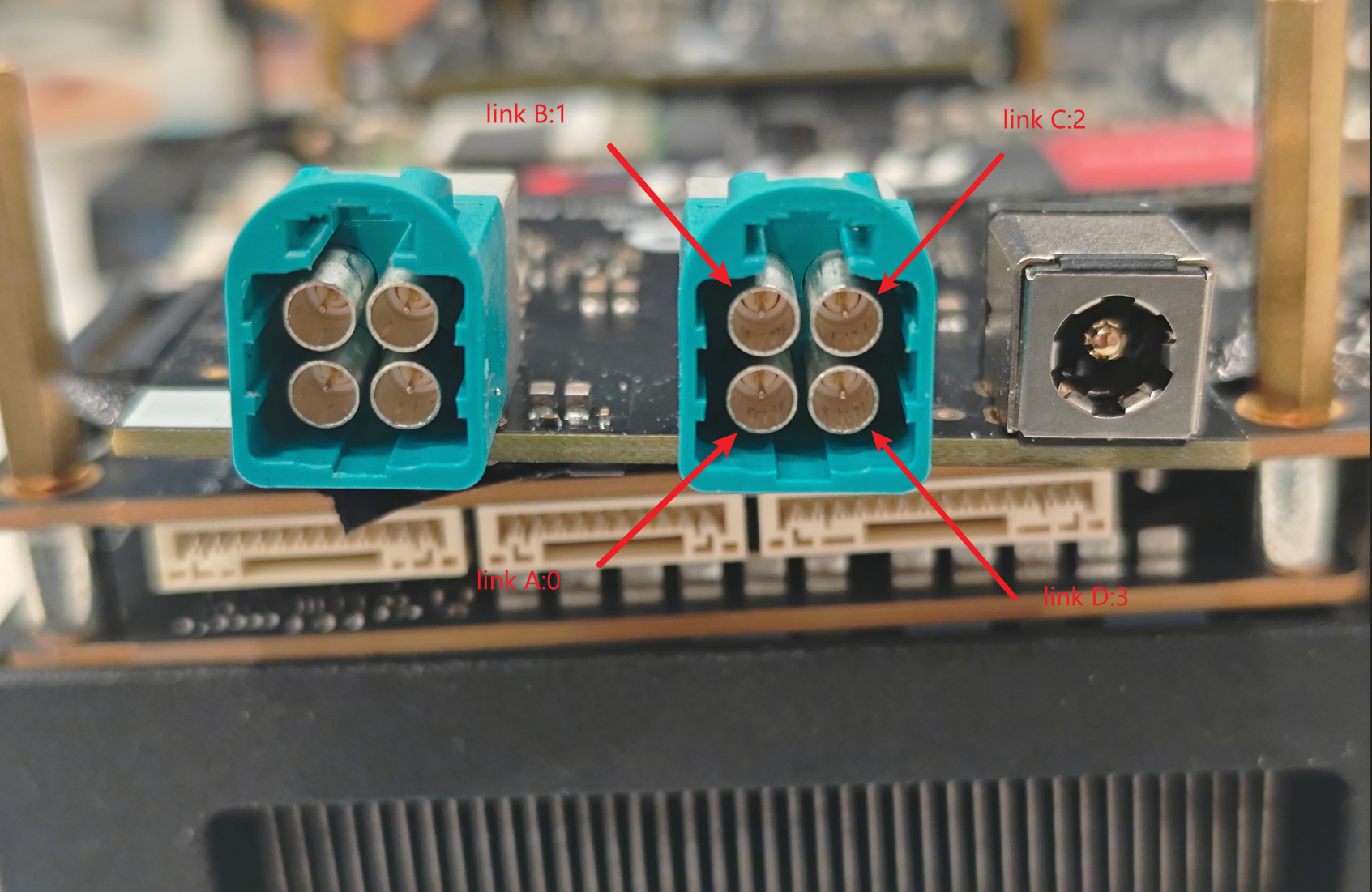
The MIPI host numbers are shown in the figure

The deserializer link numbers corresponding to MIPI host 2 are shown in the figure
Software Usage Guide
All example programs and dependent resource files are installed by default in the /app/multimedia_samples directory on the development board. Users can directly log in to the development board to use these examples. For example, to use the sample_pym example, follow these commands:
#1. Enter the source code directory
cd /app/multimedia_samples/sample_pym

#2. Compile the program
make

#3. Run sample_pym to get program help information

./sample_pym
Usage: sample_pym [OPTIONS]
Options:
-i, --input_file FILE   Specify the input file
-w, --input_width WIDTH Specify the input width
-h, --input_height HEIGHT       Specify the input height
-f, --feedback                  Specify feedback mode
-V, --verbose           Enable verbose mode
Other examples can be used in the same way.
Example Development Guide
Compilation Method
The dependencies for the example code in this module are as follows:
- Depends on the hbre header files and library files generated by compiling the BSP source code, as well as header files and dynamic libraries such as ffmpeg in the root file system. References to related libraries and paths are specified in the Makefile in each sample directory.
LDFLAGS += -lvpf -lvio -lcam -lhbmem
LDFLAGS := -L/usr/hobot/lib
INCDIR := -I/usr/hobot/include -I/usr/include/cjson/
- Depends on the Sensor configuration files in the
/app/multimedia_samples/vp_sensorsdirectory. References to related files are specified in/app/multimedia_samples/Makefile.inwith the following configuration:
INCS += -I . \
	-I ${PLATFORM_SAMPLES_DIR}/utils/ \
	-I ${PLATFORM_SAMPLES_DIR}/vp_sensors

SRC_PATH := ${PLATFORM_SAMPLES_DIR}/utils
SRC_PATH += $(shell find ${PLATFORM_SAMPLES_DIR}/vp_sensors -maxdepth 1 -type d)
-
Compiling all examples together
Compiling all together is currently not supported.
-
Compiling a single example
-
Log in to the device.
-
Navigate to each example in the
/app/multimedia_samples/directory and develop and compile individually. For example, to compile thesample_vinexample:cd /app/multimedia_samples/sample_vin/get_vin_data
make -
The compiled executable program will be in the current directory and can be run directly. For example:
get_vin_datais the compiled executable program.root@ubuntu:/app/multimedia_samples/sample_vin/get_vin_data# ls
get_vin_data get_vin_data.c get_vin_data.o Makefile
Frequently Asked Questions
Insufficient space in /app directory causing example execution failure
Cause: The /app directory is a mounted application partition. Some example programs require saving large amounts of video and image data during execution, which may fill up the space and cause program results to deviate from expectations.
Solution: Copy the program to another directory for execution or clean up unused data.
Kernel log spam when logged in via serial terminal
Execute the following command on the board to lower the Kernel log output level, preventing excessive logs from interfering with viewing the program execution flow:
echo 4 > /proc/sys/kernel/printk